HP ZBook 8 G1i 16" 2026, Core Ultra 7 265H, 32GB, 1TB SSD, Meteor Silver

3 USB-C ports for modern gear verified Nov 29
61/100 overall score
- CPU
- Intel Core Ultra 7 265H
- RAM
- 32 GB
- Storage
- 1 TB
- Screen
- 16" 1920x1200
- GPU
- Intel NVIDIA RTX 500 Ada Generation
- OS
- Windows 11 Pro
- Weight
- 1.8 kg
- Battery
- 77 Wh
Snapshot
The 30-Second Version
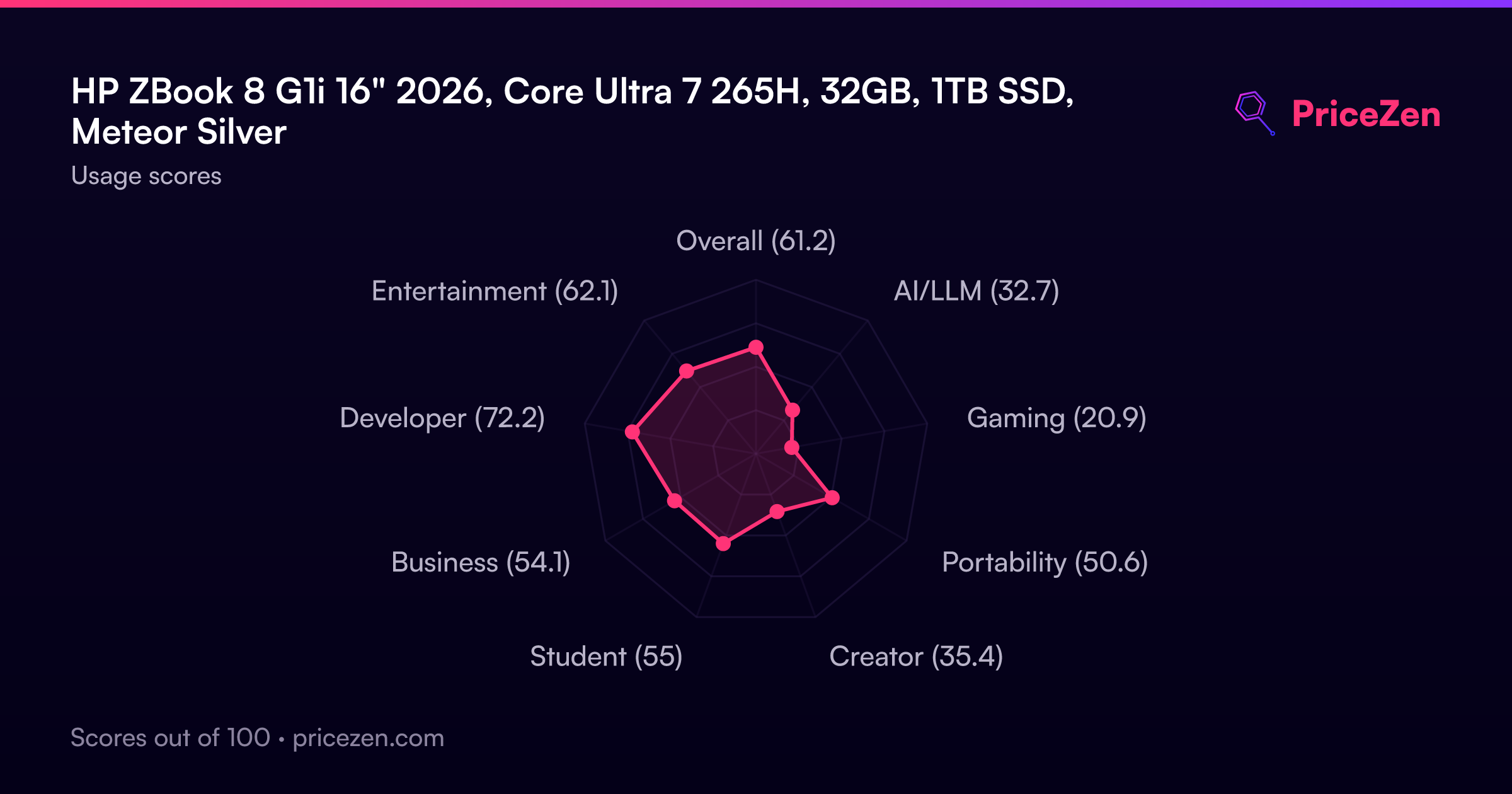
Strong CPU, 32GB of RAM and a port list that shames most laptops, wrapped in a 1.75kg chassis. Our model gives it 72.2 for developer work but only 20.9 for gaming, and affordability ranks near the bottom at CAD 3,300 to CAD 3,658. Worth it for certified pro work, not for anything else.
Pros & Cons
Pros
- 16-core Core Ultra 7 265H is one of the faster chips in the category. 92nd
- 32GB of DDR5 handles big projects and heavy multitasking without flinching. 89th
- Port selection is a standout: Thunderbolt, HDMI 2.1, Ethernet and Wi-Fi 7. 86th
- 1.75kg is light for a 16" workstation. 79th
Cons
- Pricing lands in the bottom tier for affordability.
- Gaming scores 20.9/100, so forget it as a play machine.
- 300-nit 60Hz panel is merely average.
- Reliability ranks below average in our data.
The proof
Performance
The Core Ultra 7 265H lands in the 89th percentile, so compiling, containers and heavy multitasking are its happy place, and 32GB of DDR5 ranks among the best you can buy right now. Storage is strong at 1TB NVMe. Graphics are the ceiling: the RTX 500 Ada sits about mid-pack, and gaming scores a rough 20.9 out of 100. The 16" 1920x1200 IPS panel covers 100% sRGB but only hits 300 nits at 60Hz, which is average for the class. Ports are a standout though, with Thunderbolt, three USB-C, USB-A, HDMI 2.1, Ethernet and Wi-Fi 7. Reliability ranks below average in our data, which is worth knowing before you drop this kind of money.
Specifications
Full Specifications
Processor
| CPU | Intel Core Ultra 7 265H |
| Cores | 16 |
| Frequency | 2.2 GHz |
| L3 Cache | 24 MB |
Graphics
| GPU | NVIDIA RTX 500 Ada Generation |
| Type | Integrated |
| VRAM | 4 GB |
| VRAM Type | Shared |
Memory & Storage
| RAM | 32 GB |
| RAM Generation | DDR5 |
| Storage | 1 TB |
| Storage Type | NVMe SSD |
Display
| Size | 16" |
| Resolution | 1920x1200 (Full HD) |
| Panel | IPS |
| Refresh Rate | 60 Hz |
| Brightness | 300 nits |
| Color Gamut | 100% sRGB |
Connectivity
| USB-C Ports | 3 |
| USB Ports | 1 |
| Thunderbolt | Thunderbolt 4 x 2 |
| HDMI | HDMI 2.1 |
| Wi-Fi | Wi-Fi 7 |
| Bluetooth | Bluetooth 5.4 |
| Ethernet | Gigabit Ethernet |
Physical
| Weight | 1.8 kg / 3.9 lbs |
| Battery | 77 Wh |
| OS | Windows 11 Pro |
vs Competition
Cross-shop carefully, because these rivals pull in different directions. The Apple MacBook Pro 14.2" M4 Pro is the obvious alternative if you're not tied to Windows 11 Pro and want a smaller machine. The Samsung Galaxy Book5 Pro 14" is the pick if portability matters more than pro graphics. And if you were eyeing the ASUS ROG Zephyrus 14", Lenovo Legion Pro 7i Gen 10 or MSI Raider 16 Max HX for after-hours gaming, know that this ZBook's 20.9 gaming score means it isn't playing in that league. Its edge is the port array, the 89th-percentile CPU and certified pro drivers.
| Spec | HP ZBook 8 G1i 16" | Apple MacBook Pro 14.2" M4 Pro | ASUS ROG Zephyrus 14" GA403WW-G14.R95080 | Lenovo Legion Pro 7i Gen 10 16" | Samsung Galaxy Book5 Pro 14" NP944XHA-KG3US | MSI Raider 16 Max HX |
|---|---|---|---|---|---|---|
| CPU | Intel Core Ultra 7 265H | Apple M4 Pro | AMD Ryzen AI 9 HX 370 | Intel Core Ultra 9 275HX | Intel Core Ultra 7 258V | Intel Core Ultra 9 290HX |
| RAM (GB) | 32 | 48 | 32 | 32 | 32 | 32 |
| Storage (GB) | 1024 | 4096 | 2048 | 1024 | 1024 | 1024 |
| Screen | 16" 1920x1200 | 14.2" 3024x1964 | 14" 2880x1800 | 16" 2560x1600 | 14" 2880x1800 | 16" 2560x1600 |
| GPU | Intel NVIDIA RTX 500 Ada Generation | Apple (16-Core) | NVIDIA GeForce RTX 5080 | NVIDIA GeForce RTX 5070 Ti | Intel Arc Graphics 140V | NVIDIA GeForce RTX 5080 |
| OS | Windows 11 Pro | macOS | Windows 11 Home | Windows 11 Home | Windows 11 Pro | Windows 11 Home |
| Weight (kg) | 1.8 | 1.6 | 1.6 | 2.7 | 1.2 | 2.6 |
| Battery (Wh) | 77 | 72 | - | 99 | 63 | 100 |
| Compare | Compare | Compare | Compare | Compare |
| Product | CPU | GPU | RAM | Ports | Screen | Portability | Storage | Reliability | Affordability |
|---|---|---|---|---|---|---|---|---|---|
| HP ZBook 8 G1i 16" | 89.4 | 72.9 | 86.3 | 92.2 | 63.8 | 28.6 | 79.3 | 33.7 | 11.6 |
| Apple MacBook Pro 14.2" M4 Pro Compare | 92.4 | 78.9 | 90.6 | 73.8 | 99.1 | 68.9 | 98.4 | 98.2 | 4.7 |
| ASUS ROG Zephyrus 14" GA403WW-G14.R95080 Compare | 91.2 | 98.3 | 90.8 | 89.4 | 96 | 73.6 | 89.7 | 60.6 | 6.1 |
| Lenovo Legion Pro 7i Gen 10 16" Compare | 97.2 | 96.7 | 89 | 97.3 | 95 | 9.5 | 79.3 | 82 | 5.9 |
| Samsung Galaxy Book5 Pro 14" NP944XHA-KG3US Compare | 65.8 | 69.6 | 79.5 | 83.5 | 90.3 | 89.4 | 79.3 | 82 | 21.4 |
| MSI Raider 16 Max HX Compare | 99.6 | 98.3 | 86.3 | 98.6 | 91.4 | 10.9 | 79.3 | 60.6 | 7.9 |
Price
Value & Pricing
Here's the hard part. We track listings from CAD 3,300 to CAD 3,658, a CAD 358 spread, and Newegg is currently the only store in our data with a listed price at CAD 3,658, the top of that range. Affordability sits in the 12th percentile, so you're paying a workstation tax for certified graphics and vPro manageability. If your employer is buying and your software demands ISV certification, fine. If it's your own money, that's a lot for a 60Hz 300-nit screen.
Read more
Overview
The ZBook 8 G1i is HP's mobile workstation for people who need pro-app certification more than raw horsepower. This config pairs a 16-core Core Ultra 7 265H with 32GB of DDR5, a 1TB NVMe drive and an RTX 500 Ada with 4GB of VRAM. At 1.75kg it's genuinely light for a 16" machine.
Our scoring model puts it at 61.2 overall, which undersells what it's actually good at. Developer work scores 72.2, and the CPU and memory sit near the top of the category. The catch is price: CAD 3,300 to CAD 3,658 makes this one of the priciest laptops we track.
Common Questions
Q: Can it handle games after work?
Not really. Gaming scores 20.9 out of 100 in our model and the RTX 500 Ada only has 4GB of VRAM, so it's built for pro apps rather than frame rates.
Q: Is 32GB enough for development work?
For most workflows, yes. The 32GB of DDR5 ranks among the best configurations in this category and pairs well with the 16-core Core Ultra 7 265H for containers and compiles.
Q: Is the screen good enough for color work?
It covers 100% sRGB, which is fine for web and UI work, but 300 nits and 60Hz keep it mid-pack overall. Bright rooms will be a struggle.
Who Should Skip This
Gamers, skip it entirely, a 20.9 gaming score is not a rounding error. Same goes if you're paying out of pocket: affordability ranks in the bottom tier and you can get more speed per dollar elsewhere. And if you need a bright, high-refresh display for outdoor or motion-heavy work, this 300-nit 60Hz panel will annoy you daily.
Verdict
Buy this if you're a developer or engineer running certified pro apps on Windows, you move around a lot, and someone else signs the purchase order. The CPU, RAM and connectivity are legitimately strong and 1.75kg is easy to carry. Just go in knowing the display is ordinary and the graphics won't save you in anything GPU-heavy.
Usage Scores
- Overall61.2
- AI/LLM32.7
- Gaming20.9
- Portability50.6
- Creator35.4
- Student55
- Business54.2
- Developer72.2
- Entertainment62.1