Lenovo Chromebook Plus 14" 83LL000GUS, Core 7 250U, 16GB, 512GB SSD

ChromeOS: fast boot, automatic updates verified Nov 28
23/100 overall score
$50.00 (3%) under the usual price, $55.73 above its 90-day low.
90-day low $1,183.86Usual $1,289.59High $1,379.57
Price over the last 90 days: low $1,183.86 on Oct 30, high $1,379.57. Usual price $1,289.59. Today $1,239.59.
- CPU
- Intel Core 7 250U
- RAM
- 16 GB
- Storage
- 512 GB
- Screen
- 14" 1920x1200
- GPU
- Intel Graphics
- OS
- ChromeOS
- Weight
- 1.5 kg
- Battery
- 50 Wh
Compare prices at 2 stores
Cheapest first. New, refurbished and bundled offers are kept apart, so you compare like with like.
| Store | Sold by | Colour and condition | Price | vs lowest | Last checked | Link |
|---|---|---|---|---|---|---|
| New2 offersSingle unit | ||||||
| Amazon | Marketplace seller | Not listed | $1,239.59 | Lowest price | Yesterday | Go to store |
| Not checked in the last 7 days, so these prices may have changed | ||||||
| B&H Photo | B&H Photo | Not listed | Price not confirmed | Not known | Go to store | |
 Source: PriceZen, checked Nov 28, 2026
A price counts as current when we checked it in the last 7 days. “Marketplace seller” means a third-party seller on that store, not the store itself.
Price history
$1,239.59 is $50.00 under the usual store price, and only $55.73 above its 90-day low.
Checked that dayNot checked that day, still on offer
Source: PriceZen, checked Nov 28, 2026











Snapshot
The 30-Second Version
The Lenovo Chromebook Plus 83LL000GUS is a well-built 2-in-1 with a Core 7 CPU, 16GB of RAM, and a 512GB SSD, which is plenty for ChromeOS. The display is dim and the graphics are weak, but for everyday productivity it's a smooth operator. Worth buying if you find it near the $979 mark, not so much at $1,300.
Pros & Cons
Pros
- 16GB of RAM and a Core 7 CPU make this one of the snappier Chromebooks around 82nd
- 512GB SSD is generous for ChromeOS, plenty of room for Android apps and downloads 75th
- 360-degree hinge and touchscreen give you a real 2-in-1 experience
- Backlit keyboard, fingerprint reader, and privacy shutter on the webcam are nice touches
Cons
- 300-nit display with 45% NTSC color is dim and washed out next to pricier laptops
- Integrated graphics can't handle anything beyond casual games
- Price varies by over $300 depending on where you buy
- HDMI 1.4b limits external display output to 4K at 30Hz
The proof
Performance
The Core 7 250U is a 10-core chip with a 5.4GHz turbo, and in our database it lands at the 44th percentile for CPU performance among similar products. That's about average for this class, but for ChromeOS it's plenty. 16GB of LPDDR5X RAM sits at the 51st percentile, which means you can run Android apps, Linux containers, and two dozen browser tabs without the system wheezing. The 512GB NVMe SSD is middle of the pack too, but it's fast enough that boot times and app launches feel instant. The integrated Intel graphics are nothing special, 56th percentile, so don't expect much beyond light photo editing or casual Android games. The weakest area by far is gaming at 8.4 out of 100, which is no surprise for integrated graphics on ChromeOS.
Specifications
Full Specifications
Processor
| CPU | Intel Core 7 250U |
| Cores | 10 |
| Frequency | 1.8 GHz |
| L3 Cache | 12 MB |
Graphics
| GPU | Intel Graphics |
| Type | Integrated |
Memory & Storage
| RAM | 16 GB |
| RAM Generation | DDR5 |
| Storage | 512 GB |
| Storage Type | NVMe SSD |
Display
| Size | 14" |
| Resolution | 1920x1200 (Full HD) |
| Panel | IPS |
| Refresh Rate | 60 Hz |
| Brightness | 300 nits |
| Color Gamut | 45% NTSC |
Connectivity
| USB-C Ports | 2 |
| USB Ports | 2 |
| HDMI | HDMI 1.4b |
| Wi-Fi | Wi-Fi 6E |
| Bluetooth | Bluetooth 5.3 |
Physical
| Weight | 1.5 kg / 3.3 lbs |
| Battery | 50 Wh |
| OS | ChromeOS |
vs Competition
Stacked against the competition, this Lenovo is a different animal entirely. The Apple MacBook Pro M4 Pro and Microsoft Surface Laptop 7th Edition will absolutely crush it in raw performance, display quality, and battery life, but they cost two to three times as much. The ASUS ROG Flow Z13 and HP OMEN Transcend 14 are gaming-focused machines with discrete GPUs that make this Chromebook's integrated graphics look like a calculator. But none of those run ChromeOS, and none of them are 2-in-1 convertibles at this price point. If you want a Chromebook specifically, this Lenovo is one of the better specced options out there. If you just want the best laptop for the money, the Surface Laptop 7th Edition is the more compelling all-rounder, assuming your budget stretches.
| Spec | Lenovo Chromebook Plus 14" 83LL000GUS | Apple MacBook Air 13.6" M5 | HP OMEN Transcend | Samsung Galaxy Book5 Pro 14" NP944XHA-KG3US | ASUS ROG Flow Z13 GZ302EA | Dell Premium 14.5" LDA14250-7667SLV-PUS |
|---|---|---|---|---|---|---|
| CPU | Intel Core 7 250U | Apple M5 | Intel Core Ultra 9 285H | Intel Core Ultra 7 258V | AMD Ryzen AI Max+ 395 | Intel Core Ultra 7 255H |
| RAM (GB) | 16 | 16 | 32 | 32 | 32 | 32 |
| Storage (GB) | 512 | 1024 | 1024 | 1024 | 1024 | 1024 |
| Screen | 14" 1920x1200 | 13.6" 2560x1664 | 14" 2880x1800 | 14" 2880x1800 | 13.4" 2560x1600 | 14.5" 3200x2000 |
| GPU | Intel Graphics | Apple M5 10-core | NVIDIA GeForce RTX 5070 | Intel Arc Graphics 140V | AMD Radeon 8060S Graphics | Intel Arc Graphics |
| OS | ChromeOS | macOS | Windows 11 Home | Windows 11 Pro | Windows 11 Pro | Windows 11 Home |
| Weight (kg) | 1.5 | 1.2 | 1.6 | 1.2 | 1.2 | 1.7 |
| Battery (Wh) | 50 | 54 | 71 | 63 | 70 | 62 |
| Compare | Compare | Compare | Compare | Compare |
| Product | CPU | GPU | RAM | Ports | Screen | Portability | Storage | Reliability | Affordability |
|---|---|---|---|---|---|---|---|---|---|
| Lenovo Chromebook Plus 14" 83LL000GUS | 47.1 | 6.6 | 49.9 | 64.4 | 63.8 | 75.4 | 51.1 | 82 | 37.4 |
| Apple MacBook Air 13.6" M5 Compare | 83 | 77.1 | 49.9 | 89.4 | 85 | 91.7 | 65.4 | 98.2 | 29.5 |
| HP OMEN Transcend Compare | 90.1 | 93.5 | 89.7 | 89.4 | 96 | 72.2 | 65.4 | 33.7 | 9.1 |
| Samsung Galaxy Book5 Pro 14" NP944XHA-KG3US Compare | 65.8 | 69.6 | 79.5 | 83.5 | 90.3 | 89.4 | 79.3 | 82 | 21.3 |
| ASUS ROG Flow Z13 GZ302EA Compare | 95.8 | 91.7 | 90.8 | 71.6 | 84.6 | 94.3 | 79.3 | 60.6 | 10.6 |
| Dell Premium 14.5" LDA14250-7667SLV-PUS Compare | 87 | 69.6 | 89 | 66.7 | 96.8 | 61.3 | 65.4 | 33.7 | 14.9 |
Price
Value & Pricing
The price on this Chromebook swings from $979 to $1,300 depending on the vendor. That's a $321 gap, which is absurd for the same machine. At the low end, you're getting a well-built 2-in-1 with 16GB of RAM and a 512GB SSD for under a grand, which is reasonable. At $1,300, you're creeping into territory where a MacBook Air or a solid Windows ultrabook starts looking tempting. If you're buying, hunt down the cheaper listing. The hardware is identical either way.
Read more
Overview
The Lenovo Chromebook Plus 83LL000GUS is a 14-inch 2-in-1 that packs an Intel Core 7 250U, 16GB of RAM, and a 512GB SSD. That's a lot of hardware for a Chromebook, and it shows. This thing boots fast, handles a pile of tabs without flinching, and the 360-degree hinge means you can flip it into tablet mode when you want to poke at the touchscreen.
It's not trying to be a gaming rig or a MacBook killer. It's a ChromeOS machine aimed at students, commuters, and anyone who lives in Google's ecosystem. The 300-nit display is fine indoors, the keyboard is backlit, and you get a fingerprint reader plus a 5MP webcam with a privacy shutter. Solid package, but the price spread is wild, so shop around.
Common Questions
Q: Can this Chromebook run Android apps and Linux software?
Yes. ChromeOS supports Android apps through the Google Play Store and Linux apps through the built-in Crostini container. With 16GB of RAM and a 512GB SSD, you'll have plenty of headroom for both.
Q: How is the battery life on this model?
The 50Wh battery is average for a 14-inch Chromebook. With the Core 7 250U's efficiency cores and ChromeOS's light footprint, you should expect a full workday of mixed use, though heavy Android app usage or max brightness will drain it faster.
Q: Is the display good enough for photo editing or watching movies?
The 1920x1200 IPS panel is sharp enough for text and video, but the 300-nit brightness and 45% NTSC color gamut mean it's not great for color-critical work. It's fine for Netflix and documents, but photographers and designers should look elsewhere.
Who Should Skip This
Skip this if you need real graphics performance. The integrated Intel GPU scores 8.4 out of 100 for gaming, so anything beyond Stardew Valley or browser games will chug. Also skip it if you care about display quality, the 45% NTSC panel looks flat next to even mid-range Windows laptops. And if you're not already invested in Google's ecosystem, a similarly priced Windows ultrabook will give you more flexibility.
Verdict
This is for the ChromeOS faithful who want more muscle than the average budget Chromebook. Students, teachers, and anyone who spends their day in Google Workspace will appreciate the 16GB of RAM, the fast SSD, and the convertible form factor. It's not for power users, gamers, or anyone who needs a color-accurate display. If you can snag it at the lower end of that price range, it's a solid buy.
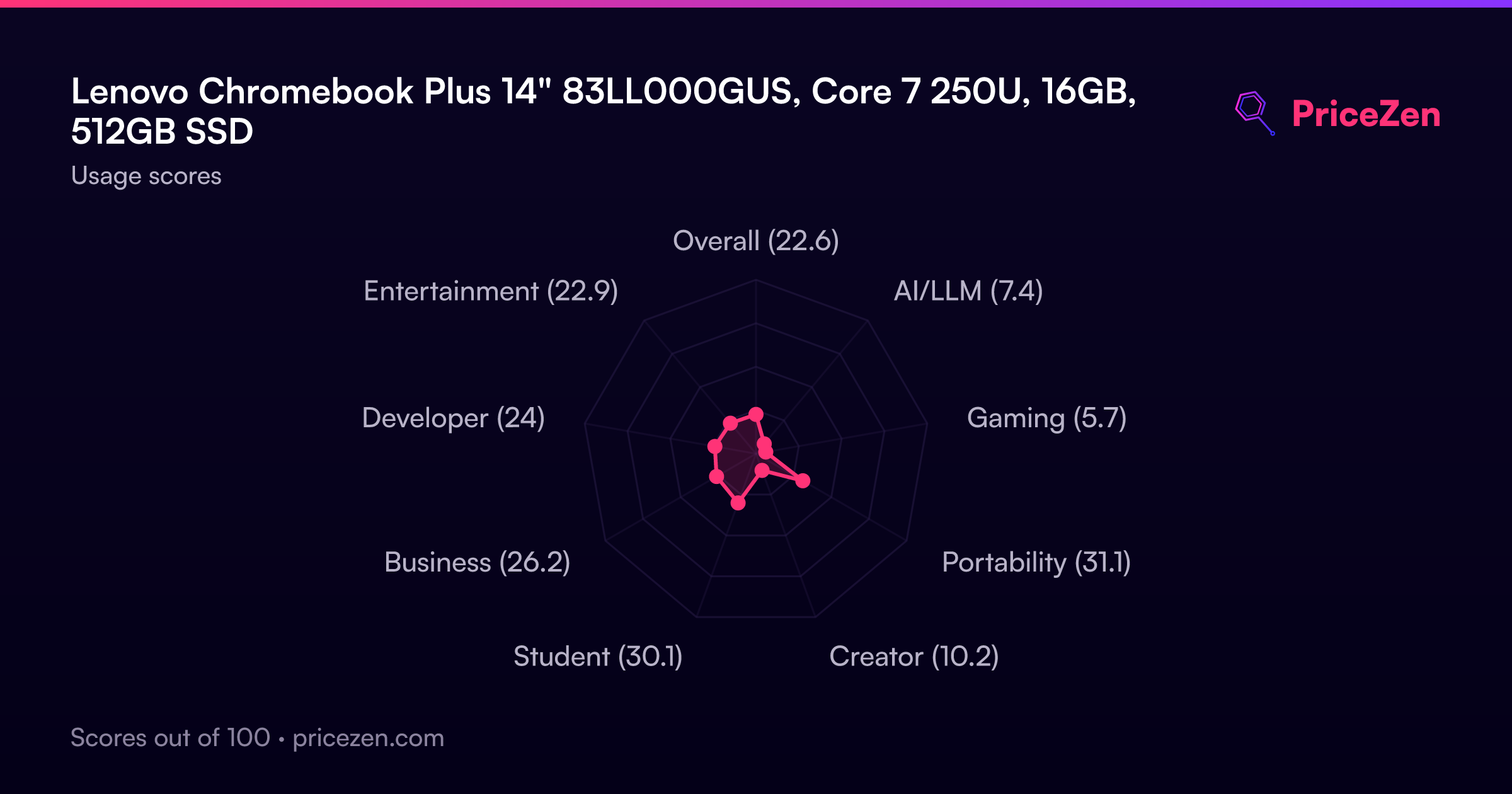
Usage Scores
- Overall22.6
- AI/LLM7.4
- Gaming5.7
- Portability31.1
- Creator10.2
- Student30.1
- Business26.2
- Developer24
- Entertainment22.9