Apple MacBook Pro 14.2" M1 Pro 2021, 16GB, 1TB SSD, Space Gray
The 10-core M1 Pro chip with a 16-core GPU delivers desktop-level performance for demanding creative work, paired with a 14-inch 120Hz display reaching 1600 nits. The 70Wh battery and 1TB SSD make it a reliable portable workstation, while the Thunderbolt and HDMI ports expand connectivity. Best for video editors and developers who need sustained power and a bright, high-refresh screen in a 1.59kg laptop.



Snapshot
The 30-Second Version
The MacBook Pro 14 M1 Pro scores 87.1 out of 100 for students and lands in the 98th percentile for reliability. The 3024-by-1964 Mini-LED display is one of the best we've tested, but gaming is a disaster at 22.1 out of 100. At USD 750 used, it's a great buy for school and creative work, not for games.
Pros & Cons
Pros
- Reliability in the 98th percentile, one of the most dependable laptops we track 99th
- Screen in the 97th percentile with 1000 nits and 3024-by-1964 Mini-LED 98th
- Student score of 87.1 out of 100, excellent for schoolwork and research 97th
- Three Thunderbolt 4 ports plus HDMI, SDXC, and MagSafe 3 at the 74th percentile 74th
- 1TB SSD and 16GB unified memory at USD 750 used is strong value
Cons
- Gaming score of 22.1 out of 100, one of the worst we've seen for that use case
- RAM at the 51st percentile, just average for a pro laptop
- GPU at the 62nd percentile, solid but not a creative powerhouse
- No price listed for new units, only used and refurbished options available
What owners think
How owner sentiment changed over time
ExclusiveBased on when customers actually wrote their reviews - so you can see whether early praise held up.
More happy owners lately: 100% vs 58% in Jul 2023 – Jun 2024
Across all 1,137 store ratings: 4.9★. Most owners rate without writing a review. The chart counts the 49 written reviews with stars and their own date.
2 written reviews without stars are left out of the trend.
Show the numbers
| Period | Reviews | Happy | Mixed | Unhappy | Happy share |
|---|---|---|---|---|---|
| Jul 2023 – Jun 2024 | 12 | 7 | 1 | 4 | 58% |
| Jul – Dec 2024 | 14 | 7 | 0 | 7 | 50% |
| Jan – Jun 2025 | 12 | 10 | 1 | 1 | 83% |
| Jul 2025 – May 2026 | 11 | 11 | 0 | 0 | 100% |
Each column joins calendar quarters until it holds at least 10 reviews with stars and their own date. Happy = 4-5★, mixed = 3★, unhappy = 1-2★.
The proof
Performance
The M1 Pro's 10-core CPU (3.2GHz, 6 performance cores, 2 efficiency cores) lands in the 75th percentile of our database, which translates to well above average for everyday tasks and most creative workflows. The 14-core GPU sits at the 62nd percentile, so it's solid but not a standout. Where this machine really shines is the display: 97th percentile means the 3024-by-1964 Mini-LED panel is one of the best on the market, with 1000 nits of brightness and 254 pixels per inch. That's the kind of screen that makes editing photos or watching HDR content feel premium.
The 16GB of unified memory is the weak link here. At the 51st percentile, it's about average, and for heavy multitasking or large video projects, you'll feel the ceiling. The 1TB SSD lands at the 66th percentile, which is solid but not exceptional. Port selection is a strong point at the 74th percentile: three Thunderbolt 4 ports, HDMI 2.0, an SDXC card slot, MagSafe 3, and a headphone jack. That's more connectivity than most ultrabooks offer, and the MagSafe return is genuinely useful.
Specifications
Full Specifications
Processor
| CPU | Apple M1 Pro |
| Cores | 10 |
| Frequency | 3.2 GHz |
Graphics
| GPU | Apple M1 Pro 16-core |
| Type | Integrated |
| VRAM Type | System Shared |
Memory & Storage
| RAM | 16 GB |
| RAM Generation | DDR3 |
| Storage | 1 TB |
| Storage Type | SSD |
Display
| Size | 14.2" |
| Resolution | 3024x1964 |
| Panel | IPS |
| Refresh Rate | 120 Hz |
| Brightness | 1000 nits |
| Color Gamut | 100% DCI-P3 |
Connectivity
| USB-C Ports | 3 |
| USB Ports | 0 |
| Thunderbolt | Thunderbolt 4 |
| HDMI | 1x HDMI |
| Wi-Fi | Wi-Fi 6 |
| Bluetooth | Bluetooth 5.0 |
Physical
| Weight | 1.6 kg / 3.5 lbs |
| Battery | 96 Wh |
| OS | macOS |
vs Competition
Against the Lenovo Legion 5i, the MacBook Pro 14 wins on display and reliability but loses badly on gaming. The Legion's dedicated GPU will run circles around the M1 Pro's integrated 14-core graphics, and that 22.1 gaming score tells the story. The ASUS ROG Zephyrus G14 is another gaming-focused competitor that trades blows on portability but offers far better frame rates. The HP OmniBook X Flip and MSI Creator A13V are closer in spirit to the MacBook Pro, but neither matches the 97th percentile screen quality. The Alienware Aurora is a desktop replacement, so it's not really in the same conversation for portability. If you need macOS and a great display, the MacBook Pro 14 is the clear pick. If you need gaming performance, look elsewhere.
| Spec | Apple MacBook Pro 14.2" M1 Pro | Lenovo Legion 5i Gen 10 15.1" | Samsung Galaxy Book5 Pro 14" NP944XHA-KG3US | ASUS Zenbook 14" UX3405CA-U9321TB | HP OmniBook X Flip | Dell Premium 14.5" LDA14250-7667SLV-PUS |
|---|---|---|---|---|---|---|
| CPU | Apple M1 Pro | Intel Core i9 14900HX | Intel Core Ultra 7 258V | Intel Core Ultra 9 285H | AMD Ryzen AI 7 350 | Intel Core Ultra 7 255H |
| RAM (GB) | 16 | 16 | 32 | 32 | 24 | 32 |
| Storage (GB) | 1024 | 512 | 1024 | 1024 | 1024 | 1024 |
| Screen | 14.2" 3024x1964 | 15.1" 2560x1600 | 14" 2880x1800 | 14" 1920x1200 | 14" 1920x1200 | 14.5" 3200x2000 |
| GPU | Apple M1 Pro 16-core | NVIDIA GeForce RTX 5070 | Intel Arc Graphics 140V | Intel Arc Graphics | AMD Radeon 860M | Intel Arc Graphics |
| OS | macOS | Windows 11 Home | Windows 11 Pro | Windows 11 Home | Windows 11 Home | Windows 11 Home |
| Weight (kg) | 1.6 | 1.9 | 1.2 | 1.3 | 1.4 | 1.7 |
| Battery (Wh) | 96 | 80 | 63 | 75 | 59 | 62 |
| Compare | Compare | Compare | Compare | Compare |
| Product | CPU | GPU | RAM | Ports | Screen | Portability | Storage | Reliability | Social Proof | Affordability |
|---|---|---|---|---|---|---|---|---|---|---|
| Apple MacBook Pro 14.2" M1 Pro | 73.7 | 63.1 | 24.5 | 73.8 | 96.9 | 69 | 65.4 | 98.2 | 98.9 | 49.4 |
| Lenovo Legion 5i Gen 10 15.1" Compare | 93.2 | 93.5 | 59.9 | 98.6 | 93.5 | 57.2 | 51.1 | 81.9 | 99.7 | 16.2 |
| Samsung Galaxy Book5 Pro 14" NP944XHA-KG3US Compare | 65.8 | 69.7 | 79.5 | 83.5 | 90.3 | 89.4 | 79.3 | 81.9 | 95.6 | 21.4 |
| ASUS Zenbook 14" UX3405CA-U9321TB Compare | 90.1 | 69.7 | 89.7 | 58.3 | 79.7 | 86.9 | 65.4 | 60.6 | 95.6 | 16.8 |
| HP OmniBook X Flip Compare | 80 | 64.6 | 82.3 | 89.4 | 71.7 | 79.3 | 65.4 | 33.7 | 93.2 | 44.6 |
| Dell Premium 14.5" LDA14250-7667SLV-PUS Compare | 87 | 69.7 | 89 | 66.7 | 96.8 | 61.3 | 65.4 | 33.7 | 95.6 | 14.9 |
Price
Value & Pricing
At USD 750 for a used unit in good condition, this MacBook Pro 14 delivers a lot of performance per dollar. The 1TB SSD alone would cost a chunk of that in an upgrade, and the display quality is something you'd normally pay well over a grand for. The affordability percentile sits at 58th, which means it's not a bargain bin deal, but it's better than average for what you get. The refurbished listings with a 1-year warranty add some peace of mind, though the price differences between used and refurbished units aren't broken out clearly. If you can find one at or below USD 750, it's a smart buy.
Amazon 1 offer From $909
Best Buy 4 offers From $1,140
Price history
Read more
Overview
The MacBook Pro 14 with the M1 Pro chip still holds up remarkably well in 2025, and the numbers back that up. Our database puts its reliability in the 98th percentile and the screen in the 97th, which means this machine is basically top of the charts for build quality and display performance. The 3024-by-1964 Mini-LED panel hits 1000 nits of sustained brightness, and that's before you even talk about the 120Hz ProMotion refresh rate. For students, it scores an 87.1 out of 100, which is the strongest use case we track for this laptop.
But it's not all sunshine. Gaming lands at a rough 22.1 out of 100, which is one of the weakest scores we've seen for that category. The 14-core GPU is fine for creative work and light rendering, but it's not built for modern AAA titles. And while the CPU sits at the 75th percentile, the RAM at the 51st percentile tells you 16GB of unified memory is just average these days. Still, at USD 750 for a used unit, this is a lot of laptop for the money.
Common Questions
Q: Is the MacBook Pro 14 M1 Pro good for gaming?
No. Our database scores it 22.1 out of 100 for gaming, which is one of the weakest results we track. The 14-core integrated GPU sits at the 62nd percentile, so it handles light tasks fine but struggles with modern AAA titles.
Q: How does the display compare to other laptops?
The 14.2-inch Mini-LED panel is in the 97th percentile of our database, making it one of the best laptop screens available. It runs at 3024-by-1964 resolution with 1000 nits of brightness and 254 pixels per inch, which is excellent for HDR content and photo editing.
Q: Is 16GB of RAM enough for this MacBook Pro?
It's about average. The 16GB of unified memory lands at the 51st percentile in our database, so it's fine for everyday tasks and moderate creative work. Heavy video editing or running many virtual machines will push against that ceiling, and you can't upgrade it later.
Who Should Skip This
Skip this if you're a gamer. The 22.1 out of 100 gaming score is one of the worst we've seen, and the integrated 14-core GPU just isn't built for that workload. Also skip it if you need more than 16GB of RAM for heavy creative work, since the memory is soldered and sits at the 51st percentile. If you're on a tight budget, the 58th percentile affordability score means there are cheaper Windows laptops that'll handle basic tasks fine, though you'll sacrifice the display quality and reliability.
Verdict
The MacBook Pro 14 with M1 Pro is still a fantastic laptop for students and creative professionals who prioritize display quality and reliability over raw gaming power. The 97th percentile screen and 98th percentile reliability are the headline numbers, and they're backed by a strong port selection and a 1TB SSD. At USD 750 used, it's a compelling deal. Just don't buy it expecting to play modern games, because that 22.1 gaming score is a real letdown.
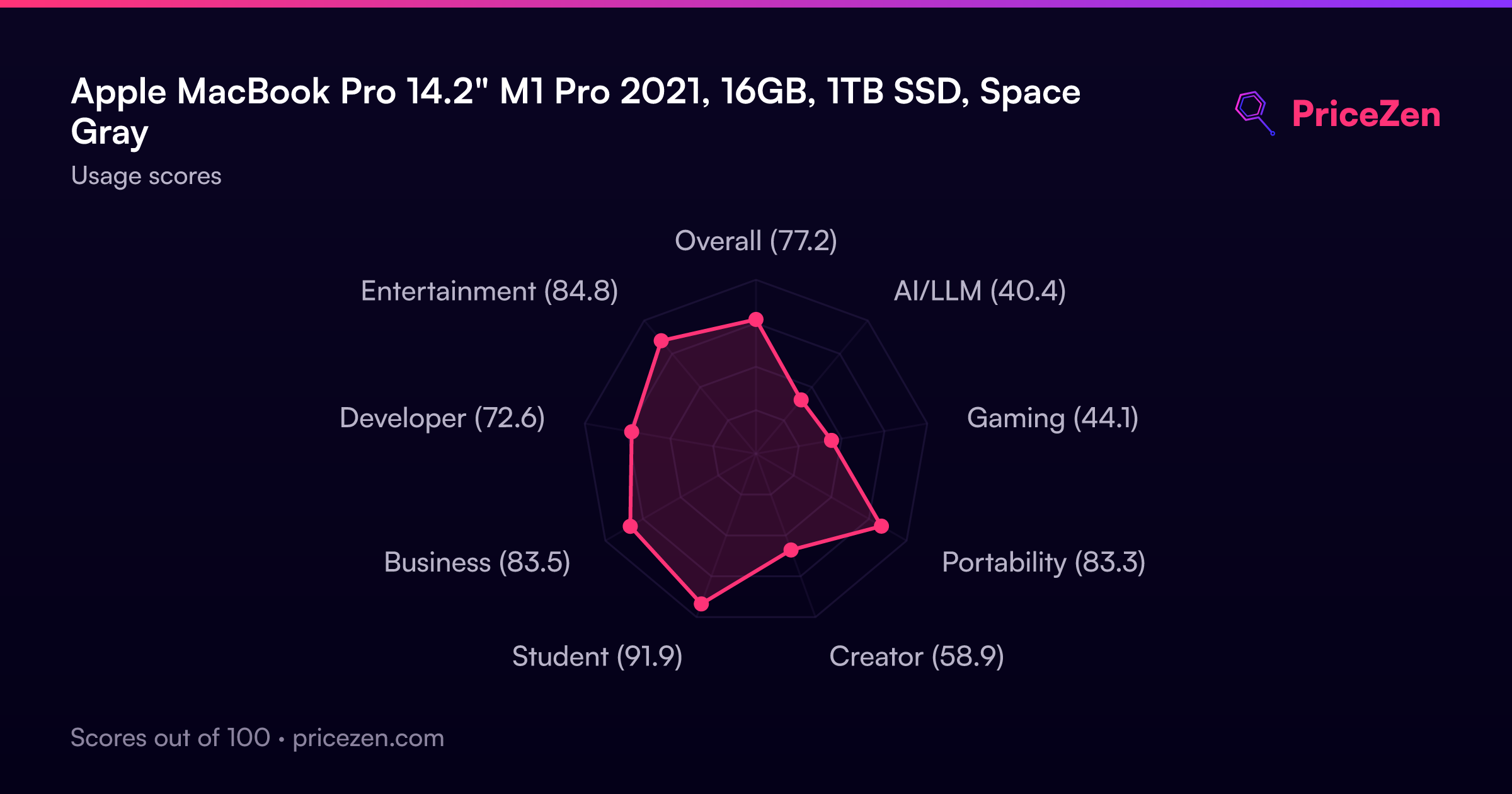
Usage Scores
- Overall77.2
- AI/LLM40.4
- Gaming44.1
- Portability83.3
- Creator58.9
- Student91.9
- Business83.5
- Developer72.6
- Entertainment84.8