Acer TravelMate P4 Spin 14" TMP414RN-54-56G9, Core Ultra 5 125U, 16GB, 512GB SSD, Blue
The Intel Core Ultra 5 125U with integrated Arc graphics and 16GB DDR5 RAM handles demanding multitasking and light creative work. The 14-inch 1920x1200 IPS touchscreen with 100% sRGB and a garage-able Active Stylus makes it a flexible 2-in-1 for on-the-go use. Best for business professionals and students who need a durable convertible for productivity and note-taking, not for gaming.


Snapshot
The 30-Second Version
The port selection is the star here, landing in the 95th percentile with Thunderbolt, Ethernet, and dual USB-C. Performance is average across the board, with the CPU at the 55th percentile and storage at the 36th. The 11th percentile reliability score is the biggest concern, and US prices swing by USD 598 between vendors, so shop carefully.
Pros & Cons
Pros
- Port selection is in the 95th percentile, with Thunderbolt and Ethernet included 95th
- Touchscreen with 100% sRGB coverage and 1920x1200 resolution 76th
- 16GB of DDR5 RAM handles multitasking without choking 70th
- Integrated Arc graphics score in the 69th percentile, above average for iGPU 66th
- Windows 11 Pro with discrete TPM and Secured-core PC Level 3
Cons
- Gaming score of 17.1 out of 100 is one of the weakest we've seen
- 512GB SSD lands in the 36th percentile for storage
- Reliability sits in the 11th percentile, a real concern
- 2.48kg is heavy for a 14-inch convertible
- Affordability in the 36th percentile, and prices swing wildly between vendors
The proof
Performance
The Core 5 125U is a 12-core chip running at 1.3GHz base, and it lands in the 55th percentile for CPU performance in our database. That's about average for business laptops, which means it'll chew through Outlook, Teams, and a dozen browser tabs without breaking a sweat. The 16GB of DDR5 RAM sits right at the 50th percentile, so you're getting exactly what you'd expect at this tier. The 512GB SSD is in the 36th percentile for storage, which is a bit tight if you're keeping years of files local.
The integrated Intel Arc graphics with 16GB of shared VRAM puts the GPU in the 69th percentile. For an integrated solution, that's actually above average, and it'll handle light photo editing and smooth 4K video playback. But don't expect much beyond that. The 53Wh battery is on the smaller side for a 2.48kg machine, and combined with the 60Hz display, this is clearly built for productivity, not pushing pixels.
Specifications
Full Specifications
Processor
| CPU | Intel Core Ultra 5 125U |
| Cores | 12 |
| Frequency | 1.3 GHz |
| L3 Cache | 12 MB |
Graphics
| GPU | Intel Graphics |
| Type | Integrated |
| VRAM Type | Shared |
Memory & Storage
| RAM | 16 GB |
| RAM Generation | DDR5 |
| Storage | 512 GB |
| Storage Type | NVMe SSD |
Display
| Size | 14" |
| Resolution | 1920x1200 (Full HD) |
| Panel | IPS |
| Refresh Rate | 60 Hz |
| Color Gamut | sRGB 100% |
Connectivity
| USB-C Ports | 2 |
| USB Ports | 2 |
| Thunderbolt | Thunderbolt 4 |
| HDMI | 1x |
| Wi-Fi | Wi-Fi 6E |
| Bluetooth | Bluetooth 5.3 |
| Ethernet | Gigabit Ethernet |
Physical
| Weight | 1.5 kg / 3.3 lbs |
| Battery | 65 Wh |
| OS | Windows 11 Pro |
vs Competition
Stacked against the competition, the TravelMate P4 Spin 14 occupies a strange middle ground. The Apple MacBook Pro M5 will crush it on battery life and display quality, but you'll pay significantly more and lose the touchscreen and port variety. The ASUS ROG Zephyrus GA403WW and Lenovo Legion 5i are gaming machines that obliterate the Acer's 17.1 gaming score, but they're heavier and lack the 2-in-1 flexibility. The HP OMEN Transcend 14 is closer in size but again prioritizes GPU power over business features. Where the Acer wins is connectivity, that 95th percentile port selection beats all of them, and the Windows 11 Pro with vPro management is something none of the gaming rigs offer. If your priority is docking stations and IT compliance, this is the pick. If you want any kind of gaming performance, look elsewhere.
| Spec | Acer TravelMate P4 Spin 14" TMP414RN-54-56G9 | Apple MacBook Pro 14.2" M4 Pro | ASUS ROG Zephyrus 14" GA403WW-G14.R95080 | Lenovo Legion Pro 7i Gen 10 16" | HP OMEN Transcend | Samsung Galaxy Book5 Pro 14" NP944XHA-KG3US |
|---|---|---|---|---|---|---|
| CPU | Intel Core Ultra 5 125U | Apple M4 Pro | AMD Ryzen AI 9 HX 370 | Intel Core Ultra 9 275HX | Intel Core Ultra 9 285H | Intel Core Ultra 7 258V |
| RAM (GB) | 16 | 48 | 32 | 32 | 32 | 32 |
| Storage (GB) | 512 | 4096 | 2048 | 1024 | 1024 | 1024 |
| Screen | 14" 1920x1200 | 14.2" 3024x1964 | 14" 2880x1800 | 16" 2560x1600 | 14" 2880x1800 | 14" 2880x1800 |
| GPU | Intel Graphics | Apple (16-Core) | NVIDIA GeForce RTX 5080 | NVIDIA GeForce RTX 5070 Ti | NVIDIA GeForce RTX 5070 | Intel Arc Graphics 140V |
| OS | Windows 11 Pro | macOS | Windows 11 Home | Windows 11 Home | Windows 11 Home | Windows 11 Pro |
| Weight (kg) | 1.5 | 1.6 | 1.6 | 2.7 | 1.6 | 1.2 |
| Battery (Wh) | 65 | 72 | - | 99 | 71 | 63 |
| Compare | Compare | Compare | Compare | Compare |
| Product | CPU | GPU | RAM | Ports | Screen | Portability | Storage | Reliability | Affordability |
|---|---|---|---|---|---|---|---|---|---|
| Acer TravelMate P4 Spin 14" TMP414RN-54-56G9 | 54.6 | 69.6 | 49.8 | 94.5 | 66.2 | 75.8 | 50.8 | 10.8 | 35.8 |
| Apple MacBook Pro 14.2" M4 Pro Compare | 92.4 | 78.8 | 90.6 | 73.1 | 99.3 | 68.8 | 98.4 | 98.3 | 4.2 |
| ASUS ROG Zephyrus 14" GA403WW-G14.R95080 Compare | 91.2 | 98.3 | 90.9 | 89.2 | 96.5 | 73.7 | 89.7 | 60.7 | 5.8 |
| Lenovo Legion Pro 7i Gen 10 16" Compare | 97.2 | 96.6 | 89 | 97.2 | 95.6 | 9.6 | 79.2 | 82.1 | 5.6 |
| HP OMEN Transcend Compare | 90.1 | 93.5 | 89.7 | 89.2 | 96.5 | 72.3 | 65.1 | 33.6 | 8.5 |
| Samsung Galaxy Book5 Pro 14" NP944XHA-KG3US Compare | 65.7 | 69.6 | 79.4 | 83 | 91.6 | 89.5 | 79.2 | 82.1 | 20.6 |
Price
Value & Pricing
Pricing on this thing is all over the map. In the US, you'll find it listed between USD 1,200 and USD 1,798 across two listings, a spread of USD 598 for what should be the same machine. That's a huge gap, and it means you absolutely need to shop around before buying. In Canada, the range is CAD 1,708 to CAD 2,040, a CAD 332 difference. The best US deal is at the lower end of that range, and honestly, paying anywhere near USD 1,798 for this spec sheet would be a mistake. The 36th percentile affordability score reflects that this isn't a budget machine, but the port selection and business features do justify a mid-range price if you find it at the right vendor.
Amazon 1 offer From $1,798
Price history
Read more
Overview
The Acer TravelMate P4 Spin 14 is a business 2-in-1 that gets one thing very right: ports. It lands in the 95th percentile for connectivity, which means Thunderbolt, dual USB-C, dual USB-A, Ethernet, and Wi-Fi 6E all show up to the party. That's rare in a convertible this size, and it's the kind of thing IT departments actually care about. The Intel Core 5 125U with 16GB of DDR5 and a 512GB SSD keeps everyday work moving fine, but the 53Wh battery and 2.48kg weight tell you this is more desk-hopper than road warrior.
Our database puts compactness at 55.9 out of 100 and student use at 54.4. The screen is a 14-inch 1920x1200 IPS touch panel with 100% sRGB coverage, which sits in the 66th percentile. That's solid for spreadsheets and video calls, though the 60Hz refresh rate won't excite anyone. The weakest area is gaming at 17.1 out of 100, which is no surprise with integrated Intel Arc graphics. This is a work machine, not a play machine.
Common Questions
Q: Can this laptop handle gaming?
Not really. The gaming score in our database is 17.1 out of 100, which puts it near the bottom for this category. The integrated Intel Arc graphics are fine for casual browser games or very light titles at low settings, but anything demanding will struggle. The 60Hz display also caps your frame rate experience.
Q: Is the 512GB SSD enough storage?
It depends on your workflow. The 512GB SSD lands in the 36th percentile for storage among similar laptops, which means it's on the smaller side. If you work with large files like video or extensive local datasets, you'll likely need an external drive or cloud storage. For typical office documents and applications, it's workable but tight.
Q: How good is the battery life?
The 53Wh battery is modest for a 2.48kg laptop. We don't have a battery benchmark score in our database for this model, but based on the capacity and the 12-core CPU, expect a full workday to be a stretch under heavy use. The 60Hz display helps conserve some power, but this isn't an all-day machine without a charger nearby.
Who Should Skip This
Skip this if you care about gaming or long-term reliability. The 17.1 gaming score is one of the worst in our database for this category, and the 11th percentile reliability ranking suggests you might be rolling the dice on longevity. The 512GB SSD in the 36th percentile is also a limitation if you store much locally. And if you're price-sensitive, the 36th percentile affordability score combined with that USD 598 price spread between US vendors means you could easily overpay. Creative professionals who need serious GPU power or anyone who wants a lightweight travel companion should look elsewhere, 2.48kg is a lot to carry for a 14-inch machine.
Verdict
The Acer TravelMate P4 Spin 14 is a business laptop that knows its audience. The 95th percentile port selection, Windows 11 Pro, vPro support, and Secured-core PC Level 3 make it a genuinely strong choice for corporate deployments. The Core 5 125U and 16GB of RAM are adequate for office work, and the touchscreen adds real flexibility. But the 11th percentile reliability score is a red flag we can't ignore, and the 36th percentile storage means you'll be leaning on cloud storage sooner than you'd like. If you can find it at the USD 1,200 end of the US pricing range, it's a reasonable deal. At USD 1,798, it's not.
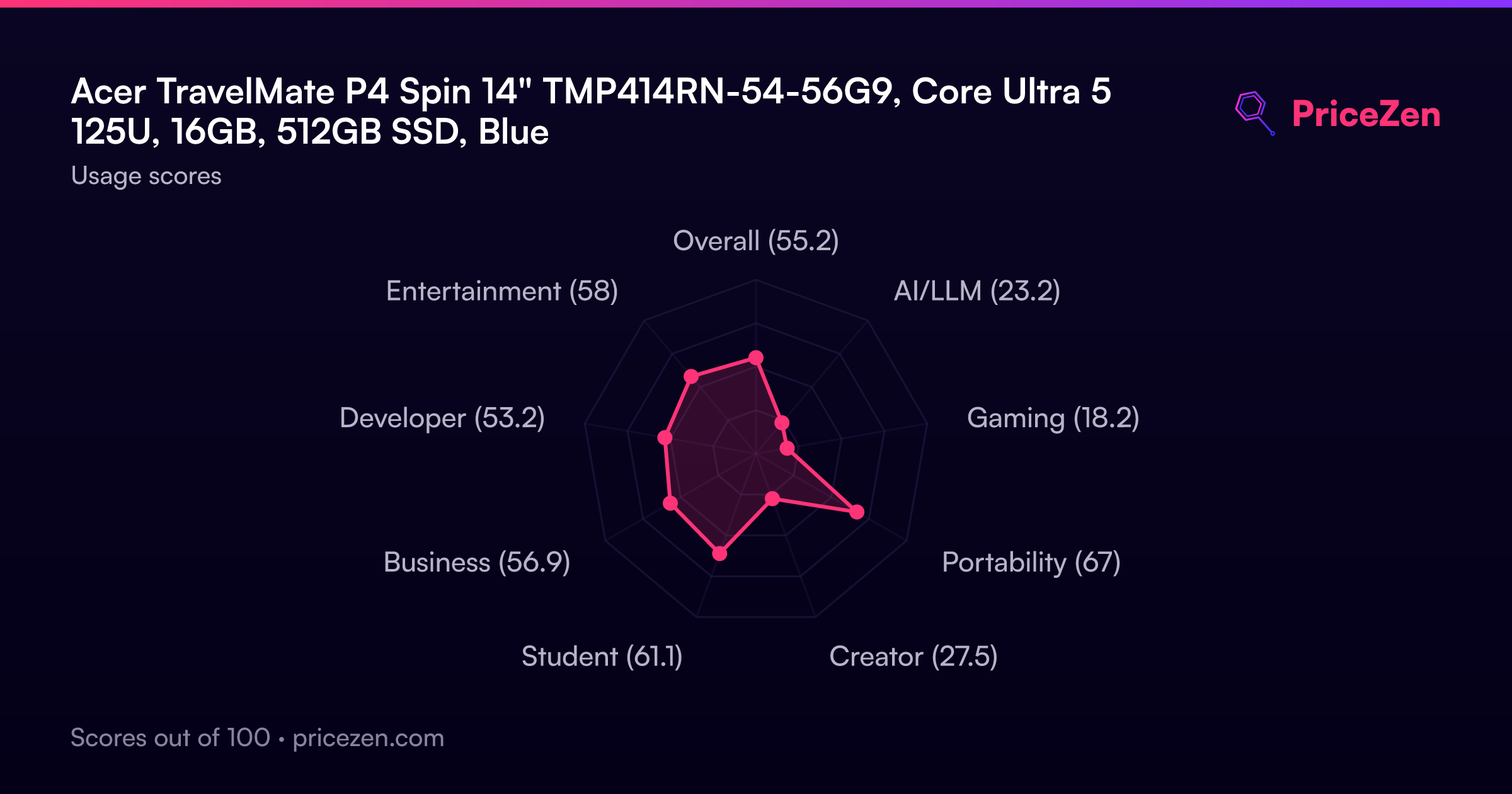
Usage Scores
- Overall55.2
- AI/LLM23.2
- Gaming18.2
- Portability67
- Creator27.5
- Student61.1
- Business56.9
- Developer53.2
- Entertainment58