HP OmniStudio 24-cv0024 2026, Ryzen 3 3000, 8GB, 512GB SSD, Jet Black

All-in-one computing at a below-peer price verified Nov 23
64/100 overall score 4.7 average from 224 owner ratings
$100.00 (14%) under the usual price, and the lowest in 90 days.
Usual $699.99High and store’s “was” $899.99
Price over the last 90 days: low $599.99 on Nov 9, high $899.99. Usual price $699.99. The store’s “was” price $899.99. Today $599.99.
- CPU
- AMD Ryzen 3 30
- RAM
- 8 GB
- Storage
- 512 GB
- GPU
- AMD Radeon 840M
- Form factor
- aio
- Psu
- 90 W
- OS
- Windows 11 Home
Compare prices at 1 store
Cheapest first. New, refurbished and bundled offers are kept apart, so you compare like with like.
| Store | Sold by | Colour and condition | Price | vs lowest | Last checked | Link |
|---|---|---|---|---|---|---|
| New1 offerSingle unit | ||||||
| Best Buy | Best Buy | Jet Black | $599.99 | Lowest price | Today | Go to store |
| Refurbished and renewed2 offersNot new: condition and warranty vary by seller | ||||||
| Best Buy | Best Buy | Open box, Jet Black | $439.99 | −$160.00 | Today | Go to store |
| Out of stock when last checked | ||||||
| Best Buy | Best Buy | Open box, Jet Black | No price | Out of stock | Today | Go to store |
 Source: PriceZen, checked Nov 28, 2026
5 listings; 2 of them repeat another offer exactly (same store, seller, condition, colour and price), so they show once. A price counts as current when we checked it in the last 7 days. “Marketplace seller” means a third-party seller on that store, not the store itself.
Price history
$599.99 is $100.00 under the usual store price, and the lowest in 90 days.
Checked that dayNot checked that day, still on offer
Source: PriceZen, checked Nov 28, 2026
Snapshot
The 30-Second Version
The HP OmniStudio is a sharp-looking all-in-one that nails the basics for everyday computing. The display is crisp, setup is a breeze, and it runs quiet, but the cheap included keyboard and missing headphone jack are letdowns. Grab it if you can find it near the $400 mark and your needs don't go beyond web browsing and office work.
Pros & Cons
Pros
- Sleek, space-saving design that looks great on a desk. 98th
- Crisp 23.8" FHD IPS display with wide viewing angles. 86th
- Tool-less setup gets you running in minutes. 70th
- Quiet operation even under moderate load.
Cons
- Included wired keyboard and mouse are cheap and plasticky.
- No headphone jack is a baffling omission.
- Gaming performance is limited to older or very light titles.
- No VESA mount support limits placement options.
What owners think
The Word on the Street
- Owners consistently praise the sleek, modern design and how compact it is on a desk.
- A very common complaint is that the included wired keyboard and mouse feel incredibly cheap and ruin the premium vibe.
- Several buyers mention the display is bright and crisp, perfect for streaming and office work.
How owner sentiment changed over time
ExclusiveBased on when customers actually wrote their reviews - so you can see whether early praise held up.
5 written reviews, Jun 2026: 5 happy
Across all 224 store ratings: 4.7★. Most owners rate without writing a review. The chart counts the 5 written reviews.
Each dot is one written review, in the month it was written. Happy = 4-5★, mixed = 3★, unhappy = 1-2★.
The proof
Performance
The Ryzen 3 3000 series chip and 8GB of DDR5 RAM handle everyday tasks without breaking a sweat. You can juggle a dozen browser tabs, stream music, and work on documents simultaneously, and the system stays quiet and responsive. The 512GB SSD is snappy for booting and loading apps, though its storage capacity lands in the bottom third of our database. Where things fall apart is anything demanding. The integrated Radeon 840M graphics are fine for video playback but choke on modern games or GPU-heavy work. Our AI and LLM benchmarks put this machine near the very bottom of the pack, so don't even think about local AI workloads. It's a one-trick pony, but it does that trick well.
Specifications
Full Specifications
Processor
| CPU | AMD Ryzen 3 30 |
| Cores | 4 |
| Frequency | 2.4 GHz |
| L3 Cache | 4 MB |
Graphics
| GPU | AMD Radeon 840M |
| Type | Integrated |
Memory & Storage
| RAM | 8 GB |
| RAM Generation | DDR5 |
| Storage | 512 GB |
| Storage Type | SSD |
Build
| Form Factor | aio |
| PSU | 90 |
| Weight | 4.9 kg / 10.8 lbs |
Connectivity
| USB-C Ports | 2 |
| USB Ports | 5 |
| Thunderbolt | 0 |
| HDMI | 1x HDMI 2.0b |
| DisplayPort | 0 |
| Wi-Fi | Wi-Fi 6 |
| Bluetooth | Bluetooth 5.4 |
| Ethernet | Gigabit Ethernet |
System
| OS | Windows 11 Home |
vs Competition
Stacked against the Apple Mac mini M4 Pro, the OmniStudio looks like a budget-friendly alternative that includes a display, but it gets absolutely demolished in raw performance. The Mac mini is a powerhouse for creative work, while the HP is strictly for basics. The Lenovo Legion Tower and Dell Tower Desktop are traditional towers that offer far more upgradeability and gaming potential, but they lack the all-in-one simplicity. The Minisforum DeskMini and ASUS NUC 14 Pro are tiny, powerful mini PCs that beat the HP on CPU and GPU grunt, but you'll need to bring your own monitor, keyboard, and mouse. The HP's real advantage is the clean, single-cable aesthetic for users who just want a simple, good-looking computer.
| Spec | HP OmniStudio 24-cv0024 | Apple Mac Studio M3 Ultra | Dell Alienware Aurora ACT1250 | MSI Aegis Z2 A8NVL-1610US | iBUYPOWER Slate MESH SMI7N4601 | Lenovo Yoga AIO F0J20012US |
|---|---|---|---|---|---|---|
| CPU | AMD Ryzen 3 30 | Apple M3 Ultra | Intel Core Ultra 7 265F | AMD Ryzen 7 8700F | Intel Core i7 14700F | Intel Core Ultra 7 255H |
| RAM (GB) | 8 | 96 | 16 | 16 | 32 | 16 |
| Storage (GB) | 512 | 1024 | 1024 | 3072 | 1024 | 2048 |
| GPU | AMD Radeon 840M | Apple M3 Ultra 60-core | NVIDIA GeForce RTX 5060 Ti | NVIDIA GeForce RTX 5060 | NVIDIA GeForce RTX 4060 | Intel Arc Graphics |
| Form Factor | aio | sff | mid-tower | mid-tower | mid-tower | aio |
| Psu W | 90 | - | 500 | 650 | 600 | 170 |
| OS | Windows 11 Home | macOS | Windows 11 Home | Windows 11 Home | Windows 11 Home | Windows 11 Home |
| Compare | Compare | Compare | Compare | Compare |
| Product | CPU | GPU | RAM | Ports | Storage | User Sentiment | Reliability | Social Proof |
|---|---|---|---|---|---|---|---|---|
| HP OmniStudio 24-cv0024 | 26.6 | 54.6 | 17 | 85.6 | 29.2 | 62.8 | 70.3 | 98.2 |
| Apple Mac Studio M3 Ultra Compare | 99.7 | 77.2 | 95.8 | 93.6 | 53.3 | 95 | 99.3 | 75.2 |
| Dell Alienware Aurora ACT1250 Compare | 90.4 | 83.2 | 51.2 | 99.9 | 53.3 | 53.1 | 70.3 | 84.5 |
| MSI Aegis Z2 A8NVL-1610US Compare | 69.3 | 79.4 | 56.4 | 90.4 | 96.4 | 88.6 | 37.7 | 99.7 |
| iBUYPOWER Slate MESH SMI7N4601 Compare | 84.2 | 75.1 | 78 | 95.6 | 68.6 | 98.6 | 27.5 | 98.2 |
| Lenovo Yoga AIO F0J20012US Compare | 70.1 | 60 | 57.5 | 60.8 | 82.5 | 76 | 70.3 | 96.5 |
Price
Value & Pricing
Pricing on this model is all over the map, with a spread from $390 to $870 across vendors. At the low end, it's a genuinely good deal for a sleek, capable home office machine. At the high end, you're getting fleeced. The sweet spot is clearly the lower half of that range, where you're paying for the design and convenience without overpaying for the modest internals. If you can snag it closer to $400, the value proposition is strong. Push past $600, and you should be looking at more powerful alternatives.
Read more
Overview
HP's OmniStudio 24-cv0024 is an all-in-one that knows exactly what it is: a clean, compact desktop for getting stuff done. It's not trying to be a gaming rig or a creative workstation. It wraps a 23.8-inch FHD IPS screen around a modest AMD Ryzen 3 processor and 8GB of RAM, and the whole package looks sharp on a desk without hogging space. Setup is refreshingly simple, with a tool-less design that gets you from box to boot in minutes.
But HP made some odd choices here. The included wired keyboard and mouse feel like an afterthought, cheap plastic that clashes with the otherwise sleek Jet Black chassis. And while the port selection is generous on paper, the lack of a headphone jack and VESA mount will frustrate anyone who wants a clean audio setup or a multi-monitor arm. For basic productivity, streaming, and web browsing, it's a solid pick. Just don't expect it to stretch beyond that.
Common Questions
Q: Can I upgrade the RAM or storage later?
Yes, the OmniStudio is designed with tool-less access, and multiple owners confirm you can easily add more RAM or swap in a larger SSD down the line.
Q: Is this computer good for gaming?
Not really. The integrated Radeon 840M graphics can handle older or very light indie games, but it struggles with modern titles and sits in the middle of the pack for GPU performance.
Q: Does it have a touchscreen?
No, this model has a standard 23.8-inch FHD IPS non-touch display with wide viewing angles.
Who Should Skip This
Skip this if you need any real graphics horsepower for gaming, video editing, or 3D work. The GPU is a weak spot, and the lack of Thunderbolt means you can't easily add an external GPU later. Also, if a headphone jack is non-negotiable for your setup, look elsewhere because HP straight-up omitted it.
Verdict
The HP OmniStudio 24-cv0024 is for someone who wants a no-fuss desktop that looks nice and handles the basics quietly. It's perfect for a family kitchen PC, a dorm room, or a home office where spreadsheets and streaming are the heaviest lifts. The upgradeable RAM and SSD are a nice touch for future-proofing, but the cheap peripherals and missing headphone jack are annoying corners to cut. If your needs are simple and you find it at a good price, it's an easy recommendation.
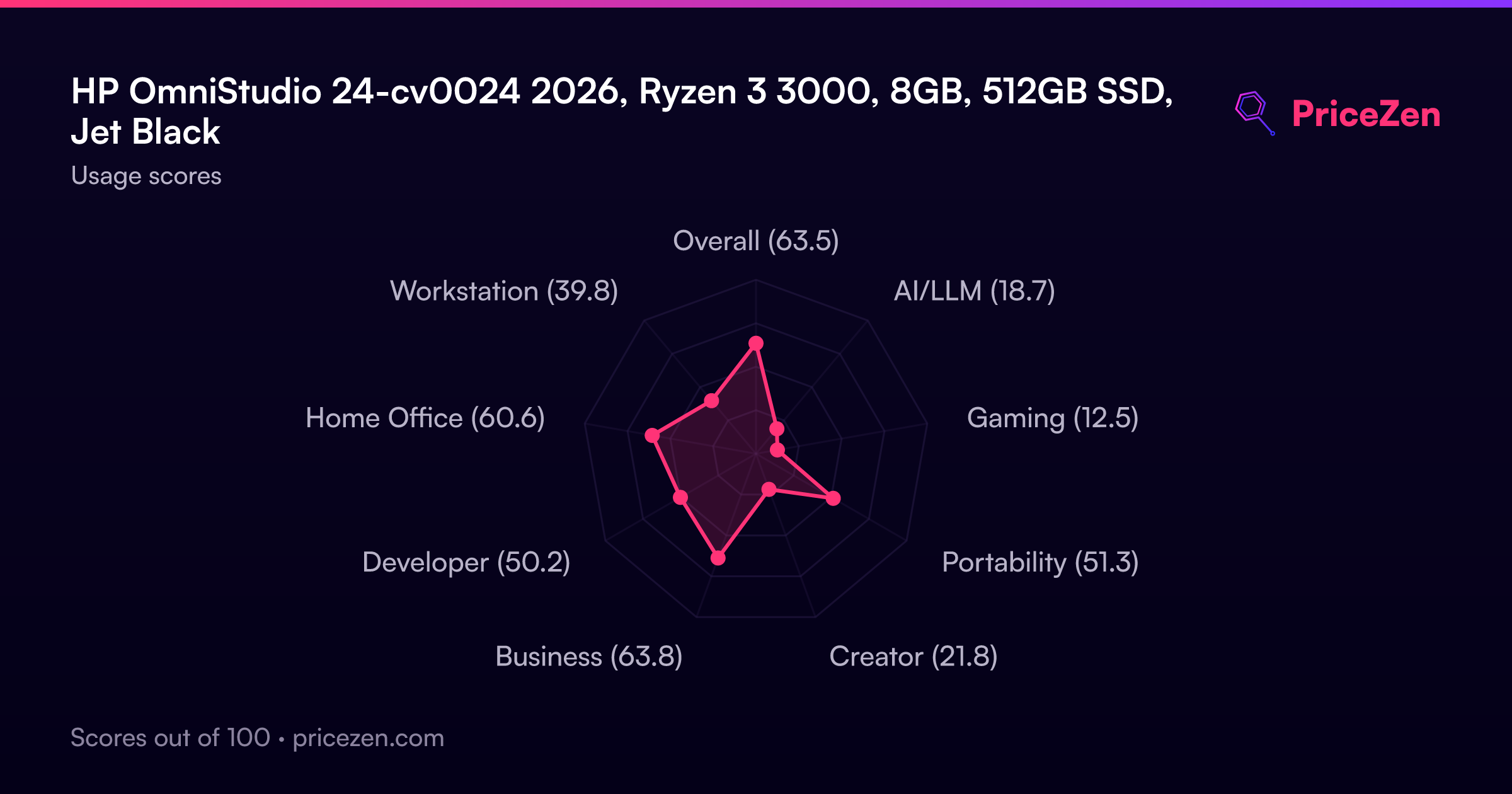
Usage Scores
- Overall63.5
- AI/LLM18.8
- Gaming12.5
- Portability51.3
- Creator21.8
- Business63.8
- Developer50.2
- Home Office60.6
- Workstation39.8