Dell XPS 2250, Core Ultra 7 265, 64GB, 2TB SSD
The 20-core Intel Core Ultra 7 265 processor and 64GB of DDR5 RAM provide substantial headroom for compiling code and running multiple virtual machines simultaneously. Dual 4K monitor support via Thunderbolt 4 and HDMI, combined with Wi-Fi 7 connectivity, makes this a versatile hub for complex workflows. This tower is best for developers and business users who need a high-memory, multi-display workstation for productivity, not gaming.

No current retailer price
Where we saw it before. Check the store for today's price.
Snapshot
The 30-Second Version
The Dell XPS 2250 is a developer's tower wearing an office suit: 64GB of DDR5 in the 94th percentile, a 20-core Core Ultra 7 265 and a 2TB NVMe SSD for USD 1,999 at Newegg. Integrated Intel UHD graphics mean gaming scores just 19.4/100, and the 460W PSU won't welcome a big GPU later. Note that this is a retailer-upgraded config, so the box has been opened. Buy it for compiles, VMs and heavy multitasking, skip it if you game.
Pros & Cons
Pros
- 64GB DDR5 sits in the 94th percentile, near the top of every desktop we track 94th
- 20-core Core Ultra 7 265 boosts to 5.3GHz, one of the stronger CPUs in the category 88th
- 2TB NVMe SSD is well above average capacity with fast load times 83rd
- Wi-Fi 7 plus 2.5GbE Ethernet and Thunderbolt 4 cover modern office networking 70th
- Windows 11 Pro included, with remote desktop and business security tools
Cons
- Gaming scores just 19.4/100 on integrated Intel UHD Graphics
- 460W PSU leaves little room for adding a serious graphics card later
- Only one USB-C port alongside five USB-A, so modern peripherals compete for one slot
- Configuration is retailer-upgraded, meaning the box was opened for installation
- Reliability ranking is only middling at the 70th percentile
What owners think
The Word on the Street
The proof
Performance
The Core Ultra 7 265 runs 20 cores at a 2.4GHz base with a 5.3GHz boost, and our ranking puts it ahead of the large majority of desktops we compare. In practice that split matters: the high boost clock keeps single-threaded work snappy, so IDEs, spreadsheets and general app responsiveness feel quick, while the core count is what chews through parallel builds, container workloads and batch jobs. Pair that with 64GB of DDR5, which is close to the top of the charts in our data, and you've got headroom to run several VMs alongside your editor without the system reaching for the page file. The 2TB NVMe drive is well above average for capacity and gives you fast boots and quick project loads.
And then there's the other half of the story. Intel UHD Graphics is integrated, sharing system memory rather than carrying its own, and the 460W power supply isn't sized for a big discrete card drop-in later. Our GPU ranking sits around the middle of the pack for desktops overall, but the gaming score of 19.4/100 is the honest number for anyone hoping to play something after hours. What the graphics can do is drive displays: Dell rates it for 4K output and dual-monitor setups over HDMI and Thunderbolt 4, which is exactly the workload it was picked for. Video editing timelines, 3D viewports and GPU-accelerated rendering will all feel the ceiling fast.
Specifications
Full Specifications
Processor
| CPU | Intel Core Ultra 7 265 |
| Cores | 20 |
| Frequency | 2.4 GHz |
| L3 Cache | 30 MB |
Graphics
| GPU | Intel UHD Graphics |
| Type | Integrated |
| VRAM Type | Shared |
Memory & Storage
| RAM | 64 GB |
| RAM Generation | DDR5 |
| Storage | 2 TB |
| Storage Type | SSD |
Build
| Form Factor | mid-tower |
| PSU | 460 |
Connectivity
| USB-C Ports | 1 |
| USB Ports | 5 |
| Thunderbolt | 1 x ThunderBolt 4 |
| HDMI | 1 x HDMI |
| Wi-Fi | Wi-Fi 7 |
| Bluetooth | 5 |
| Ethernet | 2.5GbE |
System
| OS | Windows 11 Pro |
vs Competition
The competitor set here is telling. The Apple Mac Studio M5 Max is the closest philosophical match, another compact-ish machine aimed at creative and development work rather than gaming, and it's the one to cross-shop if your toolchain lives comfortably on macOS. The Dell answers with Windows 11 Pro, five USB-A ports for legacy office gear, and a mid-tower chassis, plus a memory ranking in the 94th percentile that's genuinely hard to beat. If you need Windows-only software or remote desktop into a corporate environment, that decision makes itself.
The other names in our comparison list, the Lenovo Legion Tower 5a Gen 10, HP OMEN GT16-0364, ASUS ROG GM700 and MSI Aegis ZS2 A9NVP-1407US, are all gaming towers, and that's a different sport. Against them the XPS 2250 gives up ground on anything graphics-driven, and our 19.4/100 gaming score isn't going to be rescued by firmware. Where it wins is memory capacity and business connectivity: Wi-Fi 7, 2.5GbE and Thunderbolt 4 in a machine that isn't trying to light up your desk. Pick one of those towers if you game at all. Pick this if your bottleneck is RAM and compile times.
| Spec | Dell XPS 2250 | Apple Mac Studio M5 Max | Lenovo T Series Towers Legion Tower 5a Gen 10 | HP OMEN GT16-0364 | ASUS ROG GM700 | MSI Aegis ZS2 A9NVP-1407US |
|---|---|---|---|---|---|---|
| CPU | Intel Core Ultra 7 265 | Apple M5 Max | AMD Ryzen 7 7800X3D | AMD Ryzen 7 8700F | AMD Ryzen 7 9800X3D | AMD Ryzen 9 9900X |
| RAM (GB) | 64 | 48 | 32 | 32 | 32 | 32 |
| Storage (GB) | 2048 | 1024 | 4096 | 1024 | 2048 | 2048 |
| GPU | Intel UHD Graphics | Apple (40-Core) | NVIDIA GeForce RTX 5070 Ti | NVIDIA GeForce RTX 5070 | NVIDIA GeForce RTX 5070 Ti | NVIDIA GeForce RTX 5070 |
| Form Factor | mid-tower | mini | mid-tower | mid-tower | mid-tower | mid-tower |
| Psu W | 460 | 480 | 850 | 850 | 850 | 750 |
| OS | Windows 11 Pro | macOS | Windows 11 Home | Windows 11 Home | Windows 11 Home | Windows 11 Home |
| Compare | Compare | Compare | Compare | Compare |
| Product | CPU | GPU | RAM | Ports | Storage | Reliability |
|---|---|---|---|---|---|---|
| Dell XPS 2250 | 88.1 | 60 | 93.8 | 62.7 | 82.5 | 70.3 |
| Apple Mac Studio M5 Max Compare | 95.7 | 84.9 | 95 | 89.1 | 68.6 | 99.3 |
| Lenovo T Series Towers Legion Tower 5a Gen 10 Compare | 73.2 | 94.6 | 77.9 | 88.6 | 98.1 | 70.3 |
| HP OMEN GT16-0364 Compare | 69.3 | 90.6 | 87 | 97.9 | 53.3 | 70.3 |
| ASUS ROG GM700 Compare | 80.3 | 94.6 | 81.6 | 96.1 | 90 | 37.8 |
| MSI Aegis ZS2 A9NVP-1407US Compare | 92.3 | 90.6 | 87 | 90.4 | 82.5 | 37.8 |
Price
Value & Pricing
At USD 1,999 from Newegg, you're paying for memory and cores rather than pixels pushed per second, and on that axis the math works. Getting 64GB of DDR5 and a 2TB NVMe drive pre-installed alongside a leading-tier 20-core CPU is the kind of configuration that usually costs noticeably more when you spec it from a factory configurator. For a developer or a small business running VMs, that's a lot of usable capability per dollar.
We only have one US listing in our data right now, so there's no cross-store price spread to shop, and we'll keep tracking it as more listings appear. The value verdict depends entirely on your workload: if you need CPU throughput and memory, this is priced sensibly. If any part of your day involves gaming or GPU rendering, USD 1,999 buys you a machine that's fundamentally missing a component, and no amount of RAM fixes that.
We started tracking prices for this product on Jun 29, 2026. The chart appears once we have more data.
Read more
Overview
The Dell XPS 2250 is a mid-tower that makes its priorities obvious the second you read the spec sheet. A 20-core Intel Core Ultra 7 265, 64GB of DDR5 and a 2TB NVMe SSD, all wrapped around Intel UHD integrated graphics. That's not an accident or a cost-cutting move. This machine is built for people who compile code, run virtual desktops and keep forty browser tabs open while a database churns in the background, and it spends its budget accordingly.
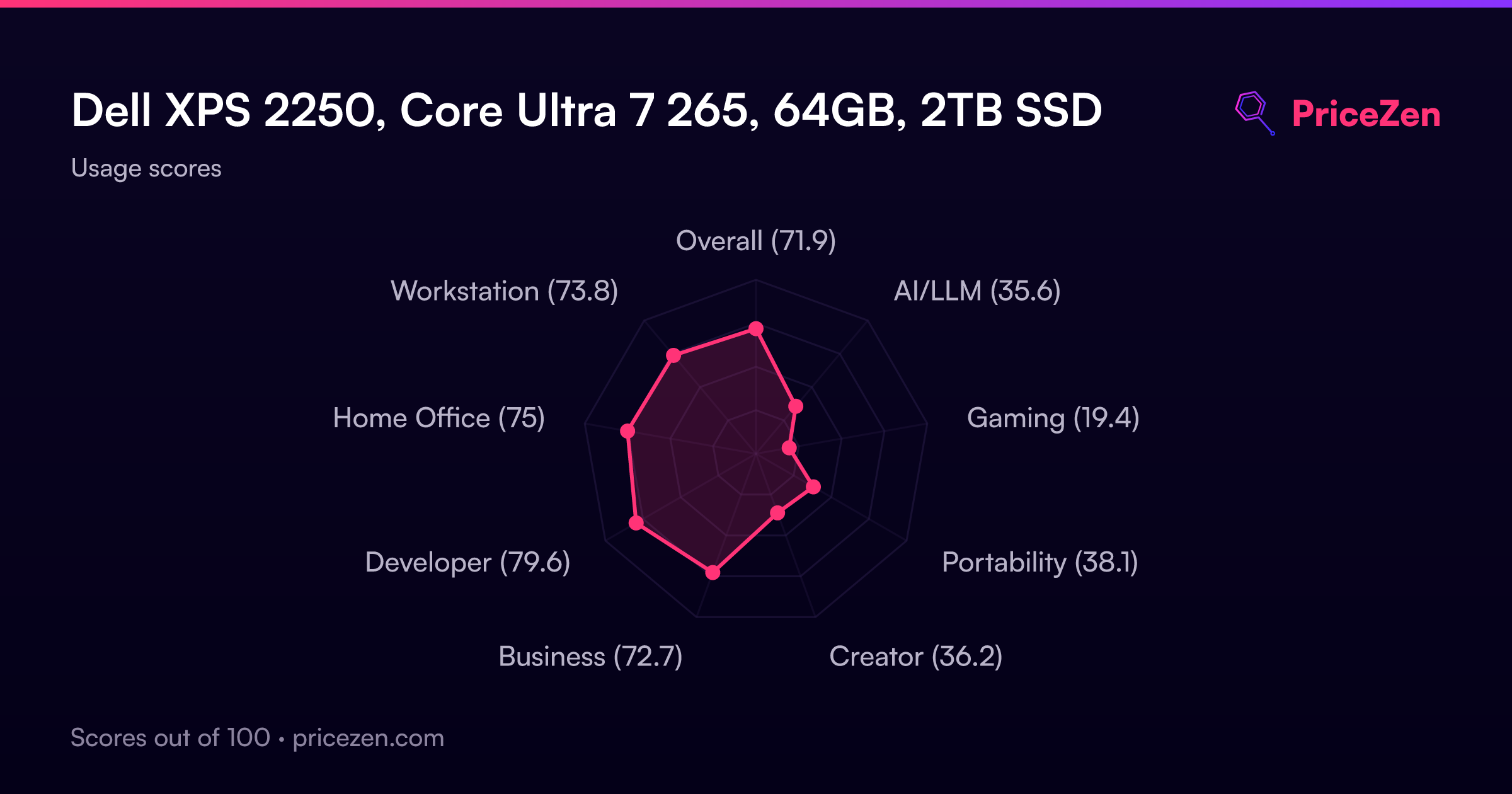
Our scoring model puts it at 79.6/100 for developers and 75/100 for home office work, with 73.8/100 as a general workstation. Gaming lands at 19.4/100, which tells you everything about where the money went. The interesting part is how lopsided that is: the memory sits in the 94th percentile against every desktop we track, the CPU is one of the best on the market, and the graphics are just... there. If your work is CPU and RAM bound, this is a very targeted buy.
One thing to know before you click add to cart: this is an upgraded configuration. The listing states plainly that the manufacturer box is opened for professional installation and testing, so the 64GB and 2TB aren't a factory-sealed base build. That's normal for retailer-upgraded towers and it's how you get this much memory at this price, but you should go in knowing it. Windows 11 Pro is included, along with Wi-Fi 7, 2.5GbE Ethernet and Thunderbolt 4, so the business-side boxes are ticked.
Common Questions
Q: Can I add a graphics card later for gaming?
Not realistically a powerful one. The 460W power supply is sized for this integrated-graphics configuration, and the Intel UHD setup means there's no existing GPU infrastructure to build on. If gaming is even a maybe, buy a tower with a discrete card from the start rather than planning an upgrade path here.
Q: Is 64GB of RAM overkill for normal work?
For email and browsing, absolutely yes. But 64GB sits in the 94th percentile of every desktop we track, and it's the single best reason to buy this machine if you run virtual machines, containers, large datasets or heavy IDEs. It's headroom you'll only appreciate if your workload actually eats memory.
Q: Why does the listing say the box was opened?
This is a retailer-upgraded configuration, and the listing states the manufacturer box is opened for professional installation and testing of the upgraded parts. That's how the 64GB and 2TB get fitted, and it's common practice for upgraded towers. Just don't expect a factory-sealed unit.
Q: Will it run two 4K monitors?
Yes, Dell rates the integrated graphics for 4K output and dual-monitor setups, driven over the HDMI port and Thunderbolt 4. That's a display-productivity feature rather than a gaming one, so expect smooth desktop and document work across both screens, not accelerated 3D.
Who Should Skip This
Gamers should walk away immediately. A 19.4/100 gaming score on integrated Intel UHD Graphics isn't a rough edge you can sand down, and the 460W PSU means a meaningful GPU upgrade isn't in the cards. The Lenovo Legion Tower 5a Gen 10, HP OMEN GT16-0364, ASUS ROG GM700 and MSI Aegis ZS2 A9NVP-1407US all exist for exactly this reason. Same goes for video editors and 3D artists whose applications lean on GPU acceleration.
You should also skip it if you specifically want a sealed factory configuration, since this one is opened for the memory and storage upgrade, or if your work is light enough that 64GB is money sitting idle. And if you're deep in Apple's software world, the Mac Studio M5 Max is the more natural cross-shop.
Verdict
For developers, this is an easy recommendation. The 79.6/100 developer score reflects a genuinely well-matched combination: lots of fast memory, a strong multi-core CPU, quick storage and enough display outputs for a two-monitor setup. Home office buyers at 75/100 are also well served, especially if you're the sort who never closes anything. Windows 11 Pro and the networking spec make it a sensible small-business machine too.
For anyone else, temper expectations. As a general workstation it scores 73.8/100, which is good but not exceptional, and the reason is the same one that tanks the gaming score. If you edit video, do 3D work or want to play games on the same box, buy something with a discrete GPU instead. And go in clear-eyed that this is an opened-box upgraded configuration, not a sealed factory build. Owners have been happy so far, with a 4.8/5 average across 16 reviews, but that's a small sample and we'd want more data before calling it a reliability slam dunk.
Usage Scores
- Overall71.9
- AI/LLM35.6
- Gaming19.4
- Portability38.1
- Creator36.2
- Business72.7
- Developer79.6
- Home Office75
- Workstation73.8