Lenovo Chromebox 83F90000US 2021, Celeron N4500, 8GB, 32GB SSD, Black

Mini PC that fits on a crowded desk verified Nov 28
37/100 overall score 4.5 average from 4 owner ratings
$9.36 (1%) under the usual price, $29.88 above its 90-day low.
90-day low $430.05Usual $469.29High $583.32
Price over the last 90 days: low $430.05 on Nov 14, high $583.32. Usual price $469.29. Today $459.93.
- CPU
- Intel Celeron N4500
- RAM
- 8 GB
- Storage
- 32 GB
- GPU
- Intel UHD Graphics
- Form factor
- mini
- OS
- ChromeOS
Compare prices at 5 stores
Cheapest first. New, refurbished and bundled offers are kept apart, so you compare like with like.
| Store | Sold by | Colour and condition | Price | vs lowest | Last checked | Link |
|---|---|---|---|---|---|---|
| New5 offersSingle unit | ||||||
| Amazon | Marketplace seller | Not listed | $459.93 | Lowest price | 2 days ago | Go to store |
| Newegg | Marketplace seller | Not listed | $469.29 | +$9.36 | 2 days ago | Go to store |
| Not checked in the last 7 days, so these prices may have changed | ||||||
| Best Buy | Marketplace seller | Black | $516.17 | +$56.24 | Oct 18 | Go to store |
| Adorama | Adorama | Black | Price not confirmed | Not known | Go to store | |
| Out of stock when last checked | ||||||
| B&H Photo | B&H Photo | Not listed | No price | Out of stock | Not known | Go to store |
 Source: PriceZen, checked Nov 26, 2026
A price counts as current when we checked it in the last 7 days. “Marketplace seller” means a third-party seller on that store, not the store itself.
Price history
$459.93 is $9.36 under the usual store price, and only $29.88 above its 90-day low.
Checked that dayNot checked that day, still on offer
Source: PriceZen, checked Nov 26, 2026


Snapshot
The 30-Second Version
The Lenovo Chromebox Micro packs a Celeron N4500, 8GB RAM, and a tiny 32GB of storage into a 0.45kg box that mounts behind your monitor. Storage is in the 4th percentile of our database, which is rough, but ChromeOS keeps things feeling snappy for light tasks. At the $319 low end it's a decent buy for basic use, but the $516 high end is a hard pass.
Pros & Cons
Pros
- Tiny 0.45kg chassis mounts behind a monitor 70th
- 8GB RAM keeps ChromeOS feeling responsive for light tasks
- Wi-Fi 6 and Gigabit Ethernet built in
- Dual display support via HDMI 1.4b and USB-C
- Reliability at the 70th percentile, above average for budget desktops
Cons
- 32GB eMMC storage is in the 4th percentile, extremely limited
- Celeron N4500 CPU lands at the 36th percentile, below average
- Gaming score of 9 out of 100, essentially unusable for games
- RAM capacity at the 16th percentile, no upgrade path
- Some owners report disappointing wireless and wired speeds
What owners think
The Word on the Street
- Owners consistently mention the compact size and how easy it is to mount behind a monitor, with setup taking just minutes.
- Multiple buyers say performance is snappy for light tasks like browsing, streaming, and looking up recipes, which is exactly what this box is built for.
- A recurring complaint is disappointing wireless connection speeds, with some users also noting slower wired performance than similar devices they've tested.
How owner sentiment changed over time
ExclusiveBased on when customers actually wrote their reviews - so you can see whether early praise held up.
4 written reviews, Apr 2024 – Jan 2025: 4 without stars
Across all 4 store ratings: 4.5★. The chart counts the 4 written reviews.
Each dot is one written review, in the month it was written. Happy = 4-5★, mixed = 3★, unhappy = 1-2★.
The proof
Performance
Let's be real about the Celeron N4500. It sits at the 36th percentile for CPU performance in our database, which means it's below average even among budget desktops. The 8GB of RAM lands at the 16th percentile. That's not a typo. For ChromeOS, though, the story is different. ChromeOS is lean, and owners consistently report snappy performance for light tasks like browsing, streaming, and document work. The integrated Intel UHD Graphics are at the 38th percentile, which is fine because nobody should be gaming on this thing. Our gaming score for this product is a 9 out of 100, and that's being generous.
The 32GB eMMC storage is the real bottleneck. At the 4th percentile, it's one of the smallest storage configurations we've tracked. ChromeOS leans heavily on cloud storage, so for the intended use case it works, but you'll be managing local files carefully. The Wi-Fi 6 support is nice on paper, though some owners report wireless speeds that don't live up to the spec sheet. Wired Gigabit Ethernet is there, but a few users say it's slower than similar devices they've tested.
Specifications
Full Specifications
Processor
| CPU | Intel Celeron N4500 |
| Cores | 2 |
| Frequency | 1.1 GHz |
| L3 Cache | 4 MB |
Graphics
| GPU | Intel UHD Graphics |
| Type | Integrated |
| VRAM Type | Shared |
Memory & Storage
| RAM | 8 GB |
| RAM Generation | DDR4 |
| Storage | 32 GB |
| Storage Type | SSD |
Build
| Form Factor | mini |
| Weight | 0.8 kg / 1.8 lbs |
Connectivity
| USB-C Ports | 2 |
| USB Ports | 2 |
| HDMI | 1x HDMI 1.4b |
| DisplayPort | 0 |
| Wi-Fi | Wi-Fi 6 |
| Bluetooth | Bluetooth 5.1 |
| Ethernet | Gigabit Ethernet |
System
| OS | ChromeOS |
vs Competition
Stacked against the competition, the Chromebox Micro is a niche player. The Apple Mac mini M4 absolutely destroys it in every performance metric, but it also costs several times more. The Minisforum DeskMini UM880 Plus and ASUS NUC 14 Pro both offer significantly more CPU and storage headroom for not much more money, especially if you catch them on sale. The HP OmniDesk M02-0234 and Dell Tower Desktop ECT1250 are traditional desktops that beat the Chromebox on raw specs but lose on size and power efficiency. Where the Lenovo wins is simplicity. ChromeOS means no driver headaches, no Windows updates eating your afternoon, and a locked-down environment that's great for shared or public use. If you need a cheap, mountable, zero-maintenance box for a specific task, this is it. If you need a general-purpose computer, look elsewhere.
| Spec | Lenovo Chromebox 83F90000US | HP OmniDesk M02-0234 | Dell Tower Desktop ECT1250 | Apple iMac M4 | MSI Aegis ZS 7NUC-607US | Minisforum DeskMini UM880 Plus |
|---|---|---|---|---|---|---|
| CPU | Intel Celeron N4500 | AMD Ryzen 7 8700G | Intel Core Ultra 7-265 | Apple M4 | AMD Ryzen 7 7700 | AMD Ryzen 7 255 |
| RAM (GB) | 8 | 16 | 32 | 16 | 16 | 32 |
| Storage (GB) | 32 | 1536 | 1024 | 256 | 1024 | 1024 |
| GPU | Intel UHD Graphics | AMD Radeon 780M | Intel UHD Graphics | Apple M4 10-core | NVIDIA GeForce RTX 4060 | AMD Radeon 780M |
| Form Factor | mini | mini-tower | mid-tower | aio | mid-tower | mini |
| Psu W | - | 280 | 360 | 143 | - | 120 |
| OS | ChromeOS | Windows 11 Home | Windows 11 Home | macOS | Windows 11 Home | Windows |
| Compare | Compare | Compare | Compare | Compare |
| Product | CPU | GPU | RAM | Ports | Storage | User Sentiment | Reliability | Social Proof |
|---|---|---|---|---|---|---|---|---|
| Lenovo Chromebox 83F90000US | 0.7 | 36.5 | 15.1 | 42.7 | 3.9 | 44.2 | 70.3 | 33 |
| HP OmniDesk M02-0234 Compare | 71.6 | 64.5 | 51.2 | 94.5 | 79.4 | 95 | 70.3 | 96.5 |
| Dell Tower Desktop ECT1250 Compare | 88.1 | 60 | 81.6 | 79.1 | 68.6 | 44.2 | 70.3 | 92.1 |
| Apple iMac M4 Compare | 56.7 | 66.5 | 45.6 | 94 | 12.7 | 62.8 | 99.3 | 99.2 |
| MSI Aegis ZS 7NUC-607US Compare | 74.5 | 75.1 | 45.6 | 94 | 53.3 | 88.6 | 37.7 | 94.5 |
| Minisforum DeskMini UM880 Plus Compare | 64.8 | 64.5 | 81.6 | 65.5 | 53.3 | 88.6 | 11.7 | 89.7 |
Price
Value & Pricing
Pricing on this thing is all over the map. In the US, we're seeing listings from $319 to $516 across five vendors, a spread of $197. That's a huge range for a budget Chromebox. At the low end, around $319, this is a reasonable buy for a kiosk, digital signage, or a basic home office setup. At $516, you're getting into territory where you could start looking at more capable mini PCs with actual SSDs and faster processors. Canadian pricing is even wilder, ranging from CAD 433 to CAD 1,070 across two listings. If you're buying in Canada, shop carefully because the high end of that range is frankly absurd for this hardware. The best US deal we're seeing is at the $319 mark, and that's really the only price point where this makes sense.
Read more
Overview
The Lenovo Chromebox Micro 83F90000US is a tiny desktop that knows exactly what it is, and mostly doesn't apologize for it. The headline numbers are a 1.1GHz Intel Celeron N4500, 8GB of RAM, and just 32GB of eMMC storage. That storage figure lands in the 4th percentile of our database, which is about as close to rock bottom as it gets. But this thing isn't trying to be a workstation. It's a ChromeOS box the size of a coaster, meant to live behind a monitor and handle the basics.
At 0.45kg, it's practically weightless, and the port selection is genuinely useful for the size. You get two USB-C ports, two USB-A ports, HDMI 1.4b, DisplayPort, Ethernet, and Wi-Fi 6. The 45W USB-C power adapter keeps cable clutter down. Our reliability data puts it at the 70th percentile, which is solid for a budget mini PC. The 4.1 out of 5 customer rating across 12 reviews backs that up, though the sentiment score of 75/100 suggests owners are happy but not blown away.
Common Questions
Q: Can the Lenovo Chromebox Micro run two monitors?
Yes. It has an HDMI 1.4b port and supports a second display through one of the USB-C ports. Both ports are capable of driving a monitor, so dual display setups are officially supported.
Q: Is 32GB of storage enough for everyday use?
It depends on your workflow. The 32GB eMMC drive is in the 4th percentile of our database, so it's extremely limited for local files. ChromeOS is designed around cloud storage, so if you're comfortable keeping documents, photos, and media in Google Drive, it works. If you need to store large files locally, you'll want to add external storage via one of the USB ports.
Q: How does the Celeron N4500 handle multitasking?
The N4500 sits at the 36th percentile for CPU performance in our database, so it's below average compared to other desktops. With 8GB of RAM, it handles light multitasking like a handful of browser tabs, a document, and a video stream without much trouble. But heavy multitasking, large spreadsheets, or anything beyond basic use will show the limits quickly.
Who Should Skip This
Skip this if you need local storage, because 32GB at the 4th percentile is a dealbreaker for anyone who keeps files on their machine. Skip it if you want to play games, since the 9 out of 100 gaming score speaks for itself. Skip it if you're buying in Canada and seeing prices near CAD 1,070, because that's highway robbery for a Celeron with eMMC storage. And skip it if you need reliable high-speed wireless, since multiple owners report disappointing Wi-Fi performance despite the Wi-Fi 6 badge on the box.
Verdict
The Lenovo Chromebox Micro is a purpose-built tool, and it's good at its purpose. Owners praise the compact size, easy setup, and snappy performance for light tasks, and the 4.1-star rating reflects that satisfaction. But the 32GB of storage is a real limitation, and the CPU and RAM rankings in our database are below average even for budget hardware. At the low end of the US price range, around $319, it's a defensible buy for kiosks, signage, or a grandma-proof web browsing machine. At anything above that, you're paying too much for too little. The reliability data is encouraging, but the weak wireless performance reported by some owners is a concern for a device that's meant to be mounted behind a monitor or TV where interference is common.
Usage Scores
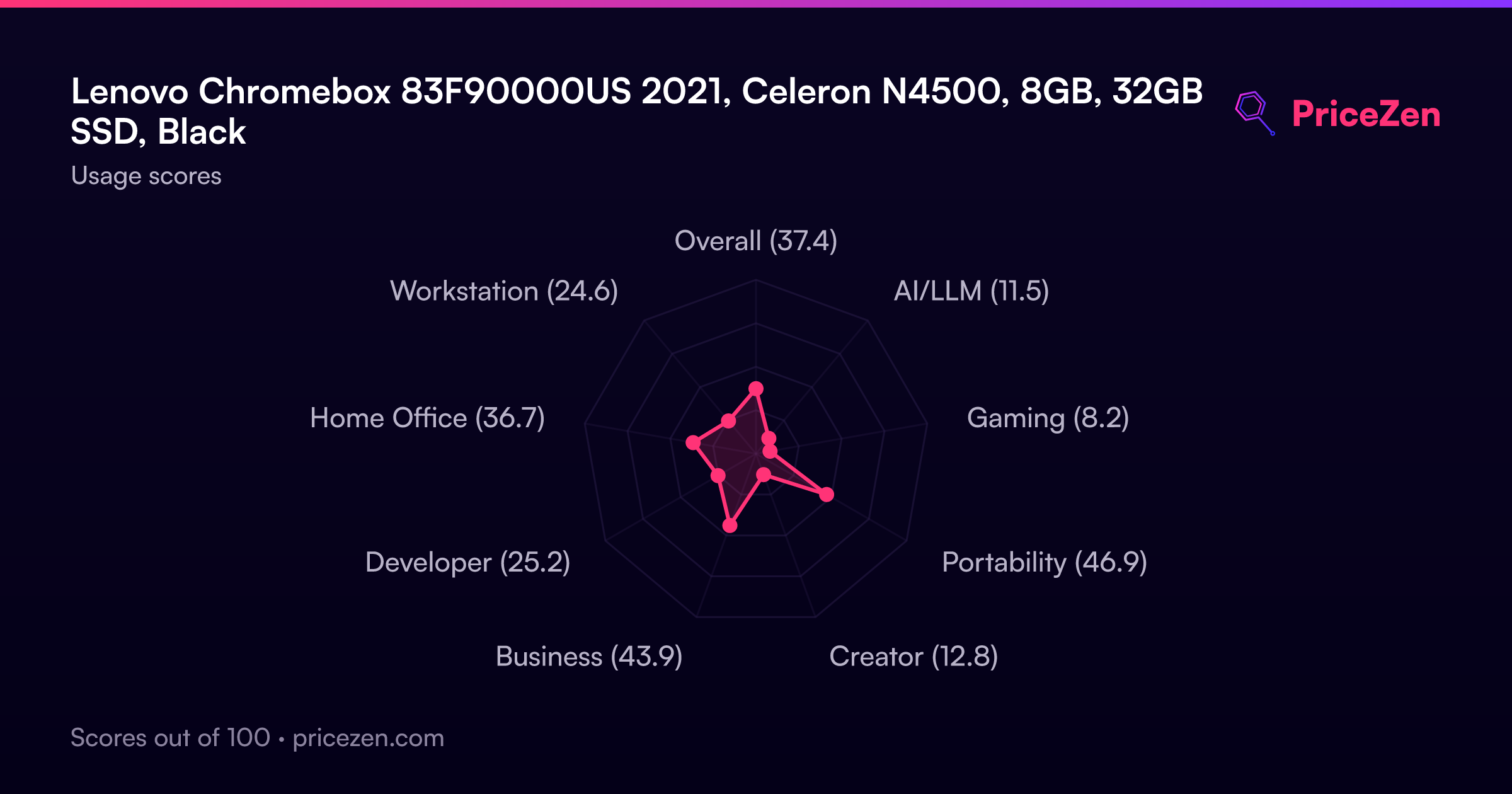
- Overall37.4
- AI/LLM11.5
- Gaming8.2
- Portability46.9
- Creator12.8
- Business43.9
- Developer25.2
- Home Office36.7
- Workstation24.6