HP Z4 G5, Xeon w5-2545, 16GB, 512GB SSD, RTX 4000 Ada Generation, Black
The Intel Xeon w5-2545 12-core processor and NVIDIA RTX 4000 Ada with 20GB VRAM provide certified reliability for multi-threaded rendering and simulation tasks. Its tower chassis offers extensive internal expansion and 10 USB-A ports, though the 16GB of ECC RAM is a minimal starting point for a system of this class. This workstation is best for engineers and data scientists running ISV-certified applications who need a stable, expandable platform rather than a compact desktop.



Snapshot
The 30-Second Version
The HP Z4 G5 is a capable workstation tower with a strong Xeon w5-2545 CPU and RTX 4000 Ada GPU, but the base 16GB RAM and 512GB SSD are underwhelming for the price. It's a great foundation for pro work if you're willing to upgrade it yourself. Shop carefully, we're tracking a spread of over USD 3,000 between vendors.
Pros & Cons
Pros
- Xeon w5-2545 delivers strong multi-threaded performance 86th
- RTX 4000 Ada with 20GB VRAM is excellent for pro apps 83rd
- Tons of ports, including 10 USB-A and 4 DisplayPort 82nd
- ECC DDR5 RAM for reliability in long renders 70th
- Room to expand RAM, storage, and GPU down the line
Cons
- 16GB RAM is low for a workstation at this price
- 512GB SSD fills up fast with pro workloads
- Heavy at 12.6kg, not something you'll move often
- Price varies wildly between vendors
- Not compact, takes up real desk space
The proof
Performance
Our database puts this config's CPU in the 83rd percentile for workstations, which translates to strong multi-threaded performance. The 12 cores and 24 threads chew through renders and simulations without breaking a sweat. The GPU lands in the 79th percentile, which is well above average. The RTX 4000 Ada is a workstation card, not a gaming card, so it's optimized for precision and stability in pro apps rather than raw frame rates in games.
In practice, you're looking at a machine that handles 4K video editing, complex CAD assemblies, and moderate machine learning tasks without much drama. The 20GB of VRAM means you can load larger scenes and datasets than you could on a typical RTX 4080 or 4090 gaming card, even though those cards are faster in pure gaming terms. Port selection is a strong point too, sitting in the 85th percentile. You get 10 USB-A ports and 4 DisplayPort 1.4a outputs, so multi-monitor setups and lots of peripherals are no problem.
Storage is the weak spot. The 512GB SSD lands in the 43rd percentile, which is about average for a budget desktop but feels stingy on a workstation. If you work with large video files or datasets, you'll fill that drive fast. RAM is also middle of the pack at the 51st percentile. 16GB of ECC DDR5 is fine for basic tasks, but it's not enough for serious multitasking with heavy pro apps. Plan on adding more.
Specifications
Full Specifications
Processor
| CPU | Intel Xeon w5-2545 |
| Cores | 12 |
| Frequency | 3.5 GHz |
| L3 Cache | 30 MB |
Graphics
| GPU | NVIDIA RTX 4000 Ada Generation |
| Type | Discrete |
| VRAM | 20 GB |
| VRAM Type | GDDR6 |
Memory & Storage
| RAM | 16 GB |
| RAM Generation | DDR5 |
| Storage | 512 GB |
| Storage Type | NVMe SSD |
Build
| Form Factor | workstation |
| PSU | 775 |
| Weight | 12.6 kg / 27.8 lbs |
Connectivity
| USB Ports | 10 |
| HDMI | 4x DisplayPort 1.4a Output |
| DisplayPort | 4x DisplayPort 1.4a |
| Bluetooth | No |
| Ethernet | Gigabit Ethernet |
System
| OS | Windows 11 Pro |
vs Competition
The HP Z4 G5 goes up against some serious competition. The Apple Mac Studio M5 Max is the obvious alternative for creative pros who don't need Windows or internal expansion. It's smaller and quieter, and Apple's unified memory approach suits video editing and 3D rendering well. But you're locked into macOS and can't upgrade anything after purchase. The HP wins on flexibility and Windows compatibility, with ECC DDR5 you can add to and room inside for more storage.
On the Windows side, the Lenovo T Series Towers Legion Tower 5a Gen 10 is the closest thing here to a traditional tower you can grow into, though it comes from Lenovo's gaming line rather than a certified workstation family. The ASUS ROG GM700 and the MSI Aegis ZS2 A9NVP-1407US are both gaming desktops first, built around fast consumer GPUs and flashy cases rather than pro drivers and long-run stability. They can look tempting on raw speed per dollar, but if you're running certified pro apps, the Z4 G5's Xeon w5-2545, ECC memory and RTX 4000 Ada with 20GB of VRAM are the safer bet. Our ranking puts this config's CPU in the 83rd percentile for workstations and its port selection in the 85th, which is where a lot of that professional value actually lives.
| Spec | HP Z4 G5 | Apple Mac Studio M5 Max | Lenovo T Series Towers Legion Tower 5a Gen 10 | ASUS ROG GM700 | MSI Aegis ZS2 A9NVP-1407US | CLX SET TGMSETRTU5204BM |
|---|---|---|---|---|---|---|
| CPU | Intel Xeon w5-2545 | Apple M5 Max | AMD Ryzen 7 7800X3D | AMD Ryzen 7 9800X3D | AMD Ryzen 9 9900X | Intel Core i9 14900KF |
| RAM (GB) | 16 | 48 | 32 | 32 | 32 | 64 |
| Storage (GB) | 512 | 1024 | 4096 | 2048 | 2048 | 8192 |
| GPU | NVIDIA RTX 4000 Ada Generation | Apple (40-Core) | NVIDIA GeForce RTX 5070 Ti | NVIDIA GeForce RTX 5070 Ti | NVIDIA GeForce RTX 5070 | NVIDIA GeForce RTX 5070 |
| Form Factor | workstation | mini | mid-tower | mid-tower | mid-tower | mid-tower |
| Psu W | 775 | 480 | 850 | 850 | 750 | 850 |
| OS | Windows 11 Pro | macOS | Windows 11 Home | Windows 11 Home | Windows 11 Home | Windows 11 Home |
| Compare | Compare | Compare | Compare | Compare |
| Product | CPU | GPU | RAM | Ports | Storage | Reliability |
|---|---|---|---|---|---|---|
| HP Z4 G5 | 83.2 | 85.6 | 49.4 | 82.2 | 40.5 | 70.3 |
| Apple Mac Studio M5 Max Compare | 95.7 | 84.9 | 95 | 89.1 | 68.6 | 99.3 |
| Lenovo T Series Towers Legion Tower 5a Gen 10 Compare | 73.2 | 94.6 | 77.9 | 88.6 | 98.1 | 70.3 |
| ASUS ROG GM700 Compare | 80.3 | 94.6 | 81.6 | 96.1 | 90 | 37.8 |
| MSI Aegis ZS2 A9NVP-1407US Compare | 92.3 | 90.6 | 87 | 90.4 | 82.5 | 37.8 |
| CLX SET TGMSETRTU5204BM Compare | 94.8 | 90.6 | 96.5 | 84.4 | 99.1 | 11.7 |
Price
Value & Pricing
Value is tricky here because the price spread is wild. We track this config across three US listings and we're seeing it between USD 5,051 and USD 8,395 right now. That's a USD 3,344 gap for what appears to be the same machine, and the top of that range has crept up since we last looked. If you're shopping for an HP Z4 G5, do yourself a favor and check Newegg first. Their listing sits at the lower end of that range, and you'll get the same tower, same Xeon, same RTX 4000 Ada. Paying anywhere near USD 8,000 for this config is hard to justify when the same box is available for thousands less elsewhere. Compared to something like an Apple Mac Studio M5 Max, you're paying for expandability and Windows compatibility. The Mac gives you more performance per dollar in some tasks, but you can't swap the GPU or add internal drives later.
Newegg 1 offer From $7,046
Amazon 1 offer From $7,544
Staples 1 offer From $8,395
Price history
Read more
Overview
The HP Z4 G5 is a proper workstation tower aimed at people doing rendering, simulation, video editing, and other heavy professional work. It sits in that mid-to-high tier of workstation pricing, and this config pairs a 12-core Intel Xeon w5-2545 with an NVIDIA RTX 4000 Ada Generation GPU. That's a serious combo for pro apps, not a machine you'd casually pick up for spreadsheets.
If you're searching for an HP Z4 G5 workstation for 3D rendering or CAD, the short answer is yes, this thing is built for exactly that. The Xeon w5-2545 runs at 3.5 GHz base and can boost up to 4.7 GHz, and the RTX 4000 Ada brings 20GB of GDDR6 VRAM. That's a lot of headroom for GPU-accelerated workloads like Blender, SolidWorks, or Premiere Pro.
But the base config is a bit of a head-scratcher. You get 16GB of DDR5 ECC RAM and a 512GB NVMe SSD. For a machine this capable, that's like putting economy tires on a sports car. Most people buying this will want to upgrade both immediately, and HP knows it. The tower has room to expand, which is part of the pitch, but out of the box it feels a little underfed.
Common Questions
Q: Is the HP Z4 G5 good for 3D rendering?
Yes, the HP Z4 G5 is well suited for 3D rendering thanks to the 12-core Xeon w5-2545 and the RTX 4000 Ada GPU with 20GB of VRAM. You'll get strong performance in apps like Blender, Maya, and Cinema 4D, though adding more RAM is recommended for complex scenes.
Q: How much RAM and storage does the HP Z4 G5 come with?
This base configuration includes 16GB of DDR5 ECC RAM and a 512GB NVMe SSD. Both are upgradeable, and most professionals will want to add more for heavy multitasking or large project files.
Q: Can the HP Z4 G5 run Windows 11?
Yes, the HP Z4 G5 ships with Windows 11 Pro for Workstations, which includes features like support for up to 6TB of RAM and advanced networking. It's ready to go out of the box.
Q: Is the HP Z4 G5 good for video editing?
The HP Z4 G5 handles 4K video editing well, especially with the RTX 4000 Ada GPU accelerating effects and encoding in Premiere Pro or DaVinci Resolve. The 512GB SSD is a bit small for large media libraries, so an external or secondary drive is a good idea.
Who Should Skip This
Skip the HP Z4 G5 if you're a gamer. The RTX 4000 Ada is a workstation card, and while it can run games, you'd get far better frame rates per dollar from a gaming desktop like the ASUS ROG GM700 or the MSI Aegis ZS2 A9NVP-1407US. Skip it if you want something compact or quiet, this tower weighs 12.6kg and takes up real space. And if you're not comfortable upgrading RAM and storage yourself, the base config will frustrate you. In that case, an Apple Mac Studio M5 Max is a better fit. Also skip it if you're on a tight budget, there are cheaper ways to get strong CPU and GPU performance if you don't need ECC RAM and workstation certification.
Verdict
Should you buy the HP Z4 G5? If you need a Windows workstation with a Xeon CPU, ECC RAM, and a pro-grade GPU, and you plan to upgrade the RAM and storage yourself, then yes. This is a solid foundation. The CPU and GPU are genuinely strong, and the port selection is excellent. Just know that the base config is not turnkey for heavy workloads. You'll want to budget for more RAM and a bigger SSD before you throw real projects at it.
If you're not comfortable opening up a tower and adding parts, or if you want something that works great out of the box, the Apple Mac Studio M5 Max is a more polished experience. And if you're just gaming or doing light creative work, this is overkill. But for professionals who need reliability, expandability, and Windows, the Z4 G5 earns its place. Just shop around, because the spread between listings is now wider than ever and there's no reason to pay the high end.
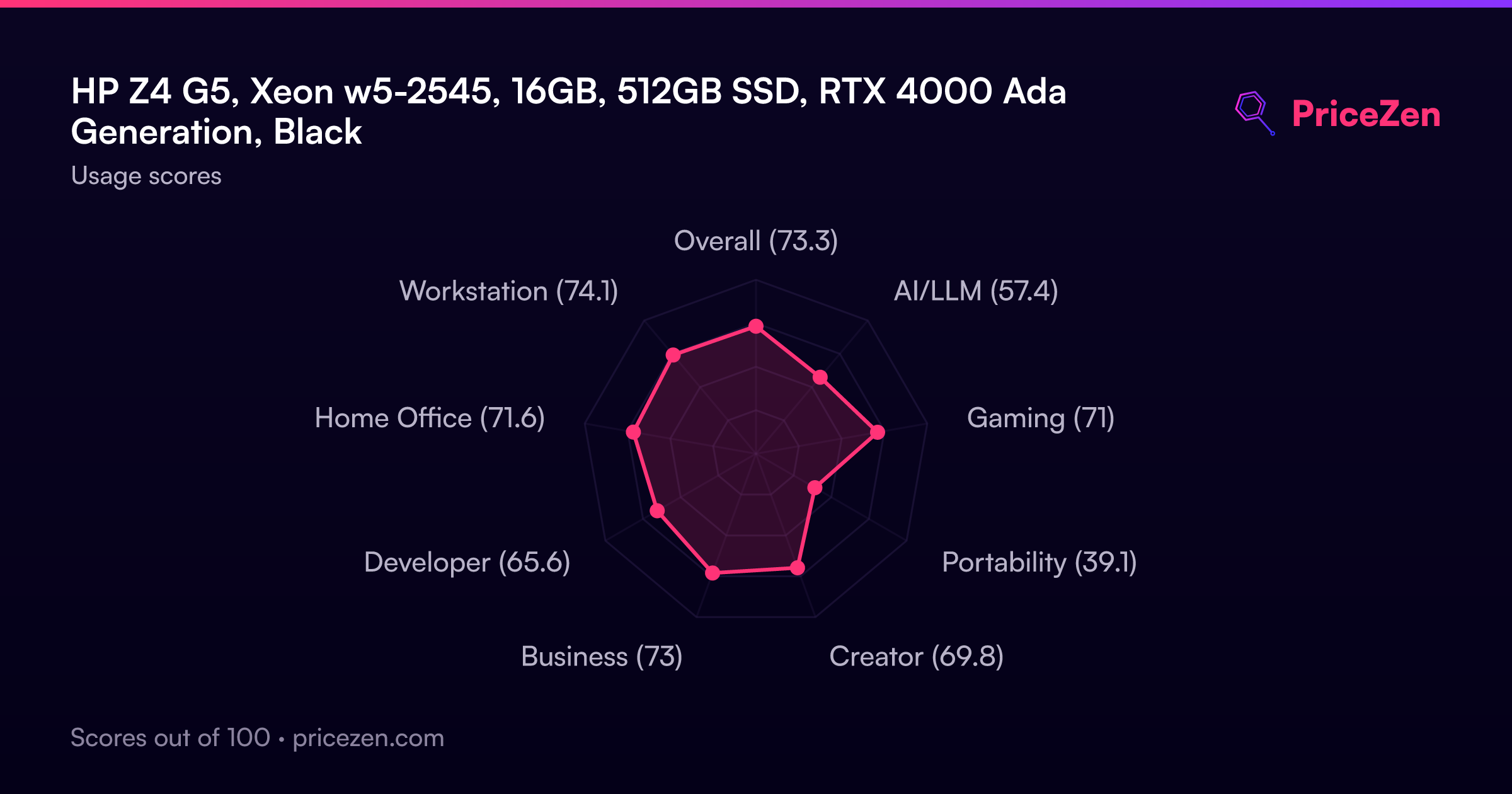
Usage Scores
- Overall73.3
- AI/LLM57.4
- Gaming71
- Portability39.1
- Creator69.8
- Business73
- Developer65.6
- Home Office71.6
- Workstation74.1