HP OmniDesk M03-0000t 2025, Core Ultra 5 225, 32GB, 1TB SSD, Black

32 GB of RAM, plenty for multitasking verified Nov 28
68/100 overall score
- CPU
- Intel Core Ultra 5 225
- RAM
- 32 GB
- Storage
- 1 TB
- GPU
- Intel Graphics
- Form factor
- mid-tower
- OS
- Windows 11 Home
Price history
Checked that dayNot checked that day, still on offer
 Source: PriceZen, checked Sep 28, 2026
Snapshot
The 30-Second Version
The OmniDesk M03-0000t is a reseller-upgraded mid-tower built around 32GB of DDR5 and a 1TB PCIe M.2 SSD, and that memory is the reason to care. Port selection is a genuine standout, ranking near the top of the desktops we track, while the 10-core Core Ultra 5 225 lands mid-pack. At USD 1,269 with only integrated Intel Graphics and a gaming score of 18.2/100, it's a productivity machine, full stop. Great for developers and heavy multitaskers, wrong for anyone who wants to game.
Pros & Cons
Pros
- 32GB of DDR5 UDIMM, well above average for desktops and the main reason to buy this 92nd
- Port selection ranks among the best we track: 8x USB-A, 2x USB-C, HDMI, DisplayPort, Ethernet, Wi-Fi 6 82nd
- 10-core Core Ultra 5 225 with 6P+4E layout and 4.9GHz turbo handles heavy multitasking cleanly 70th
- 1TB PCIe M.2 SSD means fast boots and quick file loads out of the box 68th
- Wired keyboard, mouse and an Adata 64GB USB drive included, so it's usable straight from the carton
Cons
- Gaming scores just 18.2/100 with only integrated Intel Graphics, no discrete GPU
- USD 1,269 is steep for a machine without a dedicated graphics card
- Warranty runs 1 year through the seller PCOnline, not HP directly
- 1TB storage capacity is only about average for the category
- CPU ranks mid-pack rather than leading, so long sustained workloads aren't its strength
The proof
Performance
Let's talk about what the CPU actually does for you. The Core Ultra 5 225's hybrid layout, 6 performance cores plus 4 efficiency cores, is built for the kind of messy multitasking real work involves: the heavy foreground app gets the fast cores while background sync, indexing and chat apps get parked on the efficient ones. That 4.9GHz turbo is a burst figure, not an all-day cruising speed, so expect snappy response on short tasks rather than sustained grunt through long compiles or exports. In our rankings the CPU sits at the 68th percentile, comfortably above the middle but nowhere near the top of the charts. Pair that with 32GB of DDR5, which ranks well above average for this category, and the practical result is a machine that rarely stalls because it ran out of room. Memory headroom is the real story here, not raw processor speed.
Graphics is where the numbers get blunt. Integrated Intel Graphics lands at the 60th percentile against all desktops we track, which sounds fine until you remember that most of those machines are also office boxes. Against anything with a real GPU it isn't a contest, and the 18.2/100 gaming score reflects that honestly. Desktop UI, multi-monitor spreadsheets, video calls and hardware-accelerated video playback are all reasonable asks. Modern 3D games, GPU-heavy rendering and serious local AI inference are not. Storage is the other quiet compromise: 1TB of PCIe M.2 flash is quick to boot and quick to load, but capacity ranks about average at the 53rd percentile, so if you're hoarding datasets or video projects you'll be shopping for more space sooner than you'd like. Reliability sits at the 70th percentile, decent but not a standout, and worth weighing given the third-party upgrade work.
Specifications
Full Specifications
Processor
| CPU | Intel Core Ultra 5 225 |
| Cores | 10 |
| Frequency | 3.3 GHz |
| L3 Cache | 20 MB |
Graphics
| GPU | Intel Graphics |
| Type | Integrated |
Memory & Storage
| RAM | 32 GB |
| RAM Generation | DDR5 |
| Storage | 1 TB |
| Storage Type | SSD |
Build
| Form Factor | mid-tower |
| Weight | 5.3 kg / 11.8 lbs |
Connectivity
| USB-C Ports | 2 |
| USB Ports | 8 |
| HDMI | 1x HDMI |
| DisplayPort | 1x DisplayPort |
| Wi-Fi | Wi-Fi 6 |
| Ethernet | Gigabit Ethernet |
System
| OS | Windows 11 Home |
vs Competition
The competitor set here is a strange mix, and that tells you something. The Apple Mac Studio M5 Max sits at the opposite end of the philosophy: a compact, tightly integrated workstation aimed at creative pros. If your work is GPU-bound or you live inside macOS-only tools, cross-shop it seriously, because this HP's integrated Intel Graphics and Windows 11 Home setup won't scratch that itch. Where the OmniDesk argues back is expandability and connections, with a mid-tower chassis, 8 USB-A ports and 2 USB-C plus both HDMI and DisplayPort, our port ranking puts it near the top of the category. Legacy peripherals, wired desks and multi-display office setups are its home turf.
Then there's the gaming crowd: the Lenovo T Series Towers Legion Tower 5a Gen 10, ASUS ROG GM700 and MSI Aegis ZS2 A9NVP-1407US. We're not going to pretend this HP competes with them on graphics, because a gaming score of 18.2/100 against machines built around discrete GPUs isn't a close fight. If gaming is anywhere on your list, go look at those instead. The Dell Desktop ECT1250 is the more natural rival, another business-leaning tower, and that's the comparison worth making carefully. Against it, the OmniDesk's pitch is the 32GB DDR5 config and the strong port count, weighed against a mid-pack CPU ranking and a reseller warranty rather than a factory one. Cross-shop those two on total cost and support terms, not on badge loyalty.
| Spec | HP OmniDesk M03-0000t | Apple Mac Studio M5 Max | Lenovo T Series Towers Legion Tower 5a Gen 10 | Dell Desktop ECT1250 | ASUS ROG GM700 | MSI Aegis ZS2 A9NVP-1407US |
|---|---|---|---|---|---|---|
| CPU | Intel Core Ultra 5 225 | Apple M5 Max | AMD Ryzen 7 7800X3D | Intel Core Ultra 7 265 | AMD Ryzen 7 9800X3D | AMD Ryzen 9 9900X |
| RAM (GB) | 32 | 48 | 32 | 32 | 32 | 32 |
| Storage (GB) | 1024 | 1024 | 4096 | 2048 | 2048 | 2048 |
| GPU | Intel Graphics | Apple (40-Core) | NVIDIA GeForce RTX 5070 Ti | Intel UHD Graphics | NVIDIA GeForce RTX 5070 Ti | NVIDIA GeForce RTX 5070 |
| Form Factor | mid-tower | mini | mid-tower | sff | mid-tower | mid-tower |
| Psu W | - | 480 | 850 | 180 | 850 | 750 |
| OS | Windows 11 Home | macOS | Windows 11 Home | Windows 11 Home | Windows 11 Home | Windows 11 Home |
| Compare | Compare | Compare | Compare | Compare |
| Product | CPU | GPU | RAM | Ports | Storage | Reliability |
|---|---|---|---|---|---|---|
| HP OmniDesk M03-0000t | 67.7 | 60 | 81.6 | 92.1 | 53.2 | 70.2 |
| Apple Mac Studio M5 Max Compare | 95.7 | 84.9 | 95 | 89.1 | 68.6 | 99.3 |
| Lenovo T Series Towers Legion Tower 5a Gen 10 Compare | 73.1 | 94.6 | 78 | 88.5 | 98.1 | 70.2 |
| Dell Desktop ECT1250 Compare | 88 | 60 | 81.6 | 75 | 82.5 | 70.2 |
| ASUS ROG GM700 Compare | 80.3 | 94.6 | 81.6 | 96.1 | 90 | 37.7 |
| MSI Aegis ZS2 A9NVP-1407US Compare | 92.3 | 90.7 | 87 | 90.4 | 82.5 | 37.7 |
Price
Value & Pricing
At USD 1,269 there's a single US listing in our data, so there's no store-to-store price spread to hunt through here. What we can say is that the money is going into memory and storage rather than silicon glamour. 32GB of DDR5 and a 1TB PCIe M.2 SSD are genuinely useful upgrades for anyone who's ever watched their machine choke on a dozen open apps, and buying that config pre-built saves you the hassle of opening the case yourself. For a developer or a spreadsheet-heavy office user, that's a defensible way to spend the budget.
But let's be honest about the ceiling. Our total score of 67.5/100 is middle-of-the-pack territory, and a big chunk of what drags it down is the absence of a discrete GPU. At this price you're paying a premium for RAM capacity and convenience, not for performance per dollar across the board. The seller-managed 1-year warranty is another line item worth pricing in mentally: it's coverage, but it's not manufacturer coverage, and if something goes sideways you're dealing with PCOnline rather than HP. If your workload genuinely eats memory, the value holds up. If it doesn't, you're overpaying for headroom you'll never touch.
Read more
Overview
The HP OmniDesk M03-0000t is a mid-tower that's been opened up, upgraded with new parts and resealed by a third party before it ever reaches you. The headline changes are 32GB of DDR5 UDIMM memory and a 1TB PCIe M.2 SSD, sitting alongside an Intel Core Ultra 5 225, a 10-core chip with 6 performance cores and 4 efficiency cores, a 3.3GHz base clock and a 4.9GHz turbo ceiling. Windows 11 Home comes preinstalled, and the bundle throws in a wired keyboard and mouse plus an Adata 64GB USB drive. So this isn't a stock HP config, it's a reseller-built one, and that distinction matters more than any single spec on the sheet.
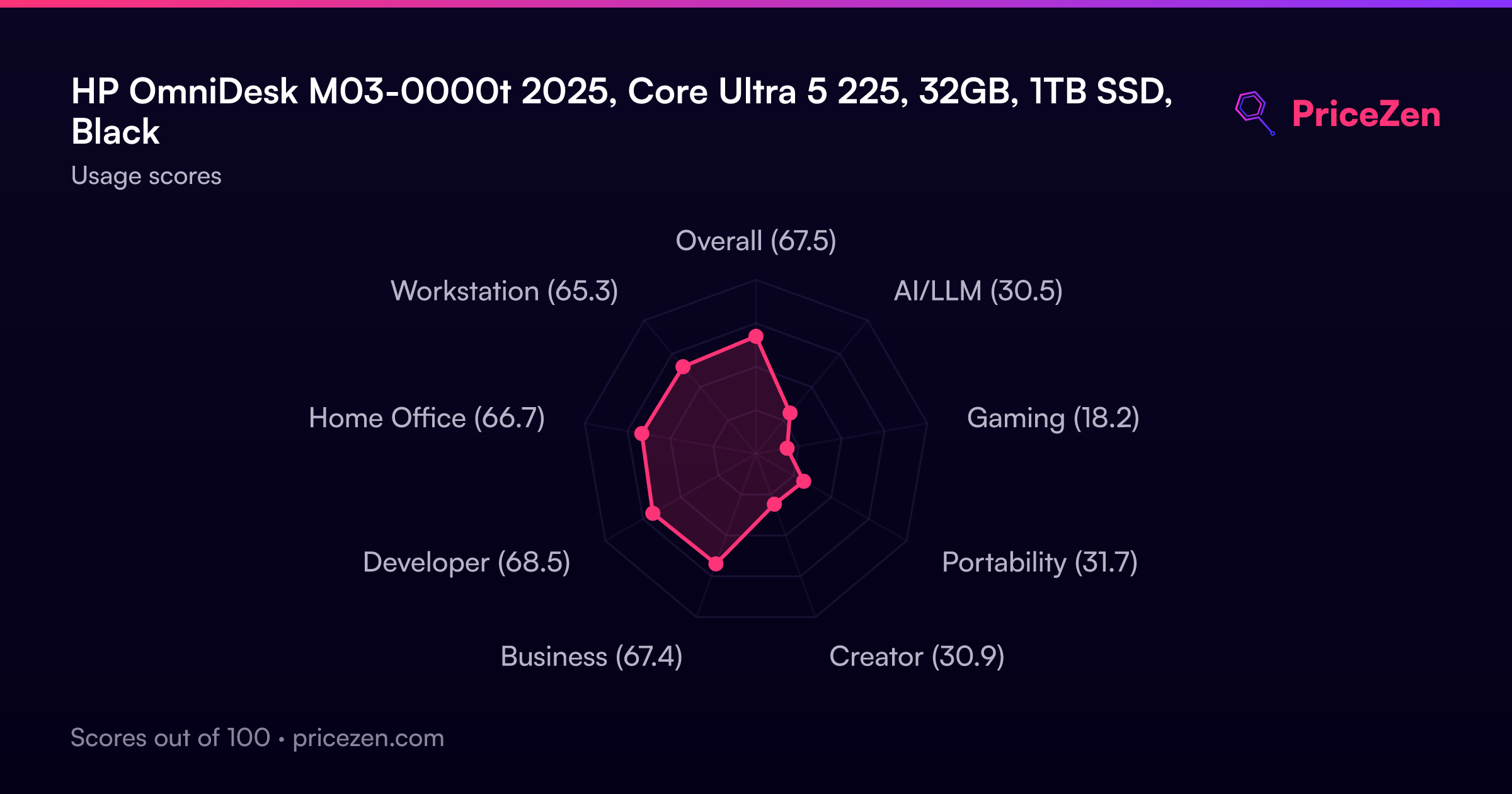
Who's it for? Our scoring model puts it at 68.6/100 for developers and 67.5/100 for business use, which tells you exactly where the sweet spot is: people who run a lot of things at once. Containers, a local dev server, forty browser tabs, three spreadsheets and a video call, all fighting for memory. With 32GB of DDR5, that fight mostly stops being a problem. The port situation backs this up too, with 8 USB-A ports, 2 USB-C, HDMI, DisplayPort, Ethernet and Wi-Fi 6, our connectivity ranking places it among the best desktops we track. If your desk looks like a cable octopus, this thing gets it.
What makes it interesting is the mismatch between how much memory and I/O you get and how little graphics muscle sits behind it. There's no discrete card here, just Intel integrated graphics. That's a deliberate trade-off, and it means this machine is a productivity workhorse rather than an all-rounder. Our overall score lands at 67.5/100, solidly middle of the pack for desktops, while gaming bottoms out at 18.2/100. Buy it for the right job and it makes sense. Buy it hoping to sneak in some gaming after work and you'll be disappointed.
Common Questions
Q: Can I game on this at all?
Light stuff, sure, but manage your expectations hard. There's no discrete graphics card, just integrated Intel Graphics, and our gaming score for this machine is 18.2/100, which is a weak spot by any measure. Older titles and casual games at low settings are the realistic ceiling. If gaming matters to you, the Legion Tower 5a Gen 10, ASUS ROG GM700 or MSI Aegis ZS2 are the machines to be looking at instead.
Q: Is 32GB of RAM overkill for office work?
For email and a few tabs, yes. For a real workload with a browser full of tabs, a couple of containers, a local database and a video call running at once, it's the difference between smooth and stuttery. Our RAM ranking puts this config well above average for desktops, and it's the single biggest reason the developer use-case score of 68.6/100 is this machine's strongest rating. You're buying headroom, and headroom ages well.
Q: What does "professionally upgraded" actually mean for warranty and support?
It means a third party opened the machine, fitted new memory and storage, then resealed it before sale. The practical consequence is that the 1-year warranty is managed by the seller, PCOnline, rather than by HP directly. That's not automatically bad, but it does change who you call when something fails, so factor it into your decision if manufacturer support is important to you.
Q: Will 1TB of storage be enough long-term?
For documents, code repositories and general business files, comfortably. For large datasets, video projects or a growing media library, less so, since 1TB ranks about average for capacity among the desktops we track. The drive itself is a fast PCIe M.2 unit, so speed isn't the concern, volume is. Plan on adding storage down the line if your files tend to multiply.
Who Should Skip This
Gamers should walk away immediately. An 18.2/100 gaming score with integrated Intel Graphics means this tower will disappoint the moment you launch anything demanding, and the Legion Tower 5a Gen 10, ASUS ROG GM700 or MSI Aegis ZS2 exist precisely for that job. Same advice for anyone doing GPU-heavy 3D rendering, video effects work or serious local AI training and inference. The 32GB of system RAM helps with dataset size, but it can't substitute for graphics horsepower that simply isn't in the box.
You should also skip it if you need manufacturer-backed support or if your workload is light. A basic browsing-and-documents user gains almost nothing from 32GB of DDR5 and would be paying USD 1,269 for capacity that sits idle, so a cheaper office tower makes more sense. And if a seller-managed 1-year warranty through PCOnline rather than HP makes you nervous, especially for a business-critical machine, the Dell Desktop ECT1250 is worth comparing on support terms before you commit.
Verdict
If you're a developer, an analyst, or someone whose workday is twenty apps deep, this is a sensible buy. The 32GB of DDR5 is the whole argument, and it's a good one: our developer score of 68.6/100 is the highest use-case rating this machine gets, and the port selection means you can wire up a proper workstation without a dock collection. The 10-core Core Ultra 5 225 keeps things responsive under that kind of load, and the 1TB PCIe SSD keeps boots and project loads quick. Just go in knowing the warranty is handled by PCOnline for a year, and budget for extra storage if your files grow fast.
If you want one machine that does work and play, look elsewhere. The 18.2/100 gaming score isn't a soft warning, it's a wall, and no amount of RAM fixes integrated graphics. Same story for anyone doing GPU-accelerated rendering or heavy local AI work. And if you specifically want manufacturer-backed support on a business desktop, the seller-managed warranty here is a real reason to hesitate. For the memory-hungry multitasker who never opens a game, though, this config does its job well.
Usage Scores
- Overall67.5
- AI/LLM30.5
- Gaming18.2
- Portability31.7
- Creator30.9
- Business67.4
- Developer68.5
- Home Office66.7
- Workstation65.3