Dell Pro Tower QCT1250 2026, Core i5-14500 vPro, 16GB, 512GB SSD, Carbon Black
The 14-core Intel Core i5-14500 vPro processor with 24MB cache delivers enterprise-grade performance for demanding business tasks, while Intel UHD 770 graphics drive dual 4K displays at 60Hz via HDMI 2.1 and DisplayPort. The 16GB DDR5 RAM and 512GB NVMe SSD ensure fast multitasking, and Windows 11 Pro with BitLocker and vPro remote management adds hardware-level security. This tower is best for financial analysts, project managers, and IT professionals in small to medium offices who need reliable multi-monitor productivity and remote manageability.











Snapshot
The 30-Second Version
A business beast for spreadsheets and video calls, but the integrated graphics and 180W PSU mean it's strictly work, no play. Grab it under USD 800 or walk away.
Pros & Cons
Pros
- 14-core i5-14500 vPro crushes business multitasking 87th
- 16GB DDR5 keeps dozens of tabs and apps running smooth 70th
- Dual 4K monitor support via HDMI 2.1 and DisplayPort 67th
- Windows 11 Pro with vPro security and remote management 66th
- Compact 11.5-inch chassis fits tight office spaces
Cons
- Integrated UHD 770 graphics are useless for gaming
- 180W PSU limits future GPU upgrades
- 512GB storage fills up fast for data-heavy users
- No Wi-Fi card included, ethernet only
- Price swings wildly between vendors
What owners think
How owner sentiment changed over time
ExclusiveBased on when customers actually wrote their reviews - so you can see whether early praise held up.
Happy owners: 93% lately, 93% in Oct 2016 – Mar 2025
Too few reviews to call that a change.
Across all 226 store ratings: 4.1★. Most owners rate without writing a review. The chart counts the 28 written reviews with stars and their own date.
Show the numbers
| Period | Reviews | Happy | Mixed | Unhappy | Happy share |
|---|---|---|---|---|---|
| Oct 2016 – Mar 2025 | 14 | 13 | 1 | 0 | 93% |
| Jul 2025 – May 2026 | 14 | 13 | 1 | 0 | 93% |
Each column joins calendar quarters until it holds at least 10 reviews with stars and their own date. Happy = 4-5★, mixed = 3★, unhappy = 1-2★.
The proof
Performance
The i5-14500 vPro surprised us with how much punch it packs for a business chip. Fourteen cores split between 6 performance and 8 efficient cores means it handles multitasking like a champ, and those P-cores boosting to 5.0GHz keep things snappy. But the integrated Intel UHD 770 is the bottleneck here. It'll drive two 4K displays for office work just fine, but ask it to do anything graphically demanding and it falls flat. The 180W power supply also means you're not dropping in a dedicated GPU later without a PSU swap.
Specifications
Full Specifications
Processor
| CPU | Intel Core i5 14500 |
| Cores | 14 |
| Frequency | 2.6 GHz |
| L3 Cache | 24 MB |
Graphics
| GPU | Intel UHD Graphics 770 |
| Type | Integrated |
| VRAM Type | Shared |
Memory & Storage
| RAM | 16 GB |
| RAM Generation | DDR5 |
| Storage | 512 GB |
| Storage Type | NVMe SSD |
Build
| Form Factor | mid-tower |
| PSU | 180 |
| Weight | 4.2 kg / 9.2 lbs |
Connectivity
| USB-C Ports | 1 |
| USB Ports | 7 |
| HDMI | 1x HDMI 2.1 |
| DisplayPort | 1x DisplayPort 1.4a |
| Ethernet | Gigabit Ethernet |
System
| OS | Windows 11 Pro |
vs Competition
Stack this against the Lenovo Legion Tower 5a Gen 10 or HP OMEN GT16-0364 and the Dell looks like a calculator next to a gaming console. Those machines bring dedicated GPUs and beefier PSUs for actual graphics work or gaming. But compare it to the Apple Mac Studio M4 Max and the Dell wins on pure value for basic office tasks, assuming you don't need macOS. The Acer Nitro N60 and MSI Aegis Z2 are closer in spirit but still lean gaming. For pure business productivity at a reasonable price, the Dell holds its own, but it's not competing with any of these on graphics.
| Spec | Dell Pro Tower QCT1250 | Apple Mac Studio M3 Ultra | HP OMEN GT16-0364 | Lenovo Legion Tower 5i Gaming | ASUS ROG NUC RNUC15JNK9X489AU | MSI Aegis Z2 C7NVP-1449US |
|---|---|---|---|---|---|---|
| CPU | Intel Core i5 14500 | Apple M3 Ultra | AMD Ryzen 7 8700F | Intel Core Ultra 7 265F | Intel Core Ultra 9 275HX | AMD Ryzen 7 7700 |
| RAM (GB) | 16 | 96 | 32 | 64 | 32 | 32 |
| Storage (GB) | 512 | 1024 | 1024 | 3072 | 1024 | 1024 |
| GPU | Intel UHD Graphics 770 | Apple M3 Ultra 60-core | NVIDIA GeForce RTX 5070 | NVIDIA GeForce RTX 5070 | NVIDIA GeForce RTX 5070 | NVIDIA GeForce RTX 5070 |
| Form Factor | mid-tower | sff | mid-tower | mid-tower | mini | mid-tower |
| Psu W | 180 | - | 850 | - | 330 | 750 |
| OS | Windows 11 Pro | macOS | Windows 11 Home | Windows 11 Home | Windows 11 Home | Windows 11 Home |
| Compare | Compare | Compare | Compare | Compare |
| Product | CPU | GPU | RAM | Ports | Storage | Reliability | Social Proof |
|---|---|---|---|---|---|---|---|
| Dell Pro Tower QCT1250 | 66.7 | 36.5 | 45.7 | 65.5 | 40.5 | 70.3 | 86.5 |
| Apple Mac Studio M3 Ultra Compare | 99.7 | 77.2 | 95.8 | 93.6 | 53.3 | 99.3 | 75.3 |
| HP OMEN GT16-0364 Compare | 69.4 | 90.7 | 87 | 97.9 | 53.3 | 70.3 | 98.2 |
| Lenovo Legion Tower 5i Gaming Compare | 90.5 | 90.7 | 98 | 96.1 | 96 | 70.3 | 0 |
| ASUS ROG NUC RNUC15JNK9X489AU Compare | 92.9 | 90.7 | 90.4 | 92.1 | 68.6 | 37.8 | 92.1 |
| MSI Aegis Z2 C7NVP-1449US Compare | 74.5 | 90.7 | 87 | 93.6 | 68.6 | 37.8 | 68.4 |
Price
Value & Pricing
The price spread here is wild. We're seeing this tower listed anywhere from USD 740 to USD 999 across two US listings, and that USD 259 gap is the difference between a solid deal and a rip-off. At the low end, you're getting a capable business desktop with modern DDR5 and a 14th-gen chip for under USD 800, which is reasonable. At the high end, you're paying gaming PC money for integrated graphics. Shop around and don't pay a cent over USD 800 for this config.
Amazon 12 offers From $750
Price history
Read more
Overview
The Dell OptiPlex Pro Tower is a business workhorse that knows exactly what it is and doesn't apologize for it. You're getting a 14-core i5-14500 vPro, 16GB of DDR5, and a 512GB NVMe SSD in a no-nonsense mid-tower that'll chew through spreadsheets, dashboards, and video calls without breaking a sweat. The one thing to know? This is a productivity machine, not a gaming rig, and the integrated UHD 770 graphics make that painfully clear.
Common Questions
Q: Can I upgrade the graphics card later?
Not easily. The 180W power supply is too weak for most dedicated GPUs, so you'd need to swap the PSU too. If you think you'll want a graphics card down the road, buy a different tower with a bigger power supply from the start.
Q: Is 512GB of storage enough?
For basic office work, yes. But if you're storing large datasets, video files, or years of documents, you'll fill it up faster than you think. Budget for an external drive or plan to add a second SSD.
Q: Can this run two 4K monitors?
Yes, and it does it well. The HDMI 2.1 and DisplayPort 1.4a ports both support 4096x2160 at 60Hz, so dual 4K displays are no problem for office work. Just don't expect smooth 4K gaming on those screens.
Who Should Skip This
If you're looking for anything resembling a gaming PC or a machine for video editing, 3D modeling, or creative work, this isn't it. The integrated UHD 770 graphics and 180W PSU are dead ends for that kind of workload. Go grab a Lenovo Legion Tower 5a or HP OMEN instead, they'll actually handle a GPU without choking.
Verdict
If you need a reliable, secure, no-frills desktop for office work, data entry, or running a small business, the Dell OptiPlex Pro Tower is a solid pick, especially if you can snag it near the USD 740 mark. The i5-14500 vPro is genuinely impressive for productivity, and the dual 4K display support is a nice touch for analysts and project managers. Just don't expect to play games or do any serious creative work on it. This is a tool, not a toy.
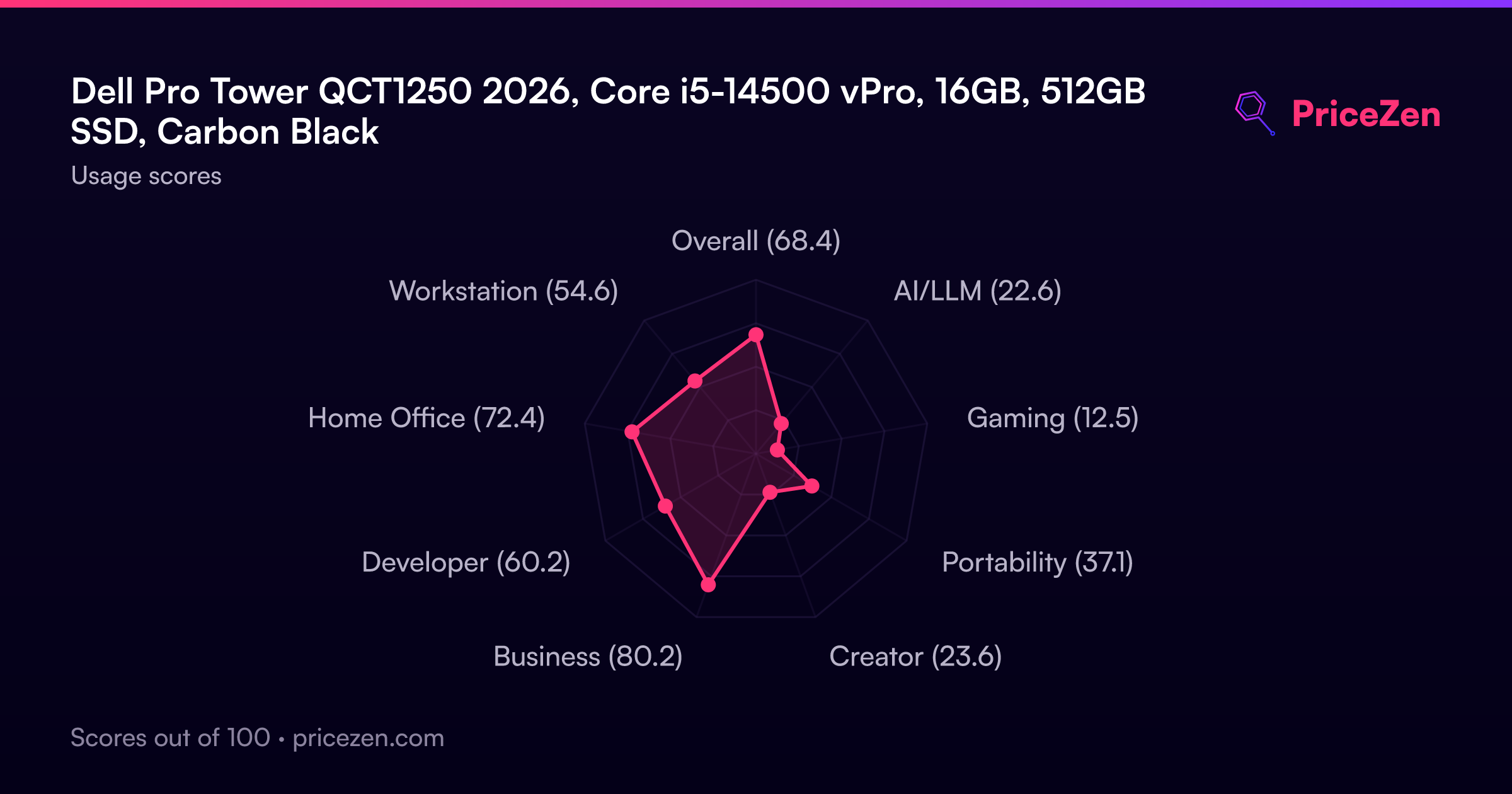
Usage Scores
- Overall68.4
- AI/LLM22.6
- Gaming12.5
- Portability37.1
- Creator23.6
- Business80.2
- Developer60.2
- Home Office72.4
- Workstation54.6