ASUS NUC 13 Pro, Core i5-1340P, 16GB, 512GB SSD

Windows 11 Pro out of the box, 16GB RAM verified Nov 25
46/100 overall score 4.2 average from 20 owner ratings
$20.00 (2%) under the usual price, and the lowest in 90 days.
Price over the last 90 days: low $749.00 on Nov 19, high $769.00. Usual price $769.00. Today $749.00.
- CPU
- Intel Core i5 1340P
- RAM
- 16 GB
- Storage
- 512 GB
- GPU
- Intel Iris Xe Graphics
- Form factor
- mini
- OS
- Windows 11 Pro
Compare prices at 1 store
Cheapest first. New, refurbished and bundled offers are kept apart, so you compare like with like.
| Store | Sold by | Colour and condition | Price | vs lowest | Last checked | Link |
|---|---|---|---|---|---|---|
| New1 offerSingle unit | ||||||
| Amazon | Marketplace seller | Not listed | $749.00 | Lowest price | 2 days ago | Go to store |
 Source: PriceZen, checked Nov 26, 2026
A price counts as current when we checked it in the last 7 days. “Marketplace seller” means a third-party seller on that store, not the store itself.
Price history
$749.00 is $20.00 under the usual store price, and the lowest in 90 days.
Checked that dayNot checked that day, still on offer
Source: PriceZen, checked Nov 26, 2026







Snapshot
The 30-Second Version
The ASUS NUC 13 Pro is a tiny, quiet Windows 11 Pro workhorse with great ports and four display outputs. Gaming is a hard no, but for office work it's a solid buy at $769. Get it for the desk space savings, not the frame rates.
Pros & Cons
Pros
- Tiny footprint with VESA mount included 77th
- Four display outputs including 8K support
- Thunderbolt 4 and Wi-Fi 6E are genuinely useful
- Quiet enough for 24/7 operation
Cons
- Gaming performance is basically nonexistent
- DDR4 RAM feels dated in 2025
- 512GB fills up fast for a business machine
- No dedicated GPU option at this price
The proof
Performance
The i5-1340P is a solid workhorse. Twelve cores and sixteen threads chew through spreadsheets, browser tabs, and video calls without breaking a sweat. The Iris Xe graphics handle 4K video playback and light photo editing fine, but the gaming score of 11.8 out of 100 tells the real story. This thing is not built for frame rates. Storage and RAM scores land in the middle of the pack, which is fine for office tasks but nothing to brag about. The port selection is where it shines, sitting well above average with Thunderbolt 4 and dual HDMI 2.1.
Specifications
Full Specifications
Processor
| CPU | Intel Core i5 1340P |
| Cores | 12 |
| Frequency | 1.9 GHz |
| L3 Cache | 12 MB |
Graphics
| GPU | Intel Iris Xe Graphics |
| Type | Integrated |
| VRAM Type | Shared |
Memory & Storage
| RAM | 16 GB |
| RAM Generation | DDR4 |
| Storage | 512 GB |
| Storage Type | NVMe SSD |
Build
| Form Factor | mini |
Connectivity
| USB-C Ports | 2 |
| USB Ports | 4 |
| Thunderbolt | Thunderbolt 4 x 2 |
| HDMI | 2x HDMI 2.1 |
| DisplayPort | 1x DP 2.1 |
| Wi-Fi | Wi-Fi 6E |
| Bluetooth | Bluetooth 5.3 |
| Ethernet | 2.5 Gigabit Ethernet |
System
| OS | Windows 11 Pro |
vs Competition
Against the Apple Mac mini M4 Pro, the NUC gets embarrassed on raw speed but wins on port variety and Windows compatibility. The Lenovo Legion and HP OMEN are gaming machines, so they're not really in the same conversation, though they'll crush the NUC in any GPU-bound task. The Dell Tower Plus offers more expandability but takes up ten times the desk space. If you need a tiny Windows box with four display outputs, the NUC is the pick. If you need any kind of gaming or heavy rendering, look at the Legion or OMEN.
| Spec | ASUS NUC 13 Pro | Apple Mac Studio M3 Ultra | HP OMEN GT16-0364 | Dell Desktop ECT1250 | Lenovo Legion Tower 5i Gaming | MSI Aegis Z2 C7NVP-1449US |
|---|---|---|---|---|---|---|
| CPU | Intel Core i5 1340P | Apple M3 Ultra | AMD Ryzen 7 8700F | Intel Core Ultra 7 265 | Intel Core Ultra 7 265F | AMD Ryzen 7 7700 |
| RAM (GB) | 16 | 96 | 32 | 32 | 64 | 32 |
| Storage (GB) | 512 | 1024 | 1024 | 2048 | 3072 | 1024 |
| GPU | Intel Iris Xe Graphics | Apple M3 Ultra 60-core | NVIDIA GeForce RTX 5070 | Intel UHD Graphics | NVIDIA GeForce RTX 5070 | NVIDIA GeForce RTX 5070 |
| Form Factor | mini | sff | mid-tower | sff | mid-tower | mid-tower |
| Psu W | - | - | 850 | 180 | - | 750 |
| OS | Windows 11 Pro | macOS | Windows 11 Home | Windows 11 Home | Windows 11 Home | Windows 11 Home |
| Compare | Compare | Compare | Compare | Compare |
| Product | CPU | GPU | RAM | Ports | Storage | Reliability | Social Proof |
|---|---|---|---|---|---|---|---|
| ASUS NUC 13 Pro | 47.7 | 49.9 | 31.3 | 77 | 40.5 | 37.7 | 41.9 |
| Apple Mac Studio M3 Ultra Compare | 99.7 | 77.2 | 95.8 | 93.6 | 53.2 | 99.3 | 75.1 |
| HP OMEN GT16-0364 Compare | 69.3 | 90.7 | 87 | 97.9 | 53.2 | 70.2 | 98.1 |
| Dell Desktop ECT1250 Compare | 88 | 60 | 81.6 | 75 | 82.5 | 70.2 | 98.1 |
| Lenovo Legion Tower 5i Gaming Compare | 90.4 | 90.7 | 98 | 96.1 | 95.9 | 70.2 | 0 |
| MSI Aegis Z2 C7NVP-1449US Compare | 74.4 | 90.7 | 87 | 93.6 | 68.6 | 37.7 | 68.3 |
Price
Value & Pricing
At $769, this is a fair deal for a compact business PC with Windows 11 Pro included. You're paying for the form factor and the port selection more than raw horsepower. The Mac mini M4 Pro will smoke it in performance, but you're locked into Apple's ecosystem. For a Windows shop that needs a reliable, quiet, mountable desktop, the price is reasonable. Just know that a mid-tower at this price would give you way more upgrade headroom.
Read more
Overview
The ASUS NUC 13 Pro is a tiny box that punches way above its weight class for office work. You get a 12-core i5-1340P, 16GB of DDR4, and a 512GB NVMe drive in a chassis you can hide behind a monitor. It's built for desks where space matters more than flashy RGB.
This config is clearly aimed at business users and home office setups. Windows 11 Pro, four display outputs, and a pile of USB ports make it a legit productivity machine. Just don't expect it to moonlight as a gaming rig.
Common Questions
Q: Can this run modern games?
No. The integrated Iris Xe graphics score in the bottom half of our database, and the gaming score of 11.8 out of 100 confirms it. Stick to office apps, streaming, and light photo work.
Q: How many monitors can I connect?
You can run four 4K displays at once, or a single 8K display. The dual HDMI 2.1 ports plus two Thunderbolt 4 ports give you plenty of options.
Q: Is the RAM and storage upgradeable?
Yes. The 16GB of DDR4 can be bumped to 64GB, and there's room for a 2.5-inch SATA drive or PCIe Gen4 SSD in addition to the included 512GB NVMe drive.
Who Should Skip This
Skip this if you need any real GPU power. Gamers, video editors, and 3D artists should look at the Lenovo Legion or HP OMEN instead. Also skip it if you want a machine you can upgrade heavily over time, the mini form factor limits your options compared to a tower like the Dell Tower Plus.
Verdict
Buy this if you need a compact, quiet Windows 11 Pro machine for office work, point-of-sale, or a home theater setup. The four display outputs and Thunderbolt 4 make it a multitasking champ. Skip it if you want to play games or do serious video editing. This is a business tool, not a toy.
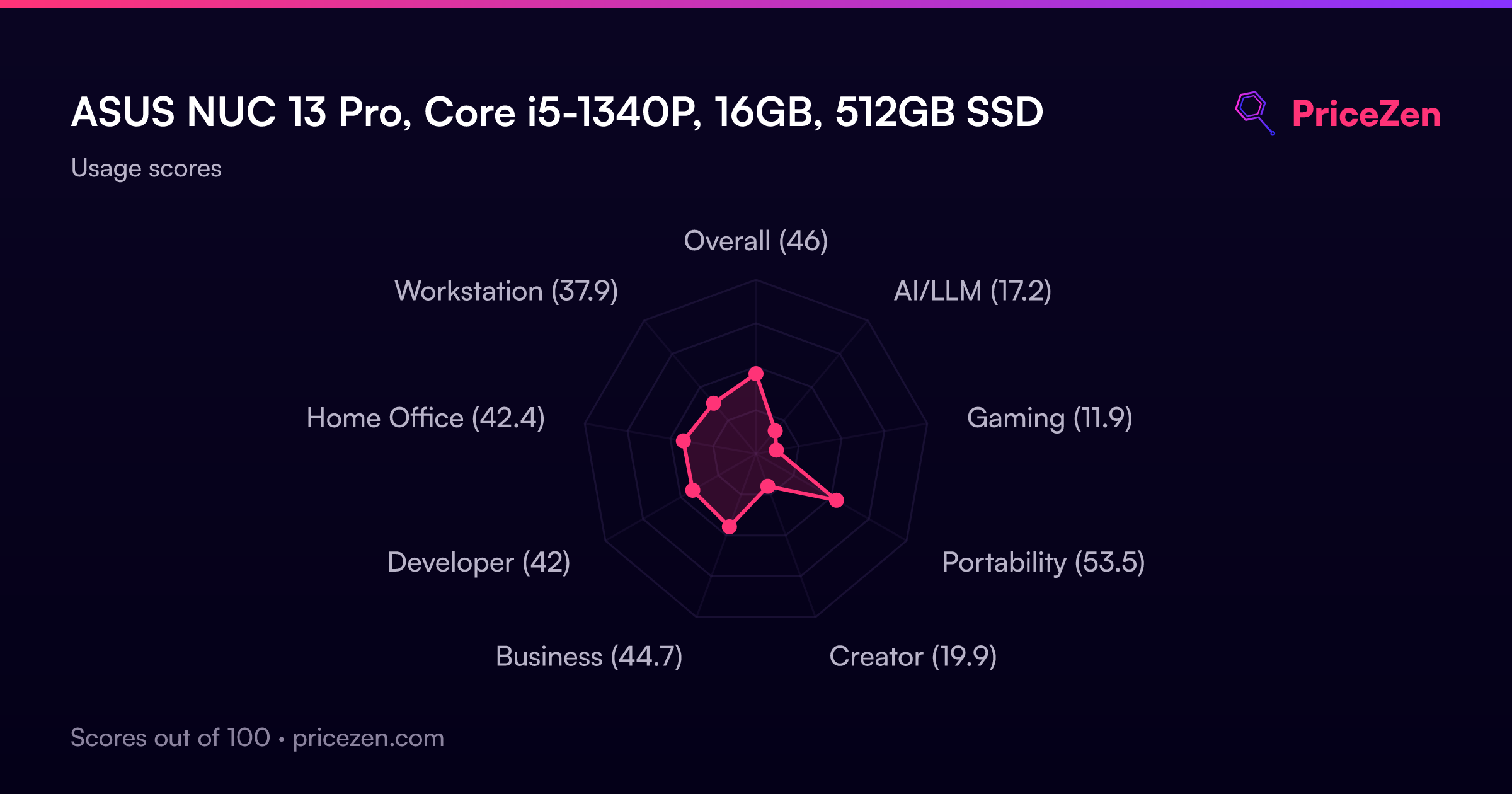
Usage Scores
- Overall46
- AI/LLM17.2
- Gaming11.9
- Portability53.5
- Creator19.9
- Business44.6
- Developer42
- Home Office42.4
- Workstation37.9