Lenovo Yoga AIO 32i 2025, Core Ultra 7 258V, 32GB, 1TB SSD, RTX 4050, Storm Grey

A display and design that win people over verified Nov 29
81/100 overall score 4.8 average from 47 owner ratings
The store has shown a “was” price on 100% of the last 60 days, so the “sale” is its everyday price.
Usual $1,949.99High $2,276.75Store’s “was” $2,940.99
Price over the last 90 days: low $1,299.99 on Nov 19, high $2,276.75. Usual price $1,949.99. The store’s “was” price $2,940.99. Today $1,299.99.
- CPU
- Intel Core Ultra 7 258V
- RAM
- 32 GB
- Storage
- 1 TB
- GPU
- NVIDIA GeForce RTX 4050 6GB GDDR6
- Form factor
- aio
- Psu
- 300 W
- OS
- Windows 11 Home
Compare prices at 3 stores
Cheapest first. New, refurbished and bundled offers are kept apart, so you compare like with like.
| Store | Sold by | Colour and condition | Price | vs lowest | Last checked | Link |
|---|---|---|---|---|---|---|
| New5 offersSingle unit | ||||||
| Lenovo | Lenovo | Storm Gray | $1,299.99 | Lowest price | 2 days ago | Go to store |
| Lenovo | Lenovo | Storm Gray | $1,669.99 | +$370.00 | 3 days ago | Go to store |
| Lenovo | Lenovo | Storm Gray | $2,099.99 | +$800.00 | 3 days ago | Go to store |
| Amazon | Not known | Not listed | $2,299.99 | +$1,000.00 | Nov 22 | Go to store |
| Not checked in the last 7 days, so these prices may have changed | ||||||
| Newegg | Marketplace seller | Gray | $1,949.99 | +$650.00 | Nov 20 | Go to store |
 Source: PriceZen, checked Nov 27, 2026
A price counts as current when we checked it in the last 7 days. “Marketplace seller” means a third-party seller on that store, not the store itself.
Price history
$1,299.99 is $650.00 under the usual store price, and the lowest in 90 days.
Checked that dayNot checked that day, still on offer
Source: PriceZen, checked Nov 27, 2026











Snapshot
The 30-Second Version
The Lenovo Yoga AIO 32i pairs a stunning 32-inch 4K display with 32GB of RAM and a discrete RTX 4050, making it one of the most capable all-in-ones we've seen. At $1,950, it's a fair price for the clean, single-cable experience, and owners love it with a 4.9-star average rating. Just don't buy it for AI workloads, that's its weakest area at 41.8/100. For home office and creative multitasking, this is a genuinely great machine.
Pros & Cons
Pros
- Gorgeous 32-inch 4K display that users consistently rave about 91st
- 32GB DDR5 RAM in the 92nd percentile, excellent for heavy multitasking 86th
- Discrete RTX 4050 GPU, a rarity in all-in-one desktops 81st
- Sleek, clean design that owners genuinely love 70th
- Strong user sentiment score of 87/100 with a 4.9-star average rating
Cons
- Screen height is not adjustable, a recurring complaint from owners
- Only 2 USB-A ports, which feels stingy for a desktop
- AI and LLM performance is weak at 41.8/100 despite Copilot+ branding
- CPU lands in the 46th percentile, middle of the pack for this category
- No touch screen option, which some buyers expected at this price
What owners think
The Word on the Street
- The display is the star of the show, with multiple owners describing the 32-inch 4K screen as gorgeous, vibrant, and a huge upgrade from their previous setups.
- Performance for everyday multitasking and media gets consistent praise, with buyers noting that the machine feels fast and responsive even with many apps open.
- The lack of screen height adjustment is a recurring frustration, with several owners wishing they could lower the display for better ergonomics.
- The included keyboard and mouse feel basic to some buyers, and a few mention minor quirks like the num lock light or occasional unexpected shutdowns.
How owner sentiment changed over time
ExclusiveBased on when customers actually wrote their reviews - so you can see whether early praise held up.
26 written reviews, Jan – Nov 2026: 25 happy, 1 mixed
Across all 47 store ratings: 4.8★. The chart counts the 26 written reviews.
- Oct – Dec 20264 of 4 happy
Buyers in this period praised the computer's sleek design, performance, and screen quality, with one noting it as the best PC they've owned.
- Screen quality praised for size, colors, and clarity.
- Sleek appearance and overall design appreciated.
- Performance described as great, with one calling it best PC owned.
- Apr – Jun 2026
Buyers praised the large 32-inch 4K display, performance, and design. One noted the display cannot be lowered, limiting use; another had issues that were resolved quickly.
- Large, sharp 32-inch 4K display praised for work and streaming.
- Fast performance, reliable, and handles multitasking well.
- Clean, attractive design that fits well on a desk.
- Display cannot be lowered, limiting ergonomic use; unit is large.
- Jan – Mar 202621 of 22 happy
Buyers praised the Yoga AIO 32i's performance, design, and 32-inch 4K display, but noted ergonomic and connectivity drawbacks like non-adjustable screen height, limited USB ports, and keyboard issues.
- Fast performance for multitasking, beautiful minimalist design, and large sharp display praised by most.
- Screen height not adjustable, causing ergonomic issues for some users.
- Limited USB ports (2), awkward button/input placement, and keyboard lacks volume control.
- Bluetooth pairing issues with keyboard/mouse; some found instructions confusing, others had no problems.
Each dot is one written review, in the month it was written. Happy = 4-5★, mixed = 3★, unhappy = 1-2★. Period summaries are in English.
The proof
Performance
Let's talk about what this thing can actually do. The Core Ultra 7 258V is an 8-core chip running at 3.7GHz, and it lands in the 46th percentile for CPUs in this category. That's middle of the pack, which sounds underwhelming until you remember what this machine is. It's not trying to compete with a Threadripper workstation. For everyday multitasking, office work, and creative apps, this chip is more than capable. The 32GB of DDR5 RAM is the real star here, sitting in the 92nd percentile. That's a lot of memory for an AIO, and it means you won't be hitting swap files when you've got 40 Chrome tabs and a video editor open at the same time.
The RTX 4050 with 6GB of GDDR6 VRAM is a solid inclusion, landing in the 62nd percentile for GPUs. It's not going to blow anyone away at 4K gaming, but it handles 1080p and 1440p gaming respectably, and it gives a real boost to GPU-accelerated creative tasks like video encoding and 3D rendering. The 1TB NVMe SSD is in the 72nd percentile for storage, which is good but not exceptional. You'll have room for a decent game library or a few years of photos and videos, but heavy media hoarders might want an external drive. The 300W PSU is adequate for this hardware, though it doesn't leave much headroom for future upgrades. Not that you'd be upgrading an AIO much anyway.
Specifications
Full Specifications
Processor
| CPU | Intel Core Ultra 7 258V |
| Cores | 8 |
| Frequency | 2.2 GHz |
| L3 Cache | 12 MB |
Graphics
| GPU | NVIDIA GeForce RTX 4050 6GB GDDR6 |
| Type | Discrete |
| VRAM | 6 GB |
| VRAM Type | GDDR6 |
Memory & Storage
| RAM | 32 GB |
| RAM Generation | DDR5 |
| Storage | 1 TB |
| Storage Type | NVMe SSD |
Build
| Form Factor | aio |
| PSU | 300 |
| Weight | 8.2 kg / 18.0 lbs |
Connectivity
| USB-C Ports | 2 |
| USB Ports | 2 |
| Thunderbolt | Thunderbolt 4 |
| HDMI | 1x HDMI 2.1 |
| DisplayPort | 1x DisplayPort 1.4 |
| Wi-Fi | Wi-Fi 7 |
| Bluetooth | Bluetooth 5.4 |
| Ethernet | Wi-Fi® 7, 802.11be 2x2 + BT5.4 |
System
| OS | Windows 11 Home |
vs Competition
The Apple Mac Studio M5 Max is the elephant in the room here. It's a different form factor entirely, a compact desktop rather than an AIO, but it's aimed at the same creative professional crowd. The Mac Studio will absolutely crush the Yoga AIO 32i in raw CPU and GPU performance, especially for video editing and 3D work. But you'll need to buy a separate display, and the total cost will climb well past the Lenovo's $1,950 price tag. The Yoga AIO 32i wins on simplicity and value, while the Mac Studio wins on pure horsepower.
The HP OMEN GT16-0364 and Dell Aurora Aurora Gaming are gaming-focused desktops that will outperform the Yoga AIO 32i in gaming scenarios, thanks to beefier GPUs and better cooling. But they're towers, which means cables, separate monitors, and more desk clutter. The ASUS ROG GM700 is in a similar boat. If gaming is your priority, any of those will serve you better. But if you want a machine that handles work, light gaming, and media consumption in one elegant package, the Yoga AIO 32i is in a class of its own. The Horizon Pcs Autherium Dragon is a wildcard, a boutique build that's hard to compare directly, but it's likely aimed at enthusiasts who want customization over convenience.
| Spec | Lenovo Yoga AIO 32i | Apple Mac Studio M5 Max | HP OMEN GT16-0364 | Dell Desktop ECT1250 | ASUS ROG GM700 | MSI Aegis ZS2 A9NVP-1407US |
|---|---|---|---|---|---|---|
| CPU | Intel Core Ultra 7 258V | Apple M5 Max | AMD Ryzen 7 8700F | Intel Core Ultra 7 265 | AMD Ryzen 7 9800X3D | AMD Ryzen 9 9900X |
| RAM (GB) | 32 | 48 | 32 | 32 | 32 | 32 |
| Storage (GB) | 1024 | 1024 | 1024 | 2048 | 2048 | 2048 |
| GPU | NVIDIA GeForce RTX 4050 6GB GDDR6 | Apple (40-Core) | NVIDIA GeForce RTX 5070 | Intel UHD Graphics | NVIDIA GeForce RTX 5070 Ti | NVIDIA GeForce RTX 5070 |
| Form Factor | aio | mini | mid-tower | sff | mid-tower | mid-tower |
| Psu W | 300 | 480 | 850 | 180 | 850 | 750 |
| OS | Windows 11 Home | macOS | Windows 11 Home | Windows 11 Home | Windows 11 Home | Windows 11 Home |
| Compare | Compare | Compare | Compare | Compare |
| Product | CPU | GPU | RAM | Ports | Storage | User Sentiment | Reliability | Social Proof |
|---|---|---|---|---|---|---|---|---|
| Lenovo Yoga AIO 32i | 50 | 56.4 | 91.2 | 56.8 | 68.5 | 85.7 | 70.2 | 80.8 |
| Apple Mac Studio M5 Max Compare | 95.7 | 85 | 95 | 89.1 | 68.5 | 95 | 99.3 | 71.4 |
| HP OMEN GT16-0364 Compare | 69.3 | 90.7 | 87 | 97.9 | 53.2 | 98.6 | 70.2 | 98.3 |
| Dell Desktop ECT1250 Compare | 88 | 60.1 | 81.6 | 75 | 82.5 | 98.6 | 70.2 | 98.3 |
| ASUS ROG GM700 Compare | 80.3 | 94.6 | 81.6 | 96.1 | 90 | 98.6 | 37.7 | 99.3 |
| MSI Aegis ZS2 A9NVP-1407US Compare | 92.3 | 90.7 | 87 | 90.4 | 82.5 | 88.6 | 37.7 | 99.3 |
Price
Value & Pricing
At $1,950 USD, the Yoga AIO 32i sits in a weird spot. It's not cheap, but it's also not outrageous for what you're getting. A 32-inch 4K display alone would run you several hundred dollars, and you're also getting a discrete GPU, 32GB of RAM, and a 1TB SSD. When you add up the components, the price starts to make sense. But here's the rub: you're paying a premium for the all-in-one form factor, and that means you're locked into this exact hardware configuration. No GPU upgrades, no RAM swaps, no adding a second drive.
Compared to a traditional desktop with similar specs, you could probably build or buy something with more raw performance for less money. But you'd lose the clean, single-cable setup that makes this machine so appealing. The value proposition here is really about the experience, not the spec sheet. If you want a beautiful, capable machine that just works without any fuss, the price is fair. If you're a tinkerer who wants to upgrade components over time, this isn't your machine.
Read more
Overview
The Lenovo Yoga AIO 32i is one of those machines that makes you stop and stare for a second. It's a 32-inch all-in-one with a 4K display, an Intel Core Ultra 7 258V, and a discrete RTX 4050 tucked inside. That's not a combo you see every day in the AIO world, where most manufacturers are happy to slap integrated graphics on a pretty screen and call it done. Lenovo went a different route here, and the result is a desktop that actually has some muscle for creative work, light gaming, and heavy multitasking.
Who's this for? Honestly, it's aimed at people who want a clean desk setup without sacrificing real performance. Think home office power users, content creators who dabble in video or photo work, and anyone who's tired of the cable spaghetti that comes with a traditional tower. The 32GB of DDR5 RAM is a big deal here, landing in the 92nd percentile for this category. You can have a ridiculous number of browser tabs open, run Photoshop, and still have headroom left over.
The interesting part is that this is Lenovo's first Copilot+ desktop. That means it's built with AI workloads in mind, at least on paper. But here's the thing: our data shows the weakest area for this machine is AI and LLM performance, scoring just 41.8 out of 100. So the marketing says "AI-ready," but the benchmarks tell a more complicated story. We'll dig into that later.
Common Questions
Q: Can the Yoga AIO 32i handle gaming?
Yes, but with caveats. The RTX 4050 with 6GB of VRAM is a discrete GPU, which is rare in all-in-ones, and it lands in the 62nd percentile for this category. You'll get smooth performance at 1080p and 1440p in most modern titles, but 4K gaming on that native display will require lowering settings significantly. If gaming is your primary use case, a dedicated gaming desktop like the HP OMEN GT16-0364 would be a better fit.
Q: Is the screen height adjustable?
No, and this is one of the most common complaints from owners. The stand is sturdy and the screen can tilt, but there's no height adjustment. If you need a specific screen height for ergonomic reasons, you'll want to factor in a monitor riser or consider a different setup.
Q: How many USB ports does it have?
The Yoga AIO 32i has 2 USB-C ports and 2 USB-A ports, plus Thunderbolt, DisplayPort, and HDMI 2.1. Several owners have noted that 2 USB-A ports feels limited for a desktop, especially if you use a wired keyboard, mouse, and other peripherals. A USB hub is a practical add-on for most users.
Q: Is this good for AI or machine learning work?
Not really. Despite the Copilot+ branding, our data shows AI and LLM performance is the weakest area for this machine, scoring just 41.8 out of 100. The RTX 4050's 6GB of VRAM is limiting for larger models, and the CPU is middle of the pack. If AI workloads are a priority, you'd be better served by a machine with a more powerful GPU and more VRAM.
Who Should Skip This
If you're an AI researcher, machine learning engineer, or anyone who needs to run local LLMs, this machine will frustrate you. The 41.8/100 AI score is a real limitation, and the 6GB of VRAM on the RTX 4050 is simply not enough for serious model work. The Copilot+ branding might tempt you, but the hardware doesn't back it up. Look at something with a beefier GPU, like a desktop with an RTX 4080 or better, or consider cloud-based AI services instead.
Serious gamers should also look elsewhere. While the RTX 4050 can handle casual gaming, it's not built for high-refresh-rate 4K gaming on that native display. A dedicated gaming desktop like the HP OMEN GT16-0364 or Dell Aurora Aurora Gaming will give you far better frame rates and upgradeability. And if you're someone who likes to tinker with hardware, swap out components, and upgrade over time, the all-in-one form factor will feel like a cage. You're locked into this exact configuration for the life of the machine.
Verdict
If you're a home office user or creative professional who wants a big, beautiful display and solid performance without the clutter of a traditional desktop, the Yoga AIO 32i is an easy recommendation. The 32-inch 4K screen is the centerpiece, and owners consistently praise it. The 32GB of RAM means you won't be waiting on your machine, and the RTX 4050 gives you enough GPU power for light gaming and creative work. The user sentiment score of 87/100 and that 4.9-star average rating tell you that people who buy this thing tend to love it.
But if you're an AI enthusiast or someone who needs serious GPU compute for machine learning or LLM work, look elsewhere. The 41.8/100 AI score is a real weak spot, and the Copilot+ branding feels more like marketing than substance here. Similarly, if you're a serious gamer who wants to play the latest titles at high settings, a dedicated gaming desktop will serve you better. The Yoga AIO 32i is a lifestyle machine, not a workstation or a gaming rig. Know what you're buying, and you'll be happy with it.
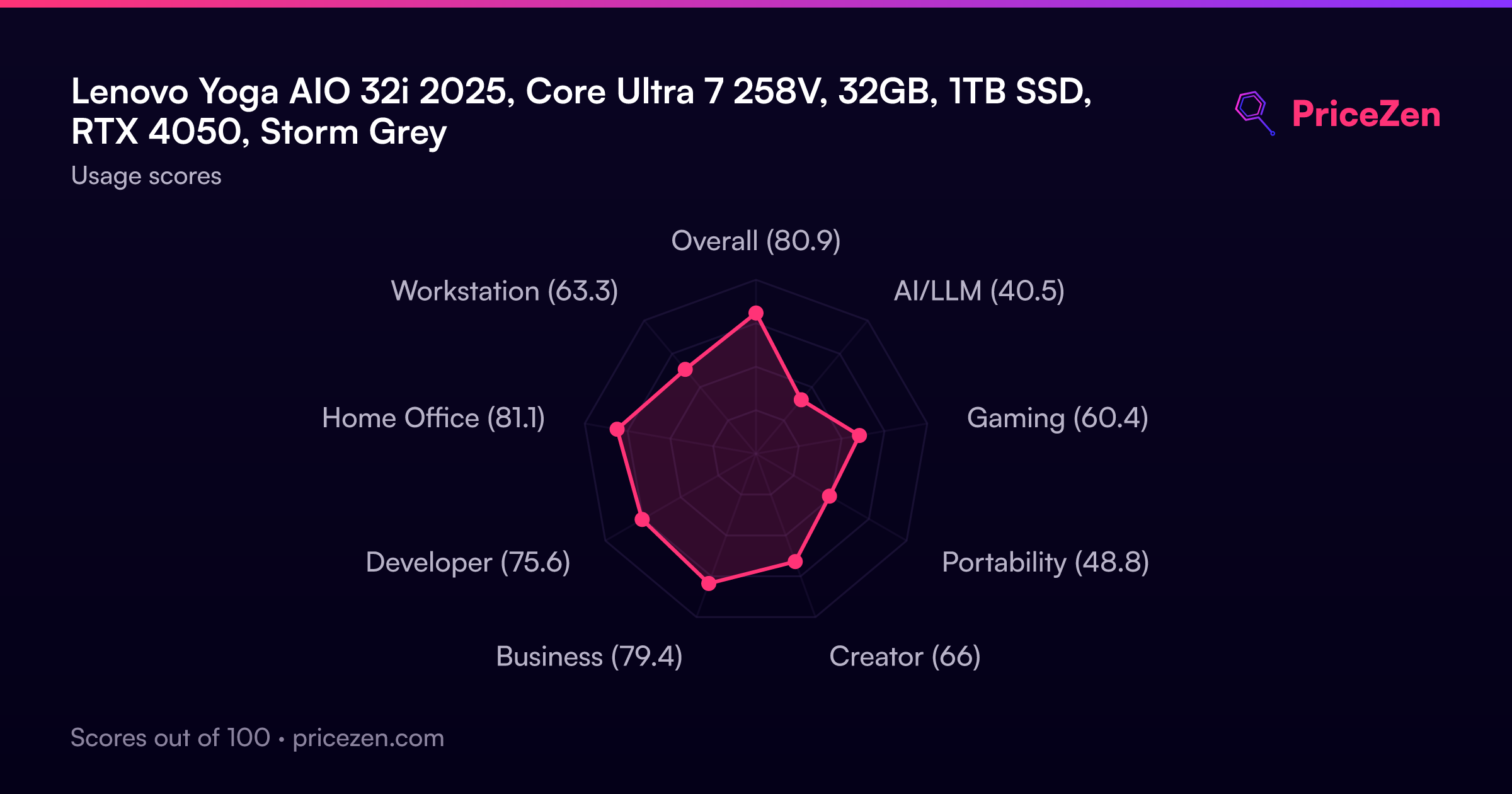
Usage Scores
- Overall80.9
- AI/LLM40.5
- Gaming60.4
- Portability48.8
- Creator66
- Business79.4
- Developer75.6
- Home Office81.1
- Workstation63.3