Jeazans 10.1" Jzpad-KB10L 2026, 3GB, 64GB, Dull Black

Incluye teclado para trabajar como en un portátil verificado el 29 nov
43/100 puntuación global 4,4 media de 386 valoraciones de propietarios
- RAM
- 3 GB
- Storage
- 64 GB
- Screen
- 10.1" 1280x800
- OS
- Android 16
- Stylus
- Sí
Compara precios en 1 tienda
De la más barata a la más cara. Las ofertas nuevas, reacondicionadas y en pack se mantienen separadas para que compares lo comparable.
| Tienda | Vendido por | Color y estado | Precio | vs. el más bajo | Última comprobación | Enlace |
|---|---|---|---|---|---|---|
| Nuevo1 ofertaUnidad individual | ||||||
| Agotado en la última comprobación | ||||||
| Amazon | Desconocido | No indicado | Sin precio | Agotado | Hace 5 días | Ir a la tienda |
 Fuente: PriceZen, comprobado el 24 nov 2026
Un precio se considera vigente si lo comprobamos en los últimos 7 días. «Vendedor externo» significa un vendedor de terceros en esa tienda, no la propia tienda.











Resumen
The 30-Second Version
The Jeazans Jzpad-KB10L is a USD 90 tablet bundled with a keyboard, mouse, case and stylus, and that bundle is the whole appeal. Wi-Fi 6, Bluetooth 5.4 and Android 16 are pleasant surprises, but 3GB of RAM and a 1280x800 screen rank near the bottom of our tablet data. Owners rate it 4.4/5 across 386 reviews, mostly parents buying for kids. Great cheap starter tablet, poor daily driver.
Pros & Cons
Ventajas
- USD 90 with keyboard, mouse, case and stylus included, top 18% on affordability 82nd
- Wi-Fi 6 and Bluetooth 5.4, current wireless standards you rarely see this cheap 76th
- Android 16 with Google Play preinstalled, no sideloading gymnastics 72nd
- microSD expansion up to 1TB rescues the tight 64GB internal storage 71st
- 4.4/5 from 386 reviews, top 18% on social proof
Desventajas
- 3GB RAM ranks in the bottom 12%, heavy multitasking will hurt
- 1280x800 on 10.1 inches, sharpness sits in the bottom 13%
- Reading is its weakest use case at 32/100, soft text on small type
- 6000mAh battery lands in the bottom 32%, below average endurance
- Marketing claims 20GB RAM against 3GB in the spec sheet, trust gap
Opinión de los propietarios
The Word on the Street
- Parents buying for children are the loudest happy group, repeatedly describing a screen that's big and clear enough for videos, games and educational apps, with smooth everyday operation.
- A recurring theme is surprise at how much comes in the box. Multiple owners say the keyboard, mouse and stylus bundle is what sold them, and that the tablet itself felt responsive for basic tasks.
- A minority of buyers push back hard on the spec claims, arguing the advertised figures don't match what the device actually reports, including the Android version shown in settings. It's a small but pointed complaint about trust rather than performance.
Cómo cambió la opinión de los propietarios con el tiempo
ExclusivaSegún cuándo escribieron realmente sus opiniones los clientes, para ver si los elogios iniciales se mantuvieron.
11 opiniones escritas, feb–may 2026: 10 satisfechos, 1 insatisfecho
En las 386 valoraciones de tiendas: 4,4★. La mayoría de los propietarios valora sin escribir una opinión. El gráfico cuenta las 11 opiniones escritas.
Cada punto es una opinión escrita, en el mes en que se escribió. Satisfechos = 4-5★, neutrales = 3★, insatisfechos = 1-2★.
Las pruebas
Performance
The 8-core CPU sits in the top 28% of our rankings and the GPU in the top 30%, which is solidly middle-of-the-pack territory for tablets. In practice that means YouTube, browsing, educational apps and casual games should be fine, and owners back that up: several buyers describe it running smoothly for their kids' videos and learning apps. Where it'll stumble is heavy multitasking, because 3GB of RAM ranks in the bottom 12%, one of the weakest memory figures we've catalogued. Android will aggressively kill background apps, so switching between a document, a browser with several tabs and a video call is going to involve reloads. The advertised 20GB almost certainly refers to physical plus virtual memory borrowed from storage, which is not the same thing and doesn't behave like it.
The display is the other soft spot. A 1280x800 IPS panel on 10.1 inches works out to roughly 149 pixels per inch, and our sharpness ranking puts it in the bottom 13% with the overall screen score in the bottom 20%. Text will look soft compared to almost anything else you'd cross-shop, which is why reading scores just 32/100 and eye comfort lands around average at the 48th percentile. Video and cartoons hide this well; ebooks and PDFs do not. Storage is 64GB with microSD expansion up to 1TB, ranking in the bottom 30%, so plan on a card if you're loading offline content. And the 6000mAh battery lands in the bottom 32%, below average for the category, so don't expect it to outlast a long travel day.
Specifications
Full Specifications
Processor
| Cores | 8 |
Memory & Storage
| RAM | 3 GB |
| Storage | 64 GB |
| Expandable | Yes |
Display
| Size | 10.1" |
| Resolution | 1280x800 |
| Panel | IPS |
Connectivity
| Wi-Fi | Wi-Fi 6 |
| Bluetooth | Bluetooth 5.4 |
Features
| Stylus Support | Yes |
Physical
| OS | Android 16 |
vs Competition
If you're cross-shopping the Apple iPad 10.2" 7th Gen or the Samsung Galaxy Tab A 11" A11+, understand what you're trading. The Jeazans wins on price and on the accessory bundle, and its Wi-Fi 6 and Bluetooth 5.4 are modern enough that connectivity lands mid-pack at the 52nd percentile. But its screen ranks in the bottom 20% and sharpness in the bottom 13%, so anyone who reads a lot or cares about text clarity should stretch toward one of those instead. The Xiaomi Redmi Pad 11" 25040RP0AL is another sensible step up if the display is your priority.
The more honest comparison is the URAO 14.1" G140L, which plays in the same budget-bundle space. Against it, the Jeazans's argument is portability and its 8-core chip sitting in the top 28%, plus a strong owner rating. The Lenovo Idea Tab Plus 12.1" is the one to look at if you actually want the laptop-replacement experience the keyboard here implies, because 3GB of RAM is not a productivity foundation no matter how many peripherals you plug in. Our overall score of 39.8/100 places the Jeazans below the mainstream options, and that's the honest summary: it competes on cost, not on capability.
| Spec | Jeazans 10.1" Jzpad-KB10L | Apple iPad Pro 11" M5 | Microsoft Surface Pro 11 13" | Samsung Galaxy Tab S 12.4" S10+ | Lenovo Idea Tab Pro Gen 2 13" | Xiaomi Pad 11.2" 62751 |
|---|---|---|---|---|---|---|
| CPU | - | Apple M5 | Qualcomm Snapdragon X Elite X1E-84-100 | Mediatek MT6989 | Qualcomm® Snapdragon™ 8s Gen 4 Processor (3.20 GHz ) | Snapdragon 8s Gen 3 |
| RAM (GB) | 3 | 12 | 16 | 12 | 8 | 12 |
| Storage (GB) | 64 | 512 | 1024 | 512 | 128 | 512 |
| Screen | 10.1" 1280x800 | 11" 2420x1668 | 13" 2880x1920 | 12.4" 2800x1752 | 13" 3504x2190 | 11.2" 3200x2136 |
| OS | Android 16 | iPadOS | Windows 11 Home | Android 14 | Android 16 | Android 14 |
| Stylus | Yes | Yes | Yes | Yes | Yes | Yes |
| Cellular | No | Yes | No | No | No | No |
| Battery (Wh) | - | 31 | 53 | - | - | - |
| Compare | Compare | Compare | Compare | Compare |
| Producto | CPU | GPU | RAM | Pantalla | Battery | Feature | Almacenamiento | Sharpness | Connectivity | Valoración social | Affordability | Water Resistance |
|---|---|---|---|---|---|---|---|---|---|---|---|---|
| Jeazans 10.1" Jzpad-KB10L | 72.4 | 70.5 | 11.8 | 20.6 | 31.7 | 63.4 | 30.3 | 13.5 | 51.6 | 82.1 | 75.5 | 46.3 |
| Apple iPad Pro 11" M5 Compare | 99.1 | 99.4 | 84.5 | 98.8 | 95.1 | 96.2 | 93.1 | 87.6 | 98.1 | 99.3 | 6 | 46.3 |
| Microsoft Surface Pro 11 13" Compare | 98.4 | 96.7 | 92.7 | 99.1 | 99.8 | 74.4 | 97.9 | 82.7 | 92.9 | 91.2 | 5.4 | 97.2 |
| Samsung Galaxy Tab S 12.4" S10+ Compare | 82.6 | 79.4 | 81.4 | 95.2 | 87.7 | 96.2 | 93.1 | 82.7 | 76.9 | 91.2 | 5.7 | 97.2 |
| Lenovo Idea Tab Pro Gen 2 13" Compare | 85.1 | 83.1 | 78.2 | 98.1 | 88.5 | 97.8 | 67 | 96.4 | 92.9 | 91.2 | 31.2 | 46.3 |
| Xiaomi Pad 11.2" 62751 Compare | 87.1 | 85.9 | 81.4 | 97.9 | 85 | 65.2 | 89.8 | 99.3 | 76.9 | 91.2 | 14.9 | 46.3 |
Precio
Value & Pricing
At USD 90, the bundle math is hard to argue with. You're paying entry-level money and getting input devices and protection that would otherwise be separate purchases. Our affordability ranking in the top 18% reflects that, and the 4.4/5 average across 386 reviews suggests most buyers feel they got what they paid for. We track pricing over time through our community browser extension, and right now we only see one US listing at USD 90 and one Canadian listing at CAD 151, so there's no store-to-store arbitrage to chase here.
But value depends entirely on what you ask of it. As a kid's video-and-games tablet or a lightweight study companion, USD 90 buys a complete setup. As a daily driver for writing, reading or work, the 3GB RAM ceiling and low-resolution screen mean you'll feel the savings every single day. Cheap isn't the same as good value, and this one lives right on that line.
Leer más
Overview
The Jeazans Jzpad-KB10L is one of those budget tablets that shows up in your feed with a photo of eight things laid out on a table: the tablet, a Bluetooth keyboard, a mouse, a case, a stylus, and whatever else fills the box. At USD 90 in the US listing we track (CAD 151 in Canada), that's a lot of hardware for very little money. Our automated system pulls specs, prices and owner reviews from across stores, and this one lands in the top 18% for affordability, which tells you exactly what the pitch is.
Under the accessories, though, you're getting a 10.1-inch IPS panel at 1280x800, an 8-core chip, 64GB of storage and Android 16 with Google Play preinstalled. Wi-Fi 6 and Bluetooth 5.4 are genuinely nice surprises at this price. The catch is memory: our spec data lists 3GB of RAM, while the marketing copy talks about 20GB. That gap matters, and it's the single biggest thing to understand before you buy.
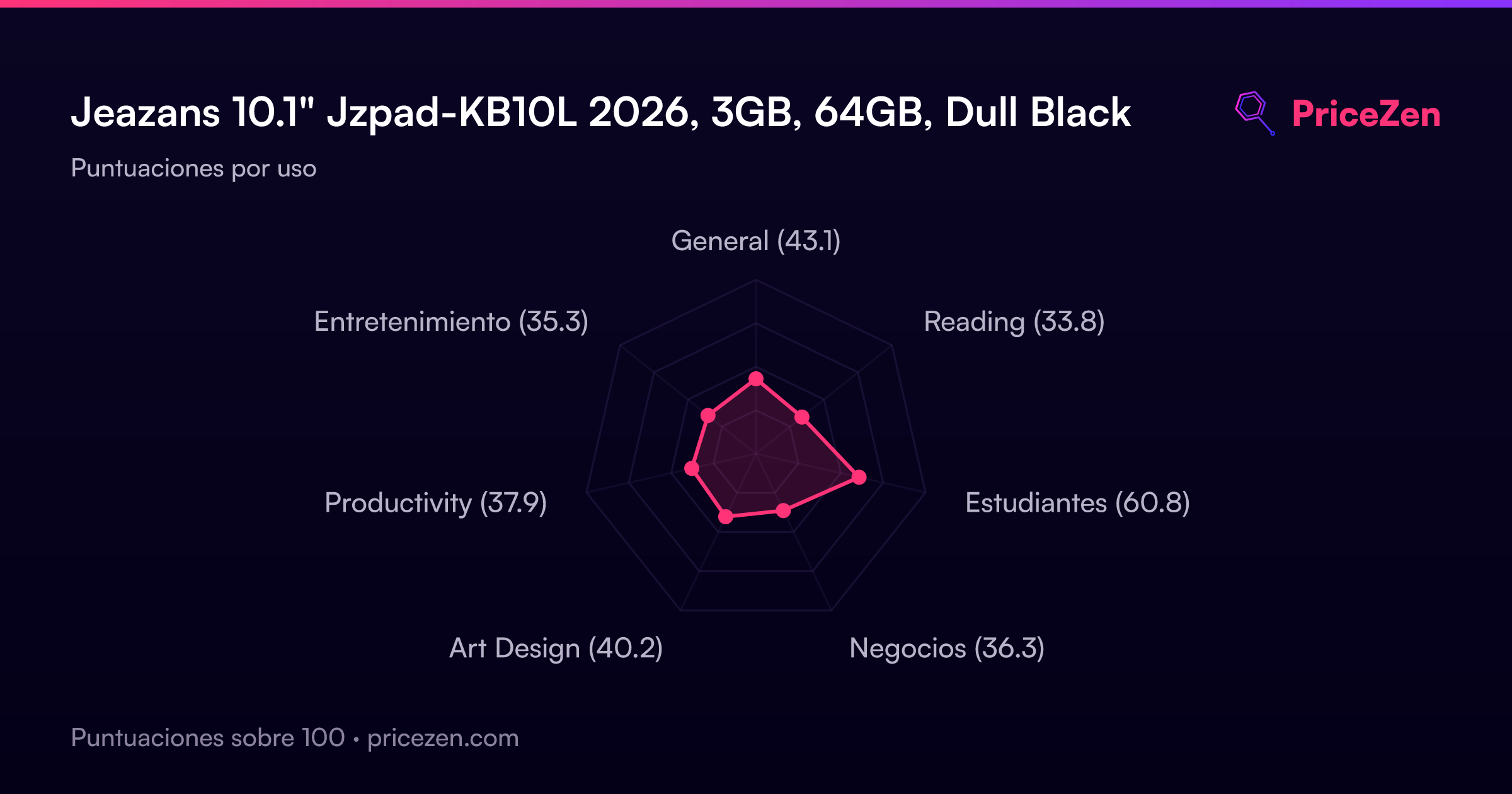
This is aimed at parents buying a first tablet for a kid, students who need something for video lectures and light note-taking, or anyone who wants a spare screen for the kitchen. Our scoring model puts it at 60.7/100 for student use and 39.8/100 overall, with reading as its weakest area at 32/100. So: a cheap, cheerful, accessory-loaded starter tablet, not a machine you'll grow into.
Common Questions
Q: Does it really have 20GB of RAM?
No. Our spec data lists 3GB of physical RAM, and the 20GB figure in the marketing is almost certainly physical plus virtual memory carved out of storage. Virtual memory is far slower than real RAM, which is why this tablet's memory ranking sits in the bottom 12% and heavy app switching will cause reloads.
Q: Is the screen good enough for reading ebooks or PDFs?
It's the weakest part of the package. At 1280x800 on a 10.1-inch panel you're looking at roughly 149 pixels per inch, and our sharpness ranking puts it in the bottom 13%. Reading scores just 32/100 in our use-case model, so small text will look soft and extended reading sessions won't be comfortable.
Q: Can I use it for schoolwork with the included keyboard?
For light work, yes. Student use is its strongest scenario at 60.7/100, and the bundled keyboard, mouse and stylus cover note-taking and documents. But with 3GB of RAM you'll hit limits fast if you're juggling research tabs, a video lecture and a document at once.
Q: Is 64GB of storage enough?
Only if you stream most of your content. Storage ranks in the bottom 30% in our data, so it's below average for tablets. The saving grace is microSD expansion up to 1TB, which is cheap insurance if you want offline movies or a big app library.
Who Should Skip This
Skip this if reading is a primary use. Books, comics, PDFs and dense web pages all suffer on a 1280x800 panel that ranks in the bottom 13% for sharpness, and our reading score of 32/100 is the lowest of any use case we model for it. Anyone who spends hours in text should look at the Xiaomi Redmi Pad 11" 25040RP0AL or the Apple iPad 10.2" 7th Gen instead.
Also skip it if you want a genuine laptop substitute. The keyboard in the box makes it look like a productivity machine, but 3GB of RAM and a below-average 6000mAh battery (bottom 32%) mean long work sessions and all-day untethered use aren't realistic. The Lenovo Idea Tab Plus 12.1" or Samsung Galaxy Tab A 11" A11+ are better starting points for that job, even if the sticker stings more.
Verdict
Buy it if you're kitting out a child with a first tablet, need a cheap second screen for recipes and streaming, or want a student device for recorded lectures and light note-taking. The 60.7/100 student score is its best use-case result, and the included keyboard and stylus make that scenario genuinely usable for the money. Owners buying for kids are the happiest cohort in the review data, and it's easy to see why: the expectations match the hardware.
Don't buy it as your main tablet. If you read books, annotate PDFs, keep a dozen tabs open or write anything longer than a message, the 3GB RAM and 1280x800 panel will grind you down within a week. Save toward an iPad 10.2" 7th Gen, a Galaxy Tab A 11" A11+ or a Redmi Pad 11" instead. And go in with eyes open on the spec inflation: when the box says 20GB and the sheet says 3GB, believe the smaller number.
Usage Scores
- General43.1
- Reading33.8
- Estudiantes60.8
- Negocios36.3
- Art Design40.2
- Productivity37.9
- Entretenimiento35.3