Microsoft Surface Pro 13" 11th Edition 2025, Core Ultra 7 268V, 32GB, 256GB, Platinum
El procesador Intel Core Ultra 7 268V con NPU de 48 TOPS y su pantalla OLED táctil de 13 pulgadas a 120 Hz con 600 nits definen su capacidad para Copilot+. Pesa solo 870 gramos, incluye Wi-Fi 7 y Thunderbolt, y mantiene la experiencia del Surface Slim Pen. Es la opción acertada para diseñadores y artistas digitales que priorizan una pantalla 2880x1920 de alta fidelidad y flujos de trabajo con IA.

Sin precio actual de tiendas
Dónde lo vimos antes. Consulta el precio de hoy en la tienda.










Resumen
The 30-Second Version
The Surface Pro EP2-20878 packs a Core Ultra 7 268V, 32GB of RAM, and a 13" 2880x1920 OLED at 120Hz into 870g, and our rankings put its memory, battery, and screen at the very top of the category. The catch is price: USD 2,050 at Newegg up to USD 2,492 at Adorama, with affordability in the 2nd percentile. Storage is just 256GB and the keyboard and pen cost extra. Buy it if you need real Windows software in a tablet, skip it if you mainly want a screen for reading and video.
Pros & Cons
Ventajas
- 32GB LPDDR5X, top of the charts for this category 99th
- 13" OLED at 2880x1920, 120Hz, 600 nits, 98th percentile screen 99th
- Core Ultra 7 268V and Arc graphics both rank among the best here 98th
- 47Wh battery rated up to 14 hours of video, 99th percentile 96th
- Wi-Fi 7, Bluetooth 5.4, Thunderbolt over USB-C, leading connectivity
Desventajas
- Affordability ranks in the 2nd percentile, one of the worst we've seen
- Only 256GB of storage for a machine aimed at creative work
- Portability scores in the 24th percentile despite the 870g weight
- Eye comfort is middle of the pack at 48, rough for long reading
- Keyboard and Slim Pen are optional extras, not in the box
Las pruebas
Performance
Let's talk about what the numbers actually mean. The 32GB of LPDDR5X sits in the 99th percentile against everything else in this category, which is basically the top of the charts. For a real buyer that means browser tabs, a couple of Adobe apps, a video call, and a VM if you're feeling ambitious, all without the system starting to swap. The Core Ultra 7 268V lands in the 94th percentile, so it's one of the best CPUs you'll find in a device shaped like this. Integrated Intel Arc graphics rank in the 96th percentile, which sounds wild until you remember most tablets are working with much weaker integrated setups. It's not a gaming GPU, but for canvas work, timeline scrubbing, and driving that high-res panel, there's headroom.
The display is the other headline: 98th percentile overall, 267 ppi, 120Hz, 600 nits. Scrolling ink strokes at 120Hz on OLED is the kind of thing artists notice within seconds. Battery ranks in the 99th percentile too, and the 47Wh cell is rated for up to 14 hours of video playback. But here's the honest wrinkle: reading battery lands at the 75th percentile, well above average but a step down from its video number, and eye comfort sits at 48, dead middle of the pack. So the endurance is genuinely strong, just don't expect the screen to be especially gentle during a long text-heavy session. Storage is the quiet weak point at 256GB, ranking in the 84th percentile, strong for the category but small in absolute terms if you're storing RAW files or video projects locally.
Specifications
Full Specifications
Processor
| CPU | Intel Core Ultra 7 268V |
| Cores | 8 |
| GPU | Arc Graphics |
Memory & Storage
| RAM | 32 GB |
| RAM Generation | LPDDR5X |
| Storage | 256 GB |
| Storage Type | SSD |
| Expandable | No |
Display
| Size | 13" |
| Resolution | 2880x1920 |
| Panel | OLED |
| Refresh Rate | 120 Hz |
| Brightness | 600 nits |
Connectivity
| Wi-Fi | Wi-Fi 7 |
| Bluetooth | Bluetooth 5.4 |
| USB-C | 2 |
| Cellular | No |
Features
| Stylus Support | Yes |
| Stylus Model | Slim Pen |
| Fingerprint Reader | No |
| Face Unlock | Yes |
Physical
| Weight | 0.9 kg / 1.9 lbs |
| Battery | 47 Wh |
| OS | Windows 11 Pro |
vs Competition
The obvious cross-shop is the Apple iPad Pro 13" M5, and this is where the decision gets philosophical rather than spec-based. The Surface's argument is Windows 11 Pro: full desktop apps, real file management, Thunderbolt, and 32GB of RAM that ranks at the very top of this category. If your work lives in desktop software, that matters more than any benchmark. If your work lives in touch-first apps, the Surface is asking you to pay a premium for flexibility you won't use. The Samsung Galaxy Tab S 12.4" S10+ is the other name worth putting on the list, and again the Surface's case rests on its own numbers: a 98th percentile screen, a 94th percentile CPU, and stylus support tied into a desktop OS.
Against the Lenovo Yoga Tab Plus Gen 2 13", the TABWEE T60 Pro 13.4", and the BESTTAB T60 12", the Surface is playing a different sport entirely. Those are consumption-first slates, and nothing in this data suggests they're chasing 32GB of RAM or a Core Ultra 7. Where the Surface gives ground is cost and simplicity, and our affordability percentile makes that gap impossible to ignore. If you want a big screen for video and browsing, the Surface's strengths are wasted on you and its price is not. Cross-shop the iPad Pro if you're torn between platforms, cross-shop the Android slates if you're torn between budgets.
| Spec | Microsoft Surface Pro 13" 11th Edition | Apple iPad Pro 13" M5 | Samsung Galaxy Tab S 12.4" S10+ | Lenovo Yoga Tab Plus 12.7" ZAEG0096US | Xiaomi Pad 11.2" 62751 | TABWEE T60 Pro 13.4" |
|---|---|---|---|---|---|---|
| CPU | Intel Core Ultra 7 268V | Apple M5 | MediaTek Dimensity 9300+ | QTI SM8650 | Snapdragon 8s Gen 3 | Unisoc |
| RAM (GB) | 32 | 16 | 12 | 16 | 12 | 8 |
| Storage (GB) | 256 | 1024 | 512 | 256 | 512 | 256 |
| Screen | 13" 2880x1920 | 13" 2752x2064 | 12.4" 2800x1752 | 12.7" 2944x1840 | 11.2" 3200x2136 | 13.4" 1920x1200 |
| OS | Windows 11 Pro | iPadOS | Android 14 | Android 14 | Android 14 | Android 15 |
| Stylus | Yes | Yes | Yes | Yes | Yes | Yes |
| Cellular | No | Yes | No | No | No | No |
| Battery (Wh) | 47 | 39 | - | - | - | - |
| Compare | Compare | Compare | Compare | Compare |
| Producto | CPU | GPU | RAM | Pantalla | Battery | Feature | Almacenamiento | Sharpness | Portability | Connectivity | Affordability | Reading Battery | Water Resistance |
|---|---|---|---|---|---|---|---|---|---|---|---|---|---|
| Microsoft Surface Pro 13" 11th Edition | 94 | 95.9 | 98.8 | 97.5 | 98.8 | 84.5 | 83.8 | 82.7 | 24.4 | 92.8 | 2.2 | 74.6 | 46.4 |
| Apple iPad Pro 13" M5 Compare | 99.1 | 99.4 | 92.7 | 99.7 | 97.7 | 96.4 | 97.9 | 73.8 | 48.3 | 99.2 | 1.9 | 41.2 | 46.4 |
| Samsung Galaxy Tab S 12.4" S10+ Compare | 82.3 | 79.1 | 81.2 | 95.2 | 87.9 | 96.4 | 93 | 82.7 | 49.9 | 76.7 | 5.9 | 56.7 | 97.3 |
| Lenovo Yoga Tab Plus 12.7" ZAEG0096US Compare | 84.1 | 82.3 | 92.7 | 96.3 | 88.7 | 96.4 | 83.8 | 90 | 42.7 | 92.8 | 21.2 | 51.8 | 46.4 |
| Xiaomi Pad 11.2" 62751 Compare | 86.7 | 85.6 | 81.2 | 97.8 | 85.2 | 64.9 | 89.6 | 99.3 | 78.9 | 76.7 | 14 | 71.2 | 46.4 |
| TABWEE T60 Pro 13.4" Compare | 95.4 | 88.9 | 66.1 | 55 | 86.7 | 88.4 | 75 | 27.7 | 32.6 | 76.7 | 37.2 | 17.9 | 46.4 |
Precio
Value & Pricing
Here's where it gets painful. In our data this config runs USD 2,050 to USD 2,492 across three US listings, a spread of USD 442 for the exact same machine. Newegg is cheapest right now at USD 2,050, B&H Photo sits at USD 2,150, and Adorama wants USD 2,492. If you're buying this, buy it from Newegg. Paying USD 442 more for identical hardware is not a decision, it's a donation. There's also a Canadian listing at CAD 3,077 if you're shopping north of the border.
Our affordability ranking puts it in the 2nd percentile, which is about as low as the scale goes. That's not a knock on the hardware, it's just what happens when you stack 32GB of RAM, an OLED panel, and a business SKU badge into one tablet. The price-to-performance case works if you'd otherwise buy a premium tablet and a laptop separately. It falls apart completely if you only need one of those things. And factor in the keyboard and Slim Pen being sold separately, because a Surface Pro without a keyboard is a very expensive picture frame.
Leer más
Overview
This is the business-flavored Surface Pro 11, model EP2-20878, and it's a strange little beast in the best way. You get an Intel Core Ultra 7 268V with eight cores, 32GB of LPDDR5X, and a 13" OLED touchscreen running 2880x1920 at 120Hz with 600 nits behind it. That's flagship tablet silicon wrapped around a full Windows 11 Pro install, TAA compliant, Wi-Fi only. Microsoft also leans hard into the Copilot+ angle here, with the integrated Intel AI Boost NPU rated for up to 48 TOPS.
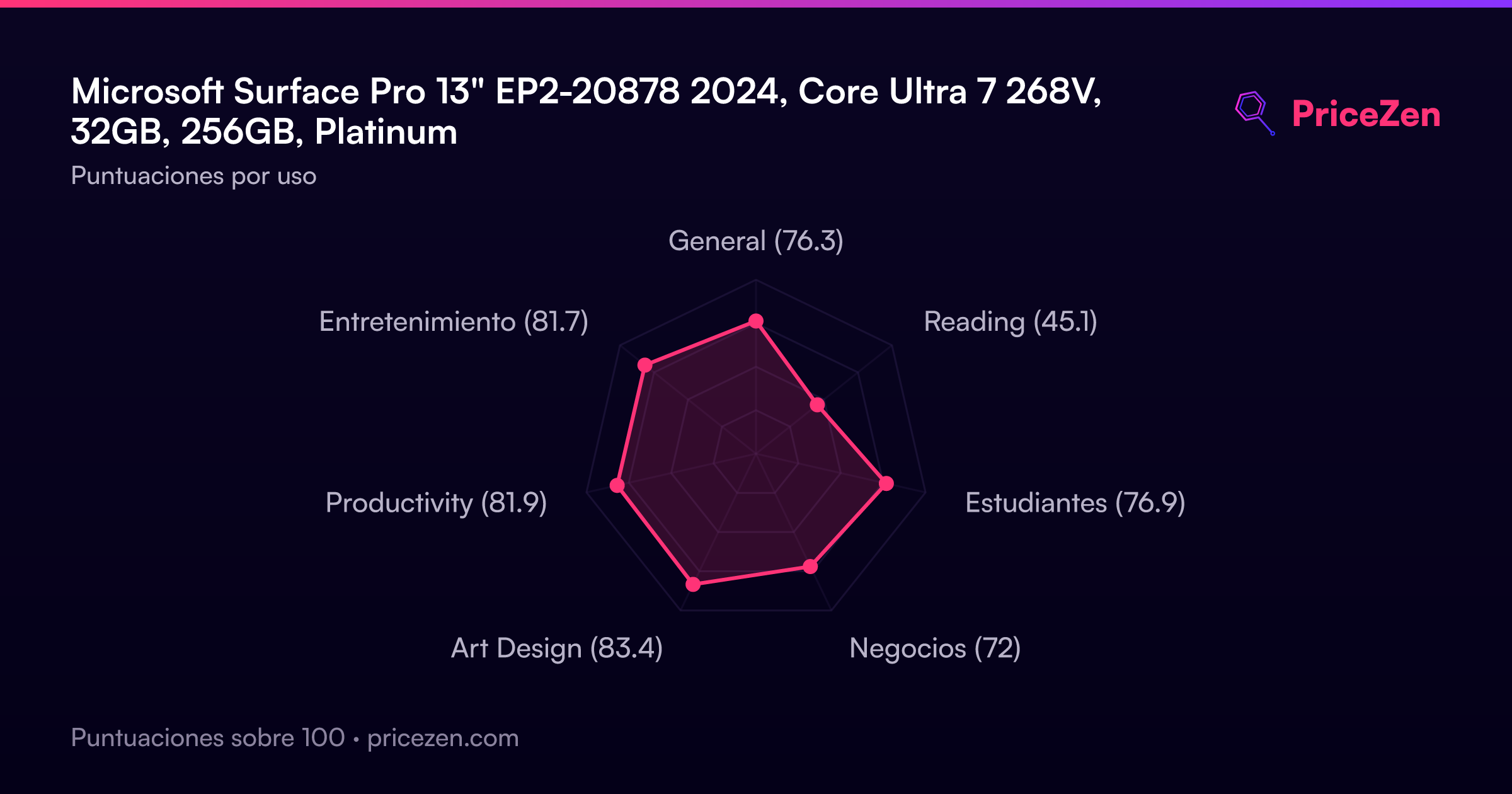
Who's it for? Honestly, people who want one device instead of two. Our scoring puts it strongest in art and design at 83.2/100, with productivity at 81.9 and entertainment at 81.7 right behind. That spread tells you something: this isn't a specialist, it's a machine that does a lot of things well. Stylus support via the Slim Pen, face unlock, and the keyboard connector mean you can sketch on it at a coffee shop and then dock it into a real work setup without swapping devices.
What makes it interesting is the combination. Plenty of tablets have nice screens. Plenty of Windows machines have 32GB of RAM. Very few put both in something that weighs 870g. And the trade-off shows up immediately in the price, which we'll get to, because our affordability ranking for this thing is brutal.
Common Questions
Q: How sharp is the display, really?
It's a 13" OLED panel at 2880x1920, which works out to 267 ppi, running at 120Hz with 600 nits of brightness. Our screen ranking puts it in the 98th percentile for this category, so it's genuinely one of the best panels you can get in a device like this. Text and line art look crisp, and the high refresh rate is the part stylus users tend to care about most.
Q: Will the battery get me through a workday?
The 47Wh cell is rated for up to 14 hours of video playback, and battery ranks in the 99th percentile against comparable devices, so endurance is a real strength here. Just know that lighter tasks like reading land lower in our rankings, at the 75th percentile, so the video figure is the optimistic end of the range. Heavy creative work will pull it down further, as it does on any Windows machine.
Q: Is 256GB enough storage for creative work?
For a machine aimed at art and design, 256GB is tight. It ranks in the 84th percentile for this category, which is strong relative to other tablets, but in absolute terms large project files and video will fill it fast. There is Thunderbolt over USB-C, so fast external storage is a reasonable workaround if you plan for it.
Q: Does it come with the keyboard and pen?
No. The keyboard connector and Slim Pen support are built in, but both accessories are optional purchases. That matters at this price, because a Surface Pro used purely as a tablet loses much of what makes the Windows 11 Pro install worthwhile. Budget for at least the keyboard before you compare total cost against anything else.
Who Should Skip This
Readers and media consumers should walk away. Reading is this product's weakest scored area at 44.1/100, eye comfort sits at 48 which is squarely average, and portability ranks in the 24th percentile despite the 870g weight. Paying USD 2,050 and up for a device whose weakest trick is the thing you'd do most is backwards. Look at the Samsung Galaxy Tab S 12.4" S10+, the Lenovo Yoga Tab Plus Gen 2 13", or the TABWEE T60 Pro 13.4" instead, since our affordability ranking for the Surface is in the 2nd percentile and those exist in a different price conversation.
Also skip it if you need mobile data, since this SKU is Wi-Fi only, or if you work with huge local files, because 256GB will frustrate you fast. And if your entire workflow lives in touch-first tablet apps rather than desktop software, the Apple iPad Pro 13" M5 is the more natural cross-shop. The Surface's whole justification is running real Windows programs, and if you don't need that, you're paying for the wrong strength.
Verdict
If you're a designer, illustrator, or consultant who needs one device that sketches, presents, and runs actual desktop software, this is a genuinely strong pick. The art and design score of 83.2 backed by a 120Hz OLED and Slim Pen support is the clearest use case, and the 32GB of RAM means it won't choke when your project files get heavy. Buy it from Newegg at USD 2,050, budget for the keyboard and pen, and treat the 256GB SSD as a reason to keep cloud storage in your workflow.
If you mostly read, browse, and watch things, skip it. Reading is its weakest area at 44.1/100, eye comfort is average, and you'd be paying flagship money for capabilities you'll never touch. And if you need cellular, this SKU is Wi-Fi only, full stop. For everyone else in the middle, the honest answer is that this is a great machine with a price that demands you actually use what makes it great.
Usage Scores
- General76.2
- Reading44.1
- Estudiantes76.8
- Negocios71.7
- Art Design83.2
- Productivity81.8
- Entretenimiento81.6