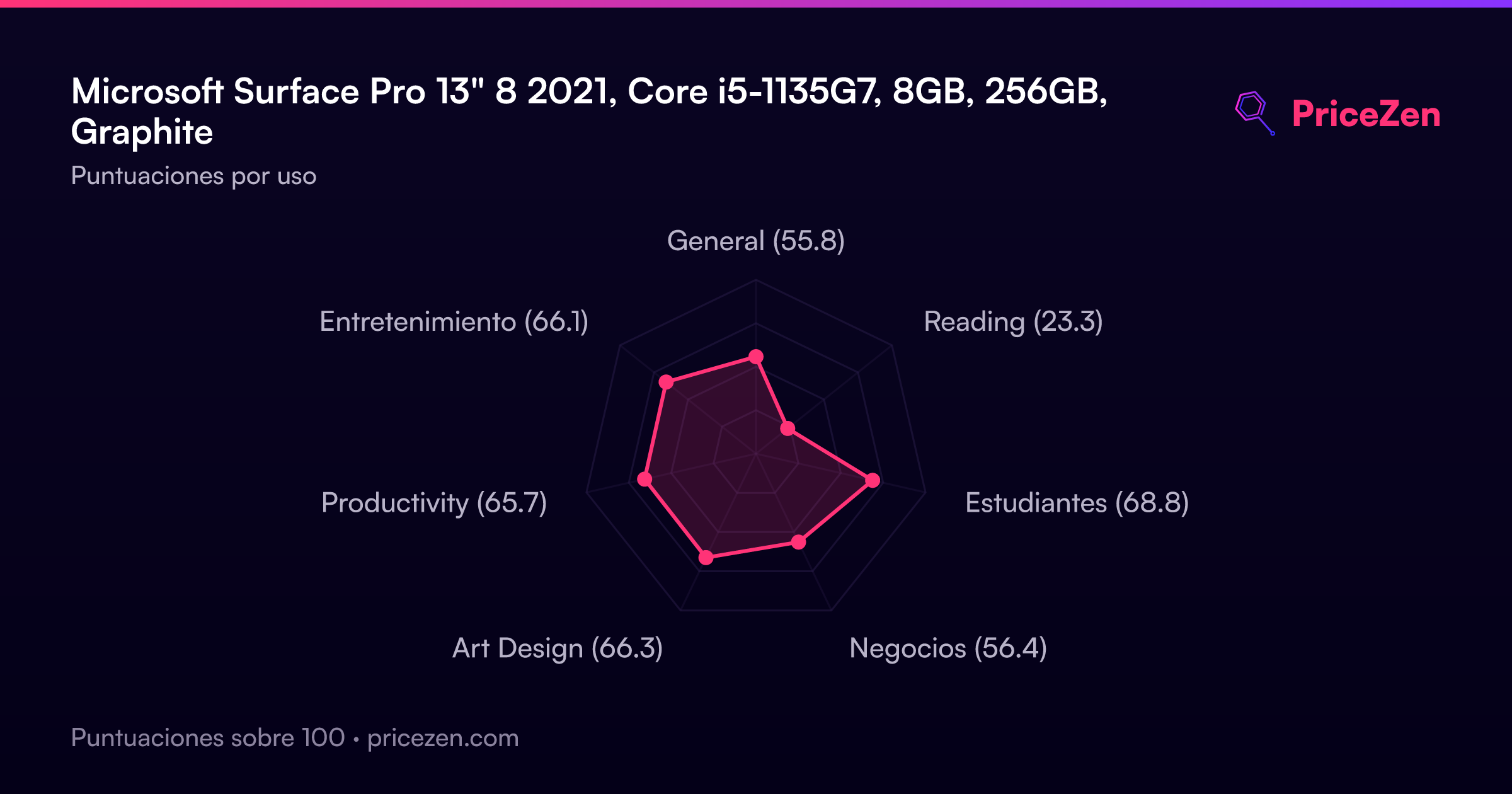
Microsoft Surface Pro 13" 8 2021, Core i5-1135G7, 8GB, 256GB, Graphite
Powered by an 11th Gen Intel Core i5-1135G7 on the Intel Evo platform, this 891g tablet-laptop hybrid features a 13-inch 2880x1920 touchscreen with up to 120Hz refresh rate. It includes a 5.0MP 1080p front-facing camera and Windows 11, and its Geek Squad Certified Refurbished status provides a 90-day warranty at a lower price point. Best for media streaming and e-reading, this device's productivity score of 20.8 makes it unsuitable for intensive work.

Sin precio actual de tiendas











Resumen
The 30-Second Version
The Microsoft Surface Pro 8 is a Windows 11 2-in-1 tablet with a stunning 120Hz display and excellent build quality. Performance from the Core i5 and 8GB RAM is fine for everyday tasks but struggles under heavy load, and owner sentiment sits at a middling 42 out of 100. At USD 400 to USD 700, it's a good value if you need Windows in a tablet, especially at the lower end of that range.
Pros & Cons
Ventajas
- Gorgeous 120Hz PixelSense display 93rd
- Excellent kickstand and build quality 89th
- Thunderbolt 4 ports for real expansion 84th
- Windows 11 with full desktop app support 83rd
- Face unlock works reliably
Desventajas
- Owner sentiment is lukewarm, scoring 42 out of 100 in our analysis
- 8GB RAM is limiting for multitasking
- Keyboard and pen sold separately
- Battery life is just average
- GPU struggles with anything beyond casual use
- No headphone jack
Opinión de los propietarios
Cómo cambió la opinión de los propietarios con el tiempo
ExclusivaSegún cuándo escribieron realmente sus opiniones los clientes, para ver si los elogios iniciales se mantuvieron.
8 opiniones escritas, dic 2021 – dic 2024: 4 satisfechos, 4 insatisfechos
Cada punto es una opinión escrita, en el mes en que se escribió. Satisfechos = 4-5★, neutrales = 3★, insatisfechos = 1-2★.
Las pruebas
Performance
The Core i5-1135G7 in here is a 4-core chip that lands in the 36th percentile for CPUs in our database. That's not great, but it's also not surprising for a thin tablet. In practice, it handles single-threaded tasks well, so launching apps and browsing feels snappy. The 8GB of LPDDR4X RAM sits at the 67th percentile, which is solid for a tablet but tight for a Windows laptop. Open 20 Chrome tabs plus Slack plus Spotify and you'll feel it start to swap.
The 13-inch PixelSense Flow display is the star here. At 2880x1920 with a 120Hz refresh rate, it ranks in the 90th percentile for screens. Text is crisp, colors are accurate, and scrolling feels buttery. The GPU is the weak link at the 37th percentile, so don't expect much beyond casual games and video playback. Storage comes in at the 84th percentile, which is fine for a 256GB SSD, though you'll want cloud storage or an external drive if you keep a lot of media local.
Specifications
Full Specifications
Processor
| CPU | Intel Core i5 1135G7 |
| Cores | 4 |
Memory & Storage
| RAM | 8 GB |
| RAM Generation | LPDDR4X |
| Storage | 256 GB |
| Storage Type | SSD |
| Expandable | No |
Display
| Size | 13" |
| Resolution | 2880x1920 |
| Panel | LCD |
| Refresh Rate | 120 Hz |
Connectivity
| Wi-Fi | Wi-Fi 6 |
| Bluetooth | Bluetooth 5.1 |
| USB-C | 2 |
| Cellular | No |
Features
| Stylus Support | Yes |
| Stylus Model | Surface Slim Pen 2 |
| Fingerprint Reader | No |
| Face Unlock | Yes |
Physical
| Weight | 0.9 kg / 2.0 lbs |
| OS | Windows 11 Home |
vs Competition
Against the Apple iPad Pro 11" M5, the Surface Pro 8 loses on raw speed and app polish. Our ranking puts the iPad ahead, and the Surface's Core i5-1135G7 sits down at the 36th percentile for CPUs in our database, which tells you where the gap comes from. But the Surface fights back with full Windows 11, which means real file management, desktop browsers, and legacy apps. That's the whole reason to pick it over any iPad.
The Samsung Galaxy Tab S 12.4" S10+ is the other premium alternative near the top of our ranking, and it's the one to look at if you mainly want a big screen for media and reading. The Surface answers with its 90th percentile display ranking, a 120Hz panel, and a kickstand that works properly on a lap or a desk. The Xiaomi Pad 11.2" 62751 and TABWEE T60 Pro 13.4" round out the current top five as the cheaper picks. Neither matches what the Surface gives you on the Windows side, and the Surface's Thunderbolt 4 ports and desktop app support are things a budget Android tablet simply doesn't offer. If you want a premium Windows tablet without paying new Surface prices, the Pro 8 still makes sense. If you just want a tablet for media and browsing, the iPad Pro or the Galaxy Tab are better picks.
| Spec | Microsoft Surface Pro 13" 8 | Apple iPad Pro 13" M5 | Samsung Galaxy Tab S 12.4" S10+ | Lenovo Yoga Tab Plus 12.7" ZAEG0096US | Xiaomi Pad 11.2" 62751 | TABWEE T60 Pro 13.4" |
|---|---|---|---|---|---|---|
| CPU | Intel Core i5 1135G7 | Apple M5 | MediaTek Dimensity 9300+ | QTI SM8650 | Snapdragon 8s Gen 3 | Unisoc |
| RAM (GB) | 8 | 16 | 12 | 16 | 12 | 8 |
| Storage (GB) | 256 | 1024 | 512 | 256 | 512 | 256 |
| Screen | 13" 2880x1920 | 13" 2752x2064 | 12.4" 2800x1752 | 12.7" 2944x1840 | 11.2" 3200x2136 | 13.4" 1920x1200 |
| OS | Windows 11 Home | iPadOS | Android 14 | Android 14 | Android 14 | Android 15 |
| Stylus | Yes | Yes | Yes | Yes | Yes | Yes |
| Cellular | No | Yes | No | No | No | No |
| Battery (Wh) | - | 39 | - | - | - | - |
| Compare | Compare | Compare | Compare | Compare |
| Producto | CPU | GPU | RAM | Pantalla | Battery | Feature | Almacenamiento | User Sentiment | Sharpness | Portability | Connectivity | Affordability | Reading Battery | Water Resistance |
|---|---|---|---|---|---|---|---|---|---|---|---|---|---|---|
| Microsoft Surface Pro 13" 8 | 79.9 | 81.5 | 66.2 | 88.7 | 71.2 | 67.8 | 83.9 | 2.5 | 82.7 | 21.6 | 92.8 | 32.5 | 4 | 46.4 |
| Apple iPad Pro 13" M5 Compare | 99.1 | 99.4 | 92.7 | 99.7 | 97.7 | 96.4 | 97.9 | 90.9 | 73.8 | 48.3 | 99.2 | 1.8 | 41.2 | 46.4 |
| Samsung Galaxy Tab S 12.4" S10+ Compare | 82.4 | 79.2 | 81.3 | 95.1 | 87.9 | 96.4 | 93.1 | 96.6 | 82.7 | 49.9 | 76.7 | 5.9 | 56.7 | 97.3 |
| Lenovo Yoga Tab Plus 12.7" ZAEG0096US Compare | 84.2 | 82.4 | 92.7 | 96.2 | 88.7 | 96.4 | 83.9 | 71.3 | 90 | 42.7 | 92.8 | 21.4 | 51.9 | 46.4 |
| Xiaomi Pad 11.2" 62751 Compare | 86.8 | 85.7 | 81.3 | 97.8 | 85.1 | 64.9 | 89.6 | 82.1 | 99.3 | 78.9 | 76.7 | 14.1 | 71.2 | 46.4 |
| TABWEE T60 Pro 13.4" Compare | 95.4 | 88.9 | 66.2 | 55 | 86.7 | 88.4 | 75.1 | 82.1 | 27.8 | 32.7 | 76.7 | 37.1 | 18 | 46.4 |
Precio
Value & Pricing
At USD 400 to USD 700 depending on the listing, the Surface Pro 8 is a much better deal than it was at its original price. The lower end of that range makes it a compelling budget 2-in-1, especially if you find one with the keyboard included. But once you creep toward USD 700, you're getting close to newer hardware territory. The Apple iPad Pro 11" M5 and Samsung Galaxy Tab S 12.4" S10+ both sit above it in our ranking, though neither runs full Windows. If you need Windows specifically, this is one of the cheaper ways to get a premium tablet experience with desktop apps. Just budget for the keyboard, because without it you're buying half a laptop. And weigh the owner feedback before you commit: a 42 out of 100 sentiment score says plenty of buyers ended up less happy than the spec sheet suggests.
Leer más
Overview
The Microsoft Surface Pro 8 sits in that weird middle ground between tablet and laptop, and honestly, it's still one of the better attempts at pulling that off. You're looking at a 13-inch Windows 11 machine with an 11th Gen Intel Core i5-1135G7, 8GB of RAM, and a 256GB SSD. It's not new hardware anymore, but the design holds up and the 120Hz display is a genuine treat. Prices bounce around between USD 400 and USD 700 depending on where you look, which makes it a much more interesting buy than it was at launch.
People searching for a 2-in-1 that can handle real desktop apps will find a lot to like here. The kickstand is still the best in the business, and the Surface Slim Pen 2 support means artists and note-takers get a proper stylus experience. But the base model's 8GB of RAM is a real constraint right now, and the Intel Iris Xe graphics won't impress anyone trying to game. Owner sentiment backs that split up: our sentiment score for this machine sits at 42 out of 100, so buyers clearly like parts of it and grumble about others.
If you're asking whether the Surface Pro 8 is good for everyday productivity, the answer is mostly yes. Web browsing, Office work, streaming, and light photo editing all feel fine. Just don't expect it to replace a proper laptop for heavy multitasking or creative workloads.
Common Questions
Q: Is the Surface Pro 8 good for gaming?
Not really. The Intel Iris Xe integrated graphics in the Surface Pro 8 can handle light indie games and older titles at low settings, but it's not built for modern AAA gaming. If gaming matters, look for a laptop with a dedicated GPU instead.
Q: Does the Surface Pro 8 come with a keyboard and pen?
No, the Surface Pro Signature Keyboard and Surface Slim Pen 2 are sold separately. You'll need to budget extra for both if you want the full laptop experience.
Q: How long does the Surface Pro 8 battery last?
The 6626mAh battery delivers average battery life for a tablet of this size. Expect around 6 to 8 hours of mixed use, less if you're pushing the 120Hz display hard or running demanding apps.
Q: Can the Surface Pro 8 replace a laptop?
For many people, yes. With the keyboard attached, it handles everyday productivity, web browsing, and Office work like a traditional laptop. But the 8GB RAM and tablet thermals mean it's not ideal for heavy multitasking, video editing, or other demanding workloads.
Who Should Skip This
Skip the Surface Pro 8 if you're a creative professional who needs serious GPU power for video editing or 3D work, the integrated graphics won't cut it. Gamers should also look elsewhere, as should anyone who regularly runs memory-hungry apps like virtual machines or large spreadsheets. If you're already deep in Apple's world, the Apple iPad Pro 11" M5 ranks higher in our data and is the easier tablet to live with. And if you don't need Windows at all, the Samsung Galaxy Tab S 12.4" S10+ is the better media tablet. Anyone put off by a 42 out of 100 owner sentiment score should probably keep shopping too.
Verdict
Should you buy the Surface Pro 8 right now? If you find it at the USD 400 end of the price range and you need Windows in a tablet form factor, yes. It's a well-built machine with a fantastic screen and enough performance for everyday work. The kickstand and keyboard combo is still the best laptop-like tablet experience you can get outside of newer Surface models.
But if you're paying closer to USD 700, think twice. The 8GB RAM ceiling and aging CPU will frustrate you if you push the machine hard. And remember the keyboard and pen are separate purchases, which adds real cost. Owner sentiment lands at 42 out of 100 in our analysis, which is a fair warning that this is a machine people buy for specific reasons rather than one that pleases everyone. For students and office workers who live in browsers and Office apps, this is a solid buy. For creatives, gamers, or heavy multitaskers, look elsewhere.
Usage Scores
- General55.8
- Reading23.3
- Estudiantes68.8
- Negocios56.4
- Art Design66.3
- Productivity65.7
- Entretenimiento66.1