Apple iPad Pro 11" TI-REF MHMU3LL/A 2021, M1, 8GB, 128GB, Cellular, Silver

Pantalla de 120 Hz: desplazamiento y trazos fluidos verificado el 28 nov
73/100 puntuación global 4,2 media de 6 valoraciones de propietarios
- CPU
- Apple M1
- RAM
- 8 GB
- Storage
- 128 GB
- Screen
- 11" 2388x1668
- OS
- iPadOS
- Stylus
- Sí
- Cellular
- Sí
- Battery
- 28 Wh
Resumen
The 30-Second Version
The iPad Pro 11-inch pairs an 8-core M1 with a 120Hz Liquid Retina panel and the best connectivity we track in a tablet, top 1% thanks to Thunderbolt, Wi-Fi 6 and optional 5G. Battery ranks in the top 7% from a 28Wh cell, and art and design is its strongest use case at 80.4/100. We're seeing USD 595 to USD 730 across three US listings, so shop the spread. Buy it for drawing and mobile creative work, skip it if you mainly want a reading tablet.
Pros & Cons
Ventajas
- Connectivity in the top 1%: Wi-Fi 6, Bluetooth 5.0, Thunderbolt and optional 5G 99th
- M1 8-core CPU and GPU both rank in the top 12% against all tablets we track 98th
- 120Hz Liquid Retina panel with P3 wide color, screen score 79, strong for drawing 93rd
- 28Wh battery ranks in the top 7% for general use 88th
- Feature set in the top 2%: Pencil 2 support, keyboard connector, Face unlock, LiDAR
Desventajas
- Affordability ranks in the bottom 22%, this is a premium-priced tablet
- Reading use case scores only 48.2/100, eye comfort sits in the bottom half
- 128GB base storage ranks in the top 30% and fills fast with creative projects
- 8GB RAM is middle of the pack for heavy multitasking
- Water resistance ranks in the bottom half, so no real protection against spills or rain
Opinión de los propietarios
Cómo cambió la opinión de los propietarios con el tiempo
ExclusivaSegún cuándo escribieron realmente sus opiniones los clientes, para ver si los elogios iniciales se mantuvieron.
6 opiniones escritas, abr–sept 2023: 5 satisfechos, 1 insatisfecho
En las 6 valoraciones de tiendas: 4,2★. El gráfico cuenta las 6 opiniones escritas.
Cada punto es una opinión escrita, en el mes en que se escribió. Satisfechos = 4-5★, neutrales = 3★, insatisfechos = 1-2★.
Las pruebas
Performance
Let's talk about what those numbers actually mean. The M1's 8 cores and the GPU both rank in the top 12%, so multi-layer illustration files, video timelines and heavy Safari tab loads have real headroom. The 120Hz ProMotion refresh rate matters here too, because pen strokes and scrolling feel immediate rather than smeared, and our screen score of 79 puts the panel well above average overall. Sharpness ranks in the top 26% from that 2388x1668 resolution across 11 inches, which is crisp for text and linework without being the densest panel we track. Storage is 128GB of NVMe, ranking in the top 30%, solid but not generous once you start hoarding ProRes clips or offline reference libraries. RAM at 8GB ranks in the middle, and that's the number to watch if you keep a dozen heavy apps open at once.
Battery is where the spec sheet gets interesting. The 28Wh cell ranks in the top 7% for general battery in our model, one of the best on the market for a tablet this size, and Apple's all-day claim lines up with that ranking. But reading-specific battery drops to the bottom 41%, below average, which tells you the efficiency story is workload-dependent: this thing sips power in mixed use and works harder during long static sessions. Portability from 471g is fine rather than featherweight, and water resistance ranks in the bottom half, so treat it like electronics, not a beach toy. Thunderbolt is the sleeper feature, since it lets you hang fast external storage and displays off a single USB-C port instead of praying your 128GB holds out.
Specifications
Full Specifications
Processor
| CPU | Apple M1 |
| Cores | 8 |
Memory & Storage
| RAM | 8 GB |
| RAM Generation | LPDDR4X |
| Storage | 128 GB |
| Storage Type | NVMe SSD |
| Expandable | No |
Display
| Size | 11" |
| Resolution | 2388x1668 |
| Panel | Liquid Retina |
| Refresh Rate | 120 Hz |
Connectivity
| Wi-Fi | Wi-Fi 6 |
| Bluetooth | Bluetooth 5.0 |
| USB-C | 1 |
| Cellular | Yes |
Features
| Stylus Support | Yes |
| Stylus Model | Apple Pencil (2nd generation) |
| Fingerprint Reader | Yes |
| Face Unlock | Yes |
Physical
| Weight | 0.5 kg / 1.0 lbs |
| Battery | 28 Wh |
| OS | iPadOS |
vs Competition
The obvious cross-shop is the Microsoft Surface Pro 11 13". If your day is spreadsheets, documents and desktop software, that's the direction to look, because this iPad runs iPadOS and our productivity score of 78.9 reflects a tablet doing laptop-ish work rather than replacing one. Where the iPad Pro fights back is its own spec sheet: 471g and an 11-inch footprint make it far easier to hold and sketch on, and the top 1% connectivity score with Thunderbolt and optional 5G means you're not giving up expandability to get that size. Samsung's Galaxy Tab S 12.4" S10+ is the other big name, and again the decision comes down to size and pen workflow. Our art and design score of 80.4 is this iPad's strongest use case, backed by the 120Hz P3 panel and second-gen Pencil support, so illustrators should weigh that heavily.
Then there's the value flank. The Lenovo Yoga Tab Plus 12.7" ZAEG0096US, the Xiaomi Pad 11.2" 62751 and the TABWEE T60 Pro 13.4" all exist in a category where this iPad's affordability ranks in the bottom 22%, and if your needs are streaming, browsing and light notes, one of those is worth a hard look before you spend USD 595 or more. What you'd be giving up is measurable in our data: the M1's top 12% CPU and GPU ranking, the top 7% battery ranking and a feature score in the top 2%. Bigger screens are also, well, bigger, and this one's portability score of 69 already reflects that 471g isn't nothing. Pick the iPad if you want the fastest chip and the best ports in the smallest pro package. Pick something else if screen size per dollar is your metric.
| Spec | Apple iPad Pro 11" TI-REF MHMU3LL/A | Microsoft Surface Pro 11 13" | Samsung Galaxy Tab S 12.4" S10+ | Lenovo Yoga Tab Plus 12.7" ZAEG0096US | Xiaomi Pad 11.2" 2AFZZCRP4CG | TABWEE T60 Pro 13.4" |
|---|---|---|---|---|---|---|
| CPU | Apple M1 | Qualcomm Snapdragon X Elite X1E-84-100 | MediaTek Dimensity 9300+ | QTI SM8650 | Snapdragon 7+ Gen 3 | Unisoc |
| RAM (GB) | 8 | 16 | 12 | 16 | 8 | 8 |
| Storage (GB) | 128 | 1024 | 512 | 256 | 256 | 256 |
| Screen | 11" 2388x1668 | 13" 2880x1920 | 12.4" 2800x1752 | 12.7" 2944x1840 | 11.2" 3200x2136 | 13.4" 1920x1200 |
| OS | iPadOS | Windows 11 Home | Android 14 | Android 14 | Android 14 | Android 15 |
| Stylus | Yes | Yes | Yes | Yes | Yes | Yes |
| Cellular | Yes | No | No | No | No | No |
| Battery (Wh) | 28 | 53 | - | - | - | - |
| Compare | Compare | Compare | Compare | Compare |
| Producto | CPU | GPU | RAM | Pantalla | Battery | Feature | Almacenamiento | Sharpness | Portability | Connectivity | Valoración social | Affordability | Reading Battery | Water Resistance |
|---|---|---|---|---|---|---|---|---|---|---|---|---|---|---|
| Apple iPad Pro 11" TI-REF MHMU3LL/A | 88.1 | 87.7 | 66.3 | 79 | 93 | 97.9 | 70.5 | 73.9 | 69.5 | 99.3 | 10.7 | 22.3 | 41.2 | 46.4 |
| Microsoft Surface Pro 11 13" Compare | 98.4 | 96.6 | 92.7 | 99 | 99.8 | 74.2 | 97.9 | 82.8 | 21.7 | 92.9 | 90.9 | 5.5 | 87 | 97.3 |
| Samsung Galaxy Tab S 12.4" S10+ Compare | 82.6 | 79.4 | 81.3 | 95.2 | 87.9 | 96.3 | 93.1 | 82.8 | 49.8 | 76.8 | 90.9 | 5.7 | 56.7 | 97.3 |
| Lenovo Yoga Tab Plus 12.7" ZAEG0096US Compare | 84.5 | 82.6 | 92.7 | 96.2 | 88.6 | 96.3 | 84.1 | 90.1 | 42.7 | 92.9 | 87 | 21.2 | 51.8 | 46.4 |
| Xiaomi Pad 11.2" 2AFZZCRP4CG Compare | 86.8 | 84.4 | 66.3 | 97.9 | 85.1 | 54.6 | 84.1 | 99.3 | 59.9 | 76.8 | 90.9 | 34.1 | 71.2 | 46.4 |
| TABWEE T60 Pro 13.4" Compare | 95.5 | 89 | 66.3 | 55.2 | 86.6 | 88.5 | 75.3 | 28 | 32.7 | 76.8 | 87 | 36.9 | 18 | 46.4 |
Precio
Value & Pricing
In USD we're tracking three listings between USD 595 and USD 730, a spread of USD 135 for the same product. That's a meaningful gap, and it's the kind of thing our community browser extension exists to catch, since prices drift and nobody announces it. If you're seeing the top of that range, wait or look elsewhere, because the bottom of it is real and currently listed. At USD 595 the M1 plus Thunderbolt plus a 120Hz P3 panel is a lot of hardware for the money. At USD 730 you're paying enough extra to notice, and the value argument gets thinner.
Our affordability ranking of 22 doesn't mean it's badly priced, it means tablets as a category are cheaper than this and the model knows it. What you're buying is the connectivity and feature ceiling, both near the very top of our charts, plus a chip that outranks most of the field. If you'll actually use the Pencil, the keyboard connector and Thunderbolt storage, the premium makes sense. If you won't, you're subsidizing ports you'll never plug anything into.
Leer más
Overview
The iPad Pro 11-inch is the small one in Apple's pro tablet line, and it's still carrying an M1 chip with 8 cores and 8GB of LPDDR4X memory. That's desktop-class silicon in a 471g slab you can hold in one hand while standing on a train. Our scoring model puts its CPU and GPU both in the top 12% against every tablet we track, which means this thing is fast in a way most tablets simply aren't. The interesting part isn't raw speed, though. It's what Apple bolted around it: Thunderbolt over USB-C, Wi-Fi 6, Bluetooth 5.0, optional 5G, Apple Pencil (2nd generation) support and a keyboard connector. Connectivity lands in the top 1% in our data and features in the top 2%. Those are basically top-of-the-charts numbers, and they're the reason this tablet keeps showing up in workflows that used to require a laptop.
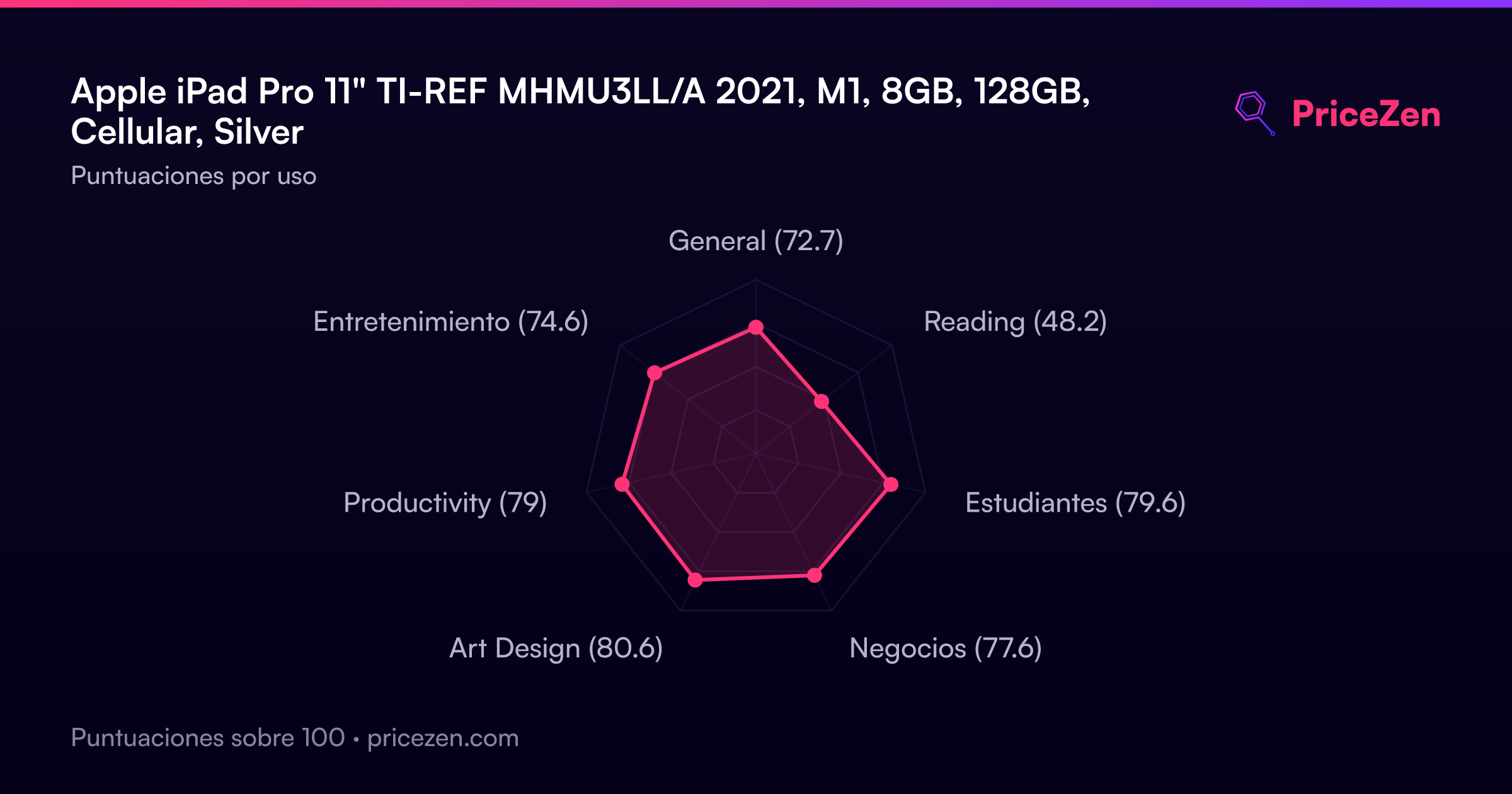
So who's it for? Our category scores say art and design first (80.4/100), then productivity (78.9) and student use (78.4). That tracks with the hardware. A 2388x1668 Liquid Retina panel running at 120Hz with P3 wide color and True Tone is a genuinely good canvas for drawing and photo work, and the second-gen Pencil pairing is the whole point for illustrators. Students get the same panel plus a keyboard connector for essays and note-taking. And anyone who lives in video calls gets a 12MP front camera with Center Stage that reframes automatically, which owners tend to appreciate more than they expect to.
Here's the trade-off you need to hear before anything else: this is not a cheap tablet, and it's not a great reading tablet. Affordability sits in the bottom 22% in our rankings, so you're paying a premium for the M1 and the port selection. Reading scores just 48.2/100 as a use case, eye comfort lands in the bottom half and reading battery in the bottom 41%. If your main plan is novels in bed, you're buying a race car to drive to the mailbox.
Common Questions
Q: Is 128GB of storage enough, or will I regret it?
For notes, sketches, streaming and normal app use, 128GB is workable, and it ranks in the top 30% in our data, so it's solid rather than stingy. The catch is creative work: large illustration files and video eat space fast. The saving grace is Thunderbolt over USB-C, which lets you run fast external storage and displays, so you can offload projects instead of constantly deleting things.
Q: Does the M1 chip actually matter in a tablet, or is it overkill?
It matters if you push the thing. The 8-core M1 and its GPU both sit in the top 12% against every tablet we track, which is one of the better showings in the category, and that headroom shows up in multi-layer art files and video timelines. For email and YouTube it's absolutely overkill, and our affordability ranking of 22 is partly the cost of that overkill.
Q: Can this replace my laptop for school or work?
Partly. Our productivity score is 78.9 and student score 78.4, both strong, and the keyboard connector plus 120Hz display make writing and annotating genuinely pleasant. But it runs iPadOS, so if your coursework or job depends on specific desktop applications, the Microsoft Surface Pro 11 13" is the safer cross-shop. Think of this as a superb companion device rather than a guaranteed one-machine setup.
Q: How's the battery for long days away from a charger?
General battery ranks in the top 7% from the 28Wh cell, which is one of the best results in our tablet data and lines up with Apple's all-day claim. Just know it's workload-dependent: reading-specific battery drops to the bottom 41%, below average. Mixed use is where this thing shines, marathon static reading sessions less so.
Who Should Skip This
Readers, first and foremost. Reading scores 48.2/100 as a use case here, eye comfort ranks in the bottom half and reading battery in the bottom 41%, so long prose sessions are the weakest thing this tablet does. Add water resistance in the bottom half and you've got a device you shouldn't take into the bath either. If books, comics and bedtime browsing are the plan, look at the value end of our tablet rankings instead, something like the Xiaomi Pad 11.2" 62751 or the TABWEE T60 Pro 13.4", and keep the difference in your pocket.
Also skip it if you need real desktop software or the biggest screen you can get. iPadOS won't run your desktop apps, and at 11 inches this is the compact option next to the Microsoft Surface Pro 11 13", the Samsung Galaxy Tab S 12.4" S10+ and the Lenovo Yoga Tab Plus 12.7" ZAEG0096US. And if 8GB of RAM in the middle of the pack worries you because you keep enormous multitasking loads open, that's a fair concern rather than paranoia. Buy this for pen work, speed and ports, not for screen acreage or laptop duty.
Verdict
If you draw, design or edit on the go, buy it. The combination of a top 12% M1, a 120Hz P3 Liquid Retina panel and Pencil 2 support is exactly what our 80.4 art and design score is measuring, and Thunderbolt means you can offload projects to fast external storage instead of fighting 128GB. Students who write and annotate a lot are the second-best fit at 78.4, especially with the keyboard connector in play. Try to land near USD 595 rather than USD 730, because the USD 135 spread across the three listings we track is free money if you're patient.
If you mostly read, browse and watch things, skip it and put the savings toward something built for that. Reading scores 48.2 here, eye comfort ranks in the bottom half and reading battery in the bottom 41%, and none of that improves because the chip is fast. Same story if you need a true laptop replacement: iPadOS is iPadOS, and the Surface Pro 11 13" is the more honest answer for desktop software. This is a fantastic tool for a specific job, and an expensive one for the wrong job.
Usage Scores
- General72.7
- Reading48.2
- Estudiantes79.6
- Negocios77.6
- Art Design80.6
- Productivity79
- Entretenimiento74.6