Kingston XS1000 1TB Portable USB 3.2 Gen 2
The Kingston XS1000 delivers 1050 MB/s read and 1000 MB/s write speeds over USB 3.2 Gen 2 in a pocket-sized 1TB drive that fits easily in a palm. Its compact build and included USB Type-C to Type-A adapter make it a practical choice for on-the-go backups without needing extra cables. Best for budget-conscious users who need fast, portable file storage for documents and media, though it is not suited for console expansion.

Sin precio actual de tiendas


Resumen
The 30-Second Version
The Kingston XS1000 is a compact 1TB external SSD with USB 3.2 Gen 2 speeds up to 1050 MB/s. It's great for simple file backups and everyday portability, especially at the lower end of its CAD 207 to CAD 320 price range. Just don't expect it to handle heavy random workloads or console gaming well.
Pros & Cons
Ventajas
- Tiny and genuinely pocketable
- USB-C and USB-A support out of the box
- 5-year warranty from Kingston
- Plug and play, no formatting needed
- TLC NAND instead of cheaper QLC
Desventajas
- Random performance is near the bottom of our database
- Endurance rating is disappointing
- Not great for console use
- Price varies a lot between vendors
- Only 2 customer reviews so far
Opinión de los propietarios
The Word on the Street
Cómo cambió la opinión de los propietarios con el tiempo
ExclusivaSegún cuándo escribieron realmente sus opiniones los clientes, para ver si los elogios iniciales se mantuvieron.
2 opiniones escritas, ene 2024: 2 satisfechos
En las 2 valoraciones de tiendas: 5,0★. El gráfico cuenta las 2 opiniones escritas.
Cada punto es una opinión escrita, en el mes en que se escribió. Satisfechos = 4-5★, neutrales = 3★, insatisfechos = 1-2★.
Las pruebas
Performance
The XS1000 tops out at 1050 MB/s read and 1000 MB/s write over USB 3.2 Gen 2. In our database, that puts it at the 44th percentile for speed among external SSDs. Not a barn burner, but well within the range of what most people need for daily file shuffling. You'll move a 10GB video file in around 10 seconds, give or take. That's fast enough that you won't be staring at a progress bar wondering if the drive fell asleep.
Random performance is where this drive stumbles. It lands in the 4th percentile for random operations, which means lots of small file transfers will feel sluggish compared to higher-end drives. If you're backing up a folder with thousands of tiny files, expect it to take longer than the sequential numbers suggest. Endurance is also a weak spot at the 15th percentile. For light use, fine. For constant write-heavy workloads, look elsewhere.
Specifications
Full Specifications
Drive
| Capacity | 1000 |
| Form Factor | External |
| Interface | USB 3.2 Gen 2 |
| External | Yes |
Performance
| Sequential Read (MB/s) | 1050 |
| Sequential Write (MB/s) | 1000 |
Hardware
| NAND | TLC |
vs Competition
The XS1000 goes up against some heavy hitters in our database, though most of them are internal drives. The Samsung 9100 PRO and Western Digital WD_BLACK SN850X are both PCIe 4.0 internal SSDs that absolutely crush the XS1000 on speed, but they're not portable and they cost more. The Crucial T700 is a PCIe 5.0 monster that makes the XS1000 look like a USB stick in terms of raw throughput. But again, internal drive, different use case.
For external storage specifically, the XS1000's real competition is other pocket drives like Samsung's T7 series or SanDisk's Extreme portables. Those drives tend to have better random performance and stronger endurance ratings. The XS1000 wins on simplicity and the 5-year warranty, but if you're moving lots of small files regularly, a T7 will feel noticeably snappier. The Team Group MP44 and Lexar NM1090 PRO are internal drives too, so they're not direct competitors for someone shopping for a portable backup solution.
| Spec | Kingston XS1000 | Western Digital WD_BLACK SN8100 | Samsung 9100 PRO | Crucial T700 | SanDisk WD_BLACK | Seagate FireCuda 530R |
|---|---|---|---|---|---|---|
| Capacity | 1TB | 4TB | 8TB | 2TB | 8TB | 4TB |
| Form Factor | External | M.2 2280 | M.2 2280 | M.2 2280 | M.2 2280 | M.2 2280 |
| Interface | USB 3.2 Gen 2 | PCIe 5.0 x4 | PCIe 5.0 x4 | PCIe 5.0 x4 | PCIe 5.0 x4 | PCIe 4.0 x4 |
| Seq Read | 1,050 MB/s | 14,900 MB/s | 14,800 MB/s | 12,400 MB/s | 14,900 MB/s | 7,400 MB/s |
| Nand Type | TLC | TLC | TLC | TLC | TLC | TLC |
| Dram Cache | - | false | true | true | true | false |
| Endurance | - | 2400 TBW | 4800 TBW | 1200 TBW | 4800 TBW | 5050 TBW |
| Compare | Compare | Compare | Compare | Compare |
| Producto | Speed | Random | Feature | Capacity | Endurance | Valoración social | Affordability |
|---|---|---|---|---|---|---|---|
| Kingston XS1000 | 43.7 | 3.7 | 53.1 | 55.9 | 14.7 | 23.2 | 52.6 |
| Western Digital WD_BLACK SN8100 Compare | 99.7 | 99.6 | 85.9 | 92.6 | 80.3 | 94.9 | 8.4 |
| Samsung 9100 PRO Compare | 99.2 | 99.8 | 99.8 | 98.1 | 85.6 | 94.9 | 1.9 |
| Crucial T700 Compare | 96.7 | 97.6 | 97.6 | 78.8 | 82.5 | 75 | 21.7 |
| SanDisk WD_BLACK Compare | 99.1 | 99.3 | 97.6 | 98.1 | 80.3 | 39.9 | 3.1 |
| Seagate FireCuda 530R Compare | 93 | 96.8 | 53.1 | 92.6 | 95.5 | 85.7 | 7.5 |
Precio
Value & Pricing
Pricing on the XS1000 is a bit of a rollercoaster. In Canada, we're seeing it listed anywhere from CAD 207 to CAD 320 across seven listings. That's a CAD 113 spread for the exact same drive. Memory Express has the best deal at CAD 207, and at that price it's a reasonable buy. At CAD 320, you're paying too much for what you get. The US listing sits at USD 195, which is fine but not exciting. If you can snag it near the low end of that CAD range, it's a solid value for a portable backup drive. If you're seeing it near the top, hold off or look at alternatives.
Leer más
Overview
The Kingston XS1000 is a pocket-sized external SSD that sits in the budget-friendly end of the portable storage market. It's a 1TB USB 3.2 Gen 2 drive with TLC NAND, rated for 1050 MB/s reads and 1000 MB/s writes. If you're searching for a compact external SSD for file backup, this one is about as simple as it gets. No enclosure, no power brick, just a tiny drive and a cable.
Kingston markets this as a hassle-free backup companion, and honestly, that's the right pitch. It's small enough to toss in a bag and forget about until you need it. The included USB-C to USB-A adapter means it'll work with older laptops and newer phones alike. At around CAD 207 to CAD 320 depending on the vendor, it's not the cheapest 1TB external SSD out there, but it's also not pretending to be a high-end Thunderbolt drive.
People often ask whether the XS1000 is good for everyday file transfers and backups. The short answer is yes, for most people. It's not built for console gaming or heavy sustained workloads, but for moving photos, documents, and media files around, it does the job without fuss.
Common Questions
Q: Is the Kingston XS1000 good for gaming?
Not really. The XS1000's random performance is near the bottom of our database, which means game load times will suffer compared to faster external SSDs or internal drives. It's fine for storing game files, but you'll want something quicker for actually playing off it.
Q: Does the Kingston XS1000 work with USB-A ports?
Yes. Kingston includes a USB-C to USB-A adapter in the box, so you can plug the XS1000 into older laptops, desktops, and other devices with standard USB-A ports.
Q: How fast is the Kingston XS1000?
The XS1000 is rated for up to 1050 MB/s read and 1000 MB/s write over USB 3.2 Gen 2. In practice, that means large files transfer quickly, but lots of small files will feel slower due to weak random performance.
Q: Is the Kingston XS1000 good for backing up photos and videos?
Yes, for most people it's a solid choice. The XS1000 is compact, plug-and-play, and fast enough for typical photo and video backups. Just keep in mind the endurance rating is on the lower side, so it's better for occasional backups than constant heavy writes.
Who Should Skip This
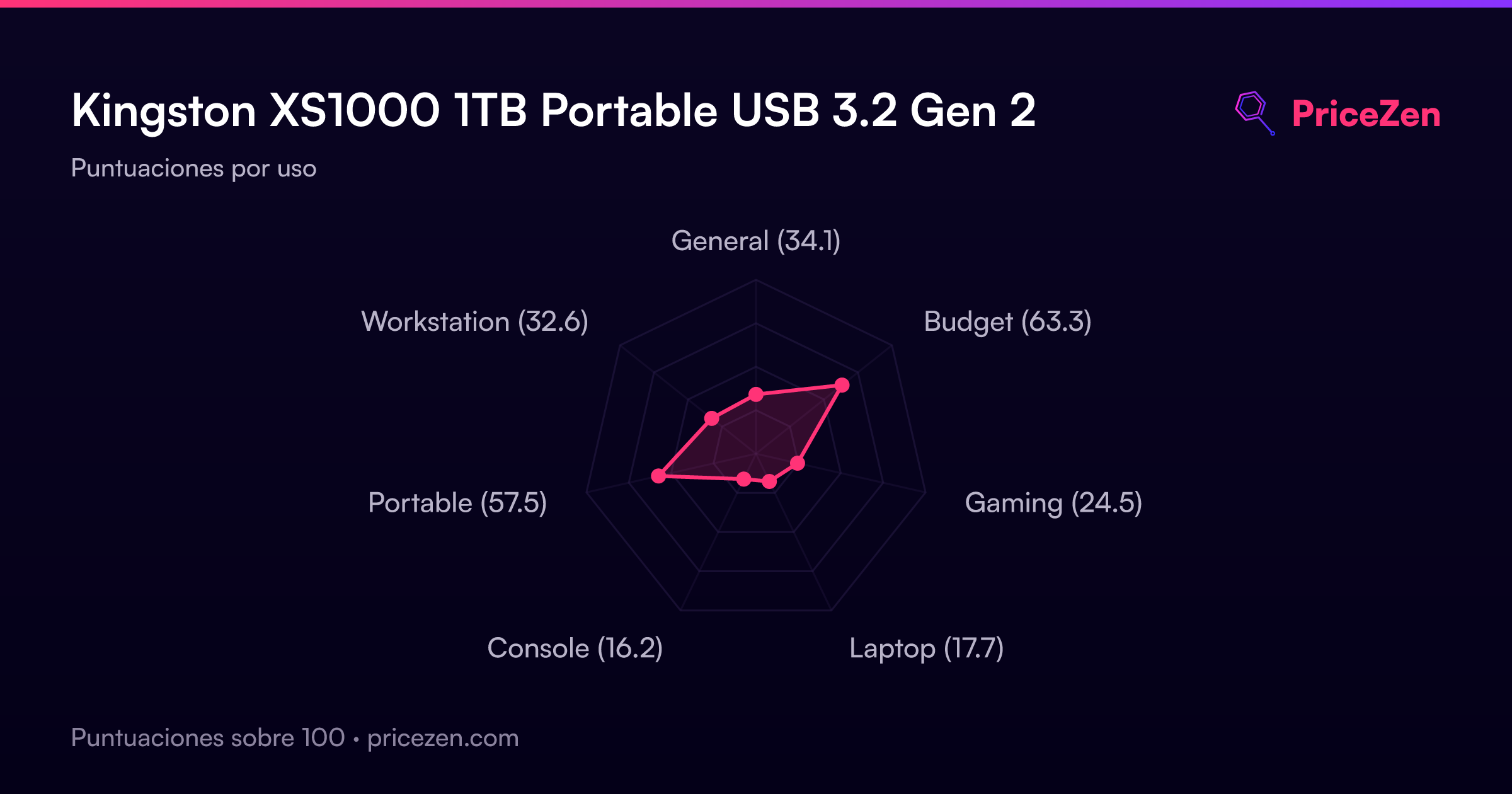
Skip the XS1000 if you're a console gamer looking for external storage. Its console score is a dismal 16.8 out of 100, and the random performance will make load times painful. Video editors working directly off the drive should also look elsewhere, something like a Samsung T7 or a Thunderbolt drive will serve you better. And if you're constantly writing large amounts of data, the low endurance rating means this drive might not hold up as long as pricier alternatives. For those folks, spend the extra cash on a drive with better sustained performance and higher endurance.
Verdict
Should you buy the Kingston XS1000? If you need a simple, compact external SSD for backing up photos, documents, and media, and you can find it near CAD 207, yes. It's a no-nonsense drive that does what it says on the box. The 5-year warranty is a nice safety net, and the plug-and-play setup means zero friction.
But if you're planning to run games off it, edit video directly from the drive, or hammer it with constant writes, this isn't the one. The random performance and endurance numbers are just too weak. For those use cases, spend a bit more on something with better sustained performance. For everyone else, the XS1000 is a perfectly fine little backup buddy.
Usage Scores
- General34.1
- Budget63.3
- Gaming24.5
- Laptop17.7
- Console16.2
- Portable57.5
- Workstation32.6