Crucial 8GB (2x4GB) DDR3L-1600 CL11 (CT2KIT51264BD160B)
Operating at 1.35V for energy efficiency, this 8GB DDR3L kit runs at 1600 MT/s with CL11 timings for stable legacy system performance. The dual 4GB UDIMM configuration enables basic dual-channel operation in older desktops with 240-pin slots. It’s best for users upgrading aging office PCs or budget builds that require low-voltage, non-ECC memory.

Sin precio actual de tiendas


Resumen
The 30-Second Version
The Crucial CT2KIT51264BD160B is an 8GB (2 x 4GB) DDR3L 1600 kit that's cheap, stable, and sips power at 1.35V, which owners running 24/7 budget machines love. Speed and capacity trail modern memory, but that's irrelevant if your board only takes DDR3. At USD 25-27 (CAD 26-40 up north, so shop around), it's a no-brainer upgrade for older desktops like Optiplexes. Skip it for new builds or serious server duty.
Pros & Cons
Ventajas
- Cheap: affordability ranks in the 93rd percentile, USD 25-27 93rd
- 1.35V operation cuts power draw for 24/7 machines
- Dual voltage (1.35V or 1.5V) widens board compatibility
- Owners report stable performance and fast boots in older Optiplex systems
- CL11 timings are solid for DDR3, above the category midpoint
Desventajas
- 1600 MT/s lags behind most desktop memory we track
- 8GB total capacity falls behind the category
- Non-ECC, so it's a poor fit for real server workloads
- Timing confusion in listings (CL9 vs CL11) trips up buyers
- Some boards need a BIOS tweak before the OS detects all 8GB
Opinión de los propietarios
The Word on the Street
Cómo cambió la opinión de los propietarios con el tiempo
ExclusivaSegún cuándo escribieron realmente sus opiniones los clientes, para ver si los elogios iniciales se mantuvieron.
20 opiniones escritas, feb 2012 – abr 2026: 19 satisfechos, 1 insatisfecho
En las 13 valoraciones de tiendas: 4,4★. El gráfico cuenta las 20 opiniones escritas.
- abr–jun 20124 de 4 satisfechos
Buyers praised the memory's speed, low power, and stability, noting it runs cool without a heat spreader. One warned about timing confusion (CL11 vs CL9), while another highlighted great value for server builds.
- Fast, low power, and stable; runs cool without needing a heat spreader.
- Excellent value, especially for bulk server builds; enabled more RAM per server within budget.
- Timing specs are confusing; some sites list CL11, others CL9, so buyers must verify correct version.
- Trusted brand reliability; works well on compatible motherboards like Asus M5A88 EVO.
- ene–mar 20123 de 3 satisfechos
Buyers praised these low-voltage RAM modules for budget servers and business PCs, noting low power use, stability in memtest, and a BIOS fix for full capacity detection.
- Low power consumption at 1.35V is valued for 24/7 operation, saving energy over time.
- Passed 3-day memtest with flying colors, indicating high reliability and stability.
- Works well as an upgrade for business PCs like Optiplex, especially for XP Mode RAM allocation.
- One user saw only 14GB of 16GB until adjusting BIOS speed to DDR3 1600; a fixable quirk.
Cada punto es una opinión escrita, en el mes en que se escribió. Satisfechos = 4-5★, neutrales = 3★, insatisfechos = 1-2★. Los resúmenes por periodo están en inglés.
Las pruebas
Performance
Let's be honest about the numbers. 1600 MT/s puts this kit near the bottom of our speed rankings, in the 14th percentile against all desktop memory we track, because modern kits leave DDR3 in the dust. The CL11 latency is actually fine for its class, sitting a bit above the middle of the pack, so within DDR3 territory these are respectable timings. And 8GB total capacity ranks in the 23rd percentile, which means most memory sold today simply holds more. None of that matters if your machine can't take anything faster anyway.
Where the specs get genuinely useful is voltage. Running at 1.35V instead of 1.5V means less power draw and less heat, and owners running 24/7 budget servers specifically call this out as the reason they picked this kit. For a machine that never sleeps, that difference quietly adds up on the power bill. Real-world reports back up the basics too: buyers describe fast boots and stable operation in older Optiplex systems. One caveat from owner feedback worth knowing: some boards need a BIOS memory speed setting adjusted before the OS sees all 8GB, so check your BIOS if the full kit doesn't show up.
Specifications
Full Specifications
Memory
| Type | DDR3L |
| Form Factor | UDIMM |
| Total Capacity | 8192 |
| Modules | 2 |
| Per Module | 4096 |
| Pins | 240 |
| Rank | 2Rx8 |
Performance
| Speed | 1600 |
| CAS Latency | 11 |
| Timings | 11-11-11 |
| Voltage | 1.35 |
Class
| ECC | No |
| Registered | No |
Features
| RGB | No |
| Heat Spreader | No |
vs Competition
The competitors our data lines up against this kit are Kingston ValueRAM, Timetec 76, Netac Shadow III, Team Group Elite, and G.Skill Ripjaws. Against the value-oriented options like Kingston ValueRAM and Team Group Elite, this Crucial kit's argument is its 1.35V low-voltage operation and dual-voltage flexibility, plus a brand reputation that shows in its 4.4/5 rating across 17 reviews. If you're cross-shopping those for an old office box or a low-power home server, the voltage spec is the tiebreaker worth weighing.
Against something like G.Skill Ripjaws, the framing changes. This kit gives ground on raw speed, sitting in the 14th percentile of our speed rankings, and on capacity at 8GB. Its counterargument is price and fitness for purpose: if your board is DDR3-only, faster-rated memory can't save you, and paying a premium for headroom your chipset can't use is wasted money. Our advice: cross-shop the value brands on price per kit, and only look at performance-oriented alternatives if your platform actually supports them.
| Spec | Crucial 8GB DDR3L | Kingston FURY Beast | Corsair VENGEANCE RGB | G.Skill Trident Z5 Royal | Team Group T-CREATE EXPERT | XPG Lancer Blade RGB |
|---|---|---|---|---|---|---|
| Capacity | 8GB | 64GB | 64GB | 64GB | 32GB | 32GB |
| Kit | 2 x 4GB | 2 x 32GB | 2 x 32GB | 2 x 32GB | 2 x 16GB | 2 x 16GB |
| Memory Type | DDR3L | DDR5 | DDR5 | DDR5 | DDR5 | DDR5 |
| Speed Mts | 1600 | 6400 | 6400 | 6000 | 6400 | 6000 |
| Cas Latency | CL11 | CL32 | CL32 | CL26 | CL32 | CL30 |
| Form Factor | UDIMM | UDIMM | UDIMM | UDIMM | UDIMM | UDIMM |
| Ecc | false | false | false | false | false | false |
| Compare | Compare | Compare | Compare | Compare |
| Producto | Speed | Feature | Latency | Capacity | User Sentiment | Valoración social | Affordability |
|---|---|---|---|---|---|---|---|
| Crucial 8GB DDR3L | 13.5 | 44.9 | 57.6 | 22.4 | 61.9 | 17.3 | 93.3 |
| Kingston FURY Beast Compare | 94.8 | 89.6 | 87.6 | 89.5 | 90.2 | 96.4 | 8.2 |
| Corsair VENGEANCE RGB Compare | 94.8 | 89.6 | 87.6 | 89.5 | 97.5 | 96.4 | 6.5 |
| G.Skill Trident Z5 Royal Compare | 87.6 | 89.6 | 99 | 89.5 | 90.2 | 58.4 | 3.9 |
| Team Group T-CREATE EXPERT Compare | 94.8 | 74.8 | 87.6 | 70.5 | 90.2 | 87.3 | 24.3 |
| XPG Lancer Blade RGB Compare | 87.6 | 89.6 | 87.6 | 70.5 | 0 | 96.4 | 15.7 |
Precio
Value & Pricing
At USD 25-27 across the US listings we track (Newegg currently sits at USD 27), this is impulse-buy territory for a working computer upgrade. Our budget score of 79.7/100 reflects that: you're getting a matched two-stick kit from a major manufacturer for less than a takeout dinner for two. Canadian shoppers should compare carefully, though. We've seen CAD prices range from CAD 26 to CAD 40 across three listings, a CAD 14 spread on the same kit, so a couple minutes of checking stores can save you real money.
The value story only works if DDR3 is what your machine needs. You're not buying performance per dollar against modern memory, you're buying the cheapest reliable path to keeping an older system usable. For that job, owners consistently say it's money well spent, especially in multi-stick packs.
Leer más
Overview
This is the RAM you buy when a perfectly good older desktop just needs more breathing room. The Crucial CT2KIT51264BD160B is an 8GB kit made of two 4GB DDR3L sticks, running at 1600 MT/s with CL11 timings (11-11-11) on a standard 240-pin unbuffered layout. It's non-ECC, dual rank (2Rx8), and it can run at either 1.35V or 1.5V depending on what your board wants. Nothing exotic here, and that's kind of the point.
The audience is pretty specific: people keeping DDR3-era machines alive. Owners in our data are dropping these into Dell Optiplex boxes for office work, building cheap always-on home servers, and doing first-time budget builds where every dollar counts. If your motherboard takes DDR3L UDIMMs and you're tired of watching your browser eat all your memory, this kit exists for you.
What makes it interesting is the split personality in our scoring. Our model ranks its affordability in the 93rd percentile, which is about as cheap-and-cheerful as memory gets, but its overall score lands at 34.7/100 because capacity and speed drag it down against everything else in the category. That's not a flaw so much as a reminder: this is legacy tech priced like legacy tech, and it's excellent at exactly one job.
Common Questions
Q: Will this work in my older desktop?
If your motherboard takes DDR3 or DDR3L unbuffered DIMMs with a 240-pin layout, this kit is designed for exactly that. It's dual voltage, so it can run at 1.35V or 1.5V depending on your board, and owners report clean installs in Dell Optiplex 380 and 390 machines. It won't fit DDR4 or DDR5 slots, so check your manual or the existing sticks first.
Q: Is 8GB enough, and why two 4GB sticks instead of one 8GB?
For office work, browsing, and light server duty on an older machine, owners find 8GB a meaningful upgrade, though it does fall behind most memory sold today in capacity. Two matched sticks let compatible boards run in dual-channel mode for better memory bandwidth, and matched kits avoid the mixing headaches that come with pairing random modules.
Q: Can I use this in a server?
For a casual home server, yes, and owners actually praise it there thanks to the low 1.35V power draw during 24/7 operation. But it's non-ECC and unbuffered, so it's wrong for hardware that requires error-correcting memory, which is why our scoring puts it near the bottom for server use. Match it to the workload, not the label.
Q: What if my PC doesn't see all 8GB after installing?
Owner feedback points to a BIOS memory speed setting as the usual culprit, with the OS failing to detect the full kit until that's adjusted. Before assuming a bad stick, go into your BIOS and check the memory configuration, then confirm both modules are seated firmly. Also note this kit runs CL11 timings, so don't worry if a listing elsewhere mentioned CL9.
Who Should Skip This
Anyone building a new PC should skip this entirely. It's DDR3, it tops out at 1600 MT/s, and 8GB won't stretch far for modern gaming or heavy multitasking. Our speed and capacity rankings put it well behind current memory, and no amount of bargain pricing fixes a platform mismatch. Look at the newer-memory options in our rankings instead.
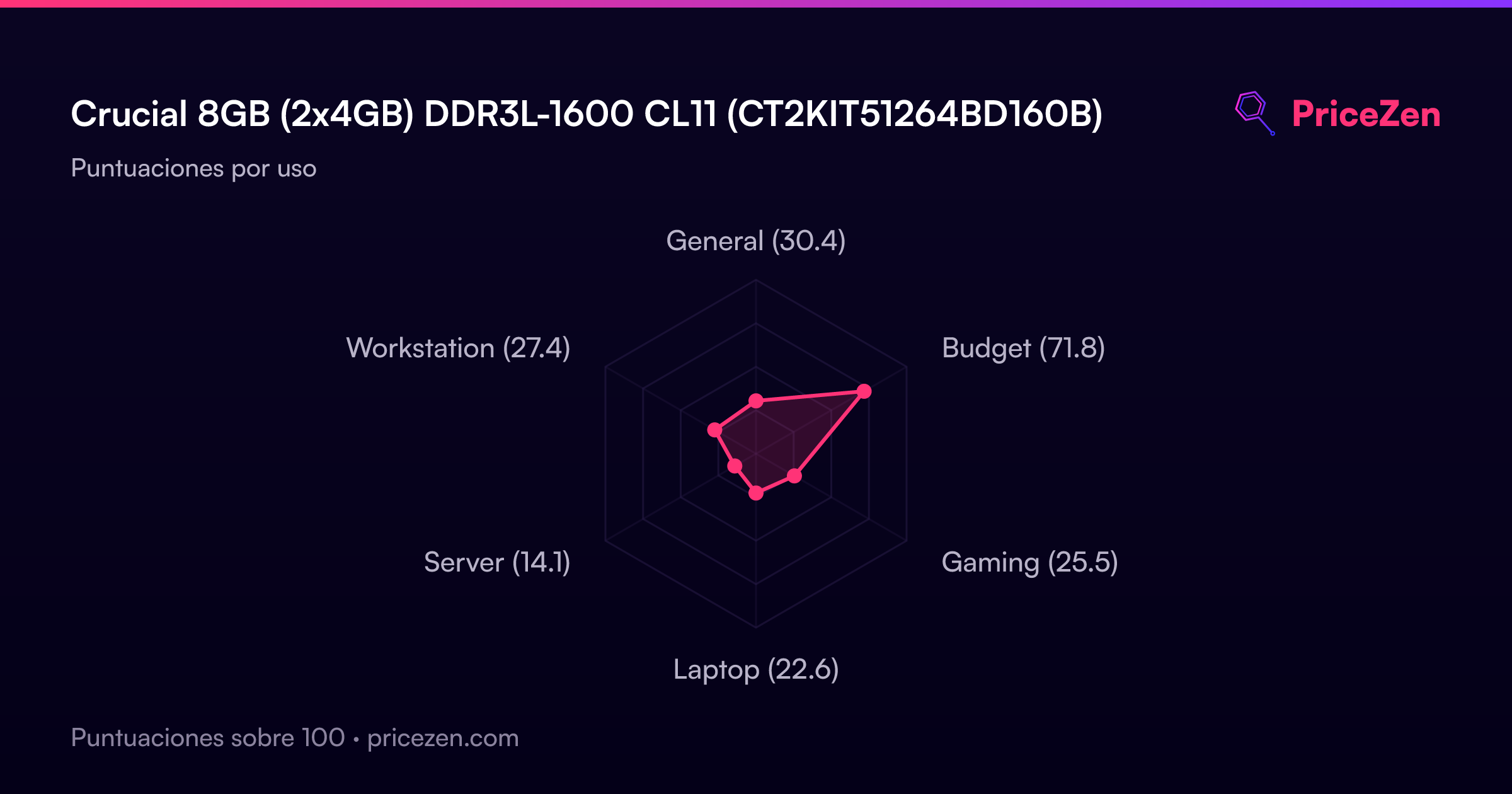
Serious server and workstation users should also pass. The non-ECC, unbuffered design means no error correction, and our model scores it 16.5/100 for server duty and 31/100 for workstation use. If your workload involves virtualization, databases, or anything where data integrity matters, buy proper ECC memory for a platform that supports it. This kit shines in casual always-on boxes, not production ones.
Verdict
If you're reviving a DDR3 desktop, upgrading an Optiplex for office work, or building a low-power always-on box on a shoestring, this is an easy recommendation. The 1.35V operation, stable owner reports, and USD 25-27 price make it one of the most sensible small upgrades you can buy for an aging machine. Owner sentiment backs this up strongly, with stability and value showing up again and again in feedback.
If you're building anything new, gaming seriously, or running workloads that need ECC or lots of capacity, look elsewhere. Our model scores it just 31/100 for workstation use and 16.5/100 for servers, and the non-ECC design plus 8GB ceiling explain why. This kit is a great answer to a narrow question. Make sure you're asking that question before you buy.
Usage Scores
- General30.4
- Budget71.8
- Gaming25.5
- Laptop22.6
- Server14.1
- Workstation27.4