Kingston ValueRAM 4GB DDR3-1333 CL9 SODIMM Black
The 4GB DDR3 SODIMM runs at 1333 MT/s with CL9 latency and 1.5V, meeting standard laptop memory specs for reliable compatibility. Its unbuffered 204-pin design and 1Rx8 configuration make it a straightforward drop-in upgrade for older notebooks. Best for budget-conscious users upgrading a legacy laptop for everyday tasks, not for servers or high-performance workloads.

Sin precio actual de tiendas




Resumen
The 30-Second Version
The cheapest trustworthy way to revive an old laptop, as long as you actually check the spec sheet first. Boring RAM that does its job, until it lands in the wrong machine.
Pros & Cons
Ventajas
- Genuinely cheap for what it does, one of the best prices in its category 86th
- Kingston reliability is real, most owners report years of trouble-free use 67th
- CL9 latency is better than average for DDR3-1333
- Dead-simple drop-in upgrade for older laptops and NAS boxes
Desventajas
- 4GB is barely enough for anything modern, capacity ranks near the bottom
- Compatibility is a coin flip on some models, several buyers got a no-boot
- A few units failed within a year, and returns weren't always honored
- Feature set is bare bones, no heatspreader, no XMP, nothing fancy
Opinión de los propietarios
The Word on the Street
Cómo cambió la opinión de los propietarios con el tiempo
ExclusivaSegún cuándo escribieron realmente sus opiniones los clientes, para ver si los elogios iniciales se mantuvieron.
25 opiniones escritas, jun 2026: 19 satisfechos, 2 insatisfechos, 4 sin estrellas
Cada punto es una opinión escrita, en el mes en que se escribió. Satisfechos = 4-5★, neutrales = 3★, insatisfechos = 1-2★.
Las pruebas
Performance
Nothing surprising in the benchmarks, because there aren't any exciting ones to have. DDR3-1333 at CL9 sits near the bottom of our speed rankings, and 4GB lands in the same basement for capacity. That's not a flaw, it's the era this part comes from. Latency is actually respectable at CL9, sitting comfortably above the middle of the pack. What did surprise us is how consistently owners describe a real, noticeable jump in responsiveness after installing it, especially in older laptops that were choking on less memory. It's unbuffered 1Rx8 with a 204-pin layout, so it's strictly a laptop and small-form-factor part. Our server score for it is dismal, which tracks: don't put this in anything that wants ECC.
Specifications
Full Specifications
Memory
| Type | DDR3 |
| Form Factor | SODIMM |
| Total Capacity | 4096 |
| Modules | 1 |
| Per Module | 4096 |
| Pins | 204 |
| Rank | 1Rx8 |
Performance
| Speed | 1333 |
| CAS Latency | 9 |
| Voltage | 1.5 |
Class
| ECC | No |
| Registered | No |
Features
| Heat Spreader | No |
vs Competition
Timetec 76 tops our competitor list and is the one we'd cross-shop first if you want more capacity for a similar outlay. Team Group Elite and KingBank KJXS are the other budget-minded options worth a look, while G.Skill Ripjaws and ADATA Premier lean toward buyers who care about higher speeds. Against all of them, this Kingston's argument is simple: it's cheap, it's from a name people trust, and its CL9 latency holds up fine. But with 4GB and DDR3-1333 sitting at the bottom of our capacity and speed charts, any of those alternatives that offers more memory or faster clocks is the smarter buy unless your machine specifically caps out here.
| Spec | Kingston ValueRAM | Corsair VENGEANCE RGB | G.Skill Trident Z5 Royal | Team Group T-CREATE EXPERT | XPG Lancer Blade RGB | Crucial Pro Overclocking |
|---|---|---|---|---|---|---|
| Capacity | 4GB | 64GB | 64GB | 32GB | 32GB | 32GB |
| Kit | 1 x 4GB | 2 x 32GB | 2 x 32GB | 2 x 16GB | 2 x 16GB | 2 x 16GB |
| Memory Type | DDR3 | DDR5 | DDR5 | DDR5 | DDR5 | DDR5 |
| Speed Mts | 1333 | 6400 | 6000 | 6400 | 6000 | 6400 |
| Cas Latency | CL9 | CL32 | CL26 | CL32 | CL30 | CL32 |
| Form Factor | SODIMM | UDIMM | UDIMM | UDIMM | UDIMM | UDIMM |
| Ecc | false | false | false | false | false | false |
| Compare | Compare | Compare | Compare | Compare |
| Producto | Speed | Feature | Latency | Capacity | User Sentiment | Valoración social | Affordability |
|---|---|---|---|---|---|---|---|
| Kingston ValueRAM | 7.2 | 18.1 | 66.9 | 8.7 | 38.4 | 4.9 | 86.4 |
| Corsair VENGEANCE RGB Compare | 94.8 | 89.6 | 87.6 | 89.5 | 97.5 | 96.4 | 6.5 |
| G.Skill Trident Z5 Royal Compare | 87.6 | 89.6 | 99 | 89.5 | 90.1 | 58.4 | 3.8 |
| Team Group T-CREATE EXPERT Compare | 94.8 | 74.8 | 87.6 | 70.5 | 90.1 | 87.3 | 22.9 |
| XPG Lancer Blade RGB Compare | 87.6 | 89.6 | 87.6 | 70.5 | 0 | 96.4 | 15.7 |
| Crucial Pro Overclocking Compare | 94.8 | 74.8 | 87.6 | 70.5 | 48.8 | 77 | 26.9 |
Precio
Value & Pricing
At USD 30 from Newegg versus USD 35 on Amazon, grab the Newegg listing and pocket the five bucks. In Europe the spread is wild, EUR 22 to EUR 82 for the same stick, so shop around before you commit. For a compatible older machine, this is easy money well spent. Just don't pay the high end of that EUR range for 4GB of DDR3.
Leer más
Overview
This is a boring stick of RAM, and that's exactly the point. The Kingston ValueRAM KVR13S9S8/4 is a single 4GB DDR3-1333 SODIMM at CL9 and 1.5V, built for people who buy memory by spec sheet rather than by RGB lighting. Our affordability ranking puts it in the top tier of laptop memory right now, and owners back that up: drop it into an older laptop or NAS and the machine wakes up.
The one thing to know before you click buy: compatibility is the whole ballgame here. Owners report flawless installs in machines like the Early 2011 MacBook Pro and various HP and ASUS laptops, but a handful of buyers got nothing but a black screen, and some units died inside a year. Check your machine's memory spec first. This isn't a stick you gamble on.
Common Questions
Q: Will this work in my older MacBook Pro?
Owners report it working well in the Early 2011 15-inch model. Pull your exact machine's memory spec before ordering, because Apple laptops of that era are picky about density and voltage.
Q: Can I run just one stick, or do I need two?
One 4GB stick works fine on its own. Adding a matched second stick gets you dual-channel, which is nicer, but nothing breaks if you go solo.
Q: Is 4GB enough for Windows 10?
It'll boot and browse, but you'll feel the ceiling fast. If your laptop has a second slot, fill it.
Who Should Skip This
If you're building or upgrading anything remotely current, this isn't it. 4GB of DDR3-1333 is a museum piece for modern workloads, and our capacity and speed rankings say so loudly. Go look at Timetec 76 or Team Group Elite for something with more headroom. And if your machine needs ECC or registered memory, walk away now.
Verdict
Buy it if you've confirmed your laptop or NAS takes a 4GB DDR3-1333 1.5V SODIMM and you just want the cheapest reliable fix. Owner sentiment sits at 78/100 across 35 pieces of feedback, which is solid for a part this old, and the 4/5 customer rating agrees. Skip it if you haven't checked compatibility, because the failure stories are real and they're almost all about mismatched systems. This is a targeted repair part, not an upgrade you buy on impulse.
Usage Scores
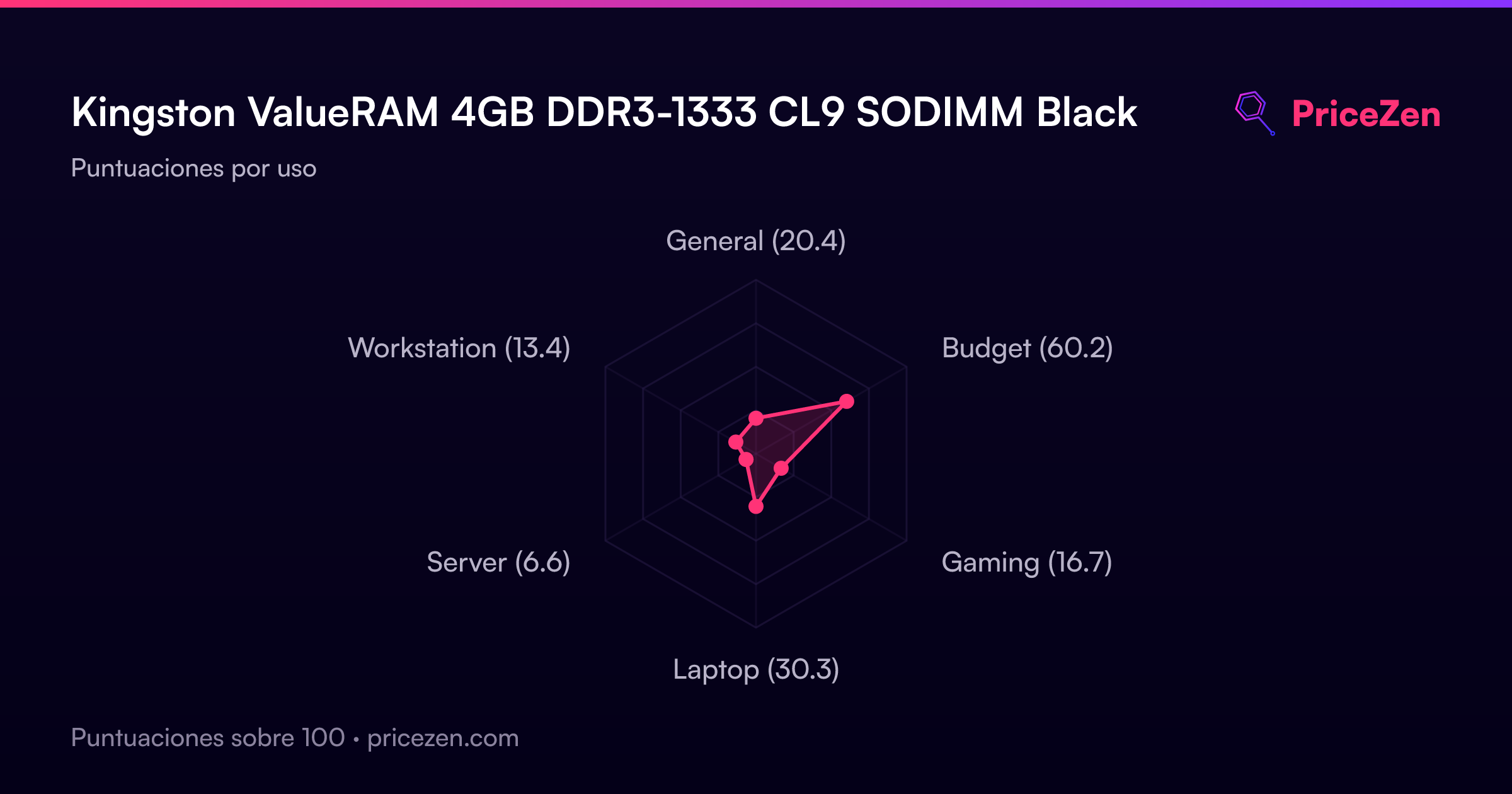
- General20.4
- Budget60.2
- Gaming16.7
- Laptop30.3
- Server6.6
- Workstation13.4