OWC 64GB (2x32GB) DDR5-4800 CL40 (OWC4E8D52R8064P-B922-SF)
This 64GB DDR5-4800 ECC UDIMM kit delivers error-correcting reliability at JEDEC-standard timings for critical workstation and server applications. It stands out with a limited lifetime warranty and an advanced replacement program, ensuring minimal downtime for mission-critical systems. This memory is best for IT administrators and engineers upgrading single-socket servers or workstations where data integrity is non-negotiable.

Sin precio actual de tiendas
Dónde lo vimos antes. Consulta el precio de hoy en la tienda.











Resumen
The 30-Second Version
OWC's 64GB DDR5 ECC kit is a workhorse for workstations and servers, not a speed demon. It runs at 4800 MT/s with loose CL40 timings, but the ECC protection and dual-rank design make it a strong pick for data-critical work. Pricing is steep at $1,910 to $2,507, and the advanced replacement warranty is the main justification for the premium. Buy it if you need ECC and can't afford downtime, skip it if you just want fast RAM.
Pros & Cons
Ventajas
- 64GB capacity in the 90th percentile, plenty for heavy workstation and server workloads 90th
- ECC protection means corrupted data won't silently wreck your renders or databases 75th
- Dual-rank 2Rx8 modules improve memory bandwidth in threaded workloads 68th
- Limited lifetime warranty with advanced replacement keeps downtime short
- JEDEC standard 1.1V operation means it runs cool and stable without tweaking
Desventajas
- CL40 latency is 18th percentile, noticeably loose compared to most DDR5 kits
- 4800 MT/s speed is just average, no headroom for overclocking
- Affordability is 3rd percentile, this is expensive RAM for the specs
- Social proof is weak at 35th percentile, only 4 reviews out there
- Useless for laptops, scoring just 43.5/100 in that category
Las pruebas
Performance
The 4800 MT/s speed lands this kit in the 68th percentile, which is solidly middle of the pack for DDR5. It's not going to win any benchmark races against 6000+ MT/s kits, but that's not the point. ECC memory runs at JEDEC speeds because stability matters more than raw throughput. The CL40 latency is where things get rough though. That's 18th percentile, meaning most DDR5 kits we track have tighter timings. For latency-sensitive workloads like code compilation or certain database operations, you'll feel that a bit.
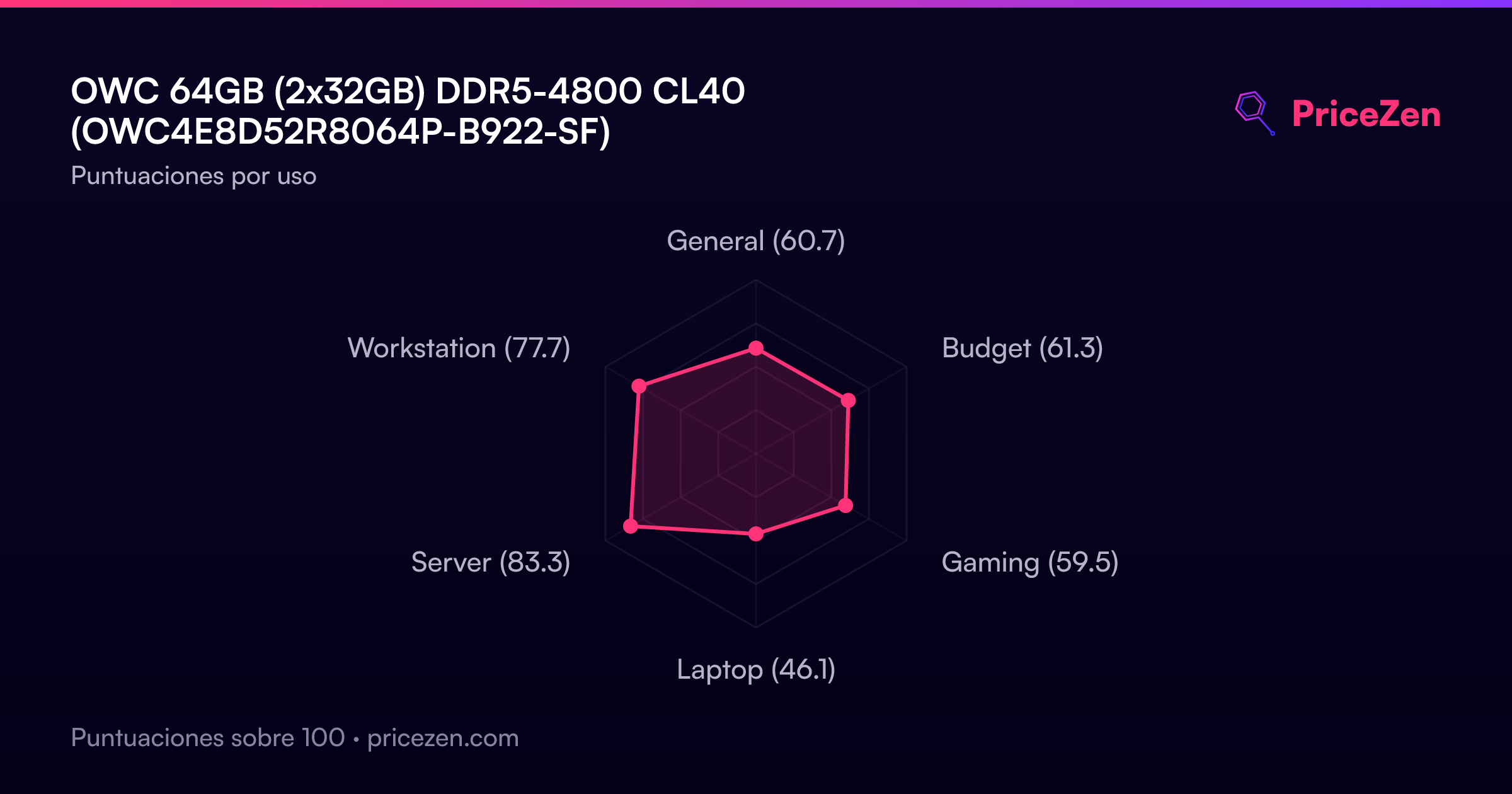
But here's the thing: for the server and workstation use cases this kit targets, the scores tell the real story. Server fit comes in at 79/100 and workstation at 75.9/100. Those are strong numbers. The dual-rank 2Rx8 configuration helps with memory-level parallelism, which can offset some of the latency penalty in heavily threaded workloads. If you're running VMs, doing 3D rendering, or processing large datasets, the capacity and ECC protection matter way more than shaving a few nanoseconds off your CAS latency.
Specifications
Full Specifications
Memory
| Type | DDR5 |
| Form Factor | UDIMM |
| Total Capacity | 65536 |
| Modules | 2 |
| Per Module | 32768 |
| Pins | 288 |
| Rank | 2Rx8 |
Performance
| Speed | 4800 |
| CAS Latency | 40 |
| Voltage | 1.1 |
Class
| ECC | Yes |
| Registered | No |
Features
| RGB | No |
| Heat Spreader | No |
vs Competition
The Kingston FURY Beast KF564C32BWEAK2-64 is the obvious alternative if you don't need ECC. It runs at 6400 MT/s with CL32 timings, which absolutely crushes this OWC kit in raw speed and latency. But it's non-ECC, so any data corruption goes undetected. For gaming or general productivity, the Kingston is the better buy and likely cheaper. The G.Skill Trident Z5 Royal and Corsair VENGEANCE RGB kits are similar stories, faster and flashier, but aimed at enthusiasts who care about RGB lighting more than data integrity.
On the ECC side, Crucial Pro Overclocking CP2K16G64C32U5B is probably the closest real competitor. Crucial is Micron's house brand, so they make their own chips and tend to price ECC memory more aggressively. The Team Group T-CREATE EXPERT kit is another option worth checking, though it's aimed more at creators who want speed with a side of stability. None of these competitors match OWC's advanced replacement warranty, which is genuinely a differentiator if you're running a business off this hardware.
| Spec | OWC 64GB DDR5 | Corsair Dominator Titanium | Team Group T-Force XTREEM ARGB | KLEVV Bolt V | Silicon Power Value Gaming | NEMIX RAM 2048GB DDR5 RDIMM |
|---|---|---|---|---|---|---|
| Capacity | 64GB | 48GB | 48GB | 32GB | 32GB | 2048GB |
| Kit | 2 x 32GB | 2 x 24GB | 2 x 24GB | 2 x 16GB | 2 x 16GB | 16 x 128GB |
| Memory Type | DDR5 | DDR5 | DDR5 | DDR5 | DDR5 | DDR5 |
| Speed Mts | 4800 | 7200 | 8000 | 7200 | 6000 | 6400 |
| Cas Latency | CL40 | CL36 | CL38 | CL34 | CL36 | CL52 |
| Form Factor | UDIMM | UDIMM | UDIMM | UDIMM | UDIMM | RDIMM |
| Ecc | Yes | No | No | No | No | Yes |
| Compare | Compare | Compare | Compare | Compare |
| Producto | Speed | Feature | Latency | Capacity | Affordability |
|---|---|---|---|---|---|
| OWC 64GB DDR5 | 67.7 | 74.8 | 17.1 | 89.5 | 2.9 |
| Corsair Dominator Titanium Compare | 98.3 | 89.5 | 87.6 | 84.1 | 11.4 |
| Team Group T-Force XTREEM ARGB Compare | 99.2 | 89.5 | 95.3 | 84.1 | 15.1 |
| KLEVV Bolt V Compare | 98.3 | 74.8 | 95.9 | 70.5 | 23.6 |
| Silicon Power Value Gaming Compare | 87.6 | 74.8 | 75.1 | 70.5 | 28.5 |
| NEMIX RAM 2048GB DDR5 RDIMM Compare | 94.8 | 98.2 | 25.6 | 99.9 | 0 |
Precio
Value & Pricing
Let's talk money, because this is where things get uncomfortable. The affordability score is 3rd percentile. That's not a typo. This kit is one of the most expensive ways to get 64GB of DDR5 we've seen. US pricing runs from $1,910 to $2,507 depending on where you look, with Newegg carrying both listings. That's a $597 spread between the cheapest and most expensive option for the exact same kit, which is wild. If you're buying, check both listings before you click.
For comparison, you can get 64GB of non-ECC DDR5 from Kingston or Corsair for a fraction of that. The ECC tax is real, and OWC's warranty program adds a premium on top. But if you're speccing out a workstation where downtime costs more than the RAM, the math changes. A day of lost work for a freelance 3D artist or a small engineering firm can easily exceed the price difference. Still, shop around. The JPY 524,074 and MXN 86,021 listings suggest international buyers might find better relative deals depending on exchange rates and import fees.
Historial de precios
Leer más
Overview
OWC has been in the memory game for ages, mostly known for Mac upgrades that don't void your warranty and actually work when you plug them in. This 64GB kit (2 x 32GB) of DDR5 ECC UDIMMs is aimed at a different crowd though. We're talking workstations and servers where a flipped bit isn't just annoying, it's a corrupted render or a crashed database. The kit runs at 4800 MT/s with CL40 timings at 1.1V, which is JEDEC standard territory, not the flashy overclocking stuff you see on gaming RAM.
Who's this for? Someone running a Ryzen 7000/9000 or Xeon W setup that needs ECC but doesn't want to pay OEM markup. The 2Rx8 configuration means dual-rank modules, which can actually help memory bandwidth in some workloads compared to single-rank sticks. Capacity-wise, 64GB puts this kit in the 90th percentile of what we track, so it's a serious amount of RAM for serious work.
What makes it interesting is the warranty story. OWC offers a limited lifetime warranty with an advanced replacement program, which matters when your workstation is how you make a living. If a stick dies, they ship a replacement before you send the bad one back. That's the kind of thing that keeps freelancers and small studios from losing a day of work.
Common Questions
Q: Does this memory work with regular desktop PCs?
It depends on your CPU and motherboard. ECC UDIMMs work with AMD Ryzen 7000/9000 series CPUs on most B650 and X670 boards, and with Intel Xeon W platforms. Standard Intel Core desktop CPUs typically don't support ECC, so check your motherboard's memory QVL list before buying. The 288-pin UDIMM form factor is standard for desktops, but ECC support is the key compatibility question.
Q: Is 4800 MT/s fast enough for demanding workloads?
For most workstation and server tasks, yes. The 4800 MT/s speed is JEDEC standard and sits in the 68th percentile of DDR5 kits we track. The dual-rank 2Rx8 configuration helps with memory bandwidth in heavily threaded workloads, which can offset the loose CL40 latency. If you're doing 3D rendering, video editing, or running VMs, you'll benefit more from the 64GB capacity and ECC protection than from faster clock speeds.
Q: Why is this memory so expensive compared to gaming RAM?
ECC memory costs more to manufacture because it includes extra chips for error correction, and the market for ECC UDIMMs is smaller than for standard DDR5. OWC also bundles a limited lifetime warranty with an advanced replacement program, which adds to the price. The affordability score is 3rd percentile, so this is genuinely one of the pricier options. If you don't need ECC, non-ECC kits from Kingston or Corsair offer better raw performance for less money.
Q: Can I mix this kit with other memory modules?
OWC recommends all DIMMs be the same capacity, speed, and manufacturer for optimal performance. Mixing different kits can cause stability issues, especially with ECC memory where timing mismatches can trigger errors. If you need more than 64GB, buy a matched kit rather than adding individual sticks later. The 2Rx8 dual-rank configuration also means you should populate slots in pairs to maintain proper memory channel balance.
Who Should Skip This
If you're building a gaming PC or a general-purpose desktop, this kit is a waste of money. The 4800 MT/s speed and CL40 latency are unremarkable, and you're paying a huge premium for ECC protection you'll never notice. A 64GB kit of Kingston FURY Beast or Corsair VENGEANCE will be faster, cheaper, and perfectly stable for gaming and everyday use. The affordability score of 3rd percentile should be a red flag for anyone who doesn't have a specific need for error-correcting memory.
Laptop users should also look elsewhere, obviously. This is desktop UDIMM memory, and the laptop score of 43.5/100 reflects that it's simply not designed for that use case. If you need a laptop memory upgrade, look for SODIMM modules instead. And if you're running a system that requires registered ECC (RDIMMs), this unbuffered kit won't work either, you'll need to check your server's spec sheet for the right memory type.
Verdict
If you're building or upgrading a workstation or server that needs ECC, this OWC kit is a solid choice. The 64GB capacity, dual-rank configuration, and lifetime warranty with advanced replacement make it a practical pick for professionals who can't afford downtime. The server score of 79/100 and workstation score of 75.9/100 back that up. It's not exciting, but it's dependable.
For everyone else, this is probably overkill. Gamers and general users should look at faster non-ECC kits from Kingston or Corsair and save a pile of money. The 4800 MT/s speed and CL40 latency are unremarkable, and the price is hard to justify unless ECC is a hard requirement. If you're on a laptop, forget it entirely, this kit scores 43.5/100 there and physically won't fit anyway.
Usage Scores
- General60.7
- Budget61.4
- Gaming59.5
- Laptop46.1
- Server83.3
- Workstation77.7