Crucial DDR5 Classic 48GB DDR5-5600 CL46 SODIMM

DDR5 SODIMM para portátiles y mini PC verificado el 27 nov
67/100 puntuación global 4,6 media de 147 valoraciones de propietarios
- Capacity
- 48GB
- Kit
- 1 x 48GB
- Memory
- DDR5
- Speed
- 5600 MT/s
- CAS latency
- CL46
- Form factor
- SODIMM
Compara precios en 1 tienda
De la más barata a la más cara. Las ofertas nuevas, reacondicionadas y en pack se mantienen separadas para que compares lo comparable.
| Tienda | Vendido por | Color y estado | Precio | vs. el más bajo | Última comprobación | Enlace |
|---|---|---|---|---|---|---|
| Nuevo1 ofertaUnidad individual | ||||||
| Agotado en la última comprobación | ||||||
| Amazon | Desconocido | No indicado | Sin precio | Agotado | 14 nov | Ir a la tienda |
 Fuente: PriceZen, comprobado el 14 nov 2026
Un precio se considera vigente si lo comprobamos en los últimos 7 días. «Vendedor externo» significa un vendedor de terceros en esa tienda, no la propia tienda.
Historial de precios
No hay ofertas de este tipo en este periodo.
Comprobado ese díaNo comprobado ese día, sigue en oferta
Fuente: PriceZen, checked 30 ago 2026











Resumen
The 30-Second Version
48GB of DDR5 in a single SODIMM, running at 5600 MT/s. The capacity is top-tier at the 85th percentile, but CL46 latency drags it down to the 23rd percentile. Buy it for capacity-hungry laptop workloads, not for speed.
Pros & Cons
Ventajas
- 48GB capacity ranks in the 85th percentile, enough for video editing and 3D rendering 84th
- 5600 MT/s speed lands in the 77th percentile, well above average for laptop memory 78th
- Supports both Intel XMP 3.0 and AMD EXPO on the same module 77th
- 1.10V power draw is efficient for a high-density stick
- Lifetime warranty and Crucial's reputation for compatibility
Desventajas
- CL46 latency sits in the 23rd percentile, one of the loosest timings we track
- Single-channel only, no dual-channel bandwidth without a second stick
- Affordability ranks in the 13th percentile, this is not a budget buy
- Known incompatibility with some Lenovo laptops due to die density issues
- Overkill for casual users who just browse and stream
Opinión de los propietarios
The Word on the Street
- Owners consistently praise the 48GB capacity for demanding tasks like Lightroom, Photoshop, and 3D rendering, with several noting they actually use all of it.
- Compatibility is a recurring theme, with some Lenovo laptop owners reporting die density issues while others confirm smooth installs in ASUS ROG and HP Omen machines.
- Installation is repeatedly described as straightforward, with the only hiccup being a longer first boot while the system runs memory training.
Cómo cambió la opinión de los propietarios con el tiempo
ExclusivaSegún cuándo escribieron realmente sus opiniones los clientes, para ver si los elogios iniciales se mantuvieron.
33 opiniones escritas, jun 2022 – mar 2026: 33 satisfechos
En las 147 valoraciones de tiendas: 4,6★. La mayoría de los propietarios valora sin escribir una opinión. El gráfico cuenta las 33 opiniones escritas.
Cada punto es una opinión escrita, en el mes en que se escribió. Satisfechos = 4-5★, neutrales = 3★, insatisfechos = 1-2★.
Las pruebas
Performance
5600 MT/s at CL46 is a mixed bag. The transfer rate is well above average for laptop memory, and Crucial's own numbers claim up to 1.75x more data than the max standard DDR4 rate of 3200 MT/s. That's real bandwidth, and it shows up in file transfers and memory-hungry workloads. But CL46 is loose. Really loose. In our database, that latency ranks in the bottom quarter of all products in this category. For most laptop users, the bandwidth bump outweighs the latency penalty. For latency-sensitive tasks, it's a compromise. The 1.10V operating voltage is efficient, and the 2Rx8 configuration helps with stability under load. Single-channel operation is the other limitation here. One stick means no dual-channel bandwidth, which matters for integrated graphics and some productivity workloads. Buyers running this alongside a soldered module report it works fine, but pure single-channel setups leave performance on the table.
Specifications
Full Specifications
Memory
| Type | DDR5 |
| Form Factor | SODIMM |
| Total Capacity | 49152 |
| Modules | 1 |
| Per Module | 49152 |
| Pins | 262 |
| Rank | 2Rx8 |
Performance
| Speed | 5600 |
| CAS Latency | 46 |
| Voltage | 1.1 |
Class
| ECC | No |
| Registered | No |
| OC Profile | Intel XMP 3.0, AMD EXPO |
Features
| RGB | No |
| Heat Spreader | No |
vs Competition
Against the Kingston FURY Beast KF564C32BWEAK2-64, the Crucial stick gives up a lot on latency. The Kingston kit runs CL32 at the same 5600 MT/s, which is dramatically tighter. The G.Skill Trident Z5 Royal and Corsair VENGEANCE RGB both push 6000 MT/s and 6400 MT/s respectively, with CL26 to CL32 timings. Those are desktop kits though, and the Crucial is a SODIMM for laptops, so the comparison isn't entirely fair. The KLEVV CRAS V RGB and Team Group T-CREATE EXPERT also target desktop builds. For laptop users who need 48GB in a single SODIMM slot, the Crucial is one of very few options available. That scarcity is part of why the price holds up despite the loose timings.
| Spec | Crucial DDR5 Classic | Kingston FURY Beast | G.Skill Trident Z5 Royal | Corsair VENGEANCE RGB | Team Group T-CREATE EXPERT | XPG Lancer Blade RGB |
|---|---|---|---|---|---|---|
| Capacity | 48GB | 64GB | 64GB | 64GB | 32GB | 32GB |
| Kit | 1 x 48GB | 2 x 32GB | 2 x 32GB | 2 x 32GB | 2 x 16GB | 2 x 16GB |
| Memory Type | DDR5 | DDR5 | DDR5 | DDR5 | DDR5 | DDR5 |
| Speed Mts | 5600 | 6400 | 6000 | 6400 | 6400 | 6000 |
| Cas Latency | CL46 | CL32 | CL26 | CL32 | CL32 | CL30 |
| Form Factor | SODIMM | UDIMM | UDIMM | UDIMM | UDIMM | UDIMM |
| Ecc | No | No | No | No | No | No |
| Compare | Compare | Compare | Compare | Compare |
| Producto | Speed | Feature | Latency | Capacity | User Sentiment | Valoración social | Affordability |
|---|---|---|---|---|---|---|---|
| Crucial DDR5 Classic | 77.6 | 56.4 | 22.3 | 84.1 | 38.4 | 76.9 | 14.8 |
| Kingston FURY Beast Compare | 94.8 | 89.6 | 87.6 | 89.5 | 90.1 | 96.4 | 7.6 |
| G.Skill Trident Z5 Royal Compare | 87.6 | 89.6 | 99 | 89.5 | 90.1 | 58.4 | 3.9 |
| Corsair VENGEANCE RGB Compare | 94.8 | 89.6 | 87.6 | 89.5 | 97.6 | 96.4 | 6.7 |
| Team Group T-CREATE EXPERT Compare | 94.8 | 74.8 | 87.6 | 70.5 | 90.1 | 87.3 | 23.8 |
| XPG Lancer Blade RGB Compare | 87.6 | 89.6 | 87.6 | 70.5 | 0 | 96.4 | 16.4 |
Precio
Value & Pricing
Value is where this stick gets complicated. The affordability percentile is 13th, which means it's priced near the bottom of the pack for budget-conscious buyers. US listings run from USD 600 to USD 820, a USD 220 spread across just two vendors. That's a huge gap for the same module. If you're shopping in the US, the lower end of that range is the only sensible option. European buyers face EUR 1,200 to EUR 1,400 across four listings, a EUR 200 spread. The CAD 883 and GBP 799 listings are single-vendor situations with no comparison shopping available. For the capacity you get, the price per gigabyte isn't terrible, but you're paying a premium for density that most people simply don't need.
Leer más
Overview
The Crucial DDR5 Classic CT48G56C46S5 is a 48GB SODIMM that sits in the 85th percentile for capacity in our database. That's the headline here. You're getting a single stick with more RAM than most laptops ship with in total, running at 5600 MT/s. The speed lands in the 77th percentile, which is solid, but the CL46 latency is where things get rough. That's a 23rd percentile showing, and it's the trade-off you make for this much density on one module.
Common Questions
Q: Will this work in my laptop?
It depends on your specific model. The module is a standard 262-pin DDR5 SODIMM, and owners report success with ASUS ROG Zephyrus, HP Omen, and many Lenovo laptops. However, some Lenovo models have die density compatibility issues. Check your laptop's maximum supported memory density before buying.
Q: Is CL46 latency going to hurt performance?
For most real-world laptop tasks, the 5600 MT/s bandwidth matters more than the loose CL46 timings. The latency ranks in the 23rd percentile in our database, so it's a weak spot on paper. But unless you're running latency-sensitive workloads, you're unlikely to notice the difference in day-to-day use.
Q: Should I buy one 48GB stick or two smaller sticks for dual-channel?
If your laptop has two SODIMM slots, two smaller sticks in dual-channel will typically outperform a single 48GB stick for integrated graphics and memory bandwidth. But if you only have one slot or need maximum capacity in a single module, this is one of the few 48GB options available.
Who Should Skip This
Skip this if you're a casual user. The 13th percentile affordability ranking means you're paying a serious premium for capacity you won't touch. If you browse, stream, and run office apps, 16GB or 32GB will serve you fine at a fraction of the cost. Also skip it if you own a Lenovo laptop with known die density limitations, since several owners report incompatibility. And if you're chasing memory performance rather than capacity, the CL46 latency and single-channel operation make this a poor fit. There are faster options with tighter timings for less money if you don't need 48GB in one stick.
Verdict
The Crucial DDR5 Classic CT48G56C46S5 is a capacity play, pure and simple. If your laptop has a single SODIMM slot and you need 48GB for video editing, 3D rendering, or running multiple VMs, this is one of the only games in town. The 85th percentile capacity ranking backs that up. But the CL46 latency and single-channel limitation mean you're not getting peak performance. User sentiment sits at 61st percentile, with owners praising the capacity and easy installation while flagging compatibility issues with certain Lenovo models. For the right workload, it's a solid buy. For everyone else, it's expensive overkill.
Usage Scores
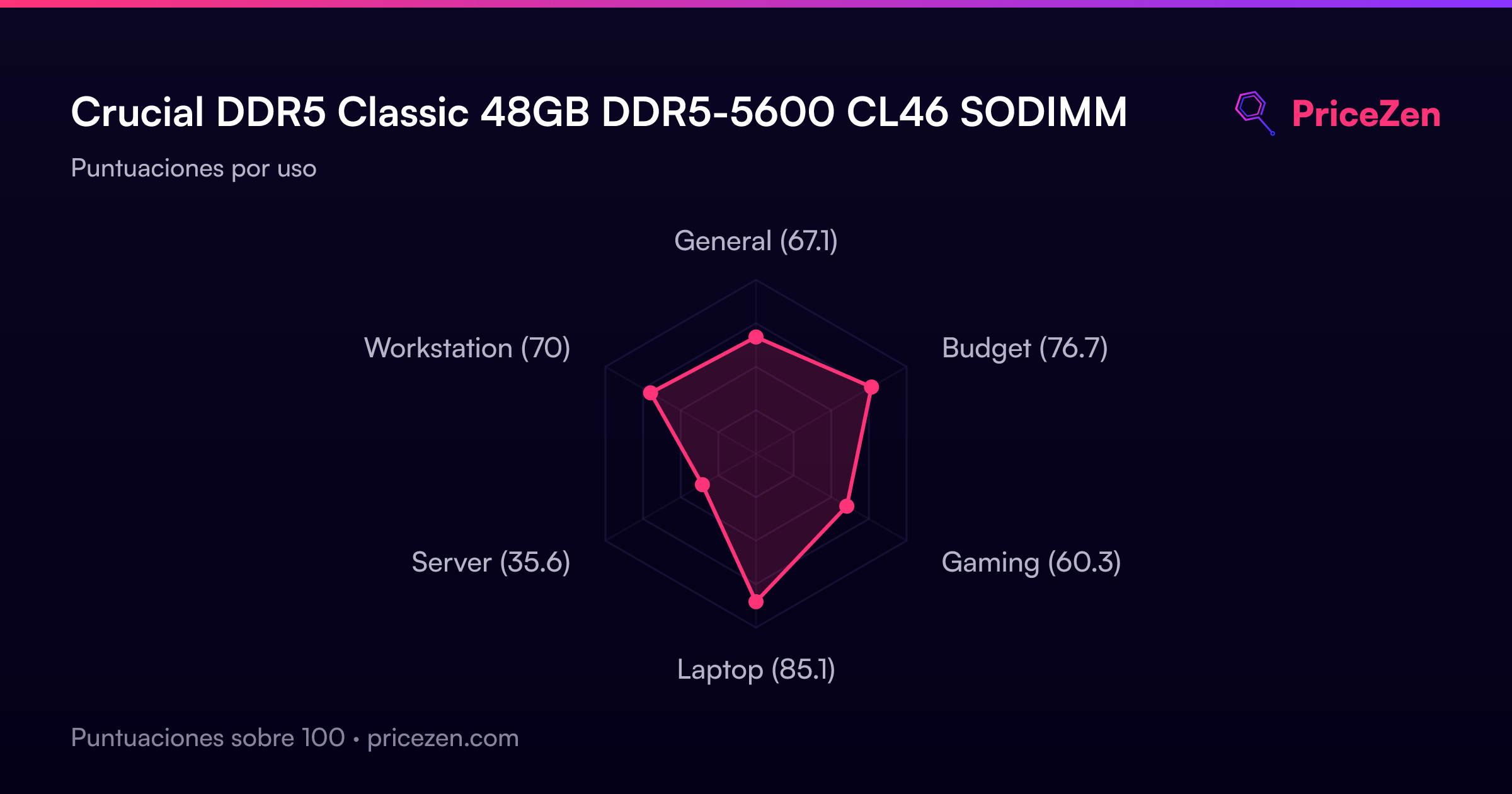
- General67.1
- Budget76.7
- Gaming60.3
- Laptop85.1
- Server35.6
- Workstation70