Gawfolk GF340H 34" Black 2025
The 34-inch IPS panel with a 120Hz refresh rate and FreeSync delivers fluid, tear-free motion for gaming, while its 128% sRGB coverage ensures vibrant color accuracy. The 21:9 ultrawide format provides 30% more screen space than standard monitors, complemented by a bezel-less design that minimizes distractions for immersive viewing. This display is best for office multitaskers and casual gamers seeking an affordable, expansive screen for productivity and entertainment.

Sin precio actual de tiendas











Resumen
The 30-Second Version
The Gawfolk GF340H is a 34-inch ultrawide IPS monitor with a 120Hz refresh rate and FreeSync, aimed at budget buyers who want a big screen without a big price tag. It delivers good color and smooth motion for gaming, but the 2560x1080 resolution looks soft at this size, and the stand is flimsy with no height adjustment. It's a solid value if you can live with the compromises and plan to mount it on a VESA arm.
Pros & Cons
Ventajas
- 34-inch ultrawide IPS panel with good color coverage
- 120Hz refresh rate with FreeSync for smooth gaming
- Wide 178-degree viewing angles
- VESA 75x75 mount support for better ergonomics
- Bezel-less design looks clean on a desk
Desventajas
- 2560x1080 resolution looks soft at 34 inches
- Stand only tilts, no height or swivel adjustment
- Only one HDMI and one DisplayPort input
- Heavy at 6.6kg, not easy to move around
- Feature set is thin compared to competitors
Opinión de los propietarios
The Word on the Street
Cómo cambió la opinión de los propietarios con el tiempo
ExclusivaSegún cuándo escribieron realmente sus opiniones los clientes, para ver si los elogios iniciales se mantuvieron.
13 opiniones escritas, abr 2024 – feb 2026: 11 satisfechos, 2 insatisfechos
En las 1399 valoraciones de tiendas: 4,2★. La mayoría de los propietarios valora sin escribir una opinión. El gráfico cuenta las 13 opiniones escritas.
Cada punto es una opinión escrita, en el mes en que se escribió. Satisfechos = 4-5★, neutrales = 3★, insatisfechos = 1-2★.
Las pruebas
Performance
The GF340H runs at 120Hz, which is a solid step up from 60Hz and noticeably smoother in fast-paced games. FreeSync is included, so if you're running an AMD GPU, you'll get adaptive sync to keep things tear-free. The 2ms response time claim is typical for this class of monitor, though real-world performance will vary depending on the overdrive setting. In our database, the performance score lands at the 56th percentile, which puts it right around average for monitors overall. That's not bad for a budget ultrawide, but it's not going to blow anyone away.
The display quality is a mixed bag. The IPS panel delivers good color accuracy and wide viewing angles, and the 350 nits brightness is fine for most indoor settings. The 128% sRGB coverage means colors will look vibrant, especially in games and video content. But the 2560x1080 resolution on a 34-inch screen works out to roughly 82 pixels per inch. For comparison, a 27-inch 1440p monitor sits around 109 PPI. So text and fine details won't be as sharp as they would be on a higher-resolution panel. If you're mostly gaming or watching movies, you probably won't mind. If you're doing detailed photo editing or reading lots of small text, you'll notice the softness.
The display score in our database is at the 65th percentile, and color comes in at the 64th percentile. Both are respectable for this price bracket. The weakest area by far is portability, which sits at the 3.5th percentile. That's not surprising for a 34-inch monitor weighing over 6.6 kilograms. This thing is meant to stay on a desk, not travel with you.
Specifications
Full Specifications
Display
| Size | 34" |
| Resolution | 2560x1080 (QHD) |
| Panel Type | IPS |
| Aspect Ratio | 21:9 |
| Curved | No |
| Screen Finish | matte |
Performance
| Refresh Rate | 120 Hz |
| Adaptive Sync | FreeSync |
Color & HDR
| Brightness | 350 nits |
| Color Gamut | 128% sRGB |
| Color Depth | 8-bit |
Connectivity
| HDMI Ports | 1 |
| DisplayPort | 1 |
| USB-C | 1 |
| Speakers | No |
Ergonomics
| Tilt | Yes |
| VESA Mount | 75x75 |
Features
| Weight | 6.6 kg / 14.6 lbs |
vs Competition
Compared to the LG UltraGear 45GX950A-B, the Gawfolk is in a completely different league. The LG is a premium ultrawide with a higher resolution, better panel technology, and a much higher price tag. If you have the budget, the LG is the better monitor in every way except price. The same goes for the Samsung Odyssey G9 G95C, which is a super ultrawide with a 49-inch panel and a much more immersive experience. These are aspirational comparisons, not direct competitors.
More realistic alternatives would be something like a 34-inch 1440p ultrawide from a more established brand. The MSI MAG 271QPX QD-OLED E2 and Gigabyte AORUS FO32U2 are both OLED panels with far better contrast and color performance, but they're also significantly more expensive and smaller in size. The Gawfolk's real competition is other budget ultrawides in the same price range, and there it holds up reasonably well on paper. The main trade-off is resolution. A 1440p ultrawide will look noticeably sharper, but you'll pay more for it. If 1080p ultrawide is what your budget allows, the Gawfolk is a decent option, though the flimsy stand and limited inputs are worth considering before you buy.
| Spec | Gawfolk GF340H 34" | LG UltraGear 45GX950A-B 45" | ASUS ROG Strix XG27UCDMG 27" | Dell UltraSharp U4025QW 39.7" | MSI MAG 271QPX QD-OLED E2 27" | Alienware AW-Series AW3425DW 34" |
|---|---|---|---|---|---|---|
| Screen Size | 34 | 45 | 27 | 39.70000076293945 | 27 | 34 |
| Resolution | 2560 x 1080 | 5120 x 2160 | 3840 x 2160 | 5120 x 2160 | 2560 x 1440 | 3440 x 1440 |
| Panel Type | IPS | OLED | OLED | IPS | QD-OLED | QD-OLED |
| Refresh Rate | 120 | 330 | 240 | 120 | 240 | 240 |
| Response Time Ms | - | 0.029999999329447746 | 0.029999999329447746 | 5 | 0.029999999329447746 | 0.029999999329447746 |
| Adaptive Sync | FreeSync | FreeSync Premium Pro | FreeSync Premium Pro | Adaptive-Sync | FreeSync Premium Pro | FreeSync Premium Pro |
| Hdr | - | DisplayHDR True Black 400 | DisplayHDR True Black 400 | HDR600 | DisplayHDR True Black 400 | HDR400 |
| Compare | Compare | Compare | Compare | Compare |
| Producto | Color | Portabilidad | Display | Feature | User Sentiment | Ergonomic | Performance | Connectivity | Valoración social |
|---|---|---|---|---|---|---|---|---|---|
| Gawfolk GF340H 34" | 62 | 49.6 | 59 | 21.2 | 48.1 | 47.4 | 56 | 62.4 | 62.3 |
| LG UltraGear 45GX950A-B 45" Compare | 99.4 | 76.7 | 99.7 | 96.3 | 76.5 | 90.8 | 99.4 | 97 | 92 |
| ASUS ROG Strix XG27UCDMG 27" Compare | 96.5 | 57.6 | 97.7 | 85 | 99.2 | 90.8 | 97.9 | 81.2 | 98.9 |
| Dell UltraSharp U4025QW 39.7" Compare | 97.9 | 76.7 | 98.6 | 96.3 | 85.7 | 90.8 | 56 | 99.3 | 96.8 |
| MSI MAG 271QPX QD-OLED E2 27" Compare | 99.2 | 57.6 | 73.4 | 85 | 95.7 | 90.8 | 97.9 | 81.2 | 98.9 |
| Alienware AW-Series AW3425DW 34" Compare | 98.9 | 74.1 | 84.2 | 90.8 | 95.7 | 90.8 | 97.9 | 95.4 | 96.8 |
Precio
Value & Pricing
The Gawfolk GF340H is a budget ultrawide, and that's where its appeal lies. You're getting a 34-inch IPS panel with 120Hz and FreeSync for what's likely a very reasonable price. The value proposition is strong if you want a big screen for gaming and general use without spending the kind of money that a 1440p ultrawide or a high-refresh 4K panel commands. That said, the feature set is sparse. You get one HDMI and one DisplayPort, no USB hub, no built-in speakers worth using, and a stand that's barely functional. The connectivity score sits at the 36th percentile, and features are at the 21st percentile. So you're paying for the panel size and refresh rate, not for extras. If you can live with the low pixel density and plan to mount it on an arm, this monitor delivers a lot of screen for the money.
Historial de precios
Leer más
Overview
The Gawfolk GF340H is a 34-inch ultrawide monitor aimed at budget-conscious buyers who want a big, immersive screen without spending a fortune. It runs a 2560x1080 resolution on an IPS panel, which gives you that 21:9 aspect ratio for extra horizontal space. The price isn't listed in our data, but this is clearly positioned as an entry-level ultrawide, not a premium display. You get a 120Hz refresh rate, FreeSync support, and a claimed 128% sRGB color coverage, which sounds great on paper for both gaming and office work.
Is the Gawfolk GF340H good for gaming? For the price, it's a reasonable option if you're coming from a standard 60Hz or even 144Hz 16:9 monitor and want more screen real estate. The 120Hz refresh rate keeps motion smooth, and FreeSync helps reduce tearing when your frame rate dips. But don't expect high-end performance. The resolution is 2560x1080 stretched across 34 inches, so pixel density is on the lower side. Text can look a bit soft if you're doing a lot of reading or spreadsheet work.
For productivity, the ultrawide format is genuinely useful. You can fit two full-size windows side by side without a second monitor. The IPS panel gives you wide 178-degree viewing angles, so colors stay consistent even if you're not sitting dead center. Just keep in mind the stand only tilts, so you'll want to factor in a VESA mount if you need height adjustment. The monitor supports 75x75mm VESA mounting, which solves that problem for about twenty bucks.
One thing to note: the manufacturer's description is a bit of a mess. It mentions a 27-inch VA panel in one section and a 34-inch IPS panel in another. Our data confirms this is the 34-inch IPS version, but the sloppy spec sheet doesn't inspire confidence. The retailer listing also mentions a 2ms response time, though that's likely a marketing number rather than a measured result.
Common Questions
Q: Is the Gawfolk GF340H good for gaming?
Yes, for budget gaming it's a solid choice. The 120Hz refresh rate and FreeSync support keep motion smooth and reduce screen tearing, though the 2560x1080 resolution means you won't get the sharpness of a 1440p ultrawide.
Q: Does the Gawfolk GF340H have built-in speakers?
The monitor does not have meaningful built-in speakers. Multiple owners report the speakers are weak or effectively absent, so you'll want external speakers or a headset.
Q: Can I mount the Gawfolk GF340H on a monitor arm?
Yes, it supports the 75x75mm VESA mounting standard. Given that the included stand only tilts and feels flimsy, a monitor arm is a recommended upgrade for better ergonomics.
Q: Is the Gawfolk GF340H good for office work?
It's decent for productivity thanks to the ultrawide 21:9 format, which lets you fit two windows side by side. However, the 1080p vertical resolution means text can look soft, so it's not ideal for heavy reading or detailed spreadsheet work.
Who Should Skip This
Skip the Gawfolk GF340H if you need sharp text for work. The 2560x1080 resolution on a 34-inch panel just doesn't have the pixel density for comfortable all-day reading or detailed photo editing. If you're a creative professional who needs accurate color and fine detail, look at a 1440p or 4K IPS panel instead. You should also skip it if you need multiple inputs for a multi-device setup, since it only has one HDMI and one DisplayPort. And if you're sensitive to build quality, the flimsy stand will annoy you. For a bit more money, a 34-inch 1440p ultrawide from a more established brand will give you a sharper picture, better stand, and more connectivity. This monitor is for people who want maximum screen size for minimum cash and are willing to accept the trade-offs.
Verdict
Should you buy the Gawfolk GF340H? If you want a big ultrawide monitor for gaming and general use on a tight budget, it's worth a look. The 120Hz refresh rate, FreeSync, and IPS panel give you a solid experience for the price. The 34-inch ultrawide format is genuinely useful for productivity, and the color coverage is better than you'd expect at this price point. But you need to go in with realistic expectations. The 2560x1080 resolution is the biggest compromise. Text isn't sharp, and if you're used to a higher-DPI display, you'll notice it immediately.
The stand is another weak point. It only tilts, and multiple owners report it feels flimsy. Plan on buying a VESA mount if you want any kind of height adjustment. The limited connectivity is also a factor if you need to plug in multiple devices. For a single PC or console setup, it's fine. For a multi-device workstation, you'll want more inputs. Overall, this is a budget monitor that delivers on the basics but cuts corners on the details. If you can live with those compromises, it's a solid value. If you can stretch your budget, a 1440p ultrawide will serve you better in the long run.
Usage Scores
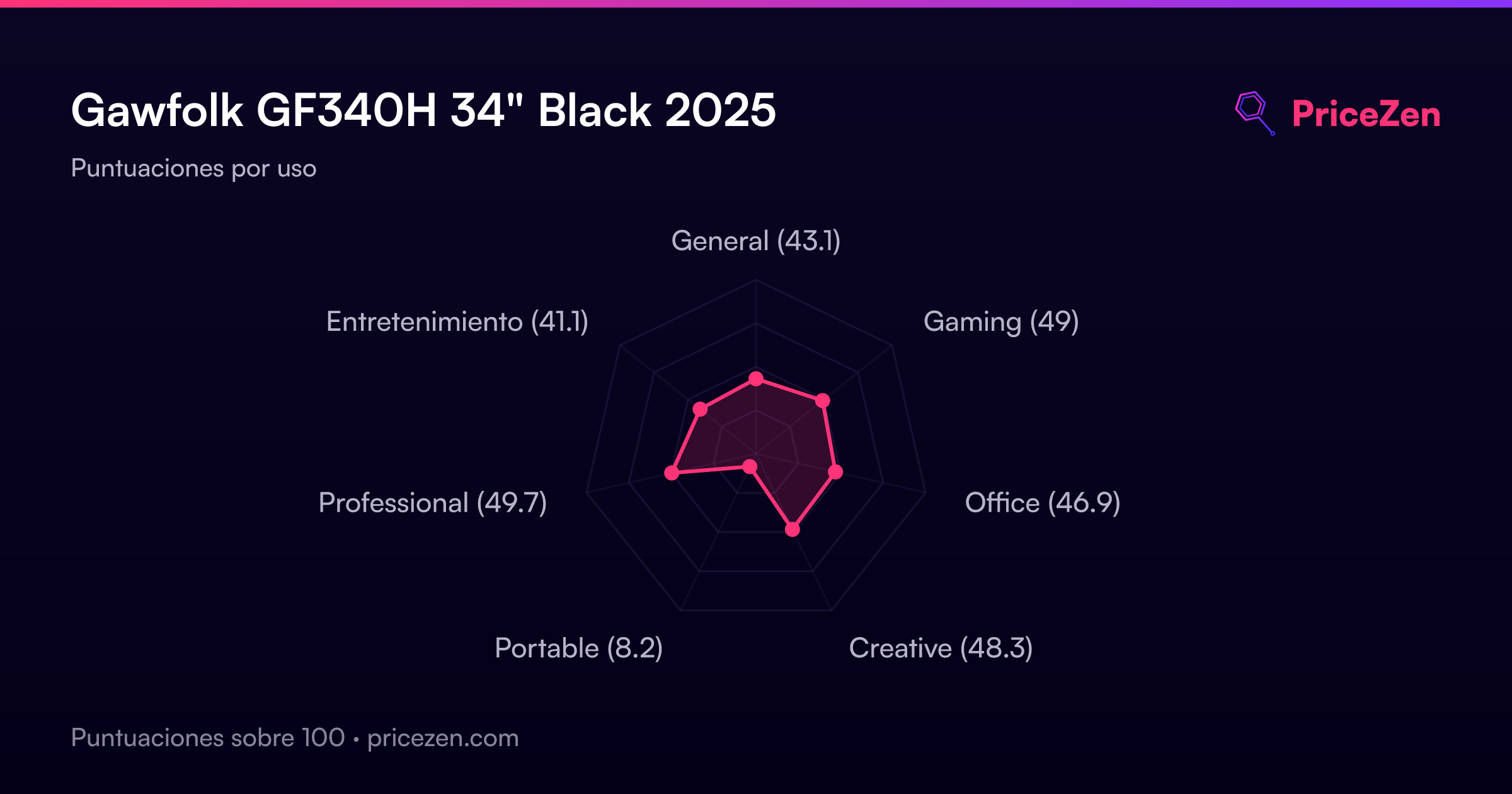
- General43.1
- Gaming49
- Office46.9
- Creative48.3
- Portable8.2
- Professional49.7
- Entretenimiento41.1