MAXHUB CMB Series ND75CMB 75" Black
The 75-inch ADS LCD panel delivers native 4K resolution at 500 nits with HDR support, making it a bright and sharp choice for digital signage. Its Crestron, Extron, and Q-Sys certifications ensure straightforward integration into existing AV control systems, while the 24/7 duty cycle and portrait or landscape mounting add flexibility. This monitor suits AV integrators and facility managers deploying reliable, always-on displays in lobbies, conference rooms, or retail spaces.

Sin precio actual de tiendas


Resumen
The 30-Second Version
The MAXHUB CMB Series ND75CMB is a 75-inch commercial display built for 24/7 operation in bright environments. The 500-nit panel with 98% sRGB coverage looks great for signage and presentations, and the Crestron, Extron, and Q-Sys certifications make enterprise integration straightforward. At $1,968 USD, it's a reasonable deal for businesses that need commercial-grade reliability. Just don't buy it for gaming or home theater use, the 60Hz refresh rate and 8ms response time will disappoint.
Pros & Cons
Ventajas
- 24/7 duty cycle means it's built to run continuously without burning out 96th
- 500 nits brightness with 25% haze level handles bright rooms well 94th
- Crestron, Extron, and Q-Sys certification makes enterprise integration painless 85th
- 98% sRGB coverage and 10-bit color deliver accurate, vibrant visuals 84th
- Built-in content sharing and management reduces need for external hardware
Desventajas
- 60Hz refresh rate and 8ms response time are weak for any fast-motion content
- Ergonomics are limited to VESA mounting, no stand adjustments to speak of
- Portability score of 26 means this thing is a beast to move and install
- No pricing advantage over consumer TVs with similar visual specs
- ADS LCD panel can't match OLED or VA contrast for dark-room viewing
Las pruebas
Performance
Let's be honest about the performance numbers. The 6th percentile ranking for performance is rough, and it's mostly because this panel runs at 60Hz with an 8ms response time. For a commercial display, that's completely fine. Nobody is playing Counter-Strike on a lobby sign. But if you're comparing this against the OLED gaming monitors in our database, it's going to look terrible on paper. The 60Hz refresh rate means smooth motion for video content, but fast-moving text or animations won't have that buttery feel you get from high-refresh panels.
The display and color scores tell a much better story. The 96th percentile display ranking and 94th percentile color ranking put this panel near the top of the commercial display category. The 500 nits of brightness is solid for indoor signage, and the 98% sRGB coverage means colors will look accurate and vibrant for marketing content, presentations, and video. The 1200:1 static contrast ratio is decent for an ADS LCD panel, though it won't touch the deep blacks you'd get from OLED or even a good VA panel. The 25% haze level is a deliberate choice for commercial use, it diffuses reflections and reduces glare in bright rooms, which is exactly what you want in a retail or office environment.
Specifications
Full Specifications
Display
| Size | 75" |
| Resolution | 3840x2160 (4K UHD) |
| Panel Type | IPS |
| Aspect Ratio | 16:9 |
| Curved | No |
| Screen Finish | matte |
Performance
| Refresh Rate | 60 Hz |
| Response Time | 8 |
Color & HDR
| Brightness | 500 nits |
| Color Gamut | 98% sRGB |
| Color Depth | 10-bit |
| HDR | ✓ |
| HDR Support | HDR |
Connectivity
| HDMI Ports | 3 |
| USB-C | 1 |
| Speakers | Yes |
Ergonomics
| Height Adjustable | No |
| Tilt | No |
| Swivel | No |
| Pivot | No |
| VESA Mount | 600x400 |
Features
| Touchscreen | No |
| PIP/PBP | Yes |
| Power | 119 |
vs Competition
The competitors in our database are mostly gaming and productivity monitors, which makes direct comparisons a bit awkward. The LG UltraGear 45GX950A-B and ASUS ROG Strix XG27UCDMG are OLED gaming panels with high refresh rates and incredible contrast, but they're not built for 24/7 commercial use and they're much smaller. The Dell UltraSharp U4025QW is a productivity-focused ultrawide with excellent color accuracy, but again, it's a desktop monitor, not a wall-mounted signage display.
The real comparison for the MAXHUB is against other commercial displays from Samsung, LG, and NEC. Those brands have long track records in the signage space and often offer similar brightness, duty cycles, and integration options. Where MAXHUB tries to compete is on price and the built-in content management features. The trade-off is brand recognition and the maturity of the support ecosystem. If your AV integrator already has a preferred vendor, they might push back on a MAXHUB. But if you're managing this yourself and want to save some money, the CMB Series is worth a look.
| Spec | MAXHUB CMB Series ND75CMB 75" | LG UltraGear 45GX950A-B 45" | ASUS ROG Strix XG27UCDMG 27" | Dell UltraSharp U4025QW 39.7" | MSI MAG 271QPX QD-OLED E2 27" | Alienware AW-Series AW3425DW 34" |
|---|---|---|---|---|---|---|
| Screen Size | 75 | 45 | 27 | 39.70000076293945 | 27 | 34 |
| Resolution | 3840 x 2160 | 5120 x 2160 | 3840 x 2160 | 5120 x 2160 | 2560 x 1440 | 3440 x 1440 |
| Panel Type | IPS | OLED | OLED | IPS | QD-OLED | QD-OLED |
| Refresh Rate | 60 | 330 | 240 | 120 | 240 | 240 |
| Response Time Ms | 8 | 0.029999999329447746 | 0.029999999329447746 | 5 | 0.029999999329447746 | 0.029999999329447746 |
| Adaptive Sync | - | FreeSync Premium Pro | FreeSync Premium Pro | Adaptive-Sync | FreeSync Premium Pro | FreeSync Premium Pro |
| Hdr | HDR | DisplayHDR True Black 400 | DisplayHDR True Black 400 | DisplayHDR 600 | DisplayHDR True Black 400 | DisplayHDR 400 True Black |
| Compare | Compare | Compare | Compare | Compare |
| Producto | Color | Portabilidad | Display | Feature | Ergonomic | Performance | Connectivity |
|---|---|---|---|---|---|---|---|
| MAXHUB CMB Series ND75CMB 75" | 93.6 | 63 | 95.5 | 83.7 | 30.6 | 6.2 | 85.3 |
| LG UltraGear 45GX950A-B 45" Compare | 99.4 | 76.5 | 99.7 | 95.7 | 90.8 | 99.4 | 97 |
| ASUS ROG Strix XG27UCDMG 27" Compare | 96.1 | 57.5 | 97.9 | 83.7 | 90.8 | 98 | 81.3 |
| Dell UltraSharp U4025QW 39.7" Compare | 98.2 | 76.5 | 98.7 | 95.7 | 90.8 | 56.1 | 99.3 |
| MSI MAG 271QPX QD-OLED E2 27" Compare | 99.1 | 57.5 | 77.3 | 83.7 | 90.8 | 98 | 81.3 |
| Alienware AW-Series AW3425DW 34" Compare | 99 | 73.9 | 85.7 | 89.7 | 90.8 | 98 | 95.5 |
Precio
Value & Pricing
At $1,968 USD, the value conversation depends entirely on what you're comparing it to. Against other commercial displays with similar certifications and duty cycles, this is actually pretty competitive. The Crestron, Extron, and Q-Sys certifications alone can save an IT department hours of integration headaches, and that time has real dollar value. The included wall mount bracket is also a nice touch that saves another chunk of change.
But if you're just looking for a big screen to show content, a 75-inch consumer TV will cost significantly less and look just as good to most viewers. What you're paying for here is the reliability, the integration ecosystem, and the peace of mind that comes with a panel rated for continuous operation. For a business that needs signage that runs 24/7 without someone babysitting it, that's worth the premium. For a small shop that just wants a menu board, it's probably overkill.
Leer más
Overview
The MAXHUB CMB Series ND75CMB is not a gaming monitor, and it doesn't pretend to be. This is a 75-inch commercial display built for lobbies, conference rooms, retail spaces, and anywhere else that needs a big, bright screen running all day without complaint. The 24/7 duty cycle is the headline here, along with a 500-nit panel that can hold its own in well-lit environments. If you're shopping for a desk monitor, this thing will absolutely dwarf your setup, and not in a good way.
What makes it interesting is the integration story. Crestron, Extron, and Q-Sys certification means IT teams can drop this into an existing AV control system without fighting drivers or workarounds. That's a big deal in corporate environments where the display is just one piece of a larger room setup. The built-in content sharing and management also means you don't necessarily need a separate media player bolted to the back, though you might still want one depending on your workflow.
At roughly $1,968 USD, this sits in a weird middle ground. It's cheaper than a lot of premium commercial panels from the big names, but it's also a lot more expensive than a consumer 75-inch TV that might look just as good to the average person walking by. The value proposition hinges on whether you actually need the commercial-grade features, the certifications, and the ability to run it into the ground without it dying on you.
Common Questions
Q: Can this display run 24/7 without issues?
Yes, the MAXHUB CMB Series is rated for a 24/7 duty cycle, which means it's designed to run continuously without the risk of burn-in or premature failure that you'd see with consumer displays. The ADS LCD panel and the 25% haze level are both choices that support long-term commercial use. Just make sure it's properly ventilated and mounted according to the included instructions.
Q: Does this work with my existing AV control system?
If you're using Crestron, Extron, or Q-Sys, then yes. The display is certified for all three platforms, which means it should integrate without custom drivers or workarounds. This is one of the main reasons to choose a commercial display like this over a consumer TV. The certification means the control protocols are documented and tested, so your integrator can get it talking to the rest of your room setup quickly.
Q: How does the image quality compare to a consumer 4K TV?
The 500 nits of brightness and 98% sRGB coverage are comparable to a good consumer TV, and the 1200:1 contrast ratio is typical for an ADS LCD panel. The main difference is the 25% haze level, which is a deliberate anti-glare treatment that makes the screen easier to read in bright rooms but slightly reduces perceived sharpness compared to a glossy consumer panel. For signage and presentations, this is a good trade-off. For movie watching in a dark room, a consumer TV with a VA or OLED panel will look better.
Q: What's included in the box?
The MAXHUB CMB Series includes a wall mount bracket, which is a nice bonus since most commercial displays make you buy that separately. You also get the standard power cable and likely an HDMI cable, though the exact accessories can vary by retailer. The display supports VESA 600x400 mounting if you prefer to use your own mount or a cart.
Who Should Skip This
If you're looking for a gaming monitor or a home theater display, this is not the product for you. The 60Hz refresh rate and 8ms response time will feel sluggish for fast-paced games, and the ADS LCD panel can't deliver the deep blacks that OLED or VA panels offer for movie watching. You'd be much better served by something like the LG UltraGear 45GX950A-B or a high-end consumer OLED TV.
Small businesses that just need a single menu board or a basic lobby display should also think twice. The commercial certifications and 24/7 rating are overkill for a screen that runs 12 hours a day, five days a week. A consumer TV with a cheap media player will do the job for less money. The MAXHUB earns its keep in multi-display deployments, corporate environments with existing AV infrastructure, and anywhere uptime is genuinely critical.
Verdict
For a corporate conference room or a digital signage deployment where the display needs to run all day, every day, the MAXHUB CMB Series ND75CMB is a solid choice. The certifications, the brightness, and the 24/7 rating are exactly what you need, and the price is reasonable for what you're getting. The built-in content management is a genuine convenience that can simplify a multi-display rollout.
For a home theater or a gaming setup, look elsewhere. The 60Hz refresh rate, the 8ms response time, and the lack of any meaningful ergonomic adjustments make this a poor fit for interactive use. You'd be much happier with a dedicated gaming monitor or a high-end consumer TV. This is a tool for businesses, not a toy for enthusiasts.
Usage Scores
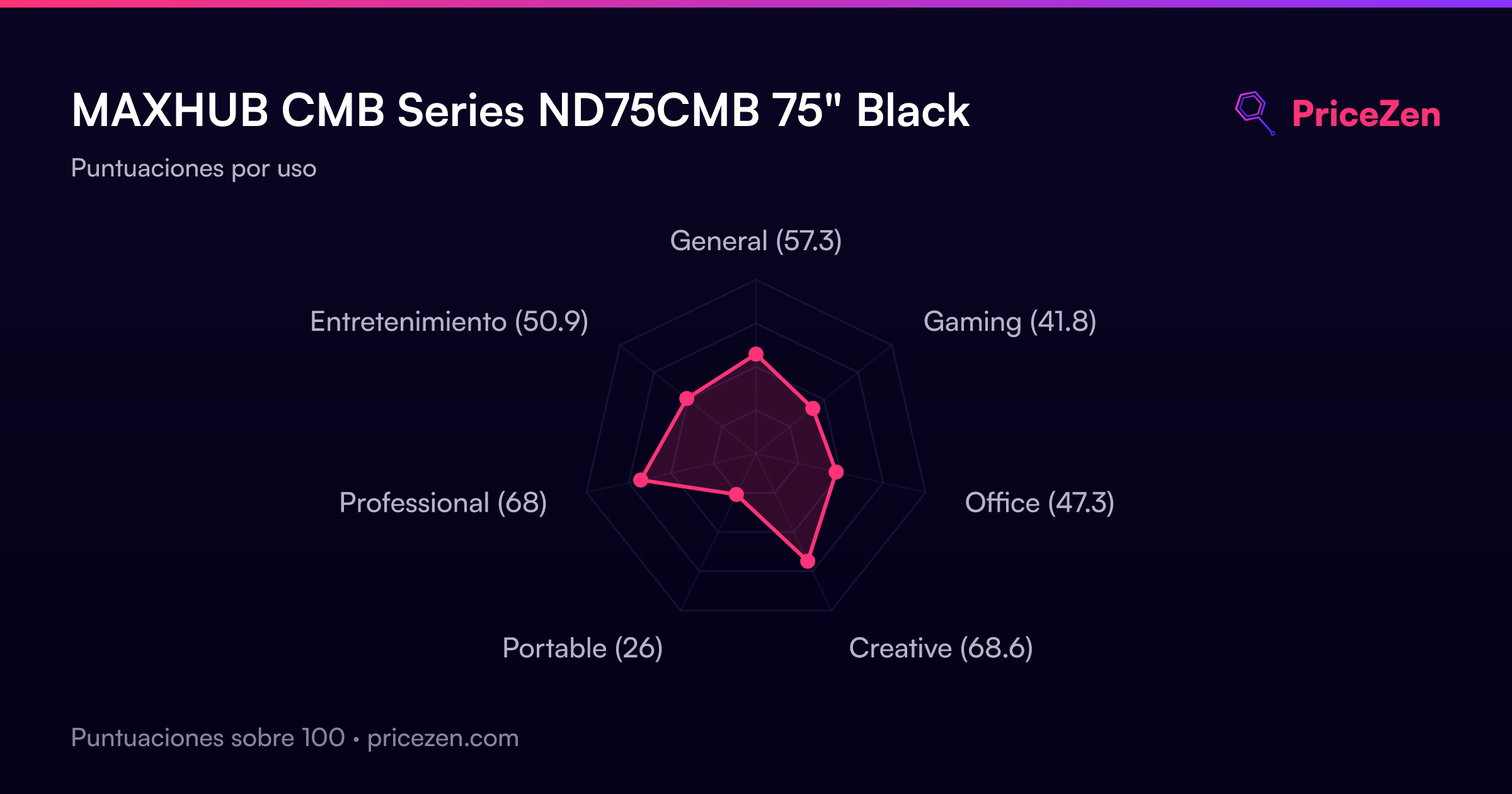
- General57.3
- Gaming41.8
- Office47.3
- Creative68.6
- Portable26
- Professional68
- Entretenimiento50.9