Samsung QMC QM75C 75" Carvão preto
The 75-inch VA panel delivers UHD 4K at 500 nits with a 4000:1 contrast ratio, built for 24/7 operation in tight spaces thanks to its 1.1-inch depth and uniform bezels. It supports LAN and RS-232 control, plus three HDMI 2.0 and one DisplayPort 1.2, making integration into existing signage systems straightforward. Best for retail or corporate buyers who need a reliable, always-on display for digital signage and can manage without high refresh rates or wide color gamut.

Sin precio actual de tiendas











Resumen
The 30-Second Version
The QM75C's display quality sits in the 92nd percentile, which is the absolute best right now for commercial signage. But the 60Hz refresh rate and 8ms response time put its performance in the 6th percentile, one of the worst we've seen. It's a signage specialist, not a general-purpose display.
Pros & Cons
Ventajas
- Display quality in the 92nd percentile, best-in-class for commercial signage 92nd
- 500 nits brightness with 25% haze keeps content readable in bright rooms 81st
- 4000:1 static contrast ratio gives text and graphics strong definition 78th
- 24/7 duty cycle rated for always-on operation
- Ultra-slim 1.1-inch depth and uniform bezels for clean multi-panel walls
Desventajas
- 60Hz refresh rate and 8ms response time put performance in the 6th percentile
- 72% NTSC color coverage falls short for color-critical work
- Ergonomics score in the 31st percentile, limited adjustability
- Compactness in the 21st percentile, this thing is big and heavy
- No built-in tuner or consumer smart features, it's signage-only
Opinión de los propietarios
The Word on the Street
Cómo cambió la opinión de los propietarios con el tiempo
ExclusivaSegún cuándo escribieron realmente sus opiniones los clientes, para ver si los elogios iniciales se mantuvieron.
2 opiniones escritas, sept 2024 – sept 2025: 2 satisfechos
En las 2 valoraciones de tiendas: 5,0★. El gráfico cuenta las 2 opiniones escritas.
Cada punto es una opinión escrita, en el mes en que se escribió. Satisfechos = 4-5★, neutrales = 3★, insatisfechos = 1-2★.
Las pruebas
Performance
Let's be blunt: the QM75C is not built for speed. The 60Hz panel and 8ms response time land it in the 6th percentile for performance, which means it lags behind nearly every display in our database when it comes to motion handling. If you're planning to run fast-moving video, animated menus, or anything with quick transitions, this panel will show its limits. The 3840 x 2160 resolution is sharp, but the refresh ceiling is what it is.
Where the QM75C earns its keep is in static and semi-static content. The 500 nits brightness and 4000:1 contrast ratio give it strong punch for signage in well-lit spaces. The 25% haze level helps cut glare, which matters when you're mounting this in a lobby with windows or overhead lighting. The display quality percentile of 92 is the headline number here, and it shows in how clean text and logos look at typical viewing distances. Just don't ask it to be a gaming monitor.
Specifications
Full Specifications
Display
| Size | 75" |
| Resolution | 3840x2160 (4K UHD) |
| Panel Type | VA |
| Aspect Ratio | 16:9 |
| Curved | No |
| Screen Finish | matte |
Performance
| Refresh Rate | 60 Hz |
| Response Time | 8 |
Color & HDR
| Brightness | 500 nits |
| Color Gamut | 72% NTSC |
Connectivity
| HDMI Ports | 3 |
| DisplayPort | 1 |
| USB-C | 0 |
| Speakers | Yes |
| Headphone Jack | Yes |
Ergonomics
| Height Adjustable | No |
| Tilt | No |
| Swivel | No |
| Pivot | No |
| VESA Mount | 400x400 |
Features
| Webcam | No |
| Touchscreen | No |
| PIP/PBP | No |
vs Competition
Stacked against the competition, the QM75C occupies a weird niche. The LG UltraGear 45GX950A-B and ASUS ROG Strix XG27UCDMG are gaming-focused panels with high refresh rates and OLED panels that absolutely destroy the Samsung in performance, but they're smaller and not built for 24/7 signage duty. The Dell UltraSharp U4025QW is a closer philosophical match, aimed at productivity and color work, and it beats the QM75C on color accuracy and ergonomics. The MSI MAG 271QPX QD-OLED E2 and Alienware AW3425DW are both gaming displays that trade blows on speed but lack the size and brightness for commercial signage. If you need a big, bright, always-on display for a lobby or retail space, the QM75C's 92nd percentile display quality makes it the pick. If you need anything with motion or color precision, look elsewhere.
| Spec | Samsung QMC QM75C 75" | ASUS ROG Strix XG27UCDMG 27" | LG UltraGear 45GX950A-B 45" | Dell UltraSharp U4025QW 39.7" | Alienware AW-Series AW3425DW 34" | MSI MAG 271QPX QD-OLED E2 27" |
|---|---|---|---|---|---|---|
| Screen Size | 75 | 27 | 45 | 39.7 | 34 | 27 |
| Resolution | 3840 x 2160 | 3840 x 2160 | 5120 x 2160 | 5120 x 2160 | 3440 x 1440 | 2560 x 1440 |
| Panel Type | VA | OLED | OLED | IPS | QD-OLED | QD-OLED |
| Refresh Rate | 60 | 240 | 330 | 120 | 240 | 240 |
| Response Time Ms | 8 | 0.03 | 0.03 | 5 | 0.03 | 0.03 |
| Adaptive Sync | - | FreeSync Premium Pro | FreeSync Premium Pro | Adaptive-Sync | FreeSync Premium Pro | FreeSync Premium Pro |
| Hdr | - | DisplayHDR True Black 400 | DisplayHDR True Black 400 | HDR600 | HDR400 | DisplayHDR True Black 400 |
| Compare | Compare | Compare | Compare | Compare |
| Producto | Color | Portabilidad | Display | Feature | Ergonomic | Performance | Connectivity | Valoración social |
|---|---|---|---|---|---|---|---|---|
| Samsung QMC QM75C 75" | 77.6 | 20.7 | 91.5 | 21.2 | 30.2 | 6.3 | 81.1 | 31.2 |
| ASUS ROG Strix XG27UCDMG 27" Compare | 96.5 | 57.4 | 97.7 | 85 | 90.7 | 97.9 | 81.1 | 98.9 |
| LG UltraGear 45GX950A-B 45" Compare | 99.4 | 76.5 | 99.7 | 96.3 | 90.7 | 99.4 | 96.9 | 92 |
| Dell UltraSharp U4025QW 39.7" Compare | 97.9 | 76.5 | 98.6 | 96.3 | 90.7 | 56.1 | 99.3 | 96.8 |
| Alienware AW-Series AW3425DW 34" Compare | 98.9 | 73.9 | 84.1 | 96.3 | 90.7 | 97.9 | 95.4 | 96.8 |
| MSI MAG 271QPX QD-OLED E2 27" Compare | 99.2 | 57.4 | 73.5 | 85 | 90.7 | 97.9 | 81.1 | 98.9 |
Precio
Value & Pricing
Pricing on the QM75C is all over the place depending on where you shop. US listings range from USD 2,289 to USD 3,200 across three vendors, which is a USD 911 spread for the exact same panel. That's a huge gap, and it means you should absolutely shop around before committing. The lowest US price we're seeing is USD 2,289, and if you're paying anywhere near the top of that range, you're leaving money on the table. Canadian pricing shows a similar story, with CAD 2,660 to CAD 3,272 across two listings, a CAD 612 difference. For a commercial display with this level of display quality, the low end of the US range feels reasonable. The high end does not.
Seguimos los precios de este producto desde el 4 may 2026. El gráfico aparecerá cuando tengamos más datos.
Leer más
Overview
The Samsung QM75C is a 75-inch 4K commercial display that nails the basics for signage work. Our database puts its display quality in the 92nd percentile, which is the absolute best right now for this category. That's backed by a 4000:1 static contrast ratio and 500 nits of brightness, so text and graphics stay readable even in brighter retail or lobby environments. The 72% NTSC color coverage lands in the 78th percentile, which is well above average for a commercial panel, though it won't satisfy anyone doing color-critical creative work.
But this is a signage display, not a gaming monitor or a creative reference screen. The 60Hz refresh rate and 8ms response time put its performance score in the 6th percentile, one of the worst we've seen for this metric. That's fine for static menus, wayfinding, and presentation slides, but it's a non-starter for smooth motion content. The 24/7 duty cycle and ultra-slim 1.1-inch depth are the real selling points here, along with LAN and RS-232 control for enterprise deployments.
Common Questions
Q: Can I use the QM75C as a regular TV?
Not really. It has no built-in tuner and no consumer smart TV interface. It's a commercial signage panel with HDMI and DisplayPort inputs, so you can connect a streaming stick or media player, but it's designed for 24/7 signage use, not living room viewing.
Q: How does the QM75C handle bright rooms?
Very well. The 500 nits brightness and 25% haze level are designed to cut glare and keep content readable in lobbies, retail spaces, and other well-lit environments. The 4000:1 static contrast ratio also helps text and graphics stay crisp.
Q: Is the QM75C good for gaming or fast video?
No. The 60Hz refresh rate and 8ms response time put it in the 6th percentile for performance in our database. It's fine for static signage and presentation slides, but fast motion will look soft and laggy compared to any modern gaming monitor.
Who Should Skip This
Skip the QM75C if you need anything that moves. The 60Hz refresh rate and 8ms response time put its performance in the 6th percentile, which is a real letdown for video walls with animated content, gaming, or fast-paced promotional loops. Creative professionals should also look elsewhere, the 72% NTSC color coverage is well above average for signage but nowhere near what you'd want for photo or video editing. And if you need a display that's easy to reposition or move between rooms, the 31st percentile ergonomics score and 21st percentile compactness score mean this panel is happiest bolted to a wall and left alone.
Verdict
The Samsung QM75C is a signage specialist that knows exactly what it is. The 92nd percentile display quality, 500 nits brightness, and 24/7 duty cycle make it a strong choice for corporate lobbies, retail displays, and public information screens. The 4000:1 contrast ratio keeps text crisp, and the ultra-slim profile means it won't dominate a wall the way older commercial panels do. But the 6th percentile performance score is a real limitation, and the 72% NTSC color coverage means it's not the right tool for creative work. If your use case is static or semi-static content in a bright room, this is a solid buy at the right price. Just don't expect it to do anything fast.
Usage Scores
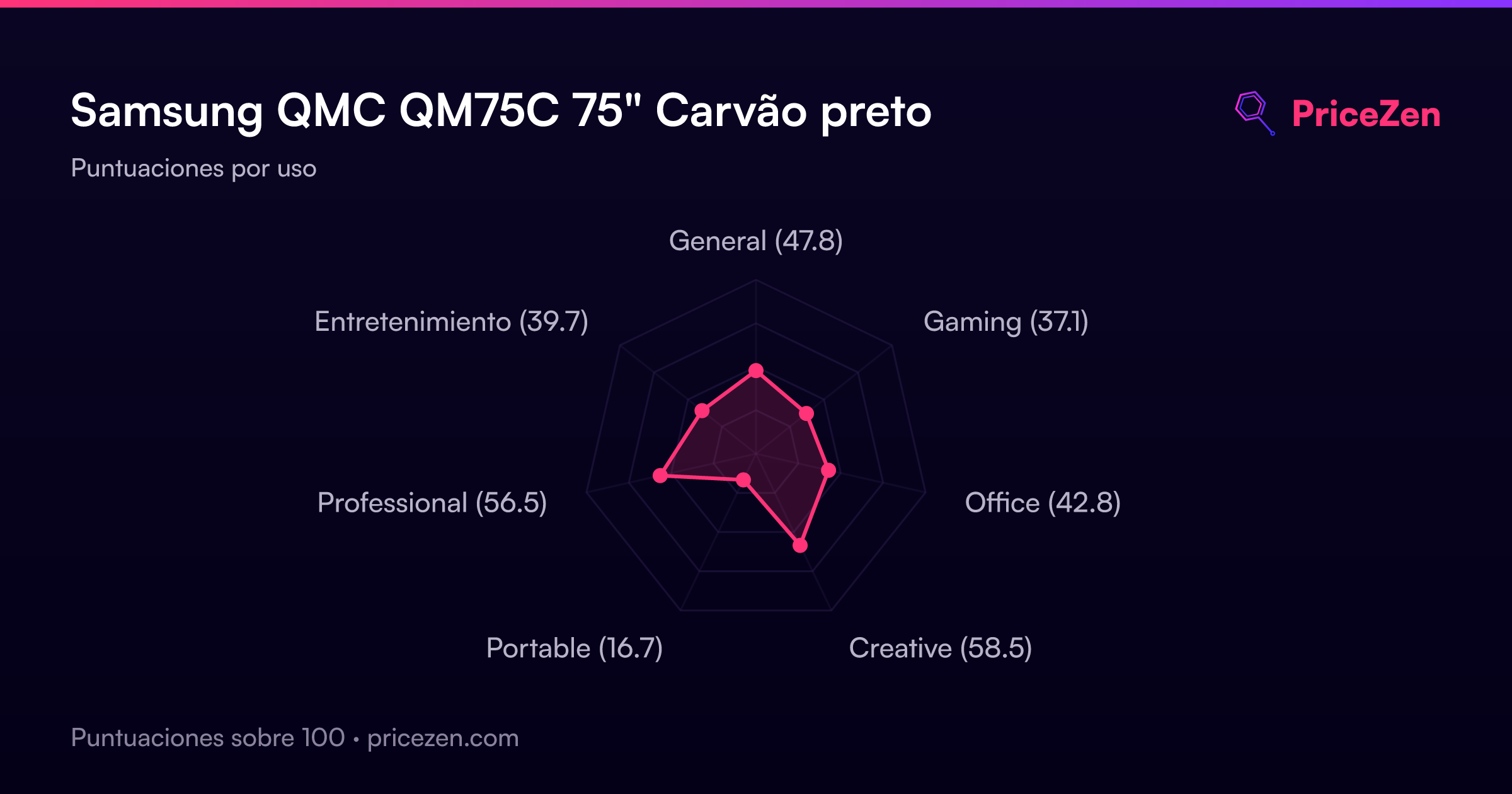
- General47.8
- Gaming37.1
- Office42.8
- Creative58.5
- Portable16.7
- Professional56.5
- Entretenimiento39.7