Dell S2421NX 24" Black 2021

Acabado brillante para un contraste intenso verificado el 28 nov
39/100 puntuación global 4,7 media de 57 valoraciones de propietarios
- Screen
- 24"
- Resolution
- 1920 x 1080
- Panel
- IPS
- Refresh
- 60 Hz
- Adaptive sync
- FreeSync
- HDR
- HDR10
Compara precios en 1 tienda
De la más barata a la más cara. Las ofertas nuevas, reacondicionadas y en pack se mantienen separadas para que compares lo comparable.
| Tienda | Vendido por | Color y estado | Precio | vs. el más bajo | Última comprobación | Enlace |
|---|---|---|---|---|---|---|
| Nuevo1 ofertaUnidad individual | ||||||
| No comprobados en los últimos 7 días, por lo que estos precios pueden haber cambiado | ||||||
| Amazon | Vendedor externo | No indicado | 5148,21 MXN | 29 oct | Ir a la tienda | |
 Fuente: PriceZen, comprobado el 29 oct 2026
Un precio se considera vigente si lo comprobamos en los últimos 7 días. «Vendedor externo» significa un vendedor de terceros en esa tienda, no la propia tienda.
Historial de precios
Comprobado ese díaNo comprobado ese día, sigue en oferta
Fuente: PriceZen, checked 2 nov 2026






Resumen
The 30-Second Version
The Dell S2421NX is a solid 24-inch 1080p IPS monitor that punches above its weight for the price. The 75Hz refresh rate and FreeSync support are nice bonuses, and the color accuracy is better than you'd expect at $164 USD. The big limitation is connectivity, HDMI only, no DisplayPort or USB-C, which can be a dealbreaker for modern laptops and docks. If you're setting up a home office and connecting via HDMI, this is a great buy. Just be aware that returns are painful if it doesn't work out.
Pros & Cons
Ventajas
- IPS panel with good color accuracy for the price 70th
- 75Hz refresh rate with FreeSync support
- Solid build quality from a trusted brand
- VESA mountable for better ergonomics
- Very affordable at $164 USD
Desventajas
- HDMI only, no DisplayPort or USB-C
- 250 nits brightness is dim for bright rooms
- Limited stand adjustment out of the box
- No built-in USB hub
- Return shipping and restocking fees are brutal if it doesn't work out
Opinión de los propietarios
The Word on the Street
- A recurring theme is that the image quality exceeds expectations for the price, with multiple owners praising the crisp text and accurate colors.
- Many buyers mention the value for money as a standout, noting that getting a Dell IPS panel at this price feels like a steal compared to other brands.
- Build quality gets consistent praise, with owners commenting that the monitor feels sturdy and well-constructed, not flimsy like some budget options.
- A common complaint is the lack of DisplayPort, which left at least one buyer unable to connect to their laptop dock and facing expensive return shipping and a restocking fee.
Cómo cambió la opinión de los propietarios con el tiempo
ExclusivaSegún cuándo escribieron realmente sus opiniones los clientes, para ver si los elogios iniciales se mantuvieron.
7 opiniones escritas, ene 2024 – sept 2025: 6 satisfechos, 1 insatisfecho
En las 57 valoraciones de tiendas: 4,7★. La mayoría de los propietarios valora sin escribir una opinión. El gráfico cuenta las 7 opiniones escritas.
Cada punto es una opinión escrita, en el mes en que se escribió. Satisfechos = 4-5★, neutrales = 3★, insatisfechos = 1-2★.
Las pruebas
Performance
The S2421NX runs at 75Hz with a 4ms response time, which is a modest bump over the standard 60Hz office monitor. In our database, its performance lands in the 35th percentile overall, so it's not going to impress anyone who's used to a 144Hz gaming panel. But for everyday use, the extra 15Hz makes scrolling and window dragging feel just a touch smoother. AMD FreeSync is included, which is a nice bonus if you have an AMD GPU and want to do some light gaming without tearing.
The display itself is a mixed bag. Brightness tops out at 250 nits, which is fine for a dim office but struggles near bright windows. The 1000:1 contrast ratio is typical for IPS, so blacks look more like dark gray in a dark room. Color accuracy is where this panel shines for the price. Users consistently praise the crispness and color, and while it's not a professional-grade display, it's more than adequate for documents, web browsing, and casual photo viewing. The 1080p resolution on a 24-inch panel gives you a pixel density of about 92 PPI, which is sharp enough that text looks clean without scaling issues.
Specifications
Full Specifications
Display
| Size | 24" |
| Resolution | 1920x1080 (Full HD) |
| Panel Type | IPS |
| Aspect Ratio | 16:9 |
| Screen Finish | glossy |
Performance
| Refresh Rate | 60 Hz |
| Adaptive Sync | FreeSync |
Color & HDR
| Brightness | 250 nits |
| HDR | HDR10 |
Connectivity
| HDMI Ports | 1 |
| Speakers | Yes |
Ergonomics
| VESA Mount | 100x100 |
Features
| Power | 20 |
| Weight | 5.8 kg / 12.9 lbs |
vs Competition
The S2421NX sits in a completely different world from the top competitors in our database. The MSI MAG 271QPX QD-OLED E2, LG UltraGear 27G810A-B, and ASUS ROG Strix XG27AQDMGR are all high-refresh gaming monitors with OLED or fast IPS panels that cost several times more. Those are for people who want 240Hz, HDR that actually works, and response times measured in fractions of a millisecond. The Dell isn't trying to compete with those, and it shouldn't.
Where the S2421NX actually competes is against other budget 24-inch 1080p monitors. The BenQ MA Series MA270U and Gigabyte M Series OLED MO27Q28G are both 27-inch panels with higher resolutions and better color coverage, but they also cost significantly more. If you're on a tight budget and just need a reliable display for work, the Dell makes more sense. The trade-off is connectivity and future-proofing. The lack of DisplayPort means you're limited to HDMI sources, which can be a dealbreaker if you have a laptop dock that outputs DisplayPort or USB-C.
| Spec | Dell S2421NX 24" | ASUS ProArt PA32DC 31.5" | Gigabyte AORUS FO32U2 32" | Apple Studio Display XDR 27" | LG UltraFine 40U990A 39.7" | Samsung Odyssey Ark LS55CG970NNXGO 55" |
|---|---|---|---|---|---|---|
| Screen Size | 24 | 31.5 | 32 | 27 | 39.7 | 55 |
| Resolution | 1920 x 1080 | 3840 x 2160 | 3840 x 2160 | 5120 x 2880 | 5120 x 2160 | 3840 x 2160 |
| Panel Type | IPS | OLED | OLED | Mini-LED | IPS | VA |
| Refresh Rate | 60 | 60 | 240 | 120 | 120 | 165 |
| Response Time Ms | - | 0.1 | 0.03 | - | 5 | 1 |
| Adaptive Sync | FreeSync | - | FreeSync Premium Pro | Adaptive-Sync | FreeSync Premium | FreeSync Premium Pro |
| Hdr | HDR10 | HDR400 | DisplayHDR True Black 400 | HDR | HDR10 | HDR10+ |
| Compare | Compare | Compare | Compare | Compare |
| Producto | Color | Portabilidad | Display | Feature | User Sentiment | Ergonomic | Performance | Connectivity | Valoración social |
|---|---|---|---|---|---|---|---|---|---|
| Dell S2421NX 24" | 41.8 | 62.8 | 37.5 | 70 | 20.5 | 30 | 35.7 | 26.7 | 54 |
| ASUS ProArt PA32DC 31.5" Compare | 80 | 71.2 | 97.7 | 85 | 0 | 90.8 | 93.9 | 93 | 74.8 |
| Gigabyte AORUS FO32U2 32" Compare | 80 | 62.8 | 99 | 85 | 61.5 | 90.8 | 97.9 | 87.4 | 91.9 |
| Apple Studio Display XDR 27" Compare | 99.8 | 81.3 | 99.3 | 94.4 | 76.6 | 66.9 | 56.1 | 89.8 | 45.1 |
| LG UltraFine 40U990A 39.7" Compare | 97.1 | 76.5 | 98.6 | 96.3 | 0 | 73.4 | 56.1 | 99.1 | 49.7 |
| Samsung Odyssey Ark LS55CG970NNXGO 55" Compare | 95.4 | 43.3 | 91.5 | 96.3 | 0 | 78.6 | 77 | 95.4 | 62.1 |
Precio
Value & Pricing
At $164 USD, the S2421NX is a solid deal for what it is. You're getting a name-brand IPS monitor with decent color and a 75Hz refresh rate for less than what many competitors charge for a 60Hz TN panel. The CAD price of $429 is a different story, but that's more about Canadian electronics pricing than Dell's value proposition. In the US market, this sits in the sweet spot for budget office monitors.
Compared to the competition in our database, the S2421NX ranks in the 69th percentile for features and 73rd for social proof, which means buyers generally like what they get. The value story is really about getting a reliable, good-looking display without paying for extras you don't need. If you just want a second monitor for work and don't care about high refresh rates or USB-C connectivity, this is hard to beat at this price.
Leer más
Overview
The Dell S2421NX is one of those monitors that doesn't try to impress you on paper. 24 inches, 1080p, IPS panel, 75Hz. Nothing flashy. But that's kind of the point. This is a monitor for people who need a second screen for spreadsheets, a clean display for a home office, or something affordable that won't make their eyes bleed after eight hours of email. It's not chasing gaming glory or color-critical work, and it knows it.
What makes it interesting is the price. At $164 USD, you're getting a brand-name IPS panel with decent color and a 75Hz refresh rate. That's a small step up from the sea of 60Hz budget panels out there, and the IPS tech means viewing angles are better than the TN panels you usually find at this price. Dell's build quality also tends to be a cut above the no-name brands flooding Amazon.
But there's a catch. The connectivity is bare bones. You get HDMI ports and that's it. No DisplayPort, no USB-C, no daisy-chaining. For a lot of modern laptops and docks, that's a problem. And the ergonomics are limited too. You can VESA mount it, which helps, but the stock stand doesn't offer much adjustment. So it's a monitor that works great in the right setup and frustrates in the wrong one.
Common Questions
Q: Does this monitor have DisplayPort?
No, the S2421NX only has HDMI ports. This is a common frustration for buyers with laptop docks or older graphics cards that output DisplayPort. If you need DisplayPort, you'll need an adapter or a different monitor. The lack of DisplayPort is one of the main reasons people return this monitor, and the return process can be expensive.
Q: Is this monitor good for gaming?
It's okay for casual gaming. The 75Hz refresh rate and 4ms response time are a step up from a standard 60Hz office monitor, and AMD FreeSync helps reduce screen tearing if you have an AMD GPU. But it's not a gaming monitor. Competitive players will want 144Hz or higher, and the 250 nits brightness means HDR content won't look impressive despite the HDR10 label.
Q: Can I mount this monitor on a monitor arm?
Yes, the S2421NX has a standard VESA 100x100 mount pattern on the back. This is actually a good way to get around the limited stand adjustment, since the stock stand only offers tilt. A monitor arm will give you height adjustment, swivel, and rotation, which makes the ergonomics much better.
Q: How bright is this monitor?
The S2421NX has a maximum brightness of 250 nits. That's fine for a typical indoor office environment, but it can struggle in rooms with lots of natural light or bright overhead lighting. If your workspace is near a window or you need to use it in a bright room, you might find yourself wishing for more brightness. The 1000:1 contrast ratio is standard for IPS panels, so blacks won't be as deep as a VA panel.
Who Should Skip This
If you need DisplayPort or USB-C connectivity, skip this monitor. The HDMI-only inputs are a hard limitation, and the return process is expensive if you discover this after buying. Look at monitors with USB-C or DisplayPort if you're using a modern laptop or dock. The BenQ MA Series or Gigabyte M Series both offer better connectivity, though at a higher price.
Gamers should also look elsewhere. The 75Hz refresh rate is fine for casual play, but anyone who takes gaming seriously will want 144Hz or higher. The ASUS ROG Strix XG27AQDMGR or LG UltraGear 27G810A-B are much better options for gaming, with higher refresh rates and better response times. And if you need a monitor for photo or video editing, the 250 nits brightness and limited color gamut won't cut it. You'll want something with higher brightness and better color coverage, like the BenQ MA270U.
Verdict
For a home office or general productivity setup, the S2421NX is an easy recommendation. The IPS panel looks good, text is crisp, and the 75Hz refresh rate is a nice little bonus. The build quality feels solid, and Dell's reputation for reliability means you're less likely to deal with dead pixels or backlight bleed than with a no-name brand. If you're connecting via HDMI and don't need to adjust the stand much, this monitor will serve you well for years.
For gamers, this is a tougher sell. The 75Hz refresh rate and 4ms response time are fine for casual gaming, but anyone who plays competitive shooters or fast-paced games will want something with a higher refresh rate. The lack of DisplayPort also limits your options for connecting to a gaming PC with a dedicated GPU. And if you need a monitor for color-critical work like photo editing or design, the 250 nits brightness and limited color gamut will hold you back. This is a workhorse, not a show pony.
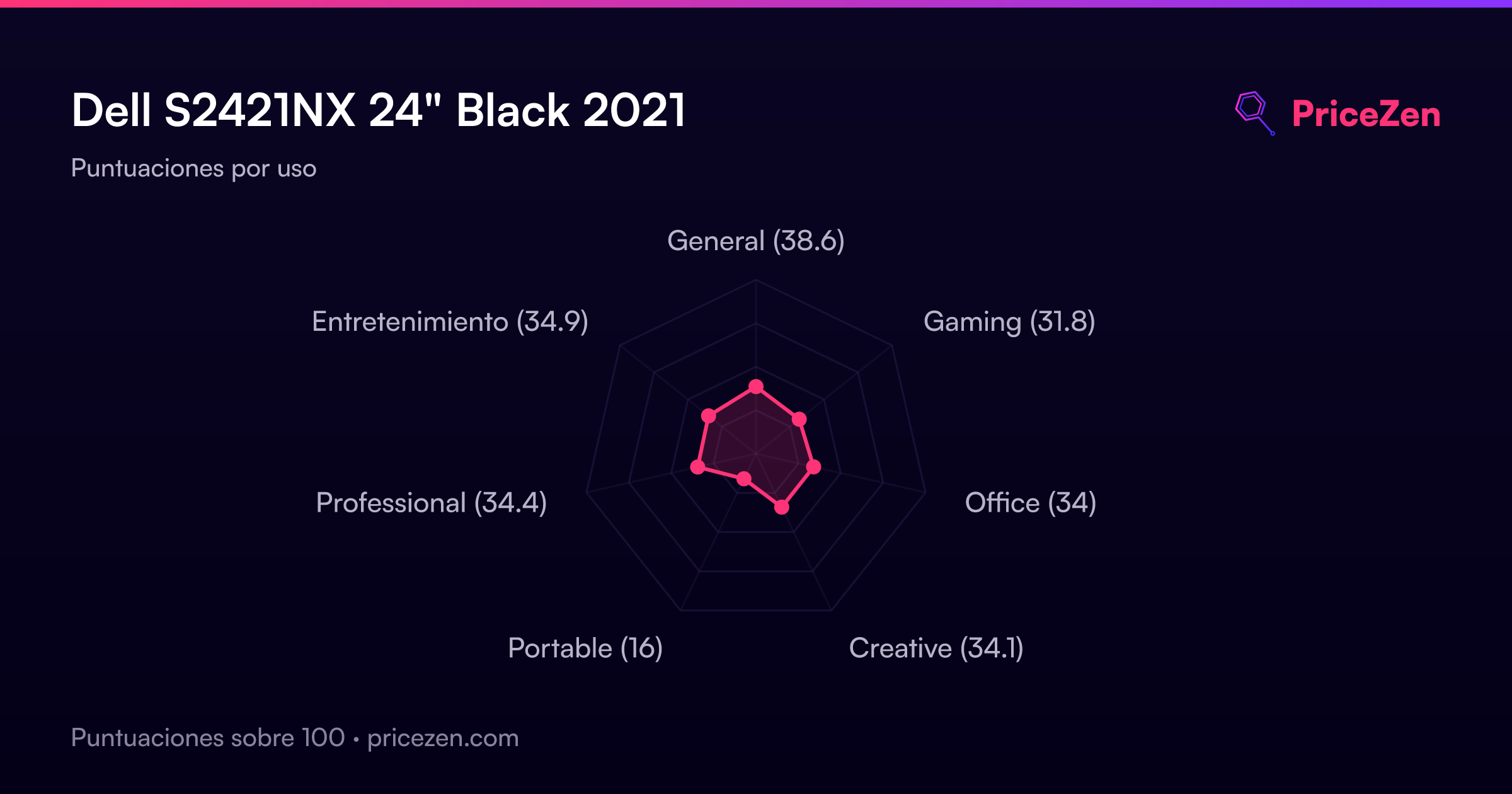
Usage Scores
- General38.6
- Gaming31.8
- Office34
- Creative34.1
- Portable16
- Professional34.4
- Entretenimiento34.9