Acer SH243Y P1si 23.8" Black 2025
The 144Hz refresh rate and 1ms response time with FreeSync deliver smooth, tear-free motion for fast-paced gaming on a 23.8-inch IPS panel. Its ErgoStand provides exceptional adjustability with 3.93-inch height, tilt, and full 360-degree swivel, a rare find at this price point. This monitor is best for budget-conscious gamers and home office users who need fluid visuals and ergonomic flexibility in a single display.

Sin precio actual de tiendas











Resumen
The 30-Second Version
A 144Hz IPS monitor with a fully adjustable stand for under $100? Yeah, it's real. Just don't expect great colors or more than one HDMI port.
Pros & Cons
Ventajas
- 144Hz refresh rate at this price is almost unfair 84th
- Ergonomic stand with height, tilt, and swivel is a rare find on budget monitors 73rd
- IPS panel gives decent viewing angles for shared screens 67th
- ZeroFrame design looks clean and saves desk space
Desventajas
- Only one HDMI port and a VGA, so forget multi-device setups
- Color performance is mediocre, 17th percentile in our database
- No built-in speakers, which is annoying for a work monitor
- 23.8 inches feels cramped if you're used to 27 or larger
Opinión de los propietarios
The Word on the Street
Cómo cambió la opinión de los propietarios con el tiempo
ExclusivaSegún cuándo escribieron realmente sus opiniones los clientes, para ver si los elogios iniciales se mantuvieron.
12 opiniones escritas, mar 2024 – may 2026: 12 satisfechos
En las 723 valoraciones de tiendas: 4,5★. La mayoría de los propietarios valora sin escribir una opinión. El gráfico cuenta las 12 opiniones escritas.
Cada punto es una opinión escrita, en el mes en que se escribió. Satisfechos = 4-5★, neutrales = 3★, insatisfechos = 1-2★.
Las pruebas
Performance
The 144Hz refresh rate is the real surprise here. Our database puts this panel's overall performance in the 73rd percentile, which is solid for a budget monitor. The 1ms VRB response time keeps motion smooth, and FreeSync works as advertised if you have an AMD GPU. But the display quality itself is a weak spot, landing in the 22nd percentile. Colors are fine for spreadsheets and YouTube, but don't expect vibrant, accurate tones for photo editing. The IPS panel helps with viewing angles, but the color gamut is nothing to write home about.
Specifications
Full Specifications
Display
| Size | 23.8" |
| Resolution | 1920x1080 (Full HD) |
| Panel Type | IPS |
| Aspect Ratio | 16:9 |
| Curved | No |
| Screen Finish | matte |
Performance
| Refresh Rate | 144 Hz |
| Response Time | 1 |
| Adaptive Sync | FreeSync |
Connectivity
| HDMI Ports | 1 |
| Speakers | No |
| Headphone Jack | No |
Ergonomics
| Height Adjustable | Yes |
| Tilt | Yes |
| Swivel | Yes |
| Pivot | No |
Features
| Webcam | No |
| Touchscreen | No |
| PIP/PBP | No |
| Weight | 3.3 kg / 7.2 lbs |
vs Competition
Against the LG UltraGear 27GS75Q-B or HP OMEN 27qs G2, the Acer loses on resolution, size, and color accuracy. Those are 1440p panels with better panels overall. But they also cost two to three times more. The ASUS TUF Gaming VG34VQL1B and Gigabyte GS G34WQC2 are ultrawide monsters, completely different beasts for immersive gaming. If you want a cheap, fast, ergonomic office monitor that can handle some gaming, the Acer wins on value. If you want actual gaming performance or color work, spend more.
| Spec | Acer SH243Y P1si 23.8" | LG UltraGear 45GX950A-B 45" | ASUS ROG Strix XG27UCDMG 27" | Dell UltraSharp U4025QW 39.7" | Alienware AW-Series AW3425DW 34" | Samsung Odyssey G80SH 32" |
|---|---|---|---|---|---|---|
| Screen Size | 23.799999237060547 | 45 | 27 | 39.70000076293945 | 34 | 32 |
| Resolution | 1920 x 1080 | 5120 x 2160 | 3840 x 2160 | 5120 x 2160 | 3440 x 1440 | 3840 x 2160 |
| Panel Type | IPS | OLED | OLED | IPS | QD-OLED | OLED |
| Refresh Rate | 144 | 330 | 240 | 120 | 240 | 240 |
| Response Time Ms | 1 | 0.029999999329447746 | 0.029999999329447746 | 5 | 0.029999999329447746 | 0.029999999329447746 |
| Adaptive Sync | FreeSync | FreeSync Premium Pro | FreeSync Premium Pro | Adaptive-Sync | FreeSync Premium Pro | FreeSync Premium Pro |
| Hdr | - | DisplayHDR True Black 400 | DisplayHDR True Black 400 | HDR600 | HDR400 | HDR10+ |
| Compare | Compare | Compare | Compare | Compare |
| Producto | Color | Portabilidad | Display | Feature | Ergonomic | Performance | Connectivity | Valoración social |
|---|---|---|---|---|---|---|---|---|
| Acer SH243Y P1si 23.8" | 15.5 | 27.8 | 21.3 | 21.2 | 67 | 72.6 | 20.8 | 84 |
| LG UltraGear 45GX950A-B 45" Compare | 99.4 | 76.6 | 99.7 | 96.3 | 90.8 | 99.4 | 96.9 | 92 |
| ASUS ROG Strix XG27UCDMG 27" Compare | 96.5 | 57.5 | 97.7 | 85.1 | 90.8 | 97.9 | 81.2 | 98.9 |
| Dell UltraSharp U4025QW 39.7" Compare | 97.9 | 76.6 | 98.6 | 96.3 | 90.8 | 56.1 | 99.3 | 96.8 |
| Alienware AW-Series AW3425DW 34" Compare | 98.9 | 74 | 84.1 | 96.3 | 90.8 | 97.9 | 95.4 | 96.8 |
| Samsung Odyssey G80SH 32" Compare | 94.4 | 49.5 | 99 | 70.2 | 90.8 | 97.9 | 81.2 | 96.8 |
Precio
Value & Pricing
At $90 to $100 in the US, this is a no-brainer for a second monitor or a budget office setup. The price spread across vendors is tiny, and the cheapest listing we found is on Amazon. For that money, you're getting a 144Hz IPS panel with a fully adjustable stand. That's absurd. If you're paying the GBP 223 or JPY 22,444 prices, though, you're getting ripped off. Shop around.
Historial de precios
Leer más
Overview
The Acer SH243Y is a 23.8-inch 1080p IPS panel that punches way above its price tag for office work and casual gaming. The headline here is the 144Hz refresh rate paired with a 1ms response time, which is rare at this budget. But don't mistake it for a premium gaming display. The color performance is mediocre and connectivity is bare bones, with just one HDMI and a VGA port. Still, for under $100, it's a steal if you know what you're getting.
Common Questions
Q: Is this monitor good for gaming?
For casual gaming, yes. The 144Hz refresh rate and 1ms response time make fast-paced games feel smooth, especially with FreeSync. But the color performance is mediocre, so don't expect vibrant HDR or accurate tones. If you're serious about competitive gaming, you'll want a panel with better color and more connectivity.
Q: Does it have built-in speakers?
No, it doesn't. You'll need external speakers or headphones. For a monitor aimed at office use, that's a minor annoyance, but not a dealbreaker at this price.
Q: Can I mount this on a wall?
Yes. The stand has a quick-release design and the monitor supports VESA mounting. The stand itself is already great with height, tilt, and swivel, but if you want it off the desk entirely, you can do that.
Who Should Skip This
If you're looking for a color-accurate display for photo or video editing, this isn't it. The color performance is in the 17th percentile, which is rough. Go grab something like the HP OMEN 27qs G2 or an LG UltraGear instead. And if you need multiple HDMI inputs for a console and PC setup, the single HDMI port here will drive you nuts. Look for a monitor with at least two HDMI ports.
Verdict
Buy it if you need a budget-friendly second monitor or a solid work-from-home display that won't break the bank. The 144Hz refresh rate and ergonomic stand are genuinely impressive at this price. Just don't expect it to compete with $300+ gaming monitors on color or connectivity. For under $100, it's one of the best value picks we've seen.
Usage Scores
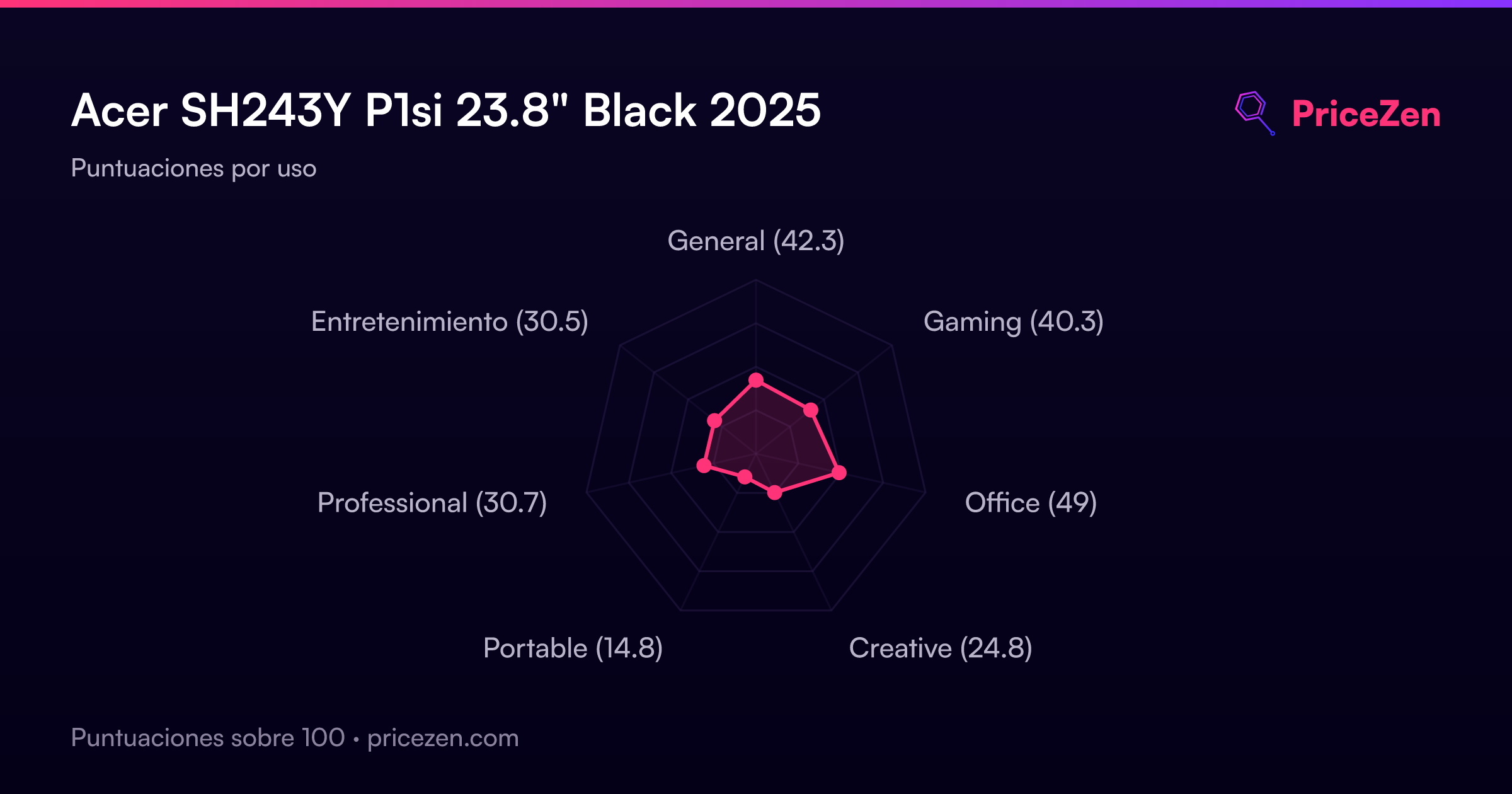
- General42.3
- Gaming40.3
- Office49
- Creative24.8
- Portable14.8
- Professional30.7
- Entretenimiento30.5