Gigabyte G G27U 27" Black 2026
The 27-inch SuperSpeed IPS panel delivers dual-mode flexibility, switching between 160Hz UHD and 320Hz FHD with a 1ms response time, plus FreeSync Premium and G-SYNC compatibility. Its 95% DCI-P3 coverage and DisplayHDR 400 provide accurate colors, while the ergonomic stand offers height, tilt, swivel, and pivot adjustments. Best for competitive gamers who want one monitor for both 4K immersion and high-refresh esports play.

Sin precio actual de tiendas


Resumen
The 30-Second Version
The G27U hits 320Hz at 1080p and 160Hz at 4K, landing in the 91st percentile for performance. Color and ergonomics are strong too, but connectivity is average and HDR is basic. At USD 250 it's a bargain; at USD 350 it's a tougher sell.
Pros & Cons
Ventajas
- 320Hz FHD dual mode is one of the fastest refresh rates we've seen 91st
- 4K at 160Hz gives you sharpness and speed in one panel 91st
- 95% DCI-P3 color coverage is strong for a gaming monitor 88th
- Ergonomics score in the 91st percentile with 130mm height adjust and pivot 84th
- FreeSync Premium and G-SYNC compatible covers both GPU camps
Desventajas
- Connectivity is just average at the 54th percentile with only 2 HDMI and 1 DP
- 350 nits brightness is fine but not impressive for HDR
- DisplayHDR 400 is the entry-level HDR tier, so don't expect real HDR punch
- Compact score of 28th percentile means a bulky footprint
- 8-bit panel without true 10-bit color depth
Las pruebas
Performance
The headline number is 320Hz. That's the refresh rate you get when you switch the G27U into FHD dual mode, and it puts this panel among the fastest gaming displays we've tracked. At native 4K, you're looking at 160Hz, which is still well above average for a UHD monitor. The 1ms GTG response time keeps motion clarity tight in both modes, and the SuperSpeed IPS panel is designed to minimize ghosting without the usual VA smearing.
Our performance percentile of 91 backs that up. This thing is built for competitive play, but it doesn't force you to live at 1080p. You can run 4K at 160Hz for slower, prettier games, then flip to 320Hz FHD when you need every frame in a shooter. The 23W power draw is also reasonable for a panel pushing this many pixels and hertz.
Specifications
Full Specifications
Display
| Size | 27" |
| Resolution | 3840x2160 (4K UHD) |
| Panel Type | IPS |
| Aspect Ratio | 16:9 |
| Curved | No |
| Screen Finish | matte |
Performance
| Refresh Rate | 320 Hz |
| Response Time | 1 |
| Adaptive Sync | FreeSync Premium |
Color & HDR
| Brightness | 350 nits |
| Color Gamut | 95% DCI-P3 / 122% sRGB |
| Color Depth | 8-bit |
| HDR | DisplayHDR 400 |
| HDR Support | HDR400 |
Connectivity
| HDMI Ports | 2 |
| DisplayPort | 1 |
| USB-C | 0 |
| Speakers | No |
| Headphone Jack | Yes |
Ergonomics
| Height Adjustable | Yes |
| Tilt | Yes |
| Swivel | Yes |
| Pivot | Yes |
| VESA Mount | 100x100 |
Features
| Webcam | No |
| Touchscreen | No |
| PIP/PBP | Yes |
| Power | 23 |
| Weight | 7.0 kg / 15.3 lbs |
vs Competition
Against the MSI MAG 271QPX QD-OLED E2, the G27U loses on contrast and HDR impact, but it wins on the dual-mode 320Hz trick and likely undercuts the MSI on price. The ASUS ROG Strix XG27AQDPG is another high-refresh competitor, but it doesn't offer the same 4K sharpness at 160Hz. The Alienware AW3425DW and Samsung Odyssey G60SD are ultrawide or OLED options that target a different buyer entirely. If you want one monitor that does both crisp 4K and ultra-fast 1080p, the G27U has a niche those others don't fill. If you want the best picture quality, the QD-OLED panels are the better call.
| Spec | Gigabyte G G27U 27" | LG UltraGear 45GX950A-B 45" | ASUS ROG Strix XG27UCDMG 27" | Dell UltraSharp U4025QW 39.7" | MSI MAG 271QPX QD-OLED E2 27" | Alienware AW-Series AW3425DW 34" |
|---|---|---|---|---|---|---|
| Screen Size | 27 | 45 | 27 | 39.70000076293945 | 27 | 34 |
| Resolution | 3840 x 2160 | 5120 x 2160 | 3840 x 2160 | 5120 x 2160 | 2560 x 1440 | 3440 x 1440 |
| Panel Type | IPS | OLED | OLED | IPS | QD-OLED | QD-OLED |
| Refresh Rate | 320 | 330 | 240 | 120 | 240 | 240 |
| Response Time Ms | 1 | 0.029999999329447746 | 0.029999999329447746 | 5 | 0.029999999329447746 | 0.029999999329447746 |
| Adaptive Sync | FreeSync Premium | FreeSync Premium Pro | FreeSync Premium Pro | Adaptive-Sync | FreeSync Premium Pro | FreeSync Premium Pro |
| Hdr | DisplayHDR 400 | DisplayHDR True Black 400 | DisplayHDR True Black 400 | DisplayHDR 600 | DisplayHDR True Black 400 | DisplayHDR 400 True Black |
| Compare | Compare | Compare | Compare | Compare |
| Producto | Color | Portabilidad | Display | Feature | Performance | Connectivity |
|---|---|---|---|---|---|---|
| Gigabyte G G27U 27" | 84 | 28 | 88.4 | 83.8 | 90.9 | 53.5 |
| LG UltraGear 45GX950A-B 45" Compare | 99.4 | 76.5 | 99.7 | 95.7 | 99.4 | 97 |
| ASUS ROG Strix XG27UCDMG 27" Compare | 96.1 | 57.5 | 97.9 | 83.8 | 98 | 81.3 |
| Dell UltraSharp U4025QW 39.7" Compare | 98.2 | 76.5 | 98.7 | 95.7 | 56.1 | 99.3 |
| MSI MAG 271QPX QD-OLED E2 27" Compare | 99.1 | 57.5 | 77.3 | 83.8 | 98 | 81.3 |
| Alienware AW-Series AW3425DW 34" Compare | 99 | 73.9 | 85.7 | 89.8 | 98 | 95.4 |
Precio
Value & Pricing
Pricing is all over the place right now. US listings range from USD 250 to USD 350, which is a USD 100 spread across just three sellers. That's a huge gap for the same monitor. At USD 250, this is an absolute steal for a dual-mode 4K 160Hz panel with this level of ergonomic adjustment. At USD 350, it's still competitive but you're inching closer to QD-OLED territory where the contrast and HDR performance blow this IPS panel away. If you're shopping in the US, hunt for the lower end of that range. Canadian buyers see a tighter spread at CAD 480 to CAD 506, which is much more consistent.
Leer más
Overview
The Gigabyte G27U is a 27-inch 4K IPS panel that pulls a neat trick: it runs 160Hz at full UHD resolution, then drops to 1080p and cranks up to 320Hz when you want maximum speed. Our database puts its performance at the 91st percentile, which is a standout for a monitor in this price bracket. The display quality lands at the 89th percentile, and color coverage hits 84th, so it's not just a one-trick pony for esports types.
But there's a catch. The connectivity score sits at a middling 54th percentile, and the compact score is a disappointing 28th. That means a chunky stand and a limited port selection. Still, for a dual-mode 4K gaming monitor with FreeSync Premium and G-SYNC compatibility, the core experience looks strong on paper.
Common Questions
Q: Can this monitor run 4K and 320Hz at the same time?
No. The 320Hz refresh rate only works in FHD dual mode at 1920x1080. At native 4K UHD resolution, the maximum refresh rate is 160Hz. You switch between the two modes depending on whether you want sharpness or speed.
Q: Does the G27U work with NVIDIA graphics cards?
Yes. It supports AMD FreeSync Premium natively and is G-SYNC compatible, so both AMD and NVIDIA GPUs can use adaptive sync to reduce tearing and stuttering.
Q: How good is the HDR on this monitor?
It's entry-level. The G27U carries VESA DisplayHDR 400 certification, which means it can accept HDR signals and hit 350 nits peak brightness, but it lacks local dimming and the brightness needed for a true HDR experience. It's fine for casual HDR, but don't expect dramatic highlights.
Who Should Skip This
If you care about HDR or deep blacks, skip this. The 350 nits brightness and DisplayHDR 400 certification are the bare minimum, and an IPS panel with a 1000:1 contrast ratio can't compete with OLED or mini-LED alternatives. The connectivity is also thin at just 2 HDMI and 1 DisplayPort, so multi-device setups will need a switcher. And if desk space is tight, the 28th percentile compact score means this stand takes up real estate.
Verdict
The G27U is a smart buy if you want 4K clarity and esports-level refresh rates without buying two monitors. The 91st percentile performance score and 89th percentile display score tell the story: this panel punches above its weight. The weak spots are connectivity and HDR, but for pure gaming versatility, it's hard to argue with 320Hz FHD and 160Hz UHD in one box. Just make sure you're not overpaying given the USD 100 price spread.
Usage Scores
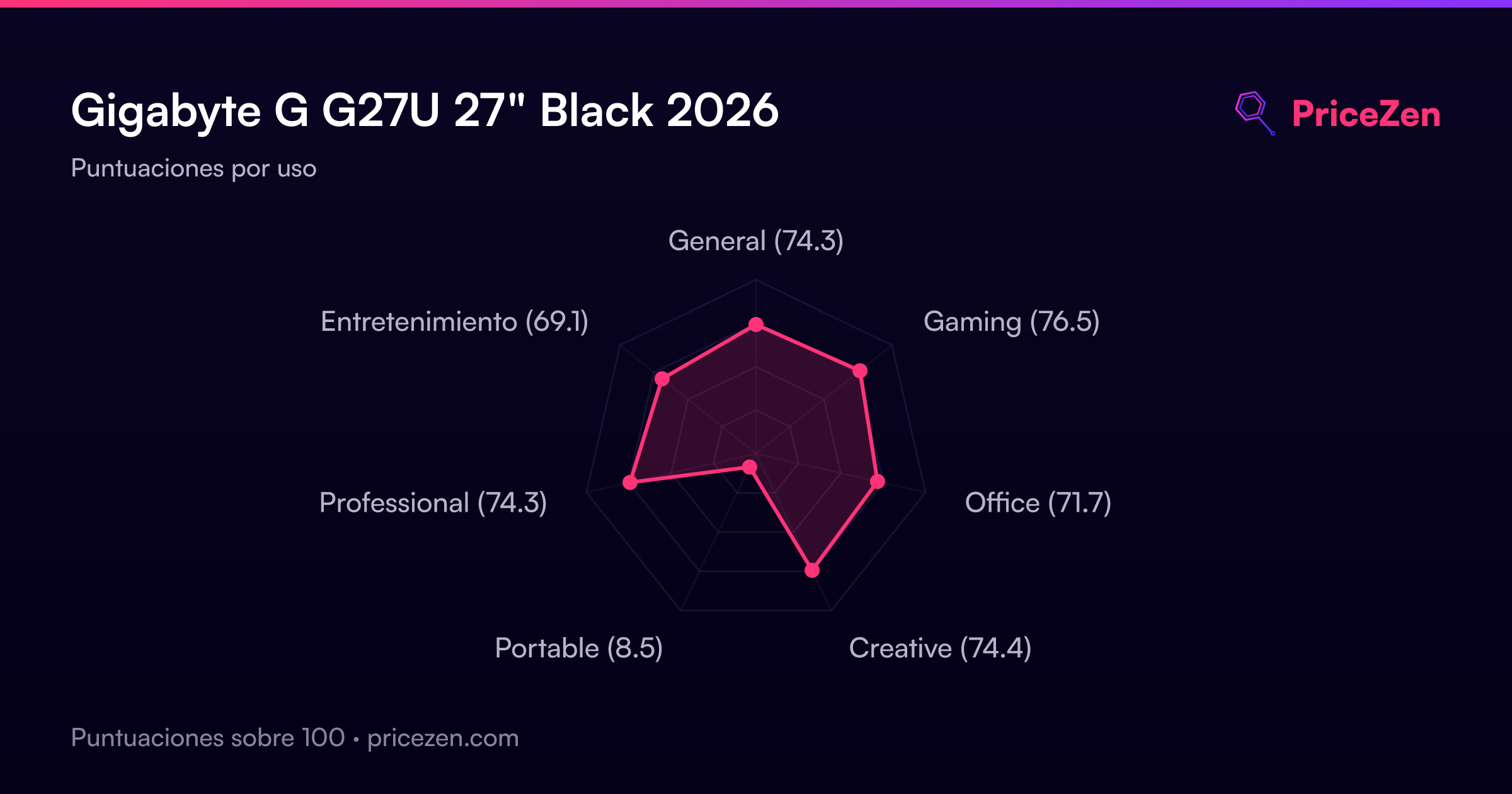
- General74.3
- Gaming76.5
- Office71.7
- Creative74.4
- Portable8.5
- Professional74.3
- Entretenimiento69.1