Acer Predator X32 XBMIIPPHUZX 32" Black
The 32-inch QD-OLED panel delivers 4096 x 2160 resolution with 99% DCI-P3 color and true 10-bit depth, paired with a 240Hz refresh rate and 0.03ms response for minimal ghosting. Its DisplayHDR True Black 400 and FreeSync Premium ensure deep blacks and tear-free gameplay, while the integrated KVM switch and USB-C add multi-device convenience. Best for desktop gamers who want a high-refresh, color-accurate curved monitor for competitive play and cinematic entertainment.

Sin precio actual de tiendas
Resumen
The 30-Second Version
The Acer Predator X32 is a 32-inch 4K QD-OLED with 240Hz and a 0.03ms response time. Performance is elite, and the contrast is stunning. Just know it's dim by modern standards and light on ports.
Pros & Cons
Ventajas
- 240Hz and 0.03ms response time make motion look ridiculously smooth 99th
- QD-OLED contrast is deep, inky, and gorgeous in dark scenes 98th
- 4K on a 32-inch panel hits a sweet spot for sharpness 91st
- FreeSync Premium keeps tearing and stutter out of the picture 74th
Desventajas
- 250 nits brightness feels dim in a sunlit room
- Only one HDMI and one USB-C port, which is stingy for a monitor this size
- No swivel or pivot, just height and tilt
- At 12.7kg, this thing is a desk anchor
Las pruebas
Performance
This is where the X32 earns its keep. The 240Hz refresh rate and 0.03ms response time put it in the 98th percentile for performance, which is basically elite territory. Motion clarity is absurd, and ghosting is a non-issue. The 4K resolution on a 32-inch panel gives you sharp text and crisp game details without needing a magnifying glass. But the 250 nits brightness is a reminder that OLED panels trade raw luminance for perfect blacks. In a bright room, you'll notice it. In a dark room, it's stunning.
Specifications
Full Specifications
Display
| Size | 32" |
| Resolution | 4096x2160 |
| Panel Type | QD-OLED |
| Aspect Ratio | 16:9 |
| Curved | Yes |
Performance
| Refresh Rate | 240 Hz |
| Response Time | 0.03 |
| Adaptive Sync | FreeSync Premium |
Color & HDR
| Brightness | 250 nits |
| Color Gamut | DCI-P3 99% |
| Color Depth | 10-bit |
| HDR | DisplayHDR True Black 400 |
Connectivity
| HDMI Ports | 1 |
| USB-C | 1 |
Ergonomics
| Height Adjustable | Yes |
| Tilt | Yes |
Features
| Webcam | No |
| Weight | 12.7 kg / 28.0 lbs |
vs Competition
Against the LG UltraGear 45GX950A-B, the X32 gives up size and likely some brightness, but it counters with a tighter pixel density and faster response. The ASUS ROG Strix XG27UCDMG is smaller at 27 inches, so the Acer wins on immersion. The MSI MAG 271QPX QD-OLED E2 is a strong budget OLED, but it can't match the Acer's 240Hz at 4K. The Alienware AW3425DW is ultrawide, which some people love, but it's not 4K and not as fast. The Samsung Odyssey G60SD is a solid all-rounder, but the X32's raw speed and resolution combo is hard to beat for gaming.
| Spec | Acer Predator X32 XBMIIPPHUZX 32" | ASUS ROG Strix XG27UCDMG 27" | LG UltraGear 45GX950A-B 45" | Dell UltraSharp U4025QW 39.7" | Alienware AW-Series AW3425DW 34" | MSI MAG 271QPX QD-OLED E2 27" |
|---|---|---|---|---|---|---|
| Screen Size | 32 | 27 | 45 | 39.7 | 34 | 27 |
| Resolution | 4096 x 2160 | 3840 x 2160 | 5120 x 2160 | 5120 x 2160 | 3440 x 1440 | 2560 x 1440 |
| Panel Type | QD-OLED | OLED | OLED | IPS | QD-OLED | QD-OLED |
| Refresh Rate | 240 | 240 | 330 | 120 | 240 | 240 |
| Response Time Ms | 0.03 | 0.03 | 0.03 | 5 | 0.03 | 0.03 |
| Adaptive Sync | FreeSync Premium | FreeSync Premium Pro | FreeSync Premium Pro | Adaptive-Sync | FreeSync Premium Pro | FreeSync Premium Pro |
| Hdr | DisplayHDR True Black 400 | DisplayHDR True Black 400 | DisplayHDR True Black 400 | HDR600 | HDR400 | DisplayHDR True Black 400 |
| Compare | Compare | Compare | Compare | Compare |
| Producto | Color | Portabilidad | Display | Feature | Ergonomic | Performance | Connectivity |
|---|---|---|---|---|---|---|---|
| Acer Predator X32 XBMIIPPHUZX 32" | 74.4 | 49.4 | 99.3 | 90.8 | 60 | 97.9 | 38.8 |
| ASUS ROG Strix XG27UCDMG 27" Compare | 96.5 | 57.4 | 97.7 | 85 | 90.7 | 97.9 | 81.1 |
| LG UltraGear 45GX950A-B 45" Compare | 99.4 | 76.5 | 99.7 | 96.3 | 90.7 | 99.4 | 96.9 |
| Dell UltraSharp U4025QW 39.7" Compare | 97.9 | 76.5 | 98.6 | 96.3 | 90.7 | 56.1 | 99.3 |
| Alienware AW-Series AW3425DW 34" Compare | 98.9 | 73.9 | 84.1 | 96.3 | 90.7 | 97.9 | 95.4 |
| MSI MAG 271QPX QD-OLED E2 27" Compare | 99.2 | 57.4 | 73.4 | 85 | 90.7 | 97.9 | 81.1 |
Precio
Value & Pricing
No price listed, so we can't do the usual math on value. What we can say is that the X32 competes with monitors that often cost a small fortune. If Acer prices this aggressively, it becomes a serious threat. If it lands at OLED flagship money, you'll want to cross-shop hard. The performance is there, but the thin port selection and modest brightness mean it needs to undercut the competition to feel like a steal.
Leer más
Overview
The Acer Predator X32 is a 32-inch QD-OLED that goes straight for the jugular. 240Hz, a 0.03ms response time, and a 4K panel in one package. That's the kind of spec sheet that makes competitive players and eye-candy lovers nod in agreement at the same time.
It's not perfect. The connectivity is thin, and the brightness won't blow your curtains off. But for pure gaming speed and OLED contrast, this thing sits near the top of our database.
Common Questions
Q: Is 250 nits bright enough for everyday use?
In a dim or dark room, yes, and the OLED contrast makes it look better than the number suggests. In a bright room with direct sunlight, you'll likely wish it had more headroom.
Q: Can I use this monitor with both a PC and a console?
You can, but the single HDMI port means you'll be swapping cables unless you use the USB-C input for one device. The built-in KVM helps if you're running two PCs.
Q: Does the 4K resolution make sense at 32 inches?
Yes. You get very high pixel density, so text and game details look sharp. It's a noticeable step up from 1440p at this size.
Who Should Skip This
Skip this if you need a monitor for a bright office or a multi-device setup. One HDMI port and no DisplayPort is a real limitation, and the 250 nits panel will struggle near windows. If you want a productivity-first display with lots of inputs, look at something like the Samsung Odyssey G60SD or a non-OLED ultrawide instead.
Verdict
Buy this if you want a big, fast, 4K OLED for gaming and you don't need a ton of ports. It's a performance monster with a gorgeous panel. Just make sure your room lighting is under control, because 250 nits won't fight the sun. Competitive players and single-player graphics snobs will both find a lot to like here.
Usage Scores
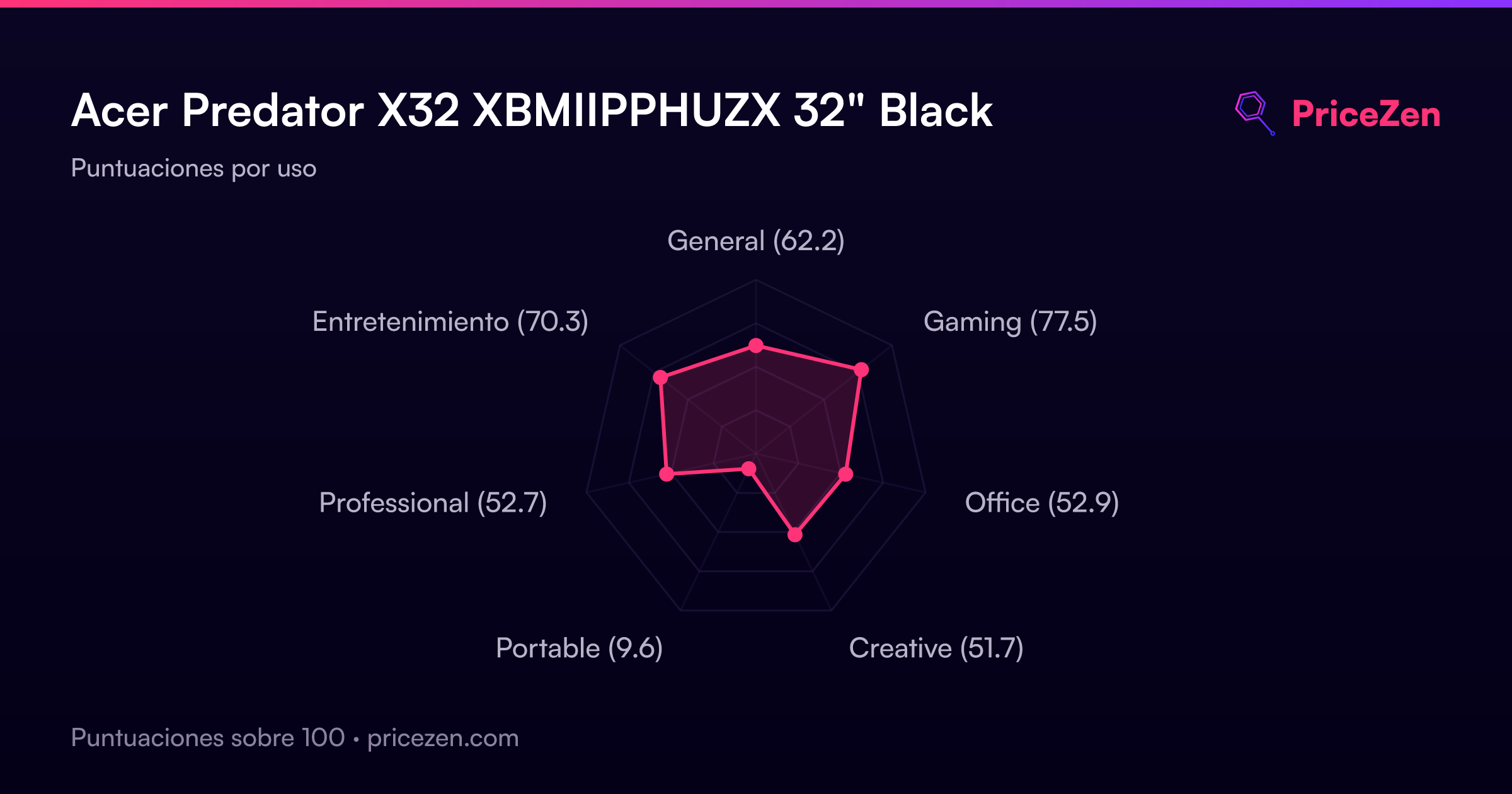
- General62.2
- Gaming77.5
- Office52.9
- Creative51.7
- Portable9.6
- Professional52.7
- Entretenimiento70.3