ASUS TUF Gaming VG27AQ1A 27" Black 2020
A 27-inch 2560 x 1440 IPS panel with a 170Hz refresh rate, 1ms MPRT response, and G-Sync Compatible support ensures sharp, tear-free gaming, enhanced by ELMB technology that eliminates ghosting. It covers 95% of the DCI-P3 color space and includes a flicker-free, low blue light certified panel with an ergonomic tilt and swivel stand for extended comfort. Competitive gamers playing fast-paced shooters will benefit from the 170Hz panel and ELMB, while its 95% DCI-P3 coverage serves entry-level content creators.

Sin precio actual de tiendas











Resumen
The 30-Second Version
The VG27AQ1A nails the basics: 170Hz, 1440p, IPS, G-Sync Compatible. But the stand is weak, HDR is dim, and user sentiment is in the 28th percentile. Buy it if you're mounting it on an arm and want smooth 1440p gaming without OLED prices. Otherwise, there are better options.
Pros & Cons
Ventajas
- 170Hz refresh rate with 1ms MPRT keeps motion buttery smooth 84th
- G-Sync Compatible and FreeSync support covers both GPU camps 80th
- 95% DCI-P3 color coverage is solid for the price 79th
- VESA mount compatibility means you can ditch the mediocre stand 70th
Desventajas
- 250 nits brightness makes HDR10 feel like a marketing afterthought
- Stand only tilts and swivels, no height adjustment or pivot
- User sentiment sits in the 28th percentile, which is rough
- Built-in speakers are basically a formality
Opinión de los propietarios
The Word on the Street
Cómo cambió la opinión de los propietarios con el tiempo
ExclusivaSegún cuándo escribieron realmente sus opiniones los clientes, para ver si los elogios iniciales se mantuvieron.
35 opiniones escritas, dic 2020 – feb 2026: 29 satisfechos, 2 neutrales, 2 insatisfechos, 2 sin estrellas
En las 178 valoraciones de tiendas: 4,5★. La mayoría de los propietarios valora sin escribir una opinión. El gráfico cuenta las 35 opiniones escritas.
Cada punto es una opinión escrita, en el mes en que se escribió. Satisfechos = 4-5★, neutrales = 3★, insatisfechos = 1-2★.
Las pruebas
Performance
The 170Hz refresh rate is the headline here, and it's legit. Combined with the 1ms MPRT and ELMB tech, motion clarity in fast-paced shooters is genuinely good. Our database puts this panel's performance in the 81st percentile, which translates to well above average for gaming monitors. The 250 nits brightness is a bit underwhelming for HDR content, so don't expect HDR10 to blow you away. It's more of a checkbox than a feature. Color accuracy lands in the 81st percentile too, which makes this a decent option for casual creative work, though serious colorists will want something with better calibration out of the box.
Specifications
Full Specifications
Display
| Size | 27" |
| Resolution | 2560x1440 (QHD) |
| Panel Type | IPS |
| Aspect Ratio | 16:9 |
| Curved | No |
| Screen Finish | matte |
Performance
| Refresh Rate | 170 Hz |
| Response Time | 1 |
| Adaptive Sync | G-Sync Compatible |
Color & HDR
| Brightness | 250 nits |
| Color Gamut | 130% sRGB / DCI-P3 95% |
| Color Depth | 10-bit |
| HDR | HDR10 |
| HDR Support | HDR10 |
Connectivity
| HDMI Ports | 2 |
| DisplayPort | 1 |
| Speakers | Yes |
| Headphone Jack | Yes |
Ergonomics
| Height Adjustable | No |
| Tilt | Yes |
| Swivel | Yes |
| Pivot | No |
| VESA Mount | 100x100 |
Features
| Power | 35 |
| Weight | 5.4 kg / 11.9 lbs |
vs Competition
Stacked against the MSI MAG 271QPX QD-OLED E2 or the LG UltraGear 27GX790A-B, this TUF panel feels dated. Those OLED options deliver dramatically better contrast, brightness, and HDR performance, though they cost significantly more. The Samsung Odyssey G60SD also outclasses it on panel quality. Where the VG27AQ1A makes sense is if you want 1440p at high refresh rates without paying OLED prices. It's a value play against premium competitors, but the Gigabyte M Series OLED MO27U2 SA shows how far the mid-range has moved.
| Spec | ASUS TUF Gaming VG27AQ1A 27" | LG UltraGear 45GX950A-B 45" | Dell UltraSharp U4025QW 39.7" | Alienware AW-Series AW3425DW 34" | MSI MAG 271QPX QD-OLED E2 27" | Samsung Odyssey G60SD 27" |
|---|---|---|---|---|---|---|
| Screen Size | 27 | 45 | 39.70000076293945 | 34 | 27 | 27 |
| Resolution | 2560 x 1440 | 5120 x 2160 | 5120 x 2160 | 3440 x 1440 | 2560 x 1440 | 2560 x 1440 |
| Panel Type | IPS | OLED | IPS | QD-OLED | QD-OLED | OLED |
| Refresh Rate | 170 | 330 | 120 | 240 | 240 | 360 |
| Response Time Ms | 1 | 0.029999999329447746 | 5 | 0.029999999329447746 | 0.029999999329447746 | 0.029999999329447746 |
| Adaptive Sync | G-Sync Compatible | FreeSync Premium Pro | Adaptive-Sync | FreeSync Premium Pro | FreeSync Premium Pro | FreeSync Premium Pro |
| Hdr | HDR10 | DisplayHDR True Black 400 | HDR600 | HDR400 | DisplayHDR True Black 400 | HDR10+ |
| Compare | Compare | Compare | Compare | Compare |
| Producto | Color | Portabilidad | Display | Feature | User Sentiment | Ergonomic | Performance | Connectivity | Valoración social |
|---|---|---|---|---|---|---|---|---|---|
| ASUS TUF Gaming VG27AQ1A 27" | 79.3 | 43.5 | 67.1 | 70.2 | 61.1 | 62.2 | 79.5 | 62.4 | 84 |
| LG UltraGear 45GX950A-B 45" Compare | 99.4 | 76.6 | 99.7 | 96.3 | 76.5 | 90.8 | 99.4 | 96.9 | 92 |
| Dell UltraSharp U4025QW 39.7" Compare | 97.9 | 76.6 | 98.6 | 96.3 | 85.6 | 90.8 | 56.1 | 99.3 | 96.8 |
| Alienware AW-Series AW3425DW 34" Compare | 98.9 | 74 | 84.1 | 96.3 | 95.7 | 90.8 | 97.9 | 95.4 | 96.8 |
| MSI MAG 271QPX QD-OLED E2 27" Compare | 99.2 | 57.5 | 73.6 | 85.1 | 95.7 | 90.8 | 97.9 | 81.2 | 98.9 |
| Samsung Odyssey G60SD 27" Compare | 90.8 | 39.5 | 73.6 | 70.2 | 95.7 | 90.8 | 99.5 | 87.6 | 92 |
Precio
Value & Pricing
At $398 USD, this monitor sits in a weird spot. It's not cheap enough to be a budget pick, and it's not premium enough to justify the price against newer options. The 170Hz refresh rate and solid color coverage are real strengths, but the weak stand and dim panel hold it back. If you can find it on sale, it's a decent buy. At full price, you're paying for the ASUS name more than the experience.
Leer más
Overview
The ASUS TUF Gaming VG27AQ1A is a 27-inch 1440p IPS panel that pushes 170Hz with a 1ms MPRT response time. It's G-Sync Compatible and supports FreeSync too, so it plays nice with both NVIDIA and AMD cards. The spec sheet reads like a solid mid-range gaming monitor, and for the most part, it delivers.
But here's the thing. The panel itself is fine, the refresh rate is genuinely smooth, and the color coverage is respectable at 95% DCI-P3. The stand is where ASUS cut corners. Tilt and swivel only, no height adjustment, no pivot. You'll want a VESA arm if you care about ergonomics.
Common Questions
Q: Does this monitor work with Xbox Series X at 120Hz?
Yes. Multiple owners report FreeSync support works with Xbox Series X, and the monitor can handle 1440p at 120Hz over HDMI 2.0 without issues.
Q: Can I mount this on a monitor arm?
Absolutely. It has a standard VESA 100x100 mount pattern, and the included screws work for most aftermarket arms. Given the limited stand adjustability, this is actually the recommended setup.
Q: Is the HDR any good on this monitor?
Not really. With only 250 nits of peak brightness, HDR10 is more of a spec sheet checkbox than a meaningful feature. You'll get better results sticking with SDR for most content.
Who Should Skip This
Skip this if you need height adjustment or pivot without buying a separate mount. The stock stand is tilt and swivel only, and that's a dealbreaker for anyone who cares about ergonomics. Also skip it if HDR matters to you. 250 nits won't cut it. And if you're doing serious color-critical work, the 81st percentile color performance sounds good on paper but won't replace a properly calibrated panel.
Verdict
This is a monitor for someone who wants 1440p at high refresh rates and doesn't want to spend OLED money. The 170Hz panel is genuinely smooth, and the color coverage is better than you'd expect at this price. But the stand is a letdown, the HDR is weak, and user sentiment is concerningly low. If you're planning to mount it on a VESA arm and mostly play competitive shooters, it'll serve you well. If you want a complete out-of-the-box experience, keep looking.
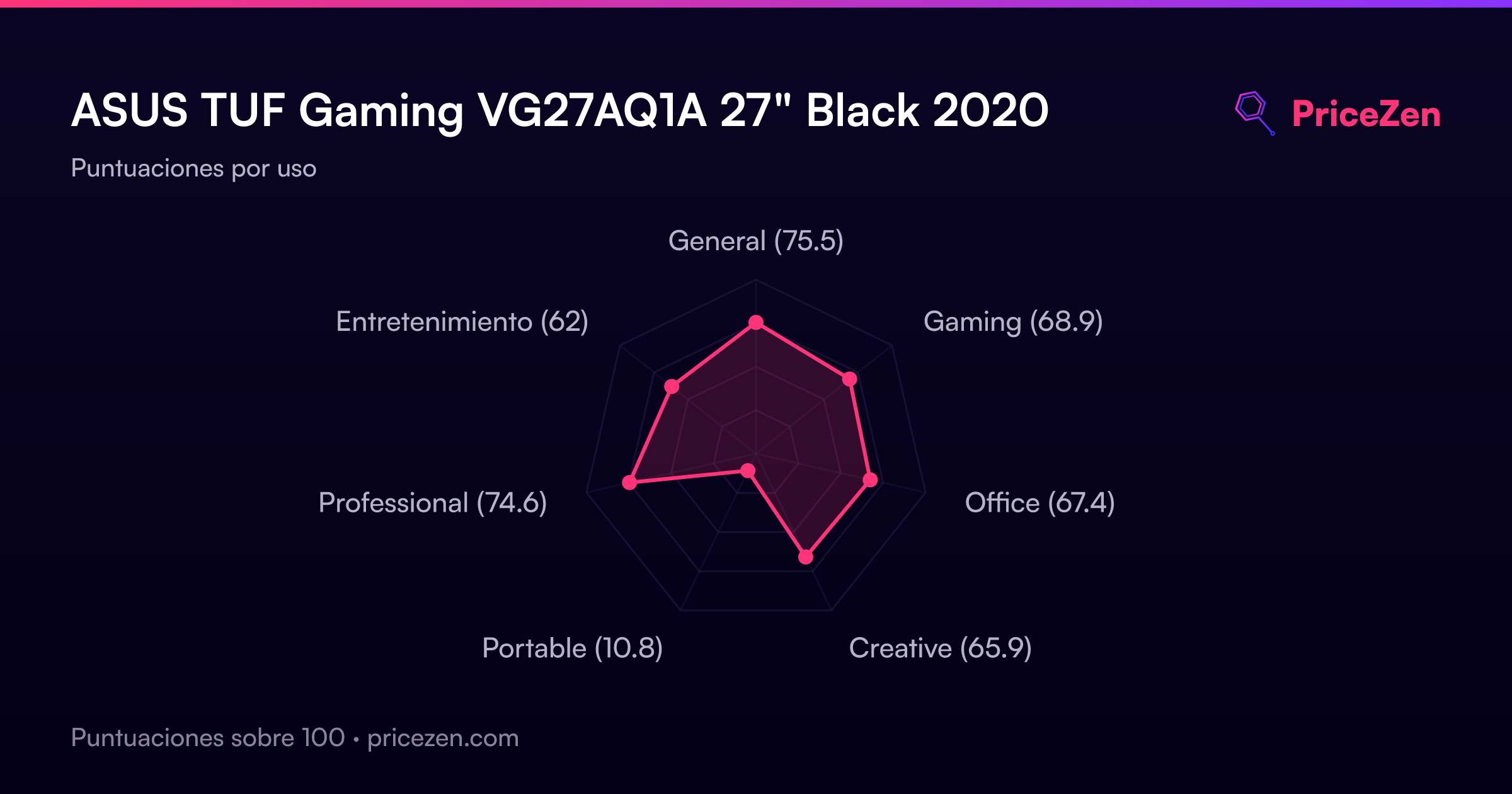
Usage Scores
- General75.5
- Gaming68.9
- Office67.4
- Creative65.9
- Portable10.8
- Professional74.6
- Entretenimiento62