LG UltraFine UHD 27BN85UN-B 27" Black 2022
The 27-inch IPS panel delivers 3840 x 2160 UHD resolution with 99% sRGB coverage and 10-bit color depth, making it a solid choice for color-critical work. Its 350-nit brightness and DisplayHDR 400 support, along with FreeSync, handle both creative tasks and casual gaming. This monitor suits photo editors and video editors who need accurate colors on a budget, though its 60Hz refresh rate limits fast-paced gaming.

Sin precio actual de tiendas


Resumen
The 30-Second Version
The LG UltraFine UHD 27BN85UN-B is a 27-inch 4K IPS monitor built for creative work, with 99% sRGB coverage and USB-C connectivity. It's sharp and color-accurate, but the 60Hz refresh rate and 5ms response time make it a poor choice for gaming. Buy it for photo editing or office work, skip it if you want smooth motion.
Pros & Cons
Ventajas
- Sharp 4K IPS panel with excellent text clarity 88th
- 99% sRGB coverage for color-accurate work 87th
- USB-C with DisplayPort alt mode and 2 USB downstream ports 83rd
- Full ergonomic stand with height, tilt, and pivot 79th
- VESA mount compatible for multi-monitor setups
Desventajas
- 60Hz refresh rate feels dated in 2025
- 5ms response time leads to motion blur in games
- DisplayHDR 400 is barely HDR
- No built-in KVM switch despite USB-C
- Price is high for a 60Hz panel
Las pruebas
Performance
The 27BN85UN-B runs at 60Hz with a 5ms response time. In our database, that puts its performance in the bottom third of monitors we track. It's not a disaster for everyday use, but if you're coming from a 144Hz panel, you'll feel the difference immediately. Scrolling feels fine. Fast-paced games feel smeary. FreeSync helps with tearing, but it can't make 60Hz feel like 120Hz.
Color performance is where this monitor earns its keep. The 99% sRGB coverage is strong, and the 10-bit color depth (8-bit + FRC) means smooth gradients without banding in most content. DisplayHDR 400 is the entry-level HDR tier, so don't expect eye-searing highlights. It's more of a checkbox than a feature. The 350 nits of brightness is adequate for a typical office or studio, but it won't fight off direct sunlight. For color-critical work, this panel is well above average. For gaming, it's a weak spot.
Specifications
Full Specifications
Display
| Size | 27" |
| Resolution | 3840x2160 (4K UHD) |
| Panel Type | IPS |
| Aspect Ratio | 16:9 |
| Curved | No |
Performance
| Refresh Rate | 60 Hz |
| Response Time | 5 |
| Adaptive Sync | FreeSync |
Color & HDR
| Brightness | 350 nits |
| Color Gamut | sRGB 99% (CIE1931) |
| Color Depth | 10-bit (8-bit + FRC) |
| HDR | HDR400 |
| HDR Support | HDR400 |
Connectivity
| HDMI Ports | 2 |
| DisplayPort | 1 |
| USB-C | 1 |
| Speakers | Yes |
| Headphone Jack | Yes |
Ergonomics
| Height Adjustable | Yes |
| Tilt | Yes |
| Swivel | No |
| Pivot | Yes |
| VESA Mount | 100x100 |
Features
| Webcam | No |
| Touchscreen | No |
| PIP/PBP | No |
| Power | 40 |
| Weight | 6.4 kg / 14.1 lbs |
vs Competition
Stacked against the competition, the 27BN85UN-B has a clear identity problem. The ASUS ROG Strix XG27UCDMG and MSI MAG 271QPX QD-OLED E2 both offer OLED panels with dramatically better contrast, faster response times, and higher refresh rates. They cost more, but the gap isn't as wide as it used to be. The Samsung Odyssey G60SD and Gigabyte M Series OLED MO27U2 SA are also in the conversation for anyone who wants gaming performance with their 4K resolution.
Where the LG wins is color accuracy out of the box and the USB-C connectivity. OLED panels can have text clarity issues due to subpixel layout, while this IPS panel renders text cleanly. The Alienware AW3425DW is a different beast entirely, an ultrawide QD-OLED that trades 4K sharpness for immersion. If you're editing photos or working with documents all day, the LG's IPS panel is arguably the better tool. If you're gaming or watching movies, every one of those competitors beats it.
| Spec | LG UltraFine UHD 27BN85UN-B 27" | ASUS ROG Strix XG27UCDMG 27" | Dell UltraSharp U4025QW 39.7" | Alienware AW-Series AW3425DW 34" | MSI MAG 271QPX QD-OLED E2 27" | Samsung Odyssey G80SH 32" |
|---|---|---|---|---|---|---|
| Screen Size | 27 | 27 | 39.70000076293945 | 34 | 27 | 32 |
| Resolution | 3840 x 2160 | 3840 x 2160 | 5120 x 2160 | 3440 x 1440 | 2560 x 1440 | 3840 x 2160 |
| Panel Type | IPS | OLED | IPS | QD-OLED | QD-OLED | OLED |
| Refresh Rate | 60 | 240 | 120 | 240 | 240 | 240 |
| Response Time Ms | 5 | 0.029999999329447746 | 5 | 0.029999999329447746 | 0.029999999329447746 | 0.029999999329447746 |
| Adaptive Sync | FreeSync | FreeSync Premium Pro | Adaptive-Sync | FreeSync Premium Pro | FreeSync Premium Pro | FreeSync Premium Pro |
| Hdr | HDR400 | DisplayHDR True Black 400 | HDR600 | HDR400 | DisplayHDR True Black 400 | HDR10+ |
| Compare | Compare | Compare | Compare | Compare |
| Producto | Color | Portabilidad | Display | Feature | Ergonomic | Performance | Connectivity |
|---|---|---|---|---|---|---|---|
| LG UltraFine UHD 27BN85UN-B 27" | 83.2 | 76.6 | 87.1 | 70.2 | 78.7 | 35.8 | 87.6 |
| ASUS ROG Strix XG27UCDMG 27" Compare | 96.5 | 57.5 | 97.7 | 85.1 | 90.8 | 97.9 | 81.2 |
| Dell UltraSharp U4025QW 39.7" Compare | 97.9 | 76.6 | 98.6 | 96.3 | 90.8 | 56.1 | 99.3 |
| Alienware AW-Series AW3425DW 34" Compare | 98.9 | 74 | 84.1 | 96.3 | 90.8 | 97.9 | 95.4 |
| MSI MAG 271QPX QD-OLED E2 27" Compare | 99.2 | 57.5 | 73.5 | 85.1 | 90.8 | 97.9 | 81.2 |
| Samsung Odyssey G80SH 32" Compare | 94.4 | 49.5 | 99 | 70.2 | 90.8 | 97.9 | 81.2 |
Precio
Value & Pricing
At USD 400 to USD 469, the 27BN85UN-B is asking a lot for a 60Hz monitor in a market where 144Hz 4K panels are getting cheaper. Newegg currently has the lowest listing at USD 400, while Best Buy sits closer to USD 469. That USD 69 spread is worth checking before you buy. For creative work, the color accuracy and 4K resolution justify some of the cost. But you're paying a premium for the LG UltraFine branding and USB-C convenience. If you don't need USB-C, there are cheaper 4K IPS monitors with similar color performance. If you do need USB-C, this is a reasonable option, just not a bargain.
Leer más
Overview
The LG UltraFine UHD 27BN85UN-B is a 27-inch 4K IPS monitor aimed squarely at creative professionals and office users who want sharp text and accurate color without paying OLED money. It sits in a weird middle ground right now. You get a 3840 x 2160 panel with 99% sRGB coverage, 10-bit color via 8-bit + FRC, and DisplayHDR 400 certification. That's a solid spec sheet for photo editing, video work, or just staring at spreadsheets all day.
But here's the thing. The refresh rate is 60Hz and the response time is 5ms. That's fine for productivity, but it's not a gaming monitor. FreeSync is there, sure, but this panel isn't chasing high frame rates. The price lands between USD 400 and USD 469 depending on where you shop, which puts it in direct competition with some very capable alternatives. We'll get into that.
For the right buyer, this monitor nails the basics. Height adjust, tilt, pivot, VESA mounting, USB-C with DisplayPort alt mode, and a pair of USB 3.0 downstream ports. It's a practical, no-nonsense display. The question is whether "practical" is enough when faster and flashier options exist at similar prices.
Common Questions
Q: Is the LG 27BN85UN-B good for gaming?
Not really. The 60Hz refresh rate and 5ms response time are fine for casual games, but fast-paced titles will show motion blur and feel less responsive than a 144Hz monitor. FreeSync helps with screen tearing, but it can't make up for the low refresh rate.
Q: Does the LG 27BN85UN-B have USB-C?
Yes, it has one USB-C port with DisplayPort alt mode, which means you can connect a laptop and get video, data, and power delivery through a single cable. There are also two USB 3.0 Type-A downstream ports for peripherals.
Q: What is the color accuracy of the LG 27BN85UN-B?
The monitor covers 99% of the sRGB color space and supports 10-bit color depth via 8-bit + FRC. That's strong for photo editing and design work, though it doesn't cover wider gamuts like DCI-P3 or Adobe RGB.
Q: Can the LG 27BN85UN-B be wall mounted?
Yes, it has a VESA 100x100 mount pattern, so you can attach it to a monitor arm or wall mount. The included stand also supports height adjustment, tilt, and pivot.
Who Should Skip This
Skip this monitor if you're a gamer, especially if you play competitive shooters or fast-paced action games. The 60Hz refresh rate and 5ms response time will frustrate you. Look at the ASUS ROG Strix XG27UCDMG or MSI MAG 271QPX QD-OLED E2 instead. Also skip it if you need wide color gamut coverage for print work, since it only covers sRGB, not Adobe RGB or DCI-P3. And if you're on a tight budget, there are cheaper 4K IPS monitors without USB-C that deliver similar image quality for less money.
Verdict
Should you buy the LG UltraFine UHD 27BN85UN-B? If you're a creative professional who needs accurate sRGB color, sharp 4K text, and USB-C connectivity for a laptop, yes. This monitor does those things well. The stand is solid, the ports are useful, and the panel quality is genuinely good for color work.
But if you're a gamer, or if you want a monitor that does double duty for work and play, look elsewhere. The 60Hz refresh rate and 5ms response time are hard to justify at this price. You can get faster panels with better HDR for similar money. This is a specialist tool, not an all-rounder.
Usage Scores
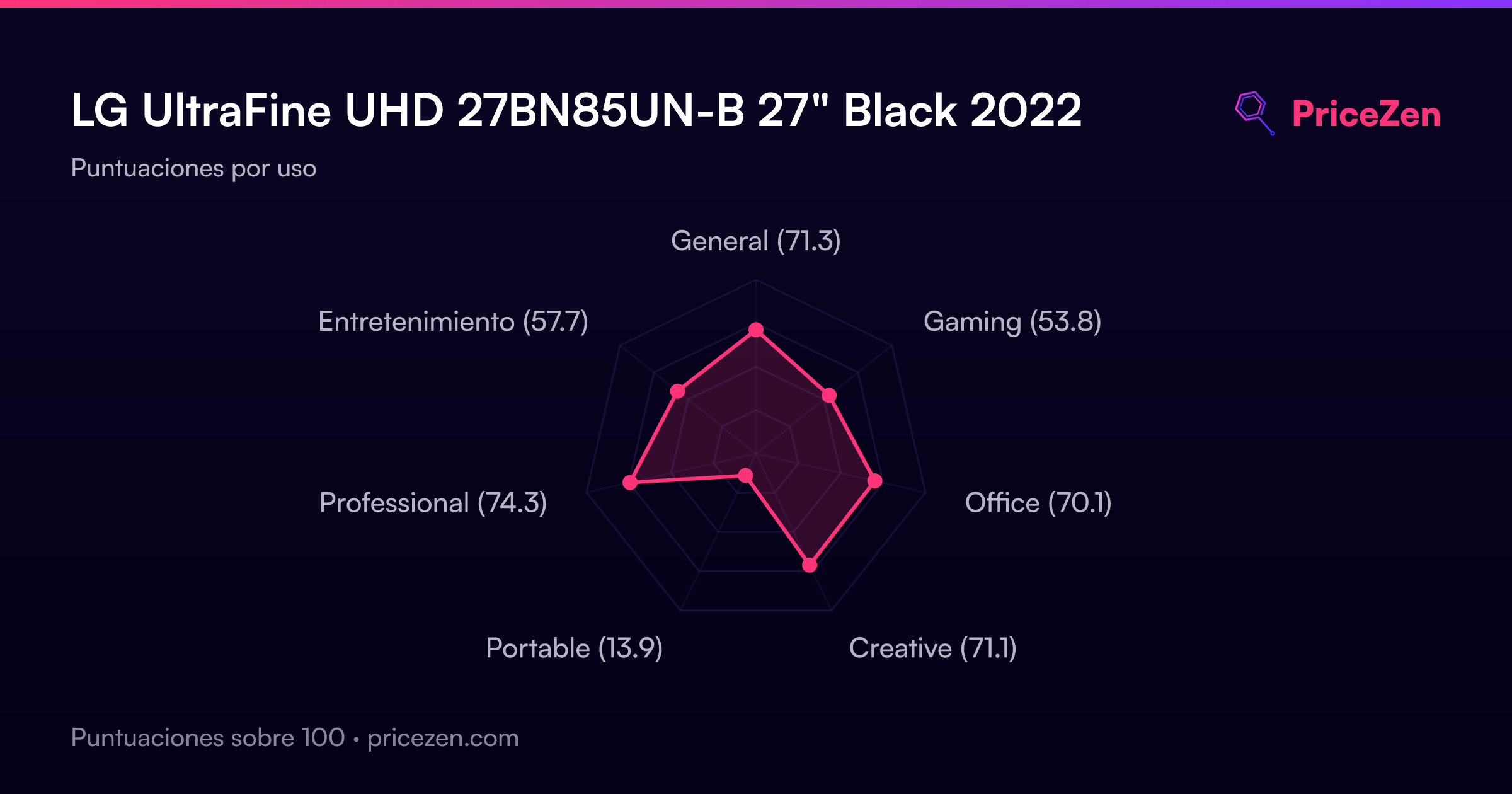
- General71.3
- Gaming53.8
- Office70.1
- Creative71.1
- Portable13.9
- Professional74.3
- Entretenimiento57.7