Acer Predator X27U W1bmiipprx 26.5" Black 2025
The QD-OLED panel delivers a 0.03ms response time and 240Hz refresh rate with 1000-nit peak HDR brightness for exceptional motion clarity and contrast. Its 99% DCI-P3 coverage and Delta E<2 color accuracy make it a viable dual-purpose display for color-critical work alongside gaming. This monitor is best for competitive gamers who also edit photos or video and refuse to compromise on per-pixel OLED dimming.

Sin precio actual de tiendas











Resumen
The 30-Second Version
The Acer Predator X27U is a 26.5-inch QD-OLED gaming monitor with 240Hz, 0.03ms response, and 99% DCI-P3 color that delivers stunning picture quality at a surprisingly affordable price. US listings range from $350 to $897, and at the low end it's one of the best OLED values we've seen. The main annoyances are VRR limited to HDMI only and a recurring auto-power-off popup. If you're upgrading from IPS and want OLED contrast without breaking the bank, this is a strong pick.
Pros & Cons
Ventajas
- QD-OLED panel delivers stunning contrast and 99% DCI-P3 color 98th
- 240Hz refresh rate with 0.03ms response time is top-tier for gaming 91st
- Aggressive pricing makes OLED accessible, with US listings as low as $350 88th
- Full ergonomic stand with height, tilt, swivel, and pivot 85th
- FreeSync Premium Pro support for smooth variable refresh on AMD GPUs
Desventajas
- VRR only works over HDMI, not DisplayPort, which frustrates some owners
- Recurring auto-power-off popup annoys multiple users
- 250 nits typical brightness feels dim in bright rooms
- Cable management hook on the stand is bulky and awkward
- At nearly 9kg, it's heavy and the stand takes up real desk space
Opinión de los propietarios
The Word on the Street
Cómo cambió la opinión de los propietarios con el tiempo
ExclusivaSegún cuándo escribieron realmente sus opiniones los clientes, para ver si los elogios iniciales se mantuvieron.
34 opiniones escritas, mar 2025 – sept 2026: 29 satisfechos, 3 neutrales, 2 insatisfechos
En las 90 valoraciones de tiendas: 4,4★. La mayoría de los propietarios valora sin escribir una opinión. El gráfico cuenta las 34 opiniones escritas.
Cada punto es una opinión escrita, en el mes en que se escribió. Satisfechos = 4-5★, neutrales = 3★, insatisfechos = 1-2★.
Las pruebas
Performance
The headline numbers here are 240Hz and a 0.03ms gray-to-gray response time. In our database, this monitor's performance lands in the 98th percentile, which puts it among the absolute best right now. For real-world gaming, that means motion clarity you simply don't get on slower panels. Fast-paced shooters feel immediate, and even desktop scrolling looks smoother than you'd expect. The 0.03ms response time is essentially instant, so ghosting and motion blur are non-issues.
The QD-OLED panel itself is the star. You get 99% DCI-P3 coverage and 10-bit color, which translates to rich, saturated colors that still feel accurate. Delta E under 2 means color accuracy is good enough for casual content creation too. Brightness is rated at 250 nits typical with a 1000-nit peak in HDR at 3% window, and it carries VESA DisplayHDR True Black 400 certification. That True Black rating matters more than the peak number for OLED, because the per-pixel dimming means blacks are truly black, not the grayish dark you get on edge-lit IPS panels. HDR content looks dramatic, though the typical brightness means a very bright room will wash things out a bit.
Specifications
Full Specifications
Display
| Size | 26.5" |
| Resolution | 2560x1440 (QHD) |
| Panel Type | QD-OLED |
| Aspect Ratio | 16:9 |
| Curved | No |
| Curvature | 1700 |
| Screen Finish | matte |
Performance
| Refresh Rate | 240 Hz |
| Response Time | 0.03 |
| Adaptive Sync | FreeSync Premium |
Color & HDR
| Brightness | 200 nits |
| Color Gamut | DCI-P3 99% |
| Color Depth | 10-bit |
| HDR | HDR10 |
| HDR Support | HDR10 |
Connectivity
| HDMI Ports | 2 |
| DisplayPort | 1 |
| USB-C | 1 |
| Speakers | Yes |
| Headphone Jack | Yes |
Ergonomics
| Height Adjustable | Yes |
| Tilt | Yes |
| Swivel | Yes |
| Pivot | Yes |
| VESA Mount | 75x75 |
Features
| Webcam | No |
| Touchscreen | No |
| PIP/PBP | Yes |
| Power | 48 |
| Weight | 5.5 kg / 12.2 lbs |
vs Competition
The ASUS ROG Strix XG27UCDMG is probably the most direct competitor. It uses a similar QD-OLED panel with 240Hz, but ASUS tends to charge a premium for the ROG branding and their tuning. The ASUS also handles VRR over both HDMI and DisplayPort, which is a real advantage if you're on an NVIDIA GPU and want to use G-Sync compatible mode over DP. The Acer's VRR limitation to HDMI only is a genuine annoyance that owners mention repeatedly.
The MSI MAG 271QPX QD-OLED E2 is another strong alternative, often priced similarly to the Acer. MSI's version has a slightly different feature set and their own OSD quirks, but the core panel performance is nearly identical. The LG UltraGear 27GX790A-B uses a WOLED panel instead of QD-OLED, which means slightly different color characteristics and typically better brightness in bright rooms, though the QD-OLED panels tend to have more vibrant color saturation. The Samsung Odyssey G60SD is also in the mix, usually at a higher price with Samsung's aggressive curve and gaming features. For pure price-to-performance, the Acer wins when it's discounted. At full price, the ASUS or MSI become more compelling because they avoid the VRR limitation and have more polished software.
| Spec | Acer Predator X27U W1bmiipprx 26.5" | ASUS ProArt PA32DC 31.5" | Apple Studio Display XDR 27" | Samsung Odyssey Ark LS55CG970NNXGO 55" | Dell UltraSharp U5226KW 51.5" | MSI MAG 274URFW 27" |
|---|---|---|---|---|---|---|
| Screen Size | 26.5 | 31.5 | 27 | 55 | 51.5 | 27 |
| Resolution | 2560 x 1440 | 3840 x 2160 | 5120 x 2880 | 3840 x 2160 | 6144 x 2560 | 3840 x 2160 |
| Panel Type | QD-OLED | OLED | Mini-LED | VA | IPS | IPS |
| Refresh Rate | 240 | 60 | 120 | 165 | 120 | 160 |
| Response Time Ms | 0.029999999329447746 | 0.10000000149011612 | - | 1 | 5 | 0.5 |
| Adaptive Sync | FreeSync Premium | - | Adaptive-Sync | FreeSync Premium Pro | Adaptive-Sync | FreeSync Premium |
| Hdr | HDR10 | HDR400 | HDR | HDR10+ | HDR | HDR |
| Compare | Compare | Compare | Compare | Compare |
| Producto | Color | Portabilidad | Display | Feature | User Sentiment | Ergonomic | Performance | Connectivity | Valoración social |
|---|---|---|---|---|---|---|---|---|---|
| Acer Predator X27U W1bmiipprx 26.5" | 67.2 | 71.3 | 72.6 | 85.1 | 61 | 90.8 | 97.9 | 87.6 | 60.6 |
| ASUS ProArt PA32DC 31.5" Compare | 80.1 | 71.3 | 97.7 | 85.1 | 0 | 90.8 | 93.9 | 93.1 | 74.8 |
| Apple Studio Display XDR 27" Compare | 99.8 | 81.4 | 99.3 | 94.4 | 76.3 | 67 | 56.1 | 89.9 | 45.2 |
| Samsung Odyssey Ark LS55CG970NNXGO 55" Compare | 95.4 | 43.4 | 91.5 | 96.3 | 0 | 78.7 | 77.1 | 95.4 | 62.2 |
| Dell UltraSharp U5226KW 51.5" Compare | 95.1 | 76.6 | 99.8 | 96.3 | 0 | 90.8 | 56.1 | 99.9 | 22.8 |
| MSI MAG 274URFW 27" Compare | 91.9 | 57.5 | 87 | 85.1 | 0 | 90.8 | 90.8 | 81.2 | 51.3 |
Precio
Value & Pricing
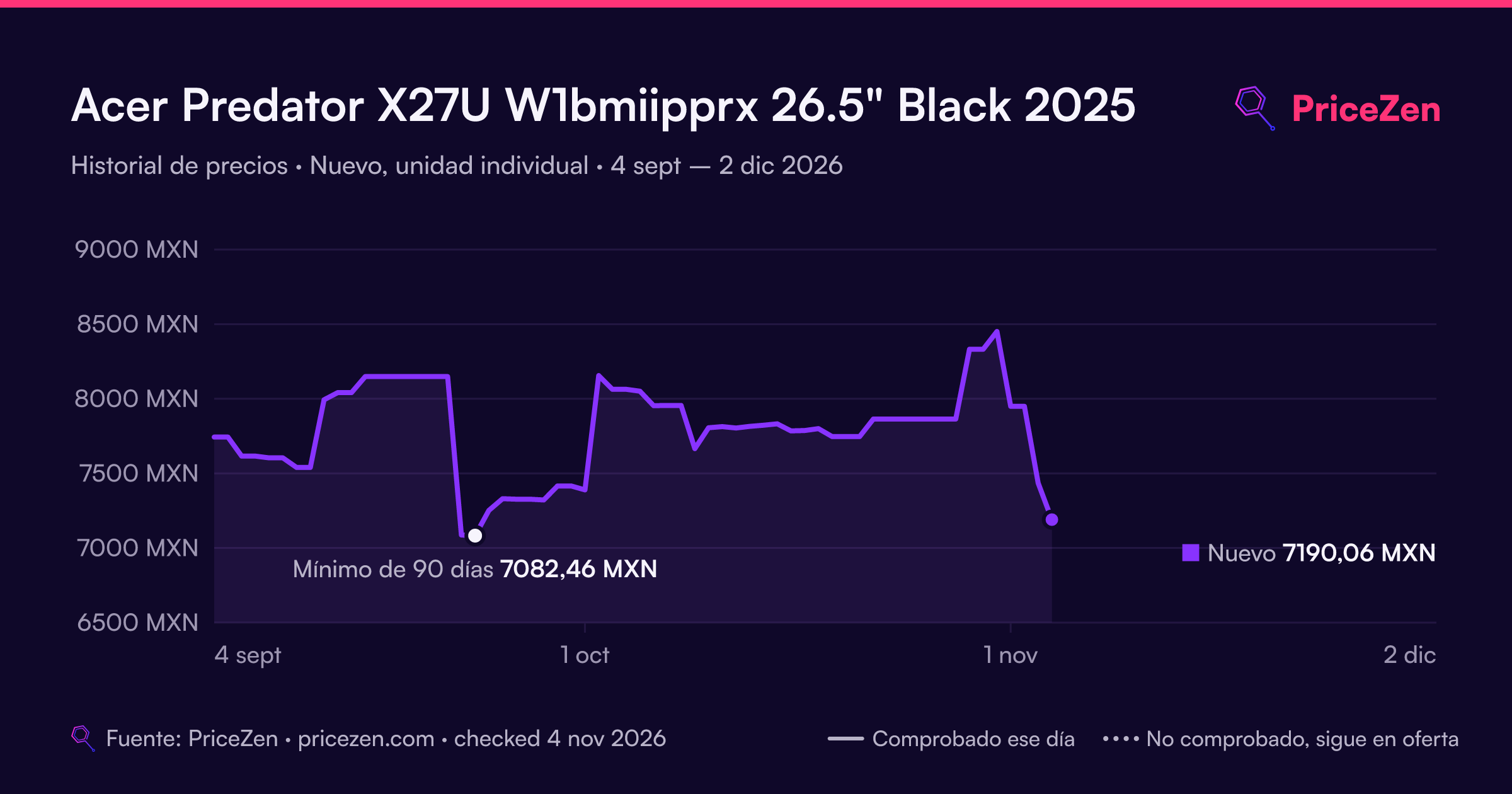
This is where the X27U gets genuinely interesting. US listings range from $350 to $897, and if you can find it near the low end, you're getting a QD-OLED gaming monitor for less than many 1440p IPS panels with worse specs. The best US deal in our data comes in at $350, which is frankly absurd for this panel. Even at the higher end around $897, you're still competitive with other 27-inch OLEDs, but the value proposition weakens considerably.
Canadian buyers see a similar spread, from CAD 500 to CAD 1,073. Again, the low end is where this monitor shines. At CAD 500, nothing else in this class touches it. The key is shopping around, because the same monitor at the top of that range faces stiff competition from the ASUS ROG Strix XG27UCDMG and MSI MAG 271QPX QD-OLED E2, which offer similar specs with fewer quirks. If you're paying full retail, the calculus shifts. But at the discounted prices we're seeing, this is one of the best value OLED monitors on the market.
Historial de precios
Leer más
Overview
The Acer Predator X27U W1bmiipprx is one of those monitors that makes you wonder why you waited so long to go OLED. It's a 26.5-inch QD-OLED panel running at 2560 x 1440 with a 240Hz refresh rate, and it lands in that sweet spot where competitive speed meets genuinely gorgeous picture quality. This isn't a monitor trying to do everything for everyone. It's aimed squarely at gamers who want that instant response and deep contrast without dropping four figures on a 4K OLED.
What makes this particular model interesting is the price. Across US retailers we're seeing it listed anywhere from $350 to $897, which is a wild spread. At the low end, you're getting a QD-OLED panel for less than many premium IPS monitors. That changes the conversation entirely. Suddenly the question isn't "is OLED worth it" but "why wouldn't you get this over a high-end IPS panel at the same price."
Acer has been making Predator monitors for years, but this feels like a moment where the tech matured enough to hit mainstream pricing. The X27U sits in a crowded field with the ASUS ROG Strix XG27UCDMG, MSI MAG 271QPX QD-OLED E2, and LG UltraGear 27GX790A-B all fighting for the same buyer. And honestly, the Acer holds its own by undercutting most of them on price while keeping the core specs intact.
Common Questions
Q: Is upgrading from a 60Hz IPS monitor to this worth it?
Absolutely, if your GPU can push high frame rates at 1440p. The jump from 60Hz to 240Hz is immediately noticeable in fast-paced games, and the QD-OLED panel adds deep blacks and vibrant colors that IPS panels simply can't match. You'll need a reasonably powerful graphics card to take full advantage of the 240Hz refresh rate, but even at lower frame rates the response time and contrast improvements are significant.
Q: Does FreeSync work over DisplayPort or only HDMI?
This is one of the quirks of this monitor. AMD FreeSync Premium Pro is supported, but owners report that variable refresh rate only functions over HDMI, not DisplayPort. If you're using an AMD GPU and want VRR, you'll need to connect via HDMI 2.1. NVIDIA users looking for G-Sync compatibility may also need to use HDMI, which is unusual since most monitors handle VRR over DisplayPort as well.
Q: How bright does this monitor actually get?
The typical brightness is rated at 250 nits, which is on the lower side for a monitor in a bright room. However, it can hit 1000 nits peak in HDR at a 3% window, and the VESA DisplayHDR True Black 400 certification means the per-pixel dimming creates excellent contrast even at lower brightness levels. In a dim or moderately lit room, it looks fantastic. In direct sunlight or very bright office lighting, you might find it a bit dim.
Q: What's the power consumption like during extended gaming?
The monitor is rated at 35W typical power consumption, which is reasonable for a 27-inch OLED panel. OLED monitors can vary in power draw depending on what's on screen, with brighter content pulling more power. For extended gaming sessions, you're looking at roughly the same ballpark as other high-refresh OLED monitors in this class, though Acer doesn't publish a specific TDP for gaming loads.
Who Should Skip This
If you're running an NVIDIA GPU and rely on G-Sync over DisplayPort, this monitor's HDMI-only VRR support is going to annoy you. You'd be better served by the ASUS ROG Strix XG27UCDMG or MSI MAG 271QPX QD-OLED E2, both of which handle VRR over both connections. Content creators who need color-critical accuracy for professional work should also look elsewhere. While Delta E under 2 is good, the 250-nit typical brightness and lack of hardware calibration features make this a gaming monitor first and a productivity tool second.
If you work in a bright room with lots of windows or overhead lighting, the typical brightness might leave you squinting. A WOLED panel like the LG UltraGear 27GX790A-B tends to handle bright environments better. And if you're a competitive esports player chasing every possible frame, you might want to look at 360Hz or 480Hz options instead, though you'll pay significantly more for the privilege.
Verdict
If you're a gamer coming from an IPS or VA panel and you want that OLED jump without spending a fortune, the X27U is an easy recommendation when you find it at the lower end of its price range. The combination of 240Hz, near-instant response, and QD-OLED contrast is transformative for fast-paced games, and the color performance makes single-player titles look stunning too. At $350 to $500 USD, this is a no-brainer.
For competitive esports players who need every possible frame and the lowest input lag, this monitor still works great, but you might also consider a 360Hz or 480Hz panel if your GPU can push those frame rates. And if you're sensitive to brightness or work in a very bright room, the 250-nit typical brightness might leave you wanting more. In that case, a brighter WOLED option like the LG UltraGear 27GX790A-B could be a better fit. But for most gamers, the X27U delivers an experience that feels premium without the premium price tag.
Usage Scores
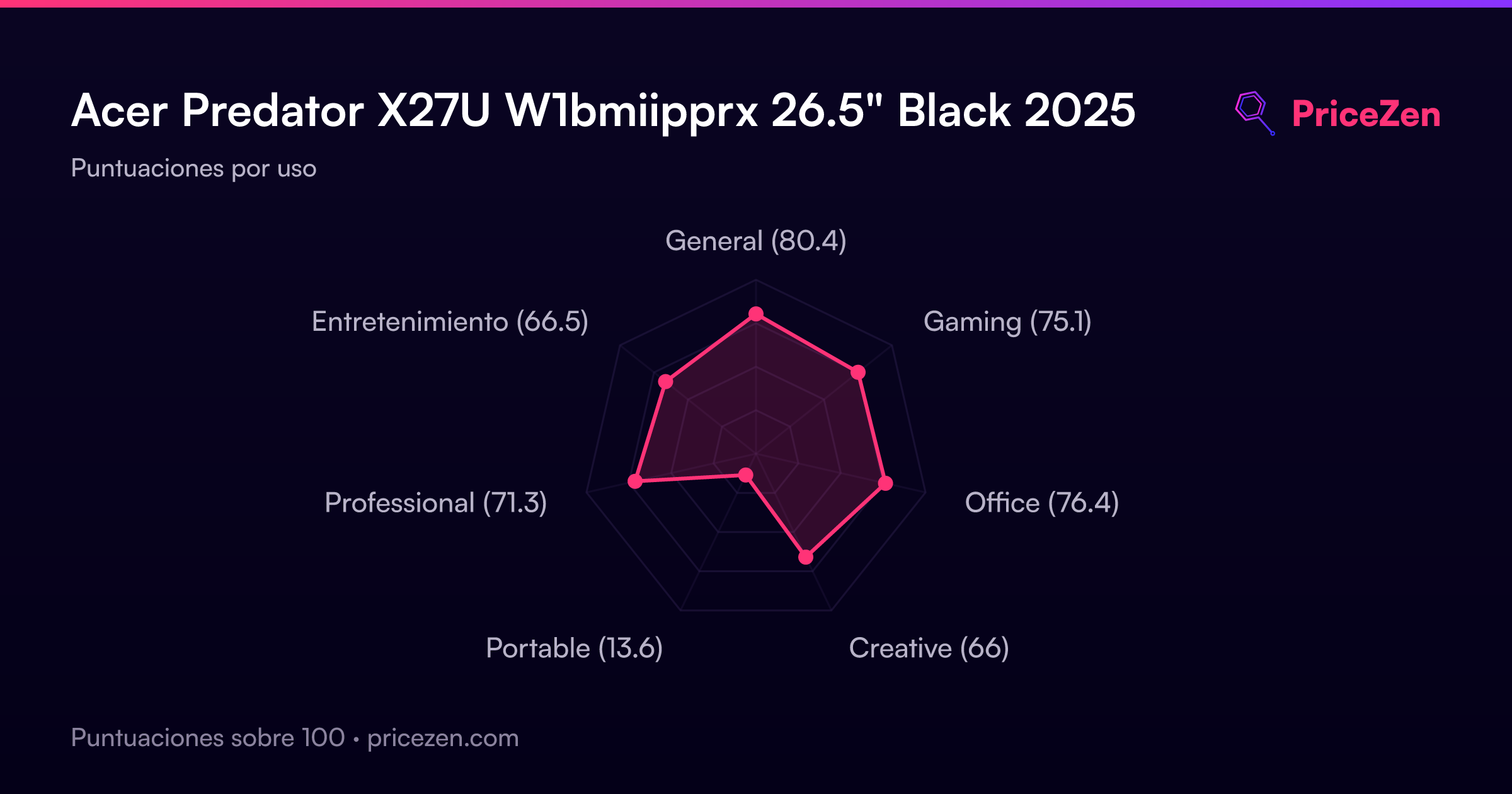
- General80.4
- Gaming75.1
- Office76.4
- Creative66
- Portable13.6
- Professional71.3
- Entretenimiento66.5