ASUS TUF Gaming VG259QMRL5A 24.5" black
The 310Hz overclocked Fast IPS panel with a 0.3ms response time delivers exceptional motion clarity for competitive shooters. Its ELMB Sync technology uniquely combines blur reduction with variable refresh rates, eliminating ghosting without the typical brightness penalty. This monitor is best for esports gamers who prioritize frame fluidity and response over high pixel density.

Sin precio actual de tiendas
Dónde lo vimos antes. Consulta el precio de hoy en la tienda.











Resumen
The 30-Second Version
The ASUS TUF Gaming VG259QMRL5A is a 24.5-inch 1080p gaming monitor with a 310Hz refresh rate and 0.3ms response time, making it one of the fastest budget esports displays you can buy. It's FreeSync Premium and G-Sync compatible, has a fully adjustable stand, and costs around USD 180 to USD 199. If you want maximum speed for competitive gaming without spending a lot, this is a top pick.
Pros & Cons
Ventajas
- 310Hz refresh rate is best-in-class for the price 99th
- 0.3ms response time keeps motion sharp 91st
- FreeSync Premium and G-Sync compatible 76th
- Fully adjustable stand with pivot and swivel 70th
- 99% sRGB coverage looks great for a budget panel
Desventajas
- HDR 400 is basically a marketing sticker
- Built-in speakers are weak
- 1080p at 24.5 inches isn't for everyone
- No USB hub or KVM switch
- Plastic build feels a bit cheap
Opinión de los propietarios
The Word on the Street
Cómo cambió la opinión de los propietarios con el tiempo
ExclusivaSegún cuándo escribieron realmente sus opiniones los clientes, para ver si los elogios iniciales se mantuvieron.
1 opinión escrita, feb 2026: 1 satisfecho
En las 25 valoraciones de tiendas: 4,5★. La mayoría de los propietarios valora sin escribir una opinión. El gráfico cuenta 1 opinión escrita.
Cada punto es una opinión escrita, en el mes en que se escribió. Satisfechos = 4-5★, neutrales = 3★, insatisfechos = 1-2★.
Las pruebas
Performance
This is where the VG259QMRL5A earns its keep. The 310Hz refresh rate puts it at the absolute top of the charts in our database, and the 0.3ms GTG response time means motion blur is basically a non-issue. In practice, fast-paced games like Valorant, CS2, or Overwatch feel incredibly smooth. Tracking enemies during quick flicks is noticeably easier than on a 144Hz or even 240Hz panel, assuming your GPU can push frames that high. The Fast IPS tech keeps colors from washing out the way older TN panels did, so you're not sacrificing image quality for speed.
ASUS also includes ELMB Sync, which lets you run their motion blur reduction tech at the same time as variable refresh rate. That's a feature a lot of monitors force you to choose between, so having both active is a genuine advantage. The 400 nits brightness is enough for most indoor setups, and the 99% sRGB coverage means games look vibrant without being oversaturated. HDR 400 is there if you want it, but honestly, it's not worth turning on. The panel just doesn't have the contrast or local dimming to make HDR look good, and you'll get a better picture with it off.
Specifications
Full Specifications
Display
| Size | 24.5" |
| Resolution | 1920x1080 (Full HD) |
| Panel Type | IPS |
| Aspect Ratio | 16:9 |
| Curved | No |
| Screen Finish | matte |
Performance
| Refresh Rate | 310 Hz |
| Response Time | 0.03 |
| Adaptive Sync | G-Sync Compatible |
Color & HDR
| Brightness | 400 nits |
| Color Gamut | sRGB 99% |
| HDR | HDR400 |
| HDR Support | HDR10 |
Connectivity
| HDMI Ports | 2 |
| DisplayPort | 1 |
| Speakers | Yes |
| Headphone Jack | Yes |
Ergonomics
| Height Adjustable | Yes |
| Tilt | Yes |
| Swivel | Yes |
| Pivot | Yes |
| VESA Mount | 100x100 |
Features
| Webcam | No |
| Weight | 4.9 kg / 10.8 lbs |
vs Competition
Compared to the MSI MAG 271QPX QD-OLED E2 or the LG UltraGear 27GX790A-B, the ASUS is in a completely different league on price. Those are 1440p OLED panels that cost two to three times as much, and they're aimed at people who want visual quality as much as speed. The ASUS is for pure esports performance on a budget. The Samsung Odyssey G7 G75F is a closer competitor in spirit, with a 1440p 240Hz VA panel, but it's bigger, more expensive, and has better contrast. The Alienware AW2725D is another 1440p option that trades refresh rate for resolution and color depth.
If you're deciding between this and a 240Hz 1440p monitor, ask yourself what you actually play. For fast-paced competitive titles where every millisecond counts, the ASUS wins on speed and price. For anything else, a 1440p panel will look noticeably sharper and give you more screen real estate. The Dell S2725QC is a 4K productivity monitor, so it's not really a direct competitor, but it shows what you give up in resolution when you go with the ASUS. Text and fine details are just sharper on higher-res panels, even if the refresh rate is lower.
| Spec | ASUS TUF Gaming VG259QMRL5A 24.5" | LG UltraGear 45GX950A-B 45" | Dell UltraSharp U4025QW 39.7" | Alienware AW-Series AW3425DW 34" | MSI MAG 271QPX QD-OLED E2 27" | Samsung Odyssey G60SD 27" |
|---|---|---|---|---|---|---|
| Screen Size | 24.5 | 45 | 39.7 | 34 | 27 | 27 |
| Resolution | 1920 x 1080 | 5120 x 2160 | 5120 x 2160 | 3440 x 1440 | 2560 x 1440 | 2560 x 1440 |
| Panel Type | IPS | OLED | IPS | QD-OLED | QD-OLED | OLED |
| Refresh Rate | 310 | 330 | 120 | 240 | 240 | 360 |
| Response Time Ms | 0.03 | 0.03 | 5 | 0.03 | 0.03 | 0.03 |
| Adaptive Sync | G-Sync Compatible | FreeSync Premium Pro | Adaptive-Sync | FreeSync Premium Pro | FreeSync Premium Pro | FreeSync Premium Pro |
| Hdr | HDR400 | DisplayHDR True Black 400 | HDR600 | HDR400 | DisplayHDR True Black 400 | HDR10+ |
| Compare | Compare | Compare | Compare | Compare |
| Producto | Color | Portabilidad | Display | Feature | Performance | Connectivity | Valoración social |
|---|---|---|---|---|---|---|---|
| ASUS TUF Gaming VG259QMRL5A 24.5" | 76.3 | 35.2 | 37.5 | 70.1 | 99.3 | 62.2 | 41.8 |
| LG UltraGear 45GX950A-B 45" Compare | 99.4 | 76.5 | 99.7 | 96.3 | 99.4 | 96.9 | 92 |
| Dell UltraSharp U4025QW 39.7" Compare | 97.9 | 76.5 | 98.6 | 96.3 | 56.1 | 99.3 | 96.8 |
| Alienware AW-Series AW3425DW 34" Compare | 98.9 | 73.9 | 84.1 | 96.3 | 97.9 | 95.4 | 96.8 |
| MSI MAG 271QPX QD-OLED E2 27" Compare | 99.2 | 57.4 | 73.4 | 85 | 97.9 | 81.1 | 98.9 |
| Samsung Odyssey G60SD 27" Compare | 90.7 | 39.4 | 73.4 | 70.1 | 99.5 | 87.5 | 92 |
Precio
Value & Pricing
At USD 180 to USD 199, this monitor is a steal for what it offers. The price spread across vendors is only about USD 19, so you're not saving much by hunting around, but Amazon tends to have the most consistent stock at the lower end of that range. For context, most 300Hz+ monitors start well above USD 250, and many 240Hz options cost more than this. You're getting top-tier speed at a budget price, which is rare. The trade-off is that you're stuck at 1080p and 24.5 inches, but for competitive gamers, that's often a feature, not a bug. If you want higher resolution or better HDR, you'll need to spend significantly more.
Leer más
Overview
The ASUS TUF Gaming VG259QMRL5A is a 24.5-inch 1080p gaming monitor that sits in the budget-to-midrange esports bracket, usually landing between USD 180 and USD 199 in the US. It's built for people who care about speed above all else, with a 310Hz overclocked refresh rate and a 0.3ms response time on a Fast IPS panel. That combo is rare at this price, and it's the main reason this monitor exists. If you're hunting for a high refresh rate 1080p monitor for competitive shooters, this is one of the cheapest ways to get past 300Hz without going to a sketchy no-name brand.
ASUS pairs that speed with FreeSync Premium and G-Sync compatibility, so you get tear-free gameplay whether you're on an AMD or Nvidia GPU. The stand is fully adjustable with height, tilt, swivel, and pivot, which is more than you usually get on budget gaming monitors. You also get 99% sRGB coverage and DisplayHDR 400, though the HDR here is more of a checkbox than a real feature. Built-in speakers and a headphone jack round out the package, though the speakers are about what you'd expect from a monitor.
For everyday use, it's solid. The 24.5-inch size and 1080p resolution keep text sharp enough for browsing and office work, and the IPS panel gives you decent viewing angles. But make no mistake, this is a gaming monitor first. The 400 nits brightness is fine for most rooms, and the color performance is well above average for a budget gaming panel. It's not going to blow you away for photo editing, but it's not supposed to.
Common Questions
Q: Is the ASUS TUF VG259QMRL5A good for competitive gaming?
Yes, it's one of the best budget options for competitive gaming. The 310Hz refresh rate and 0.3ms response time make fast-paced shooters feel incredibly smooth, and FreeSync Premium plus G-Sync compatibility means no screen tearing.
Q: Does the ASUS VG259QMRL5A work with Nvidia graphics cards?
Yes, it's G-Sync compatible, so it works with Nvidia GPUs. It also supports FreeSync Premium for AMD cards, so you're covered either way.
Q: Is 1080p at 24.5 inches sharp enough?
For gaming, yes. The pixel density is about 90 PPI, which is standard for 24-inch 1080p monitors. Text is readable and games look crisp, though it won't be as sharp as a 1440p or 4K display.
Q: Does the ASUS TUF VG259QMRL5A have good HDR?
No, the DisplayHDR 400 certification is the lowest tier and doesn't add much. The panel lacks local dimming and high peak brightness, so you're better off leaving HDR off and using the standard SDR mode.
Who Should Skip This
Skip this monitor if you're not a competitive gamer. If you mostly play single-player RPGs, strategy games, or watch movies, a 1440p or 4K panel will give you a much better experience for similar or slightly more money. Content creators and photo editors should also look elsewhere, since the 1080p resolution and limited HDR won't cut it for color-critical work. And if you need USB ports, a KVM switch, or decent built-in speakers, this monitor doesn't have them. The Dell S2725QC or a midrange 1440p gaming monitor like the Samsung Odyssey G7 would be better fits for those use cases.
Verdict
Should you buy the ASUS TUF Gaming VG259QMRL5A? If you're a competitive gamer on a budget who wants the highest refresh rate possible without spending a fortune, yes. This is one of the best values in esports monitors right now. The 310Hz refresh rate and 0.3ms response time are genuinely top-tier, and the fully adjustable stand is a nice bonus you don't always get at this price. The picture quality is good for a 1080p IPS panel, and the FreeSync and G-Sync support means it'll work smoothly with whatever GPU you have.
But if you're not playing fast-paced shooters or you care more about image quality than frame rates, this probably isn't for you. The 1080p resolution is fine at 24.5 inches, but it's not going to impress anyone who's used to 1440p or 4K. HDR is a non-factor, and the built-in speakers are best ignored. For the right person, though, this monitor is an absolute bargain. It does one thing extremely well, and it does it for less money than almost anything else in its class.
Usage Scores
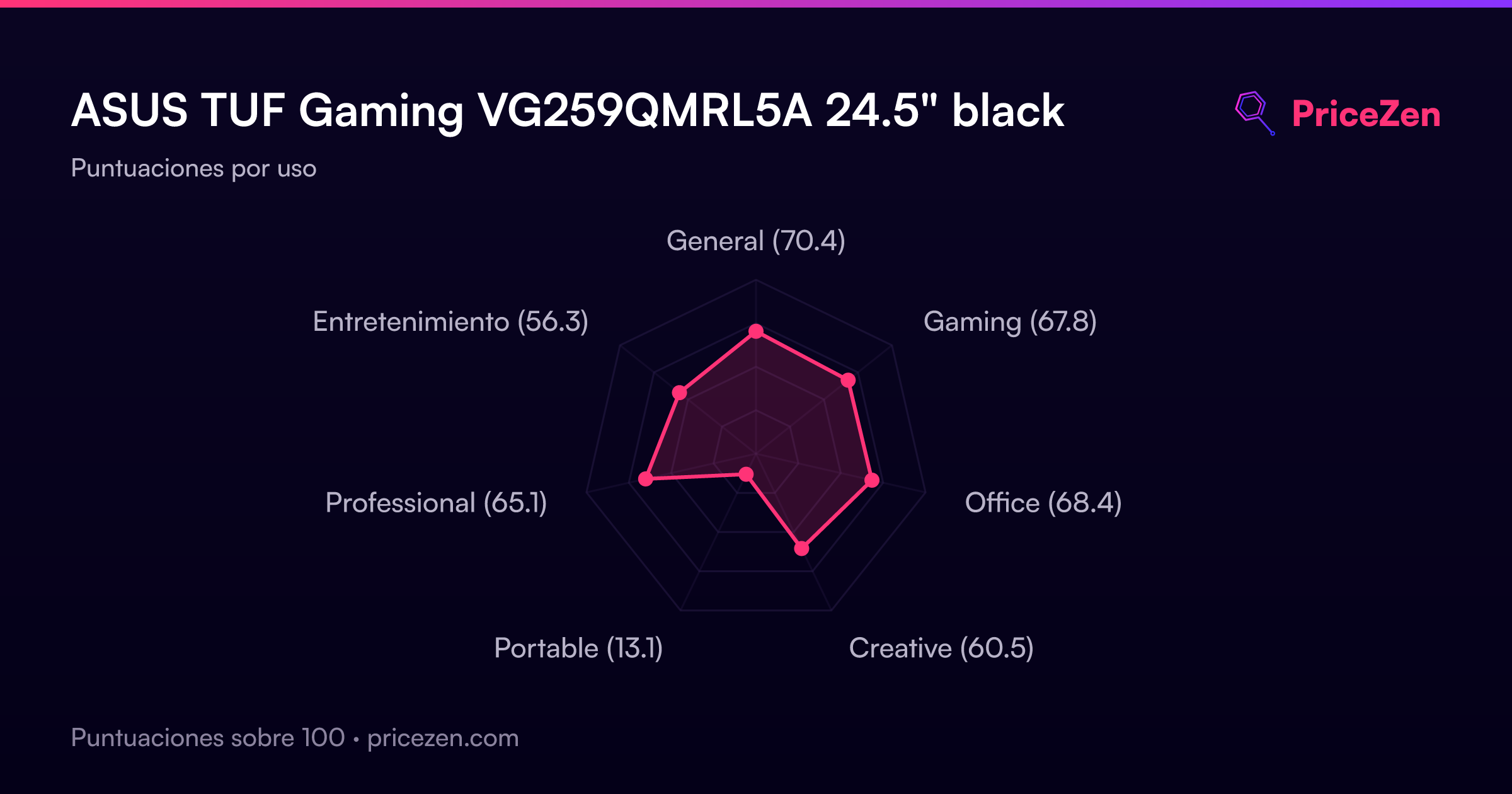
- General70.4
- Gaming67.8
- Office68.4
- Creative60.5
- Portable13.1
- Professional65.1
- Entretenimiento56.3