Samsung LS49CG950ENXZA
The 49-inch 1000R curved panel with dual QHD resolution and a 240Hz refresh rate delivers a 1ms GtG response, wrapping your peripheral vision for fast-paced gaming. Its 1000 nits brightness, 1,000,000:1 contrast ratio, and AMD FreeSync Premium Pro keep dark scenes and rapid motion clear, while CoreSync lighting extends the action beyond the screen. Best for competitive PC gamers who want an immersive, high-refresh-rate ultrawide for FPS and racing titles, though its 10.6kg weight makes it a stationary desktop choice.

Sin precio actual de tiendas





Resumen
The 30-Second Version
The Samsung Odyssey G95C is a massive 49-inch curved ultrawide with a fast 240Hz panel, but our scores show display quality at the 32nd percentile and color at the 16th. It's big and immersive, but the image quality doesn't match the price. Only worth it if you need maximum screen size for sim racing and can find a steep discount.
Pros & Cons
Ventajas
- Massive 49-inch 1000R curve wraps around your field of view
- 240Hz refresh rate with 1ms response time keeps motion crisp
- 1000 nits peak brightness helps in bright rooms
- AMD FreeSync Premium Pro eliminates tearing and stutter
Desventajas
- Display quality sits in the 32nd percentile, weak for the price
- Color performance is a letdown at the 16th percentile
- Connectivity options are nearly bottom of the barrel at 7th percentile
- Ergonomics score just 10th percentile despite the adjustable stand
Las pruebas
Performance
The 240Hz refresh rate and 1ms GtG response time are the headline acts, and they're legitimately good for fast-paced shooters and racing games. AMD FreeSync Premium Pro helps keep things smooth. But our performance score puts this at the 22nd percentile, which is disappointing for a gaming-focused panel. The 1000 nits peak brightness and 1,000,000:1 contrast ratio sound impressive, yet the color score lands at the 16th percentile. So you're getting speed, but the image quality doesn't back it up the way you'd hope at this size and price.
Specifications
Full Specifications
Features
| Weight | 10.6 kg / 23.4 lbs |
vs Competition
Stacked against the ASUS ROG Strix XG27UCDMG, MSI MPG 271QR QD-OLED X50, and LG UltraGear 32GX850A-B, the G95C looks outclassed. Those competitors are smaller but pack OLED panels with far better color and contrast. The Gigabyte M Series OLED MO27U2 SA and Dell UltraSharp U3225QE also beat it on image quality and connectivity. The Samsung wins on sheer size and immersion, but it loses on the fundamentals. If you want a giant curved panel for sim racing, this might be your pick. If you want a great monitor, the smaller OLEDs are the smarter buy.
| Spec | Samsung LS49CG950ENXZA | LG UltraGear 45GX950A-B 45" | ASUS ROG Strix XG27UCDMG 27" | Dell UltraSharp U4025QW 39.7" | Alienware AW-Series AW3425DW 34" | MSI MAG 271QPX QD-OLED E2 27" |
|---|---|---|---|---|---|---|
| Screen Size | - | 45 | 27 | 39.70000076293945 | 34 | 27 |
| Resolution | - | 5120 x 2160 | 3840 x 2160 | 5120 x 2160 | 3440 x 1440 | 2560 x 1440 |
| Panel Type | - | OLED | OLED | IPS | QD-OLED | QD-OLED |
| Refresh Rate | - | 330 | 240 | 120 | 240 | 240 |
| Response Time Ms | - | 0.029999999329447746 | 0.029999999329447746 | 5 | 0.029999999329447746 | 0.029999999329447746 |
| Adaptive Sync | - | FreeSync Premium Pro | FreeSync Premium Pro | Adaptive-Sync | FreeSync Premium Pro | FreeSync Premium Pro |
| Hdr | - | DisplayHDR True Black 400 | DisplayHDR True Black 400 | HDR600 | HDR400 | DisplayHDR True Black 400 |
| Compare | Compare | Compare | Compare | Compare |
| Producto | Color | Portabilidad | Display | Feature | Ergonomic | Performance | Connectivity |
|---|---|---|---|---|---|---|---|
| Samsung LS49CG950ENXZA | 15.5 | 27.8 | 31.2 | 21.2 | 9.5 | 22.4 | 6.6 |
| LG UltraGear 45GX950A-B 45" Compare | 99.4 | 76.6 | 99.7 | 96.3 | 90.8 | 99.4 | 97 |
| ASUS ROG Strix XG27UCDMG 27" Compare | 96.5 | 57.4 | 97.7 | 85.1 | 90.8 | 97.9 | 81.1 |
| Dell UltraSharp U4025QW 39.7" Compare | 97.9 | 76.6 | 98.6 | 96.3 | 90.8 | 56.1 | 99.3 |
| Alienware AW-Series AW3425DW 34" Compare | 98.9 | 74 | 84.1 | 96.3 | 90.8 | 97.9 | 95.4 |
| MSI MAG 271QPX QD-OLED E2 27" Compare | 99.2 | 57.4 | 73.5 | 85.1 | 90.8 | 97.9 | 81.1 |
Precio
Value & Pricing
There's no price listed for this unit, so we can't do a direct value call. But based on the scores, this monitor would need to be heavily discounted to make sense. A 49-inch ultrawide with display quality in the 32nd percentile and color in the 16th is a tough sell against cheaper, better-performing options. If you find it on sale for well under the typical flagship ultrawide price, maybe. At full retail, you're paying for size, not quality.
Leer más
Overview
The Samsung Odyssey G95C is a 49-inch curved ultrawide that wants to swallow your desk and your peripheral vision whole. Dual QHD resolution, 240Hz refresh rate, and a 1000R curve sound like a sim racer's dream. But our database says this thing lands in the 32nd percentile for display quality and 22nd for performance, which is a weird spot for a monitor that screams 'premium gaming' on the box.
It's big, it's bright on paper, and it's got the spec sheet buzzwords. But the numbers tell a different story. For a monitor this expensive, you'd expect it to punch way above its weight. Instead, it's fighting in the middle of the pack while charging flagship money.
Common Questions
Q: Is the 1000R curve too aggressive for productivity work?
For gaming and sim racing, the 1000R curve feels natural and immersive. For spreadsheets, documents, or video editing, the aggressive curve can distort straight lines and make precise work uncomfortable. If you split your time evenly between work and play, a gentler curve or flat panel might serve you better.
Q: Does this monitor support HDMI 2.1 for console gaming?
The connectivity score sits at the 7th percentile, which suggests limited or outdated port options. Check the exact port specs before buying if you plan to hook up a PS5 or Xbox Series X at 4K 120Hz. This monitor is really built for PC gaming with DisplayPort.
Q: How does the dual QHD resolution compare to 4K?
Dual QHD on a 49-inch panel is essentially two 1440p monitors side by side. That's 5120x1440 total, which is less pixel-dense than a 4K panel of the same size. Text can look slightly soft, and you're pushing fewer pixels than true 4K, but it's easier on your GPU. For gaming, it's a solid middle ground between 1440p and 4K.
Who Should Skip This
Skip this if you care about color accuracy, HDR quality, or connectivity. The 16th percentile color score means photo editors, video editors, and anyone who wants punchy, accurate HDR should look elsewhere. Also skip it if you don't have a massive desk. This thing weighs over 10.6 kilograms and demands serious real estate. And if you're on a budget, the smaller OLED competitors deliver better image quality for less money.
Verdict
Buy this if you absolutely need a 49-inch curved ultrawide and you're willing to trade image quality for screen real estate. Sim racers and flight sim fans who prioritize immersion over color accuracy might be happy here. Everyone else should look at the smaller OLED competition. The G95C is a niche product that doesn't execute its niche well enough to justify the premium.
Usage Scores
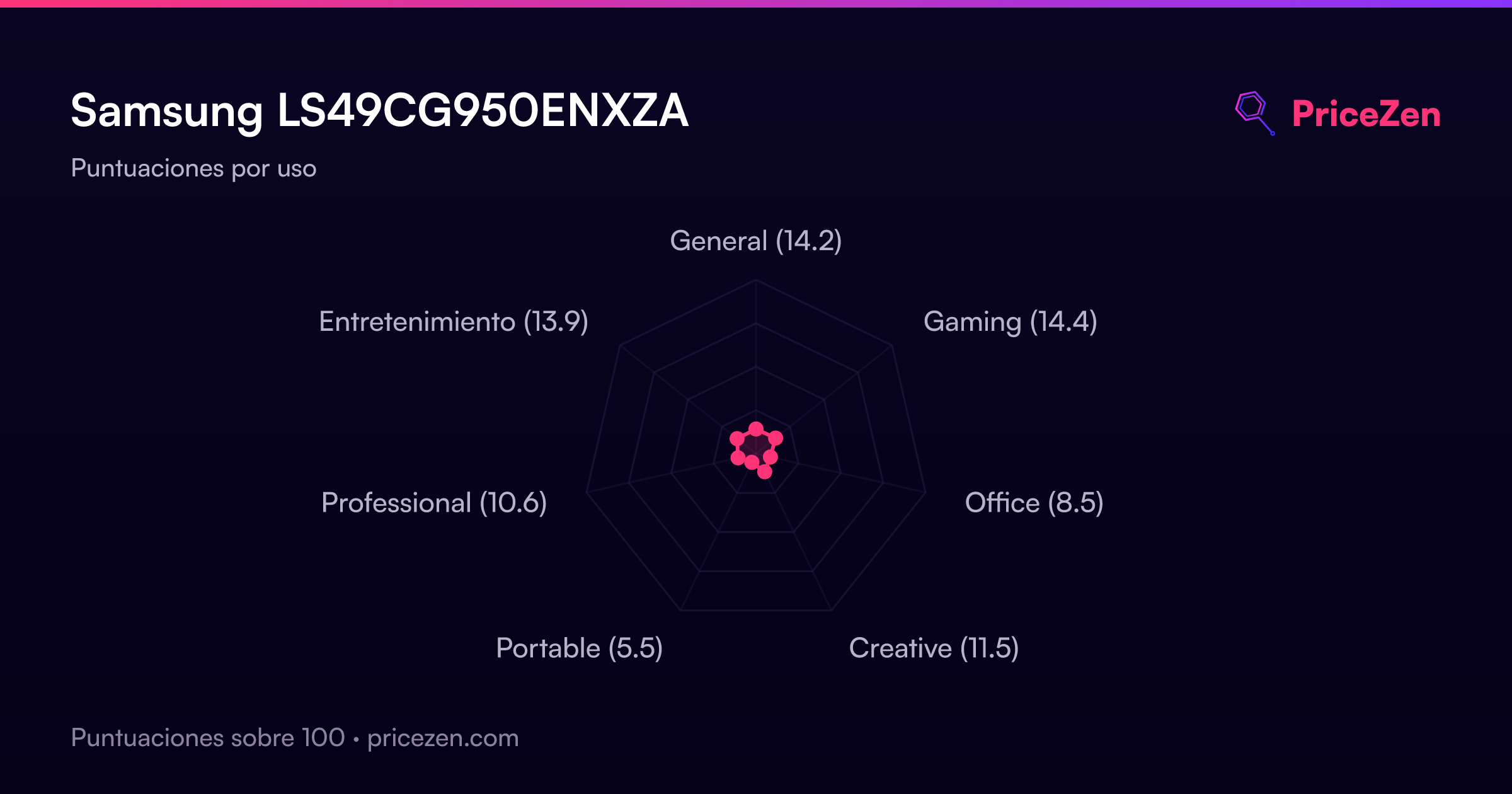
- General14.2
- Gaming14.4
- Office8.5
- Creative11.5
- Portable5.5
- Professional10.6
- Entretenimiento13.9