BenQ GW2786TC 27" White 2024

Soporte totalmente ajustable para cualquier postura verificado el 29 nov
58/100 puntuación global 5,0 media de 4 valoraciones de propietarios
- Screen
- 27"
- Resolution
- 1920 x 1080
- Panel
- IPS
- Refresh
- 100 Hz
- Response time
- 5 ms
Compara precios en 1 tienda
De la más barata a la más cara. Las ofertas nuevas, reacondicionadas y en pack se mantienen separadas para que compares lo comparable.
| Tienda | Vendido por | Color y estado | Precio | vs. el más bajo | Última comprobación | Enlace |
|---|---|---|---|---|---|---|
| Nuevo1 ofertaUnidad individual | ||||||
| No comprobados en los últimos 7 días, por lo que estos precios pueden haber cambiado | ||||||
| Amazon | Desconocido | No indicado | 6931,44 MXN | 3 nov | Ir a la tienda | |
 Fuente: PriceZen, comprobado el 3 nov 2026
Un precio se considera vigente si lo comprobamos en los últimos 7 días. «Vendedor externo» significa un vendedor de terceros en esa tienda, no la propia tienda.
Historial de precios
Comprobado ese díaNo comprobado ese día, sigue en oferta
Fuente: PriceZen, checked 3 nov 2026











Resumen
The 30-Second Version
The BenQ GW2786TC is an office workhorse with killer connectivity and ergonomics that make a real daily difference. The 1080p resolution on a 27-inch screen is its biggest weakness, but the USB-C with 65W charging is best-in-class. If you can snag it near the $170 mark, it's a great deal for a clutter-free desk setup.
Pros & Cons
Ventajas
- USB-C with 65W power delivery is a game-changer for a clean laptop setup. 93rd
- The ergonomic stand offers full height, tilt, swivel, and pivot adjustments. 91st
- Daisy chaining support makes a multi-monitor setup incredibly easy. 86th
- The built-in noise-cancelling microphone is a genuinely useful bonus for calls.
Desventajas
- 1080p resolution on a 27-inch screen results in noticeably low pixel density.
- 250 nits of brightness is just average and can look dim in well-lit spaces.
- Color accuracy is fine for office work but not good enough for professional design.
- The built-in speakers are likely weak, as is typical for this class of monitor.
Opinión de los propietarios
The Word on the Street
- Owners consistently praise how easy the monitor is to set up and the clear picture quality for everyday tasks.
- A few users mention that while the display is lovely, the 1080p resolution on a 27-inch screen is a noticeable compromise.
Cómo cambió la opinión de los propietarios con el tiempo
ExclusivaSegún cuándo escribieron realmente sus opiniones los clientes, para ver si los elogios iniciales se mantuvieron.
1 opinión escrita, mar 2026: 1 satisfecho
En las 4 valoraciones de tiendas: 5,0★. La mayoría de los propietarios valora sin escribir una opinión. El gráfico cuenta 1 opinión escrita.
Cada punto es una opinión escrita, en el mes en que se escribió. Satisfechos = 4-5★, neutrales = 3★, insatisfechos = 1-2★.
Las pruebas
Performance
The 100Hz refresh rate is a nice step up from the standard 60Hz, making scrolling and window movement feel noticeably smoother. The 5ms response time is fine for office work and casual use, but don't expect it to keep up in fast-paced games. The 250-nit brightness is solid for a typical indoor office, though it might struggle a bit in a very bright room. Color coverage hits 99% sRGB, which is accurate enough for general productivity but falls short for any serious creative work. Overall, it's a capable performer for its intended audience, just don't ask it to do more than it was designed for.
Specifications
Full Specifications
Display
| Size | 27" |
| Resolution | 1920x1080 (Full HD) |
| Panel Type | IPS |
| Aspect Ratio | 16:9 |
| Curved | No |
| Screen Finish | matte |
Performance
| Refresh Rate | 100 Hz |
| Response Time | 5 |
Color & HDR
| Brightness | 250 nits |
| Color Gamut | 99% sRGB |
| Color Depth | 8-bit |
Connectivity
| HDMI Ports | 1 |
| DisplayPort | 1 |
| USB-C | 1 |
| Thunderbolt | 65 W |
| Speakers | Yes |
| Headphone Jack | Yes |
Ergonomics
| Height Adjustable | Yes |
| Tilt | Yes |
| Swivel | Yes |
| Pivot | Yes |
| VESA Mount | 100x100 |
Features
| Webcam | No |
| Touchscreen | No |
| PIP/PBP | No |
| Power | 17 |
| Weight | 7.9 kg / 17.4 lbs |
vs Competition
Stacked against the competition, the BenQ is in a weird spot. It can't touch the visual quality of a QD-OLED like the MSI MAG 271QPX QD-OLED E2 or the high refresh rates of a gaming monitor like the ASUS ROG Strix XG27UCDMG. Even the Samsung Odyssey G60SD will run circles around it for gaming. Where the GW2786TC wins is pure office practicality. Its USB-C hub, daisy chaining, and ergonomic stand are features that those flashy gaming panels often skip. It's a specialist in productivity, not a generalist, and it's a strong choice if your main goal is a comfortable, clutter-free desk.
| Spec | BenQ GW2786TC 27" | ASUS ProArt PA32DC 31.5" | Gigabyte AORUS FO32U2 32" | Apple Studio Display XDR 27" | Samsung Odyssey Ark LS55CG970NNXGO 55" | Dell UltraSharp U5226KW 51.5" |
|---|---|---|---|---|---|---|
| Screen Size | 27 | 31.5 | 32 | 27 | 55 | 51.5 |
| Resolution | 1920 x 1080 | 3840 x 2160 | 3840 x 2160 | 5120 x 2880 | 3840 x 2160 | 6144 x 2560 |
| Panel Type | IPS | OLED | OLED | Mini-LED | VA | IPS |
| Refresh Rate | 100 | 60 | 240 | 120 | 165 | 120 |
| Response Time Ms | 5 | 0.1 | 0.03 | - | 1 | 5 |
| Adaptive Sync | - | - | FreeSync Premium Pro | Adaptive-Sync | FreeSync Premium Pro | Adaptive-Sync |
| Hdr | - | HDR400 | DisplayHDR True Black 400 | HDR | HDR10+ | HDR |
| Compare | Compare | Compare | Compare | Compare |
| Producto | Color | Portabilidad | Display | Feature | Ergonomic | Performance | Connectivity | Valoración social |
|---|---|---|---|---|---|---|---|---|
| BenQ GW2786TC 27" | 35.8 | 85.9 | 50.5 | 21.1 | 90.7 | 47.9 | 92.9 | 35.5 |
| ASUS ProArt PA32DC 31.5" Compare | 80 | 71.2 | 97.7 | 85 | 90.7 | 93.9 | 92.9 | 75.1 |
| Gigabyte AORUS FO32U2 32" Compare | 80 | 62.8 | 99 | 85 | 90.7 | 97.9 | 87.4 | 92.2 |
| Apple Studio Display XDR 27" Compare | 99.8 | 81.3 | 99.3 | 94.4 | 66.8 | 56 | 89.7 | 40.2 |
| Samsung Odyssey Ark LS55CG970NNXGO 55" Compare | 95.4 | 43.3 | 91.5 | 96.3 | 78.6 | 77 | 95.3 | 62.6 |
| Dell UltraSharp U5226KW 51.5" Compare | 95.1 | 76.5 | 99.8 | 96.3 | 90.7 | 56 | 99.9 | 23.1 |
Precio
Value & Pricing
Pricing on this model is all over the map, with a wild spread from $170 to over $52,000 from different sellers. Obviously, ignore the absurd high-end listings. At the lower end around $170, this monitor is a fantastic deal for a home office, offering ergonomics and USB-C connectivity that are hard to find at that price. If you see it creeping above $250, you should start looking at 1440p alternatives that will deliver a much sharper picture for your money.
Leer más
Overview
The BenQ GW2786TC is a 27-inch 1080p office monitor that punches above its weight in connectivity and ergonomics. It's clearly built for desk warriors who need a flexible, comfortable setup without spending a fortune. The USB-C port with 65W charging is the star here, letting you connect a laptop and charge it with a single cable. Add in daisy chaining for a clean multi-monitor rig, and you've got a seriously tidy workspace solution.
But let's be real about that 1080p resolution on a 27-inch panel. Text won't look as crisp as it does on a 1440p or 4K display, and the 250-nit brightness is just average. This monitor is all about practical office features like the noise-cancelling mic and eye-care modes, not jaw-dropping visuals. If you spend all day in spreadsheets and Zoom calls, it makes a lot of sense.
Common Questions
Q: Can this monitor charge my laptop and display video over a single cable?
Yes, the USB-C port supports video, data, and up to 65W of power delivery, which is enough to charge most ultrabooks and many work laptops.
Q: Is the 1080p resolution sharp enough on a 27-inch screen?
It's functional, but text won't be as sharp as on a 1440p or 4K monitor. If you're sensitive to pixel density or do a lot of reading, you'll notice the difference.
Q: Does the built-in microphone actually work well for calls?
The noise-cancellation feature is designed to filter out background sounds, making it a solid option for clear voice pickup in a home office without a dedicated headset.
Who Should Skip This
If you do any kind of visual creative work like photo editing or graphic design, skip this one. The color accuracy and 1080p resolution just aren't up to the task. Gamers should also look elsewhere, as the 100Hz refresh rate and 5ms response time will feel sluggish compared to even budget gaming monitors.
Verdict
The BenQ GW2786TC is a purpose-built office monitor that nails the basics for desk workers. If your daily routine involves a laptop, video calls, and a lot of documents, the USB-C connectivity and ergonomic stand will make a real difference in your comfort and workflow. Just don't buy it expecting a stunning cinematic display or a competitive gaming edge. It's a tool for getting work done, and for that specific job, it's a smart buy at the right price.
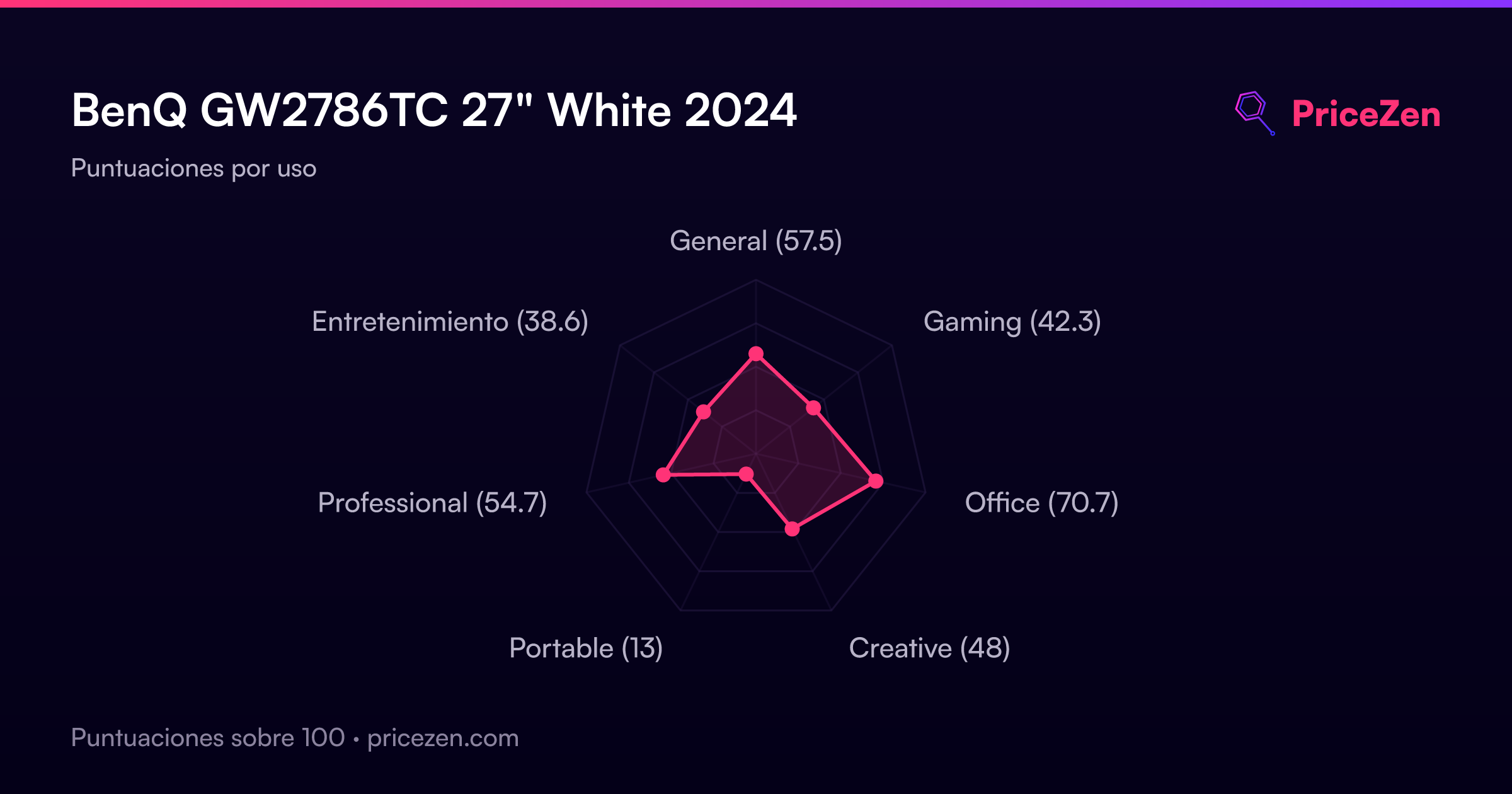
Usage Scores
- General57.5
- Gaming42.3
- Office70.7
- Creative48
- Portable13
- Professional54.7
- Entretenimiento38.6