Samsung Odyssey G3 LS27AG30ANNXZA 27" Black
A 144Hz refresh rate and 1ms response time on its VA panel deliver smooth, blur-free gaming, while the 3000:1 static contrast ratio produces deeper blacks than typical IPS competitors. The fully adjustable stand with height, tilt, swivel, and pivot offers uncommon ergonomic flexibility at this price point. This monitor is best for budget-conscious competitive gamers who prioritize motion clarity and deep contrast in a 1080p setup.

Sin precio actual de tiendas
Resumen
The 30-Second Version
The Odyssey G3 hits 144Hz with a 1ms response time and 3000:1 contrast ratio, landing in the 73rd percentile for performance. Ergonomics are best-in-class at the 91st percentile with height, tilt, swivel, and pivot. But 250 nits brightness and 1080p on 27 inches put color in the bottom fifth of our database.
Pros & Cons
Ventajas
- 144Hz refresh rate with 1ms MPRT response time 91st
- 3000:1 static contrast ratio for deep blacks 73rd
- 91st percentile ergonomics with height, tilt, swivel, and pivot
- FreeSync Premium support
- Borderless bezels on three sides
Desventajas
- 250 nits brightness, 17th percentile for color
- Only one HDMI and one DisplayPort
- 1080p on 27 inches looks soft up close
- 21st percentile for features
- No USB hub or built-in speakers
Opinión de los propietarios
The Word on the Street
Cómo cambió la opinión de los propietarios con el tiempo
ExclusivaSegún cuándo escribieron realmente sus opiniones los clientes, para ver si los elogios iniciales se mantuvieron.
6 opiniones escritas, jul 2023 – abr 2026: 6 satisfechos
En las 3 valoraciones de tiendas: 4,7★. El gráfico cuenta las 6 opiniones escritas.
Cada punto es una opinión escrita, en el mes en que se escribió. Satisfechos = 4-5★, neutrales = 3★, insatisfechos = 1-2★.
Las pruebas
Performance
The 144Hz refresh rate and 1ms MPRT response time are the headline numbers here, landing this panel in the 73rd percentile for performance. That's well above average for a budget gaming monitor. FreeSync Premium keeps things smooth without screen tearing, and the VA panel's 3000:1 contrast ratio gives you deeper blacks than most IPS panels in this class. In practice, fast-moving scenes stay clear enough for competitive play, though VA panels can show some ghosting in dark scenes.
The display itself sits at the 46th percentile, which is about average. 1920 x 1080 on a 27-inch screen means pixel density isn't great, around 81 PPI. Text can look a bit soft if you sit close. The 250 nits brightness is a weak spot, putting color performance in the 17th percentile. This is not a monitor for bright rooms or HDR content. It's built for speed and contrast, not vivid color.
Specifications
Full Specifications
Display
| Size | 27" |
| Resolution | 1920x1080 (Full HD) |
| Panel Type | VA |
| Aspect Ratio | 16:9 |
| Curved | No |
| Screen Finish | matte |
Performance
| Refresh Rate | 144 Hz |
| Response Time | 1 |
| Adaptive Sync | FreeSync Premium |
Color & HDR
| Brightness | 250 nits |
| Color Depth | 16.7 million |
Connectivity
| HDMI Ports | 1 |
| DisplayPort | 1 |
| Headphone Jack | Yes |
Ergonomics
| Height Adjustable | Yes |
| Tilt | Yes |
| Swivel | Yes |
| Pivot | Yes |
| VESA Mount | 100x100 |
Features
| Power | 27 |
| Weight | 5.3 kg / 11.7 lbs |
vs Competition
Stacked against the ASUS ROG Strix XG27UCDMG, LG UltraGear 27GX790A-B, and MSI MPG 271QR QD-OLED X50, the Odyssey G3 is playing a completely different game. Those competitors are 1440p or 4K OLED panels with HDR and much higher price tags. The G3's 1080p VA panel and 250 nits brightness put it in the 17th percentile for color, while those OLEDs sit near the top. But the G3 costs a fraction of the price. If you're comparing within the budget 1080p 144Hz space, the G3's 91st percentile ergonomics and 3000:1 contrast ratio are genuine differentiators. Against the BenQ MA270U, the G3 loses on resolution and color but wins on refresh rate and adjustability per dollar.
| Spec | Samsung Odyssey G3 LS27AG30ANNXZA 27" | LG UltraGear 45GX950A-B 45" | ASUS ROG Strix XG27UCDMG 27" | Dell UltraSharp U4025QW 39.7" | Alienware AW-Series AW3425DW 34" | MSI MAG 271QPX QD-OLED E2 27" |
|---|---|---|---|---|---|---|
| Screen Size | 27 | 45 | 27 | 39.7 | 34 | 27 |
| Resolution | 1920 x 1080 | 5120 x 2160 | 3840 x 2160 | 5120 x 2160 | 3440 x 1440 | 2560 x 1440 |
| Panel Type | VA | OLED | QD-OLED | IPS | QD-OLED | QD-OLED |
| Refresh Rate | 144 | 330 | 240 | 120 | 240 | 240 |
| Response Time Ms | 1 | 0.03 | 0.03 | 5 | 0.03 | 0.03 |
| Adaptive Sync | FreeSync Premium | FreeSync Premium Pro | FreeSync Premium Pro | Adaptive-Sync | FreeSync Premium Pro | FreeSync Premium Pro |
| Hdr | - | DisplayHDR True Black 400 | DisplayHDR True Black 400 | HDR600 | HDR400 | DisplayHDR True Black 400 |
| Compare | Compare | Compare | Compare | Compare |
| Producto | Color | Portabilidad | Display | Feature | Performance | Connectivity | Valoración social |
|---|---|---|---|---|---|---|---|
| Samsung Odyssey G3 LS27AG30ANNXZA 27" | 15.4 | 27.8 | 43.6 | 21.1 | 72.6 | 33.9 | 19.8 |
| LG UltraGear 45GX950A-B 45" Compare | 99.4 | 76.5 | 99.7 | 96.3 | 99.4 | 96.9 | 92 |
| ASUS ROG Strix XG27UCDMG 27" Compare | 96.5 | 57.4 | 97.7 | 85 | 97.9 | 81.1 | 98.9 |
| Dell UltraSharp U4025QW 39.7" Compare | 97.9 | 76.5 | 98.6 | 96.3 | 56.1 | 99.3 | 96.8 |
| Alienware AW-Series AW3425DW 34" Compare | 98.9 | 73.9 | 84.1 | 96.3 | 97.9 | 95.4 | 96.8 |
| MSI MAG 271QPX QD-OLED E2 27" Compare | 99.2 | 57.4 | 73.4 | 85 | 97.9 | 81.1 | 98.9 |
Precio
Value & Pricing
Pricing in Canada runs from CAD 300 to CAD 345 across two listings, a CAD 45 spread worth paying attention to. Memory Express has the lower end of that range, so if you're buying in Canada, that's the store to check first. For a 144Hz VA panel with this level of ergonomic adjustability, CAD 300 is a fair deal. You're not getting HDR, high brightness, or extra ports, but you're also not paying for them. The 4.7/5 customer rating from early buyers suggests people feel they got what they paid for.
Leer más
Overview
The Samsung Odyssey G3 LS27AG30ANNXZA is a 27-inch 1080p VA panel that hits 144Hz with a 1ms MPRT response time. That's a solid combo for fast-paced gaming on a budget, and the 3000:1 static contrast ratio means blacks actually look black, not washed-out gray. But the brightness tops out at 250 nits, which puts it in the bottom fifth of our database for color performance. You're getting speed and contrast, not HDR pop.
Ergonomics are where this thing quietly shines. Height adjust, tilt, swivel, and pivot put it in the 91st percentile for adjustability, which is rare at this price point. Most budget monitors give you a fixed stand and call it a day. The connectivity story is thinner, just one HDMI and one DisplayPort, and the 27W power draw is unremarkable. Overall it scores 39/100 in our database, dragged down by a 4.5/100 portable score that doesn't matter for a desk monitor.
Common Questions
Q: Is 1080p on a 27-inch monitor too low resolution?
It depends on how close you sit. At 27 inches, 1920 x 1080 works out to about 81 pixels per inch. Text and fine details can look soft if you're within two feet of the screen. For gaming, the lower resolution means higher frame rates, which pairs well with the 144Hz refresh rate. If you do a lot of reading or photo work, a 1440p panel would be sharper.
Q: Does the Odyssey G3 support HDR?
No. With 250 nits peak brightness and no local dimming, this monitor doesn't have the hardware for meaningful HDR. It's in the 17th percentile for color performance in our database. The 3000:1 contrast ratio helps with dark scenes, but HDR content will look flat compared to a brighter panel.
Q: Can I mount this monitor on a monitor arm?
Yes. It has a standard VESA 100x100 mount. The included stand already offers height adjust, tilt, swivel, and pivot, which puts it in the 91st percentile for ergonomics. If you want to free up desk space, a monitor arm is a straightforward swap.
Who Should Skip This
Skip this if you care about color accuracy or HDR. The 250 nits brightness and 17th percentile color score mean this panel won't satisfy photo editors, video creators, or anyone who wants vibrant HDR gaming. The 21st percentile feature score also means no USB hub, no built-in speakers, and just one HDMI plus one DisplayPort. If you need multiple inputs for a console and PC setup, or you want a brighter screen for a well-lit room, the Odyssey G3 will frustrate you. And if you sit close to your monitor, the 1080p resolution on a 27-inch panel will show its limits.
Verdict
The Samsung Odyssey G3 LS27AG30ANNXZA is a budget gaming monitor that gets the fundamentals right. 144Hz, 1ms response, FreeSync Premium, and a 3000:1 contrast ratio deliver a smooth, punchy gaming experience. The 91st percentile ergonomics are a genuine surprise at this price. The trade-offs are clear: 250 nits brightness, 1080p on 27 inches, and a bare-bones port selection. If you want a fast, adjustable gaming monitor without spending OLED money, this is a solid pick. If you care about color accuracy or HDR, look elsewhere.
Usage Scores
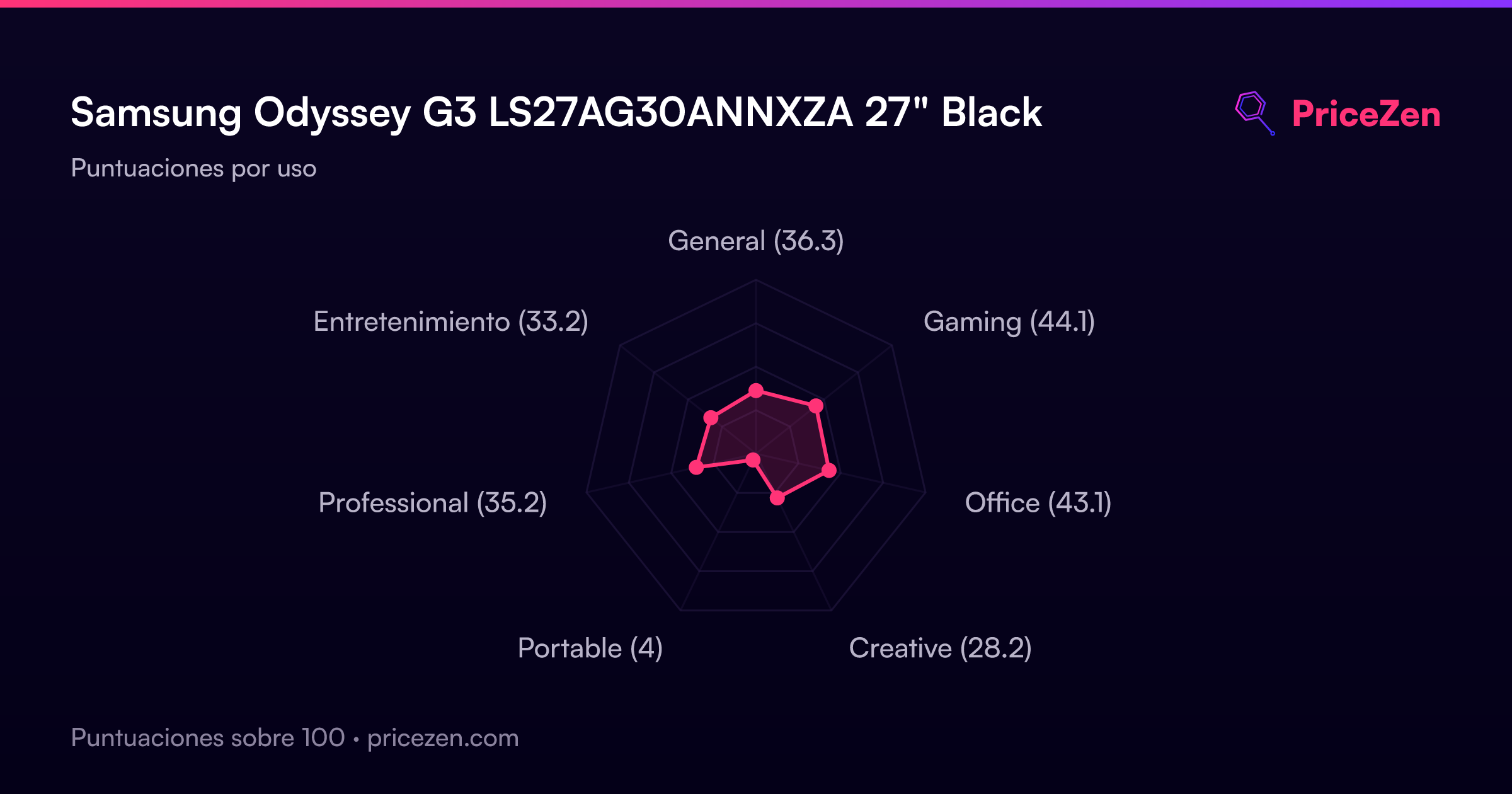
- General36.3
- Gaming44.1
- Office43.1
- Creative28.2
- Portable4
- Professional35.2
- Entretenimiento33.2