Acer Nitro UM.KX1AA.302 24.5" 2024
The 24.5-inch VA panel delivers 1920 x 1080 resolution with a 180Hz refresh rate and 1ms response time, paired with AMD FreeSync to eliminate tearing during fast gameplay. Its 99% sRGB coverage and HDR10 support make it suitable for color-sensitive work, while the zero-frame design allows for multi-monitor setups. This monitor is best for competitive gamers who prioritize smooth motion and low input lag over office productivity features.










Resumen
The 30-Second Version
The Acer Nitro KG251Q P3biip gives you 180Hz and FreeSync for BRL 890, which is a solid deal for budget esports. But it ranks at the 22nd percentile for performance and the 7th percentile for connectivity, so it's a one-trick pony. If smooth 1080p gaming is all you need, it works. If you want anything more, look elsewhere.
Pros & Cons
Ventajas
- 180Hz refresh rate keeps motion smooth for competitive gaming 92nd
- 1ms VRB response time helps reduce ghosting and smearing 89th
- AMD FreeSync eliminates screen tearing with compatible GPUs 82nd
- 99% sRGB coverage is decent for a budget VA panel 70th
- Zero-frame design works well for multi-monitor setups
Desventajas
- 22nd percentile for performance, well behind most competitors
- Ergonomics rank at the 10th percentile, barely adjustable
- Connectivity sits at the 7th percentile, very limited ports
- 16th percentile for color, not great for color-critical work
- HDR10 support is mostly a marketing checkbox without real brightness
Opinión de los propietarios
Cómo cambió la opinión de los propietarios con el tiempo
ExclusivaSegún cuándo escribieron realmente sus opiniones los clientes, para ver si los elogios iniciales se mantuvieron.
9 opiniones escritas, jul 2025 – feb 2026: 9 satisfechos
En las 160 valoraciones de tiendas: 4,6★. La mayoría de los propietarios valora sin escribir una opinión. El gráfico cuenta las 9 opiniones escritas.
Cada punto es una opinión escrita, en el mes en que se escribió. Satisfechos = 4-5★, neutrales = 3★, insatisfechos = 1-2★.
Las pruebas
Performance
The 180Hz refresh rate is the headline number, and it's legitimately fast for a budget panel. Combined with the 1ms VRB response time, you're getting smooth motion that'll handle fast-paced shooters without turning everything into a smeary mess. AMD FreeSync is here too, which means no tearing as long as you're running an AMD GPU. That's the good news. The bad news is that our database ranks this monitor at the 22nd percentile for overall performance, which puts it well behind the pack. The VA panel helps with contrast, but it's not doing any favors for motion clarity compared to the IPS and OLED options out there.
The 99% sRGB coverage sounds impressive until you look at where it lands. At the 16th percentile for color, this monitor is not the color-critical workhorse Acer's marketing copy wants you to think it is. Graphic designers and photographers should look elsewhere. HDR10 support is technically present, but without meaningful brightness or local dimming, it's more of a checkbox than a feature. The pixel pitch of 0.283mm is standard for 1080p at this size, so text and fine details look about as sharp as you'd expect from a budget panel.
Specifications
Full Specifications
Display
| Size | 24.5" |
| Resolution | 1920x1080 (Full HD) |
| Panel Type | VA |
| Aspect Ratio | 16:9 |
| Curved | No |
| Screen Finish | matte |
Performance
| Refresh Rate | 180 Hz |
| Response Time | 1 |
| Adaptive Sync | FreeSync |
Color & HDR
| Brightness | 250 nits |
| Color Gamut | 99% sRGB |
| HDR | HDR10 |
| HDR Support | HDR10 |
Connectivity
| HDMI Ports | 2 |
| DisplayPort | 1 |
Ergonomics
| Tilt | Yes |
| VESA Mount | 100x100 |
Features
| Weight | 4.8 kg / 10.7 lbs |
vs Competition
Stacked against the competition, the KG251Q is fighting a losing battle. The LG UltraGear 45GX950A-B and ASUS ROG Strix XG27UCDMG are in a completely different league, with OLED panels and 4K resolutions that make this 1080p VA panel look like a relic. The Alienware AW3425DW and Samsung Odyssey G60SD bring ultrawide and QD-OLED tech that absolutely crush the Acer in color and contrast. Even the MSI MPG 271QR QD-OLED X50, which is the closest thing to a budget option in that group, runs circles around the KG251Q in every metric that matters. The Acer's only real advantage is price. At BRL 890, it costs a fraction of what those competitors command. But you're getting a fraction of the monitor too. If you can stretch your budget even a little, the jump in quality is massive.
| Spec | Acer Nitro UM.KX1AA.302 24.5" | LG UltraGear 45GX950A-B 45" | Dell UltraSharp U4025QW 39.7" | ASUS ROG Swift PG27UCDM 26.5" | Samsung Odyssey OLED G80SD 32" | MSI MPG 322URX QD-OLED 32" |
|---|---|---|---|---|---|---|
| Screen Size | 24.5 | 45 | 39.7 | 26.5 | 32 | 32 |
| Resolution | 1920 x 1080 | 5120 x 2160 | 5120 x 2160 | 3840 x 2160 | 3840 x 2160 | 3840 x 2160 |
| Panel Type | VA | OLED | IPS | QD-OLED | OLED | QD-OLED |
| Refresh Rate | 180 | 330 | 120 | 240 | 240 | 240 |
| Response Time Ms | 1 | 0.03 | 5 | 0.03 | 0.03 | 0.03 |
| Adaptive Sync | FreeSync | FreeSync Premium Pro | Adaptive-Sync | FreeSync Premium Pro | FreeSync Premium Pro | G-Sync Compatible |
| Hdr | HDR10 | DisplayHDR True Black 400 | HDR600 | HDR10 | HDR10 | DisplayHDR True Black 400 |
| Compare | Compare | Compare | Compare | Compare |
| Producto | Color | Portabilidad | Display | Feature | User Sentiment | Ergonomic | Performance | Connectivity | Valoración social |
|---|---|---|---|---|---|---|---|---|---|
| Acer Nitro UM.KX1AA.302 24.5" | 53.5 | 12.7 | 31.2 | 70.1 | 89.1 | 47.2 | 81.7 | 53.1 | 92 |
| LG UltraGear 45GX950A-B 45" Compare | 99.4 | 76.5 | 99.7 | 96.3 | 76.6 | 90.8 | 99.4 | 96.9 | 92 |
| Dell UltraSharp U4025QW 39.7" Compare | 97.9 | 76.5 | 98.6 | 96.3 | 85.5 | 90.8 | 56.1 | 99.3 | 96.8 |
| ASUS ROG Swift PG27UCDM 26.5" Compare | 97.1 | 57.4 | 97.1 | 85 | 76.6 | 90.8 | 97.9 | 81.1 | 67.1 |
| Samsung Odyssey OLED G80SD 32" Compare | 72.1 | 76.5 | 99 | 85 | 61.4 | 90.8 | 97.9 | 96.9 | 83.9 |
| MSI MPG 322URX QD-OLED 32" Compare | 80 | 49.4 | 99 | 85 | 89.1 | 90.8 | 97.9 | 81.1 | 74.8 |
Precio
Value & Pricing
At BRL 890 in Brazil, the KG251Q is priced like a budget monitor, and that's exactly what it is. You're getting 180Hz and FreeSync for under a thousand reais, which is genuinely hard to beat if you're on a tight budget and just want smooth gameplay. But the value proposition gets murkier when you consider what you're giving up. The 7th percentile connectivity ranking means you're probably getting one HDMI and one DisplayPort and not much else. The 10th percentile ergonomics score means no height adjustment, no pivot, maybe a tilt if you're lucky. For the price, it's a fair trade if gaming is all you care about. If you need this monitor to do anything else, the compromises start adding up fast.
Amazon 1 oferta Desde 2822 MXN
Seguimos los precios de este producto desde el 25 nov 2026. El gráfico aparecerá cuando tengamos más datos.
Leer más
Overview
The Acer Nitro KG251Q P3biip is a 24.5-inch 1080p VA panel that pushes 180Hz with a 1ms VRB response time. On paper, that sounds like a solid budget esports pick. But our database puts this thing at the 22nd percentile for performance among monitors, which is a polite way of saying it's not exactly setting any records. The 99% sRGB coverage is the one spec that stands out, though even that lands at the 16th percentile for color. So you're getting a fast refresh rate on a panel that doesn't do much else particularly well.
And that's the story here. Acer packed a high refresh rate and FreeSync into a budget VA panel and called it a day. The zero-frame design is nice if you're stacking monitors, and the flicker-less and ComfyView features help with eye strain. But with ergonomics at the 10th percentile and connectivity at the 7th percentile, this monitor feels like it was built to hit a price point, not to compete with the big boys. At BRL 890 in Brazil, it's cheap. The question is whether cheap is enough when the competition is this strong.
Common Questions
Q: Is the 180Hz refresh rate actually noticeable compared to 144Hz?
Yes, the jump from 144Hz to 180Hz is noticeable in fast-paced games, especially if you're playing competitive shooters. The 1ms VRB response time helps keep motion clear too. Just keep in mind that this monitor ranks at the 22nd percentile for overall performance, so the high refresh rate is the main thing it has going for it.
Q: Can I use this monitor for photo editing or graphic design?
The 99% sRGB coverage sounds good on paper, but this monitor ranks at the 16th percentile for color accuracy among all monitors in our database. That means it's not a great choice for color-critical work. If you're doing professional photo or video editing, you'll want something with better color performance.
Q: Does this monitor have good ergonomic adjustments?
No, and that's one of its biggest weaknesses. The KG251Q ranks at the 10th percentile for ergonomics, which means you're getting very limited adjustment options. Don't expect height adjustment or pivot. You'll likely be stuck with a basic tilt, so you may need a monitor arm or stand if you want proper positioning.
Who Should Skip This
If you need a monitor for anything beyond budget gaming, skip this one. The 7th percentile connectivity ranking means you'll be fighting for ports, and the 10th percentile ergonomics score means you'll be craning your neck unless you buy a separate stand. Color-critical work is out too, with the 16th percentile color ranking making this a poor fit for designers and editors. And if you're used to higher resolutions or better panels, the 1080p VA display will feel like a step backward. This monitor is for one person: a budget-conscious gamer who wants high refresh rates and doesn't care about much else.
Verdict
The Acer Nitro KG251Q P3biip is a budget gaming monitor that delivers exactly what its price tag promises and not much more. The 180Hz refresh rate and 1ms response time are real, and they'll serve you well in fast-paced games. FreeSync is a nice bonus. But the 22nd percentile performance ranking tells the real story. This monitor is outclassed by nearly everything else on the market, and the weak ergonomics and connectivity make it a one-trick pony. If you're in Brazil, on a strict budget, and you only care about smooth 1080p gaming, it's a reasonable buy. If you want a monitor that does anything else well, keep saving.
Usage Scores
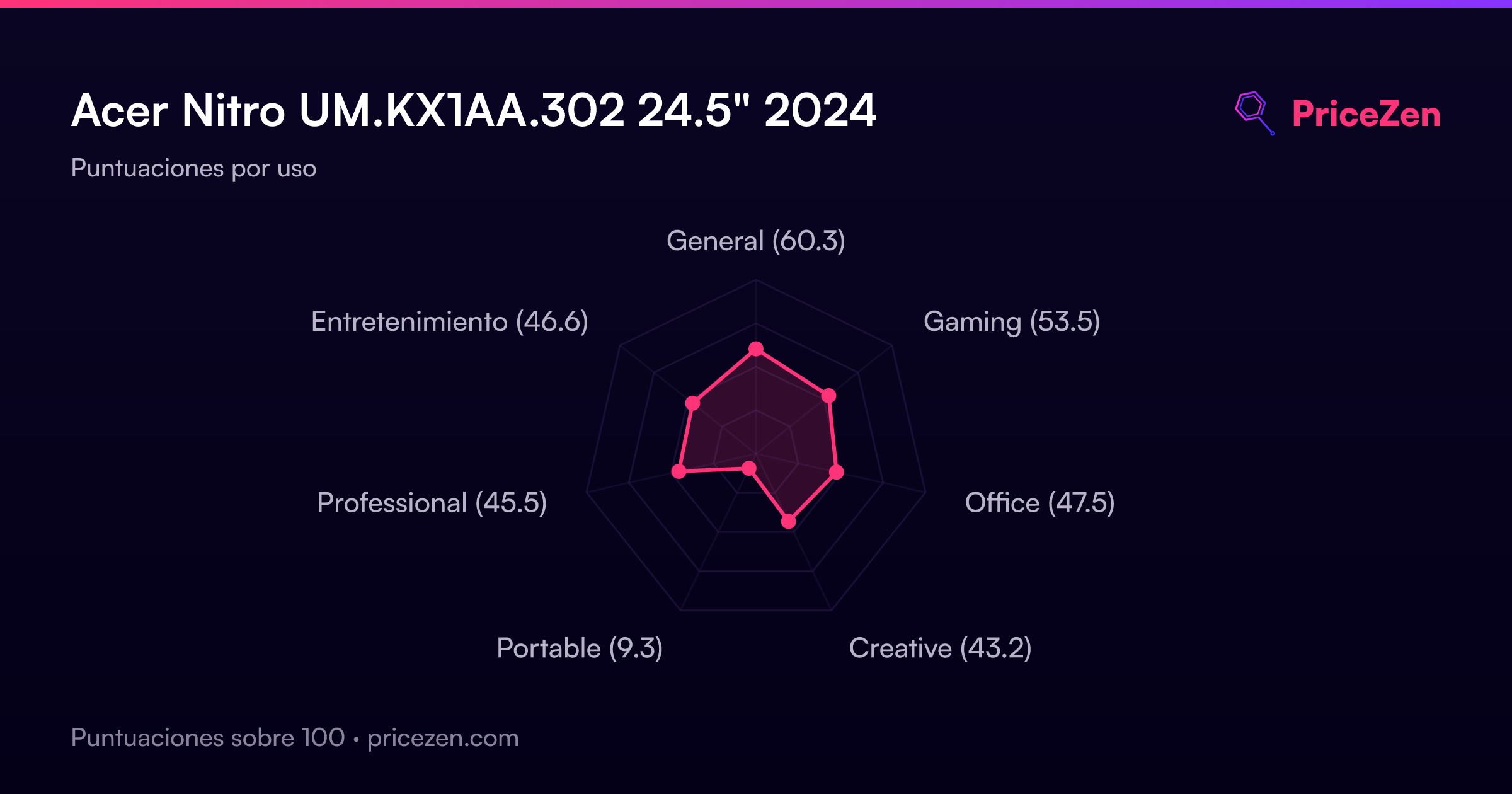
- General60.3
- Gaming53.5
- Office47.5
- Creative43.2
- Portable9.3
- Professional45.5
- Entretenimiento46.6