LG UltraGear 27G610A-B 27" Black 2026
A 27-inch QHD IPS panel with a 200Hz refresh rate and 1ms response time minimizes motion blur for fast-paced gaming, while FreeSync Premium prevents screen tearing. The 400-nit brightness and 99% sRGB coverage deliver vivid colors, and the height-adjustable, pivot, swivel, and tilt stand offers flexible ergonomics. This monitor suits competitive gamers who want a high-refresh 1440p display with smooth AMD FreeSync performance.

Sin precio actual de tiendas


Resumen
The 30-Second Version
The LG UltraGear 27G610A-B delivers 200Hz at 1440p for as little as USD 180, which is outstanding value for competitive gaming. The 1ms response time and FreeSync Premium keep motion smooth, and the full ergonomic stand is a nice touch. But dead pixel complaints and weak warranty support are real concerns, so buy from a retailer with easy returns. If you get a clean panel, this is one of the best budget high-refresh monitors around.
Pros & Cons
Ventajas
- 200Hz refresh rate at 1440p is a genuine step up from 144Hz and 165Hz panels 91st
- 1ms GtG response time keeps motion blur minimal in fast games 85th
- FreeSync Premium eliminates tearing and stuttering on AMD GPUs 84th
- Full ergonomic stand with height, tilt, swivel, and pivot 83rd
- 99% sRGB coverage makes colors pop without calibration for gaming
Desventajas
- Multiple owners report stuck or dead pixels out of the box
- Color calibration out of the box is poor for office and productivity work
- HDR10 support is mostly marketing without local dimming or higher brightness
- Stand quality feels flimsy despite the full adjustment range
- Warranty support complaints are common, with expensive repair quotes
Opinión de los propietarios
The Word on the Street
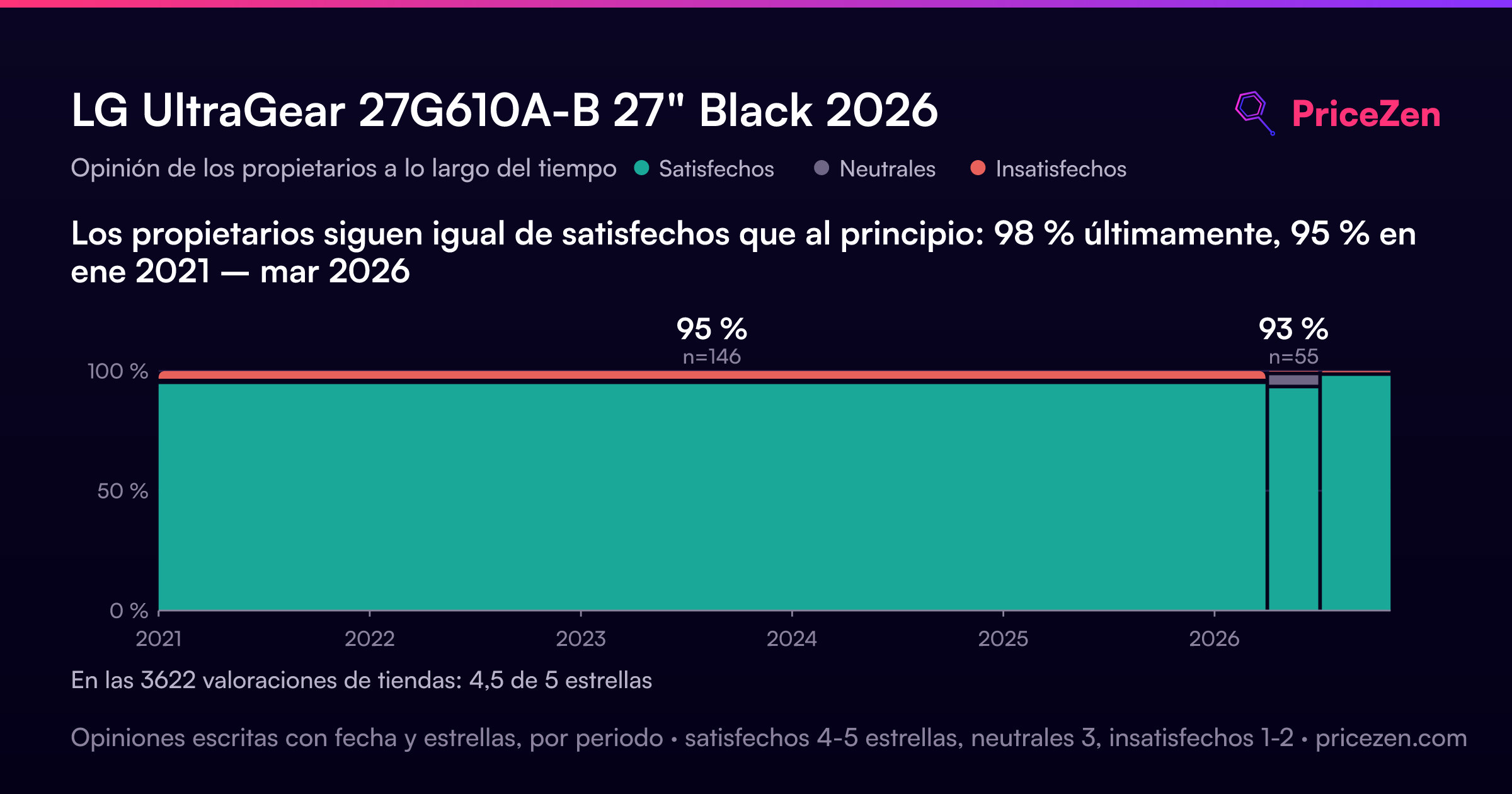
Cómo cambió la opinión de los propietarios con el tiempo
ExclusivaSegún cuándo escribieron realmente sus opiniones los clientes, para ver si los elogios iniciales se mantuvieron.
Los propietarios siguen igual de satisfechos que al principio: 98 % últimamente, 95 % en ene 2021 – mar 2026
En las 3622 valoraciones de tiendas: 4,5★. La mayoría de los propietarios valora sin escribir una opinión. El gráfico cuenta las 249 opiniones escritas con estrellas y fecha propia.
15 opiniones escritas sin estrellas quedan fuera de la tendencia.
Ver las cifras
| Periodo | Opiniones | Satisfechos | Neutrales | Insatisfechos | Proporción satisfechos |
|---|---|---|---|---|---|
| ene 2021 – mar 2026 | 146 | 138 | 1 | 7 | 95 % |
| abr–jun 2026 | 55 | 51 | 3 | 1 | 93 % |
| jul–oct 2026 | 48 | 47 | 0 | 1 | 98 % |
- jul–sept 202646 de 46 satisfechos
Buyers in Q3 2026 praised the monitor's image quality, gaming performance, and value. One noted a slow wake-up issue, and another mentioned oversized packaging.
- Image quality and colors are consistently praised, with sharpness and easy calibration noted.
- Gaming performance is highlighted, including VRR compatibility with PS5 and immersive curved display.
- Value for price is a recurring theme, with several buyers noting high specs at a low cost.
- One review reports slow wake-up from sleep, causing uncertainty about keeping the monitor.
- abr–jun 202651 de 55 satisfechos
Buyers praised the monitor's easy setup, vibrant display, and curved screen for productivity and gaming. One reported a stuck pixel, a quality concern.
- Easy and quick setup, with multiple users noting it was running within minutes.
- Display quality praised as bright, sharp, vibrant, and crisp, enhancing both work and gaming.
- Curved screen appreciated for immersion and providing ample workspace for multitasking.
- One unit had a stuck pixel near the center, distracting during dark scenes.
- ene–mar 2026130 de 138 satisfechos · 8 sin estrellas
Buyers praised the monitor's picture quality, refresh rate, and value, but several reported dead pixels, poor warranty support, and color calibration issues, especially for office work.
- Crisp visuals, smooth gaming, and good value for the price, especially when on sale.
- Dead pixels reported on some units, with one buyer needing to return and reorder.
- Warranty support criticized; claims not honored, with LG directing to subcontractor.
- Color calibration issues for office apps; videos too dark or apps washed out, manual unhelpful.
- oct–dic 20253 de 3 satisfechos · 3 sin estrellas
Buyers praised the monitor's value, 1440p resolution, high refresh rate, and easy setup, especially at a discounted price. One reviewer noted it's great for FPS shooters.
- Excellent value for the price, especially with discounts like Black Friday deals.
- High refresh rate and 1440p resolution deliver great performance for gaming, particularly FPS.
- Easy setup and adjustable settings allow for customization to user preferences.
- Curved screen size and shape are comfortable and easy to get used to.
Cada columna une trimestres hasta reunir al menos 10 opiniones con estrellas y fecha propia. Satisfechos = 4-5★, neutrales = 3★, insatisfechos = 1-2★. Los resúmenes por periodo están en inglés.
Las pruebas
Performance
The headline numbers are legit. 200Hz at 1440p means you're getting roughly 5ms between frames, and the 1ms GtG response time keeps ghosting to a minimum in fast scenes. In our database, this monitor lands in the 85th percentile for performance, which puts it among the better gaming panels we've tracked. For context, that's ahead of most 144Hz and 165Hz IPS monitors and right on the heels of some much pricier options. If you're running an RTX 4070 or RX 7800 XT class card, you can actually push 200 frames in esports titles like Valorant, CS2, or Overwatch at competitive settings.
Color performance is solid but not spectacular. The 99% sRGB coverage and 8-bit panel mean games look vibrant and accurate enough for most people, and the 400 nits brightness is fine for a typical room. HDR10 support is there, but without local dimming or higher peak brightness, it's more of a checkbox than a feature. Don't buy this for HDR. The 1000:1 static contrast ratio is standard IPS fare, so dark scenes won't have the depth you'd get from a VA panel or OLED. For pure gaming speed, though, this thing delivers.
Specifications
Full Specifications
Display
| Size | 27" |
| Resolution | 2560x1440 (QHD) |
| Panel Type | IPS |
| Aspect Ratio | 16:9 |
| Curved | No |
| Screen Finish | matte |
Performance
| Refresh Rate | 200 Hz |
| Response Time | 1 |
| Adaptive Sync | FreeSync Premium |
Color & HDR
| Brightness | 400 nits |
| Color Gamut | 99% sRGB |
| Color Depth | 8-bit |
| HDR | HDR10 |
| HDR Support | HDR10 |
Connectivity
| HDMI Ports | 2 |
| DisplayPort | 1 |
| USB-C | 0 |
| Speakers | No |
| Headphone Jack | Yes |
Ergonomics
| Height Adjustable | Yes |
| Tilt | Yes |
| Swivel | Yes |
| Pivot | Yes |
| VESA Mount | 100x100 |
Features
| Webcam | No |
| Touchscreen | No |
| PIP/PBP | No |
| Power | 22 |
| Weight | 5.3 kg / 11.7 lbs |
vs Competition
The MSI MAG 271QPX QD-OLED E2 is the obvious step-up competitor. You're paying significantly more, but you get true blacks, better HDR, and faster response times. If you play a lot of dark, atmospheric games or watch movies on your monitor, the OLED is worth the premium. The ASUS ROG Strix XG27ACDNG is another OLED option with a similar story: better picture quality, higher price, and typically better build quality than this LG.
The Alienware AW2725D and Gigabyte MO27Q28G are also in the OLED camp, and they all share the same trade-off against the LG: you give up OLED contrast and HDR performance to save a chunk of cash. The BenQ MA270U is the interesting non-OLED alternative. It's aimed more at productivity and color accuracy, so if your split is 50/50 gaming and work, BenQ's out-of-box calibration might serve you better. The LG wins on raw refresh rate per dollar, but it loses on panel lottery consistency and warranty peace of mind.
| Spec | LG UltraGear 27G610A-B 27" | ASUS ROG Strix XG27UCDMG 27" | Dell UltraSharp U4025QW 39.7" | MSI MAG 271QPX QD-OLED E2 27" | Alienware AW-Series AW3425DW 34" | Samsung Odyssey G60SD 27" |
|---|---|---|---|---|---|---|
| Screen Size | 27 | 27 | 39.70000076293945 | 27 | 34 | 27 |
| Resolution | 2560 x 1440 | 3840 x 2160 | 5120 x 2160 | 2560 x 1440 | 3440 x 1440 | 2560 x 1440 |
| Panel Type | IPS | OLED | IPS | QD-OLED | QD-OLED | OLED |
| Refresh Rate | 200 | 240 | 120 | 240 | 240 | 360 |
| Response Time Ms | 1 | 0.029999999329447746 | 5 | 0.029999999329447746 | 0.029999999329447746 | 0.029999999329447746 |
| Adaptive Sync | FreeSync Premium | FreeSync Premium Pro | Adaptive-Sync | FreeSync Premium Pro | FreeSync Premium Pro | FreeSync Premium Pro |
| Hdr | HDR10 | DisplayHDR True Black 400 | DisplayHDR 600 | DisplayHDR True Black 400 | DisplayHDR 400 True Black | HDR10+ |
| Compare | Compare | Compare | Compare | Compare |
| Producto | Color | Portabilidad | Display | Feature | User Sentiment | Performance | Connectivity | Valoración social |
|---|---|---|---|---|---|---|---|---|
| LG UltraGear 27G610A-B 27" | 82.9 | 27.9 | 70.4 | 66.8 | 2.5 | 84.8 | 53.4 | 84.1 |
| ASUS ROG Strix XG27UCDMG 27" Compare | 96.1 | 57.5 | 97.9 | 83.7 | 99.2 | 98 | 81.2 | 98.9 |
| Dell UltraSharp U4025QW 39.7" Compare | 98.2 | 76.5 | 98.7 | 95.7 | 85.7 | 56.1 | 99.3 | 96.9 |
| MSI MAG 271QPX QD-OLED E2 27" Compare | 99.1 | 57.5 | 77.3 | 83.7 | 95.7 | 98 | 81.2 | 98.9 |
| Alienware AW-Series AW3425DW 34" Compare | 99 | 73.9 | 85.7 | 89.7 | 95.7 | 98 | 95.4 | 96.9 |
| Samsung Odyssey G60SD 27" Compare | 90.3 | 39.5 | 77.3 | 66.8 | 95.7 | 99.5 | 87.6 | 92.1 |
Precio
Value & Pricing
Pricing is all over the place depending on where you shop. In the US, listings range from USD 180 to USD 250 across 8 vendors, and that USD 70 spread is worth paying attention to. Newegg has the best deal at the low end, so if you're buying in the States, that's where you should start. In Canada, the spread is even wider at CAD 210 to CAD 300 across 7 listings, and again Newegg shows up with the lowest price. That CAD 90 difference is real money.
At USD 180, this monitor is a steal for 200Hz 1440p. At USD 250, it's still competitive but you're getting closer to territory where you should start looking at alternatives. The value proposition hinges on whether you get a clean panel. A dead pixel or two at this price is annoying but maybe tolerable. A cluster of them is a return. The lack of consistent warranty support makes the gamble feel worse than it should.
Leer más
Overview
The LG UltraGear 27G610A-B sits in that sweet spot where high refresh rate gaming meets a sensible 1440p resolution. You get a 27-inch IPS panel pushing 2560 x 1440 at 200Hz with a 1ms response time, which on paper is exactly what most competitive gamers want without jumping to 4K and tanking their frame rates. It's got FreeSync Premium to keep things smooth on AMD cards, and the stand actually does the full ergonomic dance: height, tilt, swivel, and pivot.
Who's this for? Someone who plays fast shooters or racing games and wants motion clarity without spending OLED money. The 200Hz refresh rate is a genuine step up from the 144Hz and 165Hz monitors that flood this price range. And because it's 1440p rather than 1080p, text and UI elements stay crisp when you're not gaming. It's also a reasonable pick for mixed use, though our database scores it best for office work at 78.6 out of 100, which is a bit funny for a gaming monitor.
The interesting tension here is between the spec sheet and what owners actually report. The panel has solid color coverage at 99% sRGB and 400 nits brightness, but the user sentiment score sits at just 45 out of 100. Picture quality gets praise, but dead pixel complaints keep popping up. We'll dig into that gap, because it matters more than any marketing bullet point.
Common Questions
Q: Is 200Hz worth it over 144Hz or 165Hz?
For competitive shooters and fast-paced games, yes. The jump from 144Hz to 200Hz reduces frame time from about 6.9ms to 5ms, which translates to smoother motion and slightly lower input latency. You'll notice it most in games where you're tracking fast-moving targets. Just make sure your GPU can actually push 200 frames at 1440p, otherwise you're paying for headroom you won't use.
Q: How is this monitor for office work and productivity?
It's a mixed bag. The 1440p resolution gives you plenty of screen real estate and sharp text, and our database scores it 78.6 out of 100 for office use. But the out-of-box color calibration is a common complaint, so you may need to spend time tweaking settings or calibrating it yourself. If your work involves color-sensitive tasks like photo editing, this isn't the best choice without additional calibration hardware.
Q: Does FreeSync Premium work with Nvidia GPUs?
Yes, in practice. While FreeSync Premium is AMD's technology, most modern Nvidia cards support adaptive sync over DisplayPort with FreeSync monitors through Nvidia's G-Sync Compatible mode. You won't get the official G-Sync certification, but variable refresh rate generally works fine. Use the DisplayPort connection for the best compatibility rather than HDMI.
Q: What should I check when I first get this monitor?
Run a dead pixel test immediately. Display solid red, green, blue, white, and black screens and look for stuck or dead pixels, especially near the edges. Also check for backlight bleed in a dark room with a black screen. If you find defects, contact the retailer right away rather than LG, since warranty support complaints are common. Buying from a store with a generous return window is strongly recommended.
Who Should Skip This
If you're doing color-critical work like photo editing, video grading, or design, skip this. The out-of-box calibration is mediocre and the 8-bit panel without hardware calibration support won't give you the accuracy you need. Look at the BenQ MA270U or a factory-calibrated Dell UltraSharp instead. You'll pay more, but you won't fight the monitor.
Also skip this if you're sensitive to panel defects and don't want to deal with returns. The dead pixel complaints are frequent enough that it's a genuine lottery, and the warranty support stories suggest getting a repair through LG can be expensive and slow. If you want peace of mind, spend more on a monitor from a brand with better quality control or buy from a retailer with a no-questions-asked return policy. And if you're a console gamer on PS5 or Xbox Series X, note that HDMI 2.0 limits you to 1440p at 120Hz, not 200Hz, so you're leaving performance on the table.
Verdict
If you're a competitive gamer on a budget and you're willing to roll the dice on panel quality, the LG 27G610A-B is hard to beat at the low end of its price range. 200Hz at 1440p for under USD 200 is a deal that was unthinkable a few years ago. Buy it from a retailer with a solid return policy, check for dead pixels immediately, and you'll probably be happy. The ergonomic stand is a nice bonus that many budget monitors skip.
But if you're sensitive to panel defects or you need this monitor for serious color work, look elsewhere. The out-of-box calibration isn't great for office use, and the warranty horror stories are concerning. For mixed productivity and gaming, the BenQ MA270U is a safer bet. For pure gaming immersion, save up for one of the OLED competitors. The LG is a speed demon with some quality control baggage.
Usage Scores
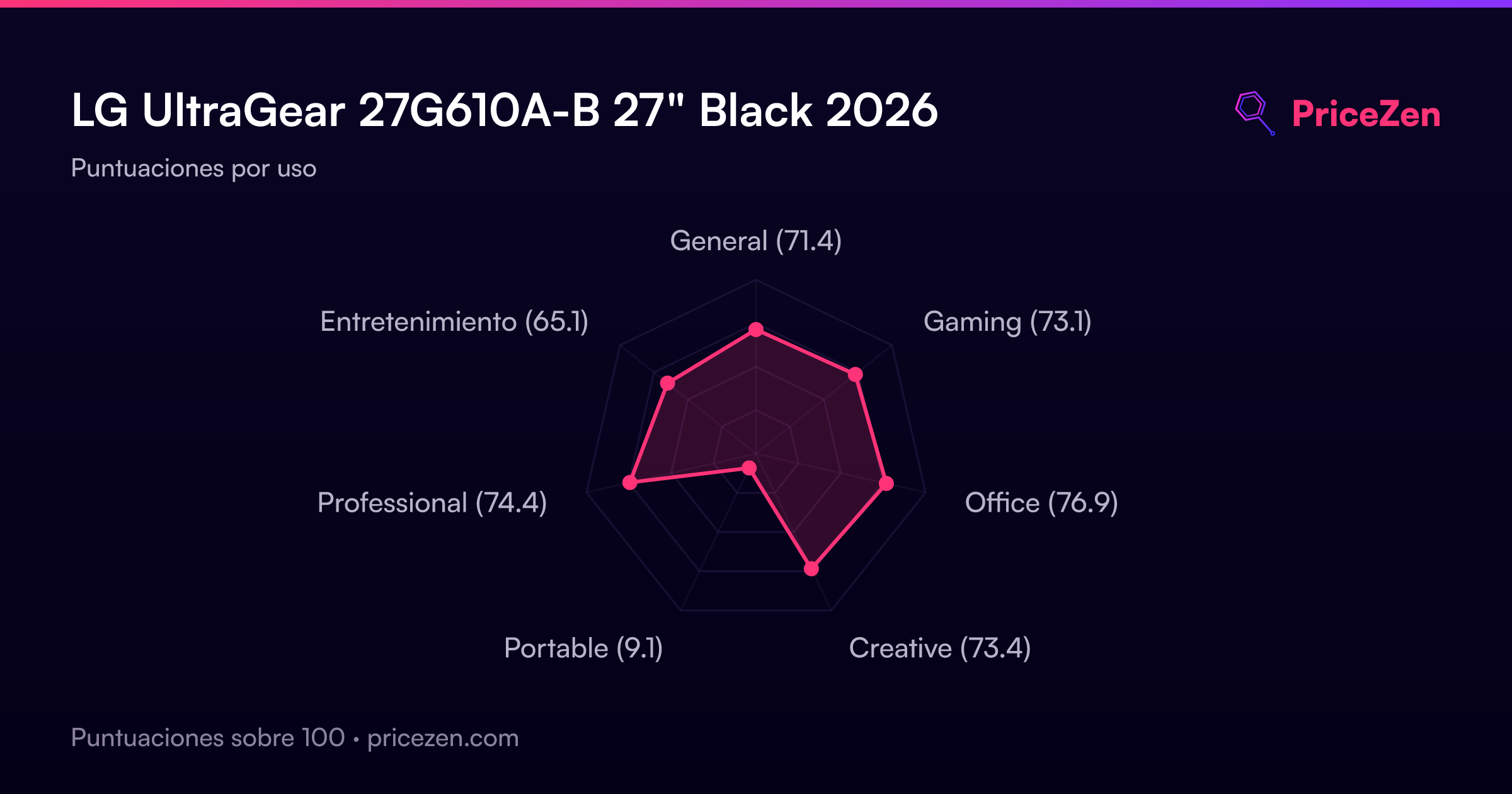
- General71.4
- Gaming73.1
- Office76.9
- Creative73.4
- Portable9.1
- Professional74.4
- Entretenimiento65.1