Dell Latitude 15.6" 3590 2018, Core i7-8550U, 8GB, 500GB HDD, Radeon 530, Black
The Intel Core i7-8550U quad-core processor and discrete AMD Radeon 530 graphics give this 15.6-inch Latitude 3590 enough power for everyday office tasks and light photo editing. Its MIL-STD 810G tested chassis and Dell Data Protection suite make it a durable, security-focused work machine at a used price point. Best for a budget-conscious business user who needs a reliable, secure laptop for document work, spreadsheets, and occasional light graphics tasks.

Sin precio actual de tiendas











Resumen
The 30-Second Version
The Dell Latitude 3590 is an aging business laptop with a slow 8th Gen i7, only 8GB of RAM, and a sluggish 500GB HDD. It has solid business security features and durability testing, but the performance is among the worst we've seen in a modern laptop. At $882 USD used, it's hard to recommend for anyone except IT departments needing Dell management tools.
Pros & Cons
Ventajas
- Windows 10 Pro with business security features
- MIL-STD 810G durability testing
- Full HD 1080p display
- Decent port selection including USB-C and Ethernet
- TPM 2.0 and FIPS 140-2 certified
Desventajas
- CPU is one of the slowest we've tested
- 500GB HDD makes everything feel sluggish
- Only 8GB of RAM, and it's not enough
- Radeon 530 GPU is barely better than integrated graphics
- Heavy at 2.02kg for a modern laptop
Las pruebas
Performance
The i7-8550U is a 4-core, 8-thread chip from 2017. It was fine for its day, but that day has passed. In our database, this CPU lands at the 9th percentile, which is a polite way of saying it's one of the slowest processors we've seen in a modern laptop. You'll feel it when you have more than a few browser tabs open or try to run anything beyond basic office apps.
The Radeon 530 discrete GPU is also a weak spot, sitting at the 31st percentile. It's technically a dedicated graphics card, but it's about as powerful as integrated graphics from a few years later. Don't expect to play anything beyond older or very lightweight games. The 500GB HDD is the real bottleneck though. At the 28th percentile for storage, a spinning drive in 2025 makes boot times feel glacial and app launches feel like you're waiting for a fax machine. The 8GB of RAM at the 6th percentile means multitasking is going to be tight. Chrome alone will eat half of that.
Specifications
Full Specifications
Processor
| CPU | Intel Core i7 8550U |
| Cores | 4 |
| Frequency | 1.8 GHz |
| L3 Cache | 8 MB |
Graphics
| GPU | AMD Radeon 530 Graphics |
| Type | Discrete |
Memory & Storage
| RAM | 8 GB |
| RAM Generation | DDR4 |
| Storage | 500 GB |
| Storage Type | HDD |
Display
| Size | 15.6" |
| Resolution | 1920x1080 (Full HD) |
| Panel | LCD |
Connectivity
| USB-C Ports | 1 |
| USB Ports | 2 |
| HDMI | 1 x HDMI |
| Wi-Fi | Wi-Fi 5 |
| Bluetooth | Yes |
| Ethernet | RJ-45 |
Physical
| Weight | 2.0 kg / 4.5 lbs |
| OS | Windows 10 Pro |
vs Competition
Stacked against something like the Lenovo ThinkPad P14s Gen 6, the Latitude 3590 looks ancient. The ThinkPad has a modern processor, likely an SSD, and better build quality. The ASUS ROG Flow Z13 and HP OMEN Transcend 14 are gaming machines that absolutely destroy this thing in performance, though they cost more. The Apple MacBook Pro M4 Pro is in a completely different universe, faster, lighter, and with a screen that makes the Latitude's 1080p panel look like a calculator display.
Even the MSI Raider, which is a chunky gaming laptop, offers dramatically better performance per dollar. The Latitude 3590's only real advantage is its business security features and the fact that it's a Dell. If you're comparing it to anything modern, it loses on almost every metric that matters.
| Spec | Dell Latitude 15.6" 3590 | Apple MacBook Pro 14.2" M4 Pro | ASUS ROG Zephyrus 14" GA403WW-G14.R95080 | Lenovo Legion Pro 7i Gen 10 16" | HP OMEN Transcend | Samsung Galaxy Book5 Pro 14" NP944XHA-KG3US |
|---|---|---|---|---|---|---|
| CPU | Intel Core i7 8550U | Apple M4 Pro | AMD Ryzen AI 9 HX 370 | Intel Core Ultra 9 275HX | Intel Core Ultra 9 285H | Intel Core Ultra 7 258V |
| RAM (GB) | 8 | 48 | 32 | 32 | 32 | 32 |
| Storage (GB) | 500 | 4096 | 2048 | 1024 | 1024 | 1024 |
| Screen | 15.6" 1920x1080 | 14.2" 3024x1964 | 14" 2880x1800 | 16" 2560x1600 | 14" 2880x1800 | 14" 2880x1800 |
| GPU | AMD Radeon 530 Graphics | Apple (16-Core) | NVIDIA GeForce RTX 5080 | NVIDIA GeForce RTX 5070 Ti | NVIDIA GeForce RTX 5070 | Intel Arc Graphics 140V |
| OS | Windows 10 Pro | macOS | Windows 11 Home | Windows 11 Home | Windows 11 Home | Windows 11 Pro |
| Weight (kg) | 2 | 1.6 | 1.6 | 2.7 | 1.6 | 1.2 |
| Battery (Wh) | - | 72 | - | 99 | 71 | 63 |
| Compare | Compare | Compare | Compare | Compare |
| Producto | CPU | GPU | RAM | Puertos | Pantalla | Portabilidad | Almacenamiento | Fiabilidad | Affordability |
|---|---|---|---|---|---|---|---|---|---|
| Dell Latitude 15.6" 3590 | 19.6 | 18.4 | 6 | 36.9 | 20.3 | 36.1 | 27.1 | 33.7 | 12.9 |
| Apple MacBook Pro 14.2" M4 Pro Compare | 92.4 | 78.8 | 90.6 | 73.8 | 99.1 | 68.9 | 98.4 | 98.3 | 4.5 |
| ASUS ROG Zephyrus 14" GA403WW-G14.R95080 Compare | 91.2 | 98.3 | 90.8 | 89.4 | 96 | 73.7 | 89.7 | 60.7 | 6 |
| Lenovo Legion Pro 7i Gen 10 16" Compare | 97.2 | 96.7 | 89 | 97.3 | 94.9 | 9.6 | 79.2 | 82.1 | 5.7 |
| HP OMEN Transcend Compare | 90.1 | 93.5 | 89.6 | 89.4 | 96 | 72.3 | 65.1 | 33.7 | 8.9 |
| Samsung Galaxy Book5 Pro 14" NP944XHA-KG3US Compare | 65.7 | 69.5 | 79.4 | 83.4 | 90.3 | 89.5 | 79.2 | 82.1 | 21 |
Precio
Value & Pricing
At $882 USD for a used unit, this is a tough sell. You can find newer laptops with SSDs, more RAM, and faster processors for less money. The Latitude 3590 has business features like Windows 10 Pro and TPM 2.0, but those don't justify the price when the core hardware is this dated. If you're buying for a business and need Dell's management tools, maybe there's a case. For everyone else, you're paying a premium for a name and some durability testing, not performance.
Leer más
Overview
The Dell Latitude 3590 is a business laptop from a few generations back, and it shows. You're looking at an 8th Gen Intel Core i7-8550U, 8GB of DDR4 RAM, a 500GB spinning hard drive, and a 15.6 inch 1080p display. It's the kind of machine IT departments bought in bulk a few years ago, and now they're showing up on the used market. At around $882 USD for a used unit, it's not exactly a bargain bin find either.
People searching for a cheap work laptop or a student laptop will probably stumble across this thing. The specs look okay on paper, an i7 and discrete Radeon 530 graphics, but the reality is a bit rougher. The CPU sits at the 9th percentile in our database, which means it's slower than almost everything else we've tested in this category. The RAM situation is worse, 6th percentile. This is a machine built for email, spreadsheets, and not much else.
But it does have some business-class credentials. Windows 10 Pro, TPM 2.0, MIL-STD 810G durability testing, and Dell's management tools. If you need a fleet machine for basic office tasks, there's a logic to it. For everyone else, keep reading.
Common Questions
Q: Is the Dell Latitude 3590 good for gaming?
No, the Radeon 530 GPU is very weak, sitting at the 31st percentile in our database. You can play older or very lightweight games, but anything modern will struggle.
Q: Can I upgrade the RAM and storage on the Latitude 3590?
The Latitude 3590 uses standard DDR4 RAM and a 2.5 inch drive bay, so upgrades are possible. Swapping the 500GB HDD for an SSD would be the single biggest performance improvement you could make.
Q: Is the Dell Latitude 3590 good for students?
It's workable for basic note-taking and web browsing, but the slow HDD and limited RAM will frustrate students who multitask. A Chromebook or a newer budget laptop would be a better choice for most students.
Q: Does the Dell Latitude 3590 have a touchscreen?
No, this model has a non-touch 15.6 inch 1920x1080 LCD display. The screen is Full HD but sits at the 20th percentile in our database, so it's not particularly bright or color-accurate.
Who Should Skip This
Skip this if you're a student, gamer, or anyone who needs to run more than a few apps at once. The slow CPU and HDD will drive you crazy. If you need a business laptop with Dell's management tools and Windows 10 Pro, this might work, but even then, a refurbished ThinkPad with an SSD would be a smarter buy. Anyone who values speed, portability, or modern features should look elsewhere.
Verdict
Should you buy the Dell Latitude 3590? Probably not. Unless you specifically need a cheap fleet machine with Windows 10 Pro and Dell's management software, this laptop is outclassed by nearly everything on the market. The slow CPU, tiny RAM, and spinning hard drive make it feel like a relic. The 5/5 customer rating is nice, but it's likely from people who bought it years ago when it was new.
If you can find one for a few hundred dollars less, it might work as a basic email and document machine. But at $882 USD, you're better off looking at refurbished ThinkPads or even a budget Chromebook for basic tasks. This is a machine for a very specific buyer, and that buyer probably already knows who they are.
Usage Scores
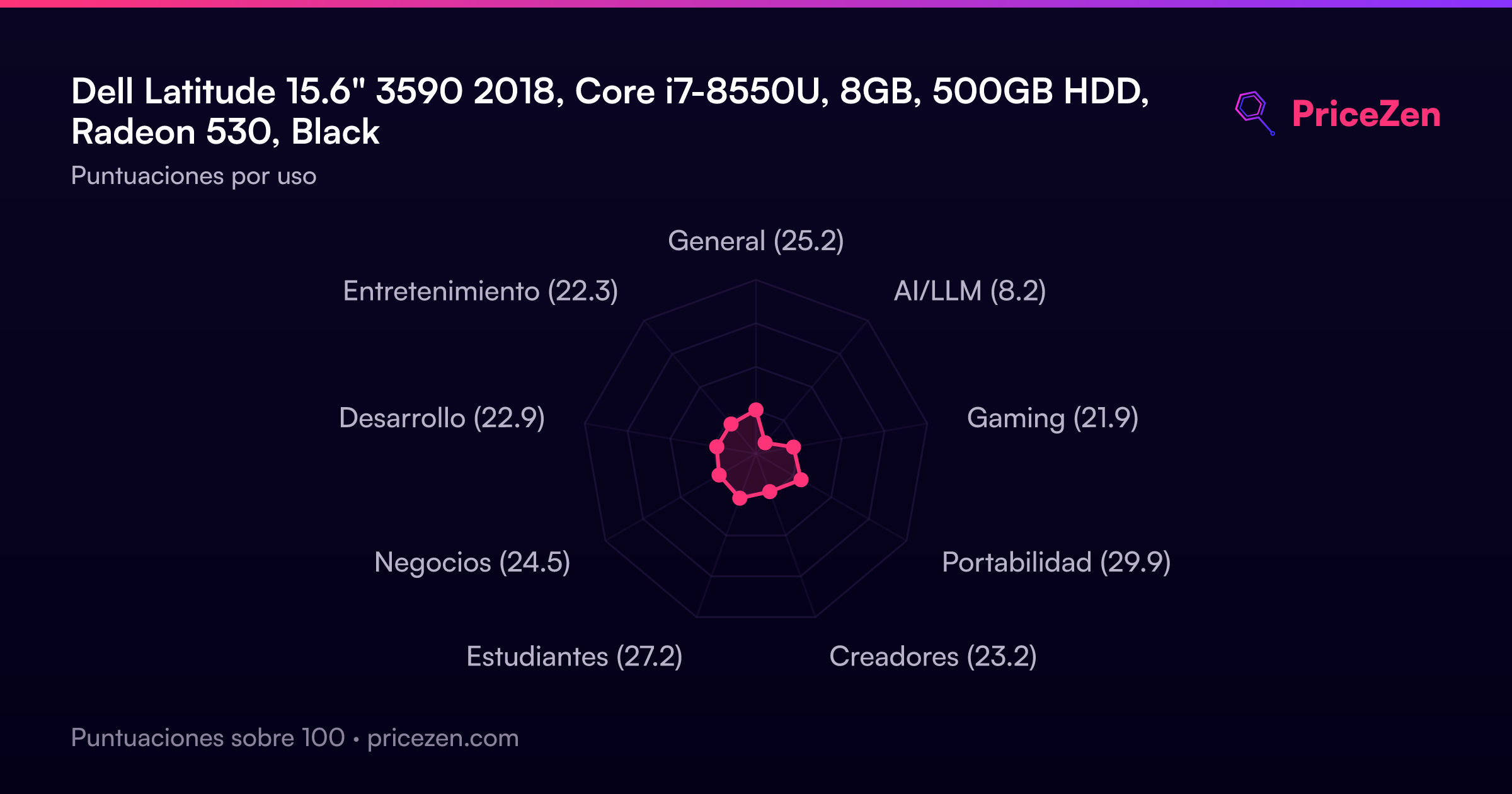
- General25.2
- AI/LLM8.2
- Gaming21.9
- Portabilidad29.9
- Creadores23.2
- Estudiantes27.2
- Negocios24.5
- Desarrollo22.9
- Entretenimiento22.3