Acer Chromebook Spin 12.2" CP312-1HN-34Z7 2024, Core i3-N305, 8GB, 128GB eMMC, Silver
The Intel Core i3-N305 8-core processor and 8GB LPDDR5 RAM keep this Chromebook responsive for daily tasks, while the 12.2-inch 1920x1200 IPS touchscreen and convertible hinge add flexibility for note-taking or media. ChromeOS boots in under 10 seconds, and the OceanGlass touchpad made from ocean-bound plastic waste offers a smooth, eco-conscious feel. Best for students who need a lightweight, secure laptop for Google Workspace, web browsing, and streaming on a budget.

Sin precio actual de tiendas


Resumen
The 30-Second Version
The Acer Chromebook Spin 312 packs a surprisingly fast 8-core Core i3-N305 and a sharp 12.2-inch touchscreen into a convertible body that weighs just 1.29kg. The catch right now is that it's out of stock at every store we track, so there's no price to chase. When it was available it was an outstanding value near the bottom of its range, though the plasticky build and slow eMMC storage always reminded you of the budget price. Battery life is hit or miss depending on usage, and reliability scores are worryingly low. For students and casual users who want Chrome OS in a small convertible, it's worth an alert, but you'll need to shop elsewhere today.
Pros & Cons
Ventajas
- Snappy 8-core Core i3-N305 handles Chrome OS and Android apps with ease 98th
- Bright, sharp 12.2" 1920x1200 touchscreen with a flexible 360-degree hinge 73rd
- Wi-Fi 6E and a solid port selection including HDMI and USB-A
- Strong spec sheet for a budget Chromebook, with a fast CPU and a good screen for the class
- Lightweight at 1.29kg and compact enough for easy travel
Desventajas
- Currently out of stock at every store we track, so there's nothing to buy right now
- 128GB eMMC storage is slow and cramped, sitting in the 7th percentile
- Plasticky, clunky build with thick bezels that feel dated
- Battery life is inconsistent, with some owners reporting mediocre real-world results
- Backlit keyboard appears to be missing on some units despite being listed
- Reliability scores are poor, landing in the 10th percentile
Opinión de los propietarios
The Word on the Street
Cómo cambió la opinión de los propietarios con el tiempo
ExclusivaSegún cuándo escribieron realmente sus opiniones los clientes, para ver si los elogios iniciales se mantuvieron.
Propietarios satisfechos: 100 % últimamente, 76 % en oct 2024 – jun 2025
Muy pocas opiniones para hablar de un cambio.
En las 44 valoraciones de tiendas: 4,6★. El gráfico cuenta las 36 opiniones escritas con estrellas y fecha propia.
7 opiniones de meses con fechas aproximadas (el día en que las vimos por primera vez) quedan fuera de la tendencia.
Ver las cifras
| Periodo | Opiniones | Satisfechos | Neutrales | Insatisfechos | Proporción satisfechos |
|---|---|---|---|---|---|
| oct 2024 – jun 2025 | 17 | 13 | 1 | 3 | 76 % |
| jul 2025 – jul 2026 | 19 | 19 | 0 | 0 | 100 % |
Cada columna une trimestres hasta reunir al menos 10 opiniones con estrellas y fecha propia. Satisfechos = 4-5★, neutrales = 3★, insatisfechos = 1-2★.
Las pruebas
Performance
The Core i3-N305 inside this Spin 312 is a genuine surprise. In our database, this processor lands in the 23rd percentile overall, which sounds mediocre until you realize it's being compared against every laptop CPU we track, including desktop replacements and gaming rigs. For a fanless or near-fanless Chromebook, this thing is quick. The 8 cores and 8GB of LPDDR5 mean multitasking is smooth, and Android apps from the Play Store run without the stutter you'd get on cheaper ARM-based Chromebooks. The integrated Intel UHD Graphics sit around the middle of the pack, which is fine because nobody's buying this for gaming. It scores a 2.4 out of 100 in our gaming suitability rating, so stick to Solitaire and maybe some light Android titles.
Real-world use is where the N305 shines. Chrome OS boots in seconds, and with Wi-Fi 6E onboard, web pages load fast and streaming stays stable. The 128GB of eMMC storage is a weak spot, landing in the 7th percentile. It's slow compared to NVMe drives and it's not a lot of space if you plan on downloading a bunch of Android apps or saving movies offline. But Chrome OS is built around cloud storage, and you get 2TB of Google One storage free for 3 months with the purchase, which helps offset the limited local storage. Just don't expect to hoard files on the device itself.
Specifications
Full Specifications
Processor
| CPU | Intel N-Series N305 |
| Cores | 8 |
| Frequency | 1.8 GHz |
| L3 Cache | 6 MB |
Graphics
| GPU | Intel UHD Graphics |
| Type | Integrated |
| VRAM Type | Shared |
Memory & Storage
| RAM | 8 GB |
| RAM Generation | LPDDR5 |
| Storage | 128 GB |
| Storage Type | eMMC |
Display
| Size | 12.2" |
| Resolution | 1920x1200 (Full HD) |
| Panel | LCD |
Connectivity
| USB-C Ports | 1 |
| USB Ports | 2 |
| HDMI | HDMI 1.4 |
| Wi-Fi | Wi-Fi 6E |
| Bluetooth | Bluetooth 5.2 |
Physical
| Weight | 1.3 kg / 2.8 lbs |
| OS | ChromeOS |
vs Competition
With the Spin 312 out of stock everywhere we track, the comparison question shifts from "which one is cheaper" to "what do you buy instead." The current field it sits against is a mix of convertibles and larger clamshells, and none of them are trying to do exactly what this Acer does at this size and weight.
The HP OmniBook X Flip 14-fm0023dx and the Lenovo Yoga 7 14" 83JR0001US are the closest in spirit, since both flip around like the Acer does. They're also bigger machines, so if the 12.2-inch footprint and 1.29kg carry weight were the whole appeal, neither is a straight swap. The ASUS Vivobook 14" TP3407SA-DS74T is another 14-inch option in the same conversation, and the Samsung Galaxy Book4 Edge 16" NP960XMA-KB1US goes the other direction entirely with a much larger panel, which is great at a desk and less great in a cramped lecture hall. Then there's the Apple MacBook Air 13.3" M1, which is the odd one out because it isn't a convertible and doesn't run Chrome OS at all. If your workflow is genuinely browser-first and you want Play Store apps on the same device, that difference matters more than any spec sheet.
Where the Acer still holds its ground is processing power for its class. The N305 lands in the 23rd percentile among every laptop CPU we track, which is unremarkable in absolute terms but strong for a Chromebook, and our ranking puts it ahead of most of the cheaper ARM-based machines people cross-shop it with. Where it loses is storage speed, at the 7th percentile, and chassis quality, which owners consistently flag. So if you need something today, any of these five is a more practical purchase simply because you can actually order one. If you specifically want a small, cheap Chrome OS convertible, the Spin 312 is worth waiting for, but only at the right price.
| Spec | Acer Chromebook Spin 12.2" CP312-1HN-34Z7 | Apple MacBook Pro 14.2" M4 Max | ASUS ROG Zephyrus 14" GA403WW-G14.R95080 | Lenovo Legion Pro 7i Gen 10 16" | HP OMEN Transcend | Samsung Galaxy Book5 Pro 14" NP944XHA-KG3US |
|---|---|---|---|---|---|---|
| CPU | Intel N-Series N305 | Apple M4 Max | AMD Ryzen AI 9 HX 370 | Intel Core Ultra 9 275HX | Intel Core Ultra 9 285H | Intel Core Ultra 7 258V |
| RAM (GB) | 8 | 64 | 32 | 32 | 32 | 32 |
| Storage (GB) | 128 | 4096 | 2048 | 1024 | 1024 | 1024 |
| Screen | 12.2" 1920x1200 | 14.2" 3024x1964 | 14" 2880x1800 | 16" 2560x1600 | 14" 2880x1800 | 14" 2880x1800 |
| GPU | Intel UHD Graphics | Apple (40-Core) | NVIDIA GeForce RTX 5080 | NVIDIA GeForce RTX 5070 Ti | NVIDIA GeForce RTX 5070 | Intel Arc Graphics 140V |
| OS | ChromeOS | macOS | Windows 11 Home | Windows 11 Home | Windows 11 Home | Windows 11 Pro |
| Weight (kg) | 1.3 | 1.6 | 1.6 | 2.7 | 1.6 | 1.2 |
| Battery (Wh) | - | 72 | - | 99 | 71 | 63 |
| Compare | Compare | Compare | Compare | Compare |
| Producto | CPU | GPU | RAM | Puertos | Pantalla | Portabilidad | Almacenamiento | User Sentiment | Fiabilidad | Valoración social | Affordability |
|---|---|---|---|---|---|---|---|---|---|---|---|
| Acer Chromebook Spin 12.2" CP312-1HN-34Z7 | 29.6 | 28 | 20.5 | 35.5 | 46.8 | 97.7 | 5.1 | 60.9 | 10.8 | 72.9 | 0 |
| Apple MacBook Pro 14.2" M4 Max Compare | 93.7 | 91.6 | 95.7 | 73.1 | 99.3 | 68.8 | 98.4 | 99 | 98.3 | 73.3 | 1.7 |
| ASUS ROG Zephyrus 14" GA403WW-G14.R95080 Compare | 91.2 | 98.3 | 90.9 | 89.2 | 96.5 | 73.7 | 89.7 | 99 | 60.7 | 96.5 | 5.8 |
| Lenovo Legion Pro 7i Gen 10 16" Compare | 97.2 | 96.6 | 89 | 97.2 | 95.6 | 9.6 | 79.2 | 90.8 | 82.1 | 99.7 | 5.6 |
| HP OMEN Transcend Compare | 90.1 | 93.5 | 89.7 | 89.2 | 96.5 | 72.3 | 65.1 | 81.2 | 33.6 | 94.2 | 8.5 |
| Samsung Galaxy Book5 Pro 14" NP944XHA-KG3US Compare | 65.7 | 69.6 | 79.4 | 83 | 91.6 | 89.5 | 79.2 | 0 | 82.1 | 96.5 | 20.6 |
Precio
Value & Pricing
Value used to be where the Spin 312 made its strongest case, and the hardware still backs that up: a capable 8-core processor, a nice touchscreen, and a convertible design in a package that undercut a lot of budget Windows laptops that would choke on their own bloatware. The problem is availability. We track prices over time across many stores, partly through our community browser extension, and right now every vendor we follow lists this model as out of stock. There's no live price to point at, which means there's no deal to chase either.
That changes how you should think about it. If stock returns, the same logic applies as before: the lower end of its historical range was the sweet spot, and paying toward the top of it put you within reach of better-built machines with faster storage. Our advice is to set a price alert rather than hunt for a stray listing at an inflated price, because a budget Chromebook only makes sense at a budget number. The included 3-month Google One AI Premium plan with Gemini Advanced and 2TB of storage was a genuine sweetener when you could actually buy the thing, and it's worth checking whether any returning stock still carries it. Until then, the value argument here is theoretical.
Leer más
Overview
The Acer Chromebook Spin 312 is one of those devices that makes you question why you'd spend more on a basic laptop. On paper, you're getting a proper 12.2-inch 1920x1200 touchscreen, an 8-core Core i3-N305, 8GB of RAM, and a 2-in-1 convertible design that flips all the way around into a tablet. It's aimed squarely at students, casual users, and anyone who lives in Google's world and wants something light enough to toss in a bag without a second thought. At 1.29kg, it's not going to weigh you down.
What makes this particular Chromebook interesting is the chip inside. The Core i3-N305 is an 8-core Alder Lake-N part that punches well above what most people expect from a Chromebook processor. You're not getting a sluggish Celeron or MediaTek experience here. This thing handles a dozen Chrome tabs, a YouTube video, and a Google Doc without breaking a sweat. The 8GB of LPDDR5 helps too. It's not upgradeable, but for Chrome OS, it's plenty for the foreseeable future.
But there are two catches. The first you'll feel the moment you pick it up: the build quality is a mixed bag. The OceanGlass touchpad made from recycled ocean plastic is a nice story and actually feels decent under your fingers, but the rest of the chassis has a hollow, plasticky vibe that some owners describe as clunky. The bezels around the screen are thick enough to land a plane on. If you care about premium fit and finish, this isn't it. The second catch is bigger right now: we track its price across stores with our own automated system, and every vendor we follow currently shows it out of stock. So this is less "go buy it today" and more "know what you're looking at if it comes back, or if you find a unit secondhand."
Common Questions
Q: Can this Chromebook run Android apps and Linux apps?
Yes, the Spin 312 has full access to the Google Play Store for Android apps, and the Core i3-N305 handles them smoothly. You can also enable the Linux development environment in Chrome OS settings if you need to run desktop-class applications. Just keep in mind the 128GB of storage fills up fast if you install a lot of large apps.
Q: How is the keyboard for typing long documents?
The keyboard is functional but not exceptional. Key travel is decent for a laptop this size, but some owners report that the keys are louder than they'd like, which could be annoying in quiet environments like libraries. The backlight situation is also inconsistent, with at least one buyer receiving a unit without it, so check your specific model if that matters to you.
Q: Does the 128GB eMMC storage feel slow in daily use?
For basic Chrome OS tasks like web browsing, streaming, and document editing, the eMMC storage is adequate. Where you'll notice the slowness is when downloading large files, installing hefty Android apps, or booting up Linux applications. It's one of the weaker points of this device, sitting in the 7th percentile for storage performance. If you need fast local storage, look for a Chromebook with an NVMe SSD instead.
Q: Is the screen good enough for watching movies and reading?
The 12.2-inch 1920x1200 IPS touchscreen is one of the highlights. It's sharp, bright enough for indoor use, and the 16:10 aspect ratio gives you a bit more vertical space for reading documents and web pages. The glossy finish can be reflective in direct sunlight, but for indoor streaming and productivity, it's solid. The thick bezels are the main aesthetic drawback.
Who Should Skip This
If you're someone who values premium build quality and a clean design, the Spin 312 is going to disappoint you. The plastic chassis feels hollow, the bezels are chunky, and the overall aesthetic screams budget laptop. You'd be happier with something like the Apple MacBook Air 13.3" M1, or with the Lenovo Yoga 7 14" 83JR0001US if you want to keep the flip-around hinge. Similarly, if you need all-day battery life without worrying about finding an outlet, the inconsistent battery reports on this model are a red flag, and the Samsung Galaxy Book4 Edge 16" NP960XMA-KB1US is worth a look if a bigger machine suits you.
Anyone who needs a laptop this week should skip it too, purely on availability. It's out of stock across every vendor we track, and waiting on a budget Chromebook rarely makes sense when the HP OmniBook X Flip 14-fm0023dx and the ASUS Vivobook 14" TP3407SA-DS74T are both convertibles you can buy now.
Gamers should obviously look elsewhere. The integrated Intel UHD Graphics and Chrome OS limitations mean this scores a 2.4 out of 100 for gaming suitability. Even light Steam gaming via the Linux container is going to be a rough experience. If you want a convertible that can handle some light gaming, one of the Windows 2-in-1s in this group is a better fit, though you'll pay more for it.
Verdict
For students and casual users who live in Google's world, the Acer Chromebook Spin 312 is an easy machine to like. The Core i3-N305 gives it enough muscle to handle everything from research papers to Netflix binges without feeling sluggish, and the 2-in-1 design adds real flexibility for reading, drawing, or propping it up in tent mode for watching videos. The 12.2-inch screen is a nice size, big enough to work on but small enough to keep the whole package portable. As a piece of hardware, it earns its recommendation.
The trouble is that you can't act on that recommendation right now. Every store we track shows it out of stock, so unless you find a used unit, this is a wait-and-see situation rather than a purchase. Set an alert, and if it returns near the bottom of its old price range, it's still one of the better values in the Chromebook space.
And if you're someone who cares about how a laptop feels in your hands, or you need something that'll last through a full day of classes without hunting for an outlet, the wait may not be worth it. The plasticky build and inconsistent battery life are real drawbacks, and the 128GB eMMC drive will frustrate you if you keep large files locally. In that case, look at a Chromebook with an NVMe drive, or at the Apple MacBook Air 13.3" M1 if you're willing to leave Chrome OS behind for better build quality and battery life.
Usage Scores
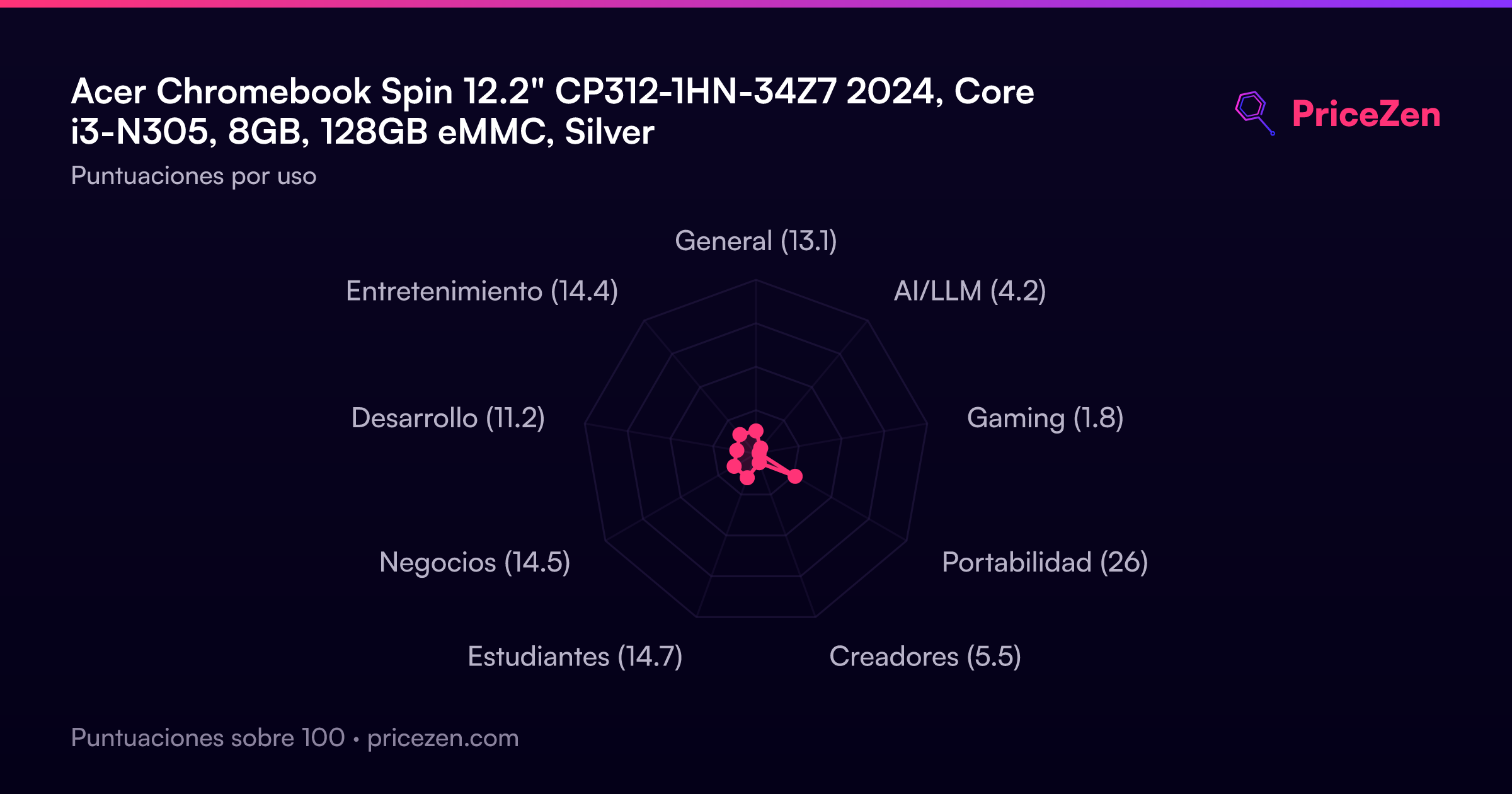
- General13.1
- AI/LLM4.2
- Gaming1.8
- Portabilidad26
- Creadores5.5
- Estudiantes14.7
- Negocios14.5
- Desarrollo11.2
- Entretenimiento14.4