ASUS Chromebook Flip CX1400FKA-AS88FT 14" 2025, Celeron N4500, 8GB, 128GB eMMC, Transparent Silver
The Intel Celeron N4500 processor and 8GB of RAM enable decent multitasking on this 14-inch FHD touchscreen Chromebook. Its 360-degree hinge and 11-hour battery life make it a practical 2-in-1 for work or play in any mode. Best for students or casual users who need a lightweight, durable laptop for web browsing, document editing, and streaming.

Sin precio actual de tiendas











Resumen
The 30-Second Version
The ASUS Chromebook Flip CX1 has a 95th percentile social proof score and 8GB of RAM, but its Celeron N4500 CPU sits in the 6th percentile and its 128GB eMMC storage is at the 5th percentile. It's a fine budget Chromebook for basic tasks at USD 386, but the EUR 214 price spread across European vendors means you need to shop carefully. Owners love the battery life and touchscreen, but overheating and freezing complaints are real.
Pros & Cons
Ventajas
- 95th percentile social proof, buyers clearly like it 88th
- 87th percentile affordability, hard to beat at USD 386 87th
- 8GB RAM is generous for a budget Chromebook 72nd
- 14-inch FHD touchscreen with 360-degree hinge
- Wi-Fi 6 and Bluetooth 5.2 connectivity
- MIL-STD 810H durability rating
Desventajas
- Celeron N4500 CPU ranks in the 6th percentile
- 128GB eMMC storage at the 5th percentile, slow and cramped
- No backlit keyboard, a common owner complaint
- Overheating and freezing reported by multiple users
- Screen quality only 20th percentile
- 1.63kg is heavy for a Chromebook
Opinión de los propietarios
The Word on the Street
Cómo cambió la opinión de los propietarios con el tiempo
ExclusivaSegún cuándo escribieron realmente sus opiniones los clientes, para ver si los elogios iniciales se mantuvieron.
9 opiniones escritas, dic 2024 – feb 2026: 8 satisfechos, 1 insatisfecho
En las 406 valoraciones de tiendas: 4,4★. La mayoría de los propietarios valora sin escribir una opinión. El gráfico cuenta las 9 opiniones escritas.
Cada punto es una opinión escrita, en el mes en que se escribió. Satisfechos = 4-5★, neutrales = 3★, insatisfechos = 1-2★.
Las pruebas
Performance
Let's be blunt: the Intel Celeron N4500 is a 2-core processor that ranks in the 6th percentile of all CPUs in our database. That's not a typo. For basic ChromeOS tasks like browsing, Google Docs, and streaming, it'll get the job done. The 8GB of LPDDR4X RAM helps smooth things out, and ChromeOS is lightweight enough that you won't feel the pain constantly. But push this thing with more than a handful of tabs or any Android app heavier than a calculator, and you'll feel it wheeze.
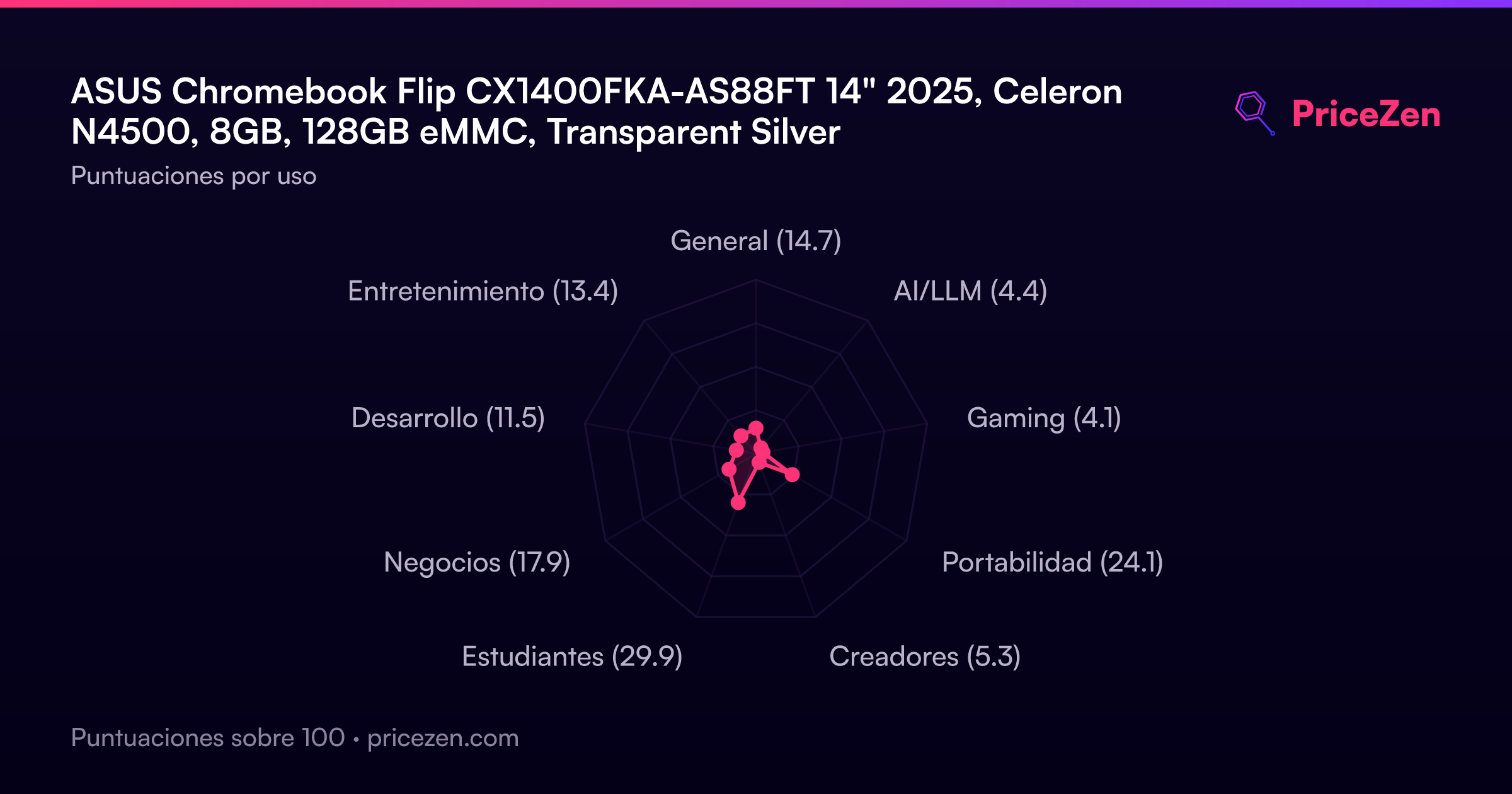
The 128GB eMMC storage is another weak spot, sitting at the 5th percentile. eMMC is essentially the same tech as an SD card, not a proper SSD. Boot times are decent thanks to ChromeOS, but file transfers and app installs will crawl compared to anything with NVMe storage. The integrated GPU ranks at the 28th percentile, which is fine for video playback but useless for anything resembling gaming. Our gaming score for this device is 4.3 out of 100, which is one of the worst we've seen.
Specifications
Full Specifications
Processor
| CPU | Intel Celeron N4500 |
| Cores | 2 |
| Frequency | 1.1 GHz |
| L3 Cache | 4 MB |
Graphics
| Type | Integrated |
Memory & Storage
| RAM | 8 GB |
| RAM Generation | LPDDR4X |
| Storage | 128 GB |
| Storage Type | eMMC |
Display
| Size | 14" |
| Resolution | 1920x1080 (Full HD) |
Connectivity
| USB-C Ports | 2 |
| USB Ports | 2 |
| Wi-Fi | Wi-Fi 6 |
| Bluetooth | Bluetooth 5.2 |
Physical
| Weight | 1.6 kg / 3.6 lbs |
| OS | ChromeOS |
vs Competition
Stacked against the Apple MacBook Air M4, this thing isn't even in the same conversation. The M4's CPU performance is in a completely different universe, and the MacBook's storage is a proper SSD. But the MacBook also costs several times more. The Lenovo Slim 7 and HP OmniBook X Flip are closer in form factor, both 2-in-1s with better screens and faster processors, but again, you're paying significantly more. The real question is whether you need a Chromebook at all. If you're just browsing, writing, and streaming, this ASUS does the job for a fraction of the price. If you need to run anything beyond ChromeOS apps, every competitor here beats it handily.
| Spec | ASUS Chromebook Flip CX1400FKA-AS88FT 14" | Apple MacBook Pro 14.2" M4 Max | Lenovo Legion Pro 7i Gen 10 16" | HP OMEN Transcend | MSI Vector 16 HX AI A2XWHG | Microsoft Surface Laptop 15" Ultra |
|---|---|---|---|---|---|---|
| CPU | Intel Celeron N4500 | Apple M4 Max | Intel Core Ultra 9 275HX | Intel Core Ultra 9 285H | Intel Core Ultra 7 255HX | NVIDIA RTX Spark N1X |
| RAM (GB) | 8 | 64 | 32 | 32 | 32 | 32 |
| Storage (GB) | 128 | 4096 | 1024 | 1024 | 2048 | 1024 |
| Screen | 14" 1920x1080 | 14.2" 3024x1964 | 16" 2560x1600 | 14" 2880x1800 | 16" 2560x1600 | 15" 3270x2180 |
| GPU | - | Apple (40-Core) | NVIDIA GeForce RTX 5070 Ti | NVIDIA GeForce RTX 5070 | NVIDIA GeForce RTX 5070TI | NVIDIA Blackwell RTX |
| OS | ChromeOS | macOS | Windows 11 Home | Windows 11 Home | Windows 11 Home | Windows 11 Pro |
| Weight (kg) | 1.6 | 1.6 | 2.7 | 1.6 | 2.7 | 2 |
| Battery (Wh) | - | 72 | 99 | 71 | 90 | 140 |
| Compare | Compare | Compare | Compare | Compare |
| Producto | CPU | GPU | RAM | Puertos | Pantalla | Portabilidad | Almacenamiento | User Sentiment | Fiabilidad | Valoración social | Affordability |
|---|---|---|---|---|---|---|---|---|---|---|---|
| ASUS Chromebook Flip CX1400FKA-AS88FT 14" | 1.9 | 28.1 | 13.2 | 33.4 | 20.3 | 72.4 | 5.1 | 61.1 | 60.6 | 88.2 | 87.4 |
| Apple MacBook Pro 14.2" M4 Max Compare | 93.7 | 91.5 | 95.6 | 73.8 | 99.1 | 68.9 | 98.4 | 99 | 98.3 | 73.2 | 1.7 |
| Lenovo Legion Pro 7i Gen 10 16" Compare | 97.2 | 96.7 | 89 | 97.3 | 95 | 9.5 | 79.2 | 90.8 | 82.1 | 99.7 | 5.7 |
| HP OMEN Transcend Compare | 90.1 | 93.5 | 89.6 | 89.4 | 96 | 72.3 | 65.2 | 81.3 | 33.7 | 93.9 | 8.8 |
| MSI Vector 16 HX AI A2XWHG Compare | 94.4 | 96.7 | 86.3 | 94.6 | 86.3 | 10 | 93.9 | 81.3 | 60.6 | 0 | 9.2 |
| Microsoft Surface Laptop 15" Ultra Compare | 92.6 | 99.9 | 79.4 | 64.4 | 99.3 | 57.7 | 65.2 | 0 | 82.1 | 32.5 | 5.8 |
Precio
Value & Pricing
At USD 386 in the US, this is a genuinely cheap 2-in-1 with a touchscreen and 8GB of RAM. The affordability ranking of 87th percentile backs that up. But the EUR pricing tells a messier story. Across DE, ES, FR, and IT, prices range from EUR 435 to EUR 649, a spread of EUR 214. That's a huge gap for the same hardware. If you're in Europe, shop around. The lower end of that range is reasonable for what you get. The upper end is highway robbery for a Celeron-powered machine. The 3-month Google One AI Premium plan sweetens the deal slightly, but that's a trial, not a reason to buy.
Historial de precios
Leer más
Overview
The ASUS Chromebook Flip CX1 CX1400FKA-AS88FT sits in a weird spot. It's got a 95th percentile social proof score and an 87th percentile affordability ranking, which means people are buying it and generally not hating it. But the internals tell a different story. The Intel Celeron N4500 lands in the 6th percentile for CPU performance in our database, and the 128GB eMMC storage is at the 5th percentile. That's bottom-of-the-barrel territory for a laptop in 2025.
What you're really getting here is a 14-inch FHD touchscreen 2-in-1 with 8GB of RAM, Wi-Fi 6, and ChromeOS for around USD 386 in the US. The 360-degree hinge and military-grade durability rating are nice touches. But the Celeron processor and eMMC storage are the kind of specs you'd expect in a budget Chromebook from five years ago, not something competing with modern ultraportables.
Common Questions
Q: Can this Chromebook handle multitasking with multiple tabs open?
It depends on your definition of multitasking. The 8GB of RAM helps, and ChromeOS is efficient, but the Celeron N4500 ranks in the 6th percentile for CPU performance in our database. A handful of lightweight tabs will be fine. Twenty tabs with video playing will bring it to its knees.
Q: Is the 128GB storage enough for a Chromebook?
For cloud-first ChromeOS users, 128GB is workable, but it's eMMC storage at the 5th percentile in our database. That means it's slower than a proper SSD. If you store files locally or install many Android apps, you'll feel the squeeze on both capacity and speed. The Micro SD card slot helps, but it's a band-aid.
Q: How does the battery life actually hold up?
ASUS claims up to 11 hours, and owner feedback suggests real-world battery life is a genuine strength. Multiple reviews mention long battery life as a highlight. Keep in mind that heavier use, especially with the screen at full brightness, will cut into that figure.
Who Should Skip This
Skip this if you need to run anything beyond ChromeOS apps and light Android apps. The Celeron N4500 at the 6th percentile and eMMC storage at the 5th percentile mean this machine will frustrate anyone trying to do real work. If you edit photos, code, run virtual machines, or even just keep dozens of tabs open, you'll hit the ceiling fast. The 20th percentile screen quality also makes this a poor choice for anyone who cares about color accuracy or brightness. And if you type in dim lighting, the missing backlit keyboard will annoy you daily.
Verdict
The ASUS Chromebook Flip CX1 is a budget Chromebook that knows what it is. The 8GB of RAM and FHD touchscreen are nice, and the 95th percentile social proof suggests most buyers are happy with their purchase. But the Celeron N4500 at the 6th percentile and eMMC storage at the 5th percentile are hard to ignore. This is a machine for light browsing, schoolwork, and media consumption, nothing more. If that's all you need and you can find it at the lower end of the price range, it's a decent buy. If you need anything resembling real performance, look elsewhere.
Usage Scores
- General14.7
- AI/LLM4.4
- Gaming4.1
- Portabilidad24.1
- Creadores5.3
- Estudiantes29.9
- Negocios17.9
- Desarrollo11.5
- Entretenimiento13.4