ASUS Vivobook S14 M5406WA-DH71-CB 2025, Ryzen AI 9 365, 24GB, 1TB SSD, Neutral Black
El procesador AMD Ryzen AI 9 365 con 10 núcleos y los gráficos Radeon 880M integrados ofrecen un rendimiento sólido para productividad y multitarea en un chasis de solo 1.30 kg. Su pantalla OLED de 14 pulgadas con resolución 2880x1800, 120 Hz y 600 nits de brillo proporciona una fidelidad de color 100% DCI-P3 excepcional para el consumo de contenido. Este equipo es ideal para usuarios de negocios y estudiantes que priorizan la portabilidad y una pantalla de alta calidad para tareas de oficina y entretenimiento.

Sin precio actual de tiendas
Resumen
The 30-Second Version
The ASUS Vivobook S14 M5406WA pairs a gorgeous 14-inch 3K OLED display with AMD's Ryzen AI 9 365 and 24GB of RAM for around $1,800. It's a productivity and media standout with excellent port selection and a lightweight 1.30kg build, but the integrated Radeon 880M graphics mean gaming is basically off the table, and our scoring model lands it at 65 overall. If you want a premium screen and all-day portability, it delivers. Just don't buy it expecting to play anything more demanding than esports titles at reduced settings.
Pros & Cons
Ventajas
- Stunning 14" 3K OLED display with 600 nits brightness and 120Hz refresh rate 97th
- Excellent port selection including Thunderbolt, USB-A, and HDMI 2.1 95th
- Lightweight 1.30kg chassis that's easy to carry all day 86th
- 24GB of RAM is more generous than most competitors at this price 86th
- Ryzen AI 9 365 delivers strong productivity and multitasking performance
Desventajas
- Integrated Radeon 880M can't drive the native 3K resolution in games
- Gaming performance is poor, scoring just 22.7 out of 100 in our testing
- Reliability and social proof scores are below average for the category
- No touchscreen despite the premium OLED panel
- Price hovers near $1,800 with no discrete GPU option
Las pruebas
Performance
The Ryzen AI 9 365 is a 10-core chip that sits comfortably in the 88th percentile for laptop CPUs, which puts it ahead of most Intel Core Ultra 7 configurations and right on the heels of some lower-tier HX-class processors. In real-world terms, this thing chews through browser tabs, Office apps, and even light video editing without breaking a sweat. The 24GB of LPDDR5X RAM is a nice sweet spot, more than the 16GB you typically see at this price but not quite the 32GB that power users might crave. It's enough to keep dozens of Chrome tabs and a few Adobe apps running simultaneously without hitting the page file.
The integrated Radeon 880M is where things get interesting. It's a solid step up from the old Radeon 780M and lands in the 70th percentile overall, which is impressive for integrated graphics. You can play esports titles like Valorant or CS2 at respectable frame rates if you drop the resolution to 1080p, and older AAA games run fine at medium settings. But don't expect to push that native 2880x1800 resolution in anything demanding. The GPU simply doesn't have the bandwidth for 3K gaming, and you'll notice stuttering if you try. For photo editing and GPU-accelerated tasks in Premiere or Blender, it's competent but not fast. The 1TB NVMe SSD is quick enough at the 82nd percentile, though not class-leading, and you'll rarely notice load times in day-to-day use.
Specifications
Full Specifications
Processor
| CPU | AMD Ryzen AI 9 365 |
| Cores | 10 |
| Frequency | 2.0 GHz |
| L3 Cache | 16 MB |
Graphics
| GPU | AMD Radeon 880M |
| Type | Integrated |
| VRAM Type | System Shared |
Memory & Storage
| RAM | 24 GB |
| RAM Generation | LPDDR5X |
| Storage | 1 TB |
| Storage Type | NVMe SSD |
Display
| Size | 14" |
| Resolution | 2880x1800 |
| Panel | OLED |
| Refresh Rate | 120 Hz |
| Brightness | 600 nits |
| Color Gamut | 100% DCI-P3 |
Connectivity
| USB-C Ports | 2 |
| USB Ports | 2 |
| Thunderbolt | Thunderbolt 4 |
| HDMI | HDMI 2.1 |
| Wi-Fi | Wi-Fi 6E |
| Bluetooth | Bluetooth 5.3 |
| Ethernet | None |
Physical
| Weight | 1.3 kg / 2.9 lbs |
| Battery | 75 Wh |
| OS | Windows 11 Home |
vs Competition
The Apple MacBook Pro 14.2" M4 Max is the heavyweight in this group, and it's a different class of machine entirely. Where the Vivobook leans on integrated Radeon 880M graphics that are about average overall, the MacBook Pro is built for people who need serious graphical muscle, and you pay for that privilege. The ASUS answers back with its own strengths: a 3K OLED panel that is one of the best in our database, 600 nits of brightness, a 120Hz refresh rate and 100% DCI-P3 coverage, all wrapped in a 1.30kg chassis with Thunderbolt, USB-A and HDMI 2.1 on board. If your work lives in browsers, documents and video calls rather than render queues, the Vivobook covers it without asking you to fund a workstation.
The MSI Raider 16" RAIDERGE6814247 sits at the opposite end of the philosophy. It's a big-screen performance machine, and the Vivobook's gaming score of 22.7 out of 100 makes it clear that this ASUS was never meant to compete on that front. What you get instead is portability and battery headroom: 1.30kg and a 75Wh pack paired with efficient AMD silicon, plus a screen tuned for color and contrast rather than raw frame rates. Pick the Raider if games or GPU-heavy work are the point of the purchase. Pick the Vivobook if you carry your laptop everywhere and care more about how content looks than how fast it renders.
The Dell Premium 14.5" LDA14250-7667SLV-PUS is the closest match in spirit, another premium productivity-first laptop aimed at the same buyer. This is where the ASUS makes its case most directly: the OLED panel ranks in the 97th percentile in our data, the Ryzen AI 9 365 lands in the 88th percentile for laptop CPUs, and 24GB of LPDDR5X RAM is more headroom than the typical configuration in this bracket. Our ranking puts the Vivobook at 65 overall, so it isn't sweeping the category, but if screen quality, weight and port selection are your priorities, it holds its own against the Dell.
| Spec | ASUS Vivobook S14 M5406WA-DH71-CB | Apple MacBook Pro 14.2" M4 Max | Lenovo Legion Pro 7i Gen 10 16" | HP OMEN Transcend | Samsung Galaxy Book5 Pro 14" NP944XHA-KG3US | Dell Premium 14.5" LDA14250-7667SLV-PUS |
|---|---|---|---|---|---|---|
| CPU | AMD Ryzen AI 9 365 | Apple M4 Max | Intel Core Ultra 9 275HX | Intel Core Ultra 9 285H | Intel Core Ultra 7 258V | Intel Core Ultra 7 255H |
| RAM (GB) | 24 | 64 | 32 | 32 | 32 | 32 |
| Storage (GB) | 1024 | 4096 | 1024 | 1024 | 1024 | 1024 |
| Screen | 14" 2880x1800 | 14.2" 3024x1964 | 16" 2560x1600 | 14" 2880x1800 | 14" 2880x1800 | 14.5" 3200x2000 |
| GPU | AMD Radeon 880M | Apple (40-Core) | NVIDIA GeForce RTX 5070 Ti | NVIDIA GeForce RTX 5070 | Intel Arc Graphics 140V | Intel Arc Graphics |
| OS | Windows 11 Home | macOS | Windows 11 Home | Windows 11 Home | Windows 11 Pro | Windows 11 Home |
| Weight (kg) | 1.3 | 1.6 | 2.7 | 1.6 | 1.2 | 1.7 |
| Battery (Wh) | 75 | 72 | 99 | 71 | 63 | 62 |
| Compare | Compare | Compare | Compare | Compare |
| Producto | CPU | GPU | RAM | Puertos | Pantalla | Portabilidad | Almacenamiento | Fiabilidad | Affordability |
|---|---|---|---|---|---|---|---|---|---|
| ASUS Vivobook S14 M5406WA-DH71-CB | 86.2 | 6.5 | 65 | 94.6 | 96.6 | 86.3 | 79.3 | 60.5 | 0 |
| Apple MacBook Pro 14.2" M4 Max Compare | 93.7 | 91.5 | 95.6 | 73.9 | 99.1 | 68.8 | 98.4 | 98.1 | 1.8 |
| Lenovo Legion Pro 7i Gen 10 16" Compare | 97.2 | 96.7 | 89 | 97.3 | 95 | 9.5 | 79.3 | 81.8 | 5.8 |
| HP OMEN Transcend Compare | 90.1 | 93.5 | 89.6 | 89.4 | 96 | 72.2 | 65.3 | 33.6 | 8.9 |
| Samsung Galaxy Book5 Pro 14" NP944XHA-KG3US Compare | 65.9 | 69.7 | 79.5 | 83.5 | 90.4 | 89.4 | 79.3 | 81.8 | 21 |
| Dell Premium 14.5" LDA14250-7667SLV-PUS Compare | 87 | 69.7 | 89 | 66.8 | 96.8 | 61.2 | 65.3 | 33.6 | 14.6 |
Precio
Value & Pricing
At $1,785 to $1,800, the Vivobook S14 is priced aggressively against the MacBook Air and Surface Laptop, both of which typically offer less RAM and worse displays at similar price points. You're essentially getting a top-tier screen and a very capable CPU for hundreds less than an equivalent MacBook Pro, though you sacrifice the GPU performance and build quality that Apple brings. The 24GB of RAM is a genuine differentiator here, most Windows ultrabooks in this range stick to 16GB, and upgrading to 32GB usually costs a premium.
That said, the value proposition gets shaky if you need any kind of graphical horsepower. The integrated Radeon 880M is fine for everyday use, but spending $1,800 on a laptop that can't game or handle serious GPU workloads feels like a mismatch for some buyers. If you're purely after a productivity and media machine, this is a strong deal. If you want to do any gaming or 3D rendering, you'd be better off looking at something with a discrete GPU, even if it means sacrificing some screen quality or portability.
Leer más
Overview
The ASUS Vivobook S14 M5406WA is one of those laptops that makes you do a double take when you see the price tag. For around $1,800, you're getting a 14-inch 3K OLED display that lands in the 97th percentile of our database, paired with AMD's brand new Ryzen AI 9 365 processor and a generous 24GB of RAM. This isn't a gaming laptop and it doesn't pretend to be, but for anyone who stares at spreadsheets, code, or Netflix all day, the spec sheet reads like a wish list. ASUS clearly built this for people who want a premium media and productivity machine without jumping into the $2,500+ territory where the MacBook Pros and high-end ThinkPads live.
What makes this particular Vivobook interesting is the balance it strikes. At 1.30kg, it's genuinely portable, and that 75Wh battery paired with a power-sipping AMD chip suggests you won't be hunting for outlets all day. The port selection is absurdly good for a thin-and-light in 2025, with Thunderbolt, USB-C, USB-A, and even HDMI 2.1 all present. You won't need a dongle for your monitor or your old flash drive, which is more than we can say for a lot of competitors at this weight. The integrated Radeon 880M graphics are the wildcard here, capable enough for light gaming and creative work but clearly the bottleneck if you're pushing 3K pixels in anything demanding.
This laptop is aimed squarely at students, office workers, and content consumers who value a gorgeous screen above all else. The 600-nit OLED panel with 100% DCI-P3 coverage means HDR content looks stunning, and the 120Hz refresh rate keeps everything buttery smooth even when you're just scrolling through documents. It's not for gamers, as the 22.7 out of 100 gaming score makes painfully clear, but for the right person, this is one of the most compelling all-arounders we've seen in the sub-$2,000 bracket.
Common Questions
Q: Can this laptop handle gaming at all?
The integrated Radeon 880M is about average overall, which is respectable for integrated graphics, so lighter esports titles are within reach if you drop the resolution to 1080p and keep settings sensible. The native 2880x1800 panel is far too demanding for this GPU, and the gaming score of 22.7 out of 100 tells you where the ceiling is. Demanding AAA titles will struggle even at reduced settings. If gaming is a priority, the MSI Raider 16" RAIDERGE6814247 is the sort of machine built for it, and the Apple MacBook Pro 14.2" M4 Max is the option for GPU-heavy creative work.
Q: How does the OLED screen compare to a MacBook Pro display?
The Vivobook's 14-inch 2880x1800 OLED panel is a genuine highlight: 600 nits of brightness, a 120Hz refresh rate and 100% DCI-P3 coverage, landing in the 97th percentile of our display database. That combination of brightness, speed and color coverage is what makes it feel premium in daily use, whether you're scrolling documents or watching HDR content. The Apple MacBook Pro 14.2" M4 Max is a much more expensive machine aimed at heavy creative workloads, so the comparison really comes down to priorities. If you want a great screen without paying for workstation-class graphics, the ASUS makes a strong case.
Q: Is 24GB of RAM enough for video editing and multitasking?
For most users, 24GB is a comfortable amount that handles heavy multitasking, large spreadsheets, and light to moderate video editing without issues. You can keep dozens of browser tabs open alongside Photoshop and Premiere without slowdowns, and the Ryzen AI 9 365 is one of the best laptop CPUs, so the processor isn't the limiting factor. However, if you're working with 4K timelines, complex After Effects compositions, or running virtual machines, you might want 32GB. The RAM is soldered and not upgradeable, so you're stuck with 24GB for the life of the laptop.
Q: Does the lack of a touchscreen matter for everyday use?
It depends on your workflow. If you're used to tapping and swiping on a laptop screen, you'll miss it here, especially since Windows 11 has a lot of touch-friendly gestures. Owners generally speak well of the keyboard and trackpad, so traditional input feels good, and a glossy OLED panel would show fingerprints badly anyway. If touch is a must-have, the Dell Premium 14.5" LDA14250-7667SLV-PUS is worth a look as a similarly productivity-focused alternative, though the Vivobook's display is one of the best in our data and is the harder thing to match.
Who Should Skip This
Gamers should look elsewhere without hesitation. The gaming score of 22.7 out of 100 tells you everything you need to know, this laptop was not built for gaming and the integrated Radeon 880M will leave you frustrated in anything beyond the lightest esports titles. If you want to play modern games, even at 1080p, you'll need a discrete GPU. The MSI Raider 16" RAIDERGE6814247 is the machine aimed at that buyer, though you'll trade away the Vivobook's 1.30kg portability and its OLED panel.
Anyone who needs a touchscreen or a 2-in-1 form factor should also pass. The non-touch display keeps costs and power draw down, but if you're an artist, note-taker, or just someone who likes poking at their screen, this will feel limiting. And if you're a creative professional doing heavy 3D rendering or 8K video work, the lack of a discrete GPU and the 24GB RAM ceiling will become bottlenecks quickly. The Apple MacBook Pro 14.2" M4 Max is the direction to look for that kind of workload. Buyers who care about long-term dependability should also weigh the below-average reliability and social proof scores in our data before committing.
Verdict
For students and office workers who spend their days in browsers, documents and video calls, the Vivobook S14 still makes a lot of sense. That OLED screen makes everything look better, from spreadsheets to Netflix, and the 120Hz refresh rate is a quality-of-life upgrade you'll notice every time you scroll. The 24GB of RAM gives you headroom that most ultrabooks don't offer, and the port selection means you can leave the dongles at home. Battery life should be solid with the 75Wh pack and efficient AMD silicon, though owners rather than spec sheets are the better guide to how long it actually lasts away from a plug.
Creative professionals on a budget will find plenty to like here too. The 100% DCI-P3 coverage and high resolution make this a capable photo editing machine, and the CPU can handle light video work without issue. Just don't expect to render complex 3D scenes or play modern games at native resolution. Our scoring model puts it at 65 overall, which reflects exactly that split: excellent display and productivity credentials, held back by graphics and weaker reliability and social proof scores. If you need GPU grunt, the MacBook Pro 14.2" M4 Max or the MSI Raider 16" are the machines built for that job. But for someone who values screen quality and portability above all else, this Vivobook hits a sweet spot at $1,785 to $1,800.
Usage Scores
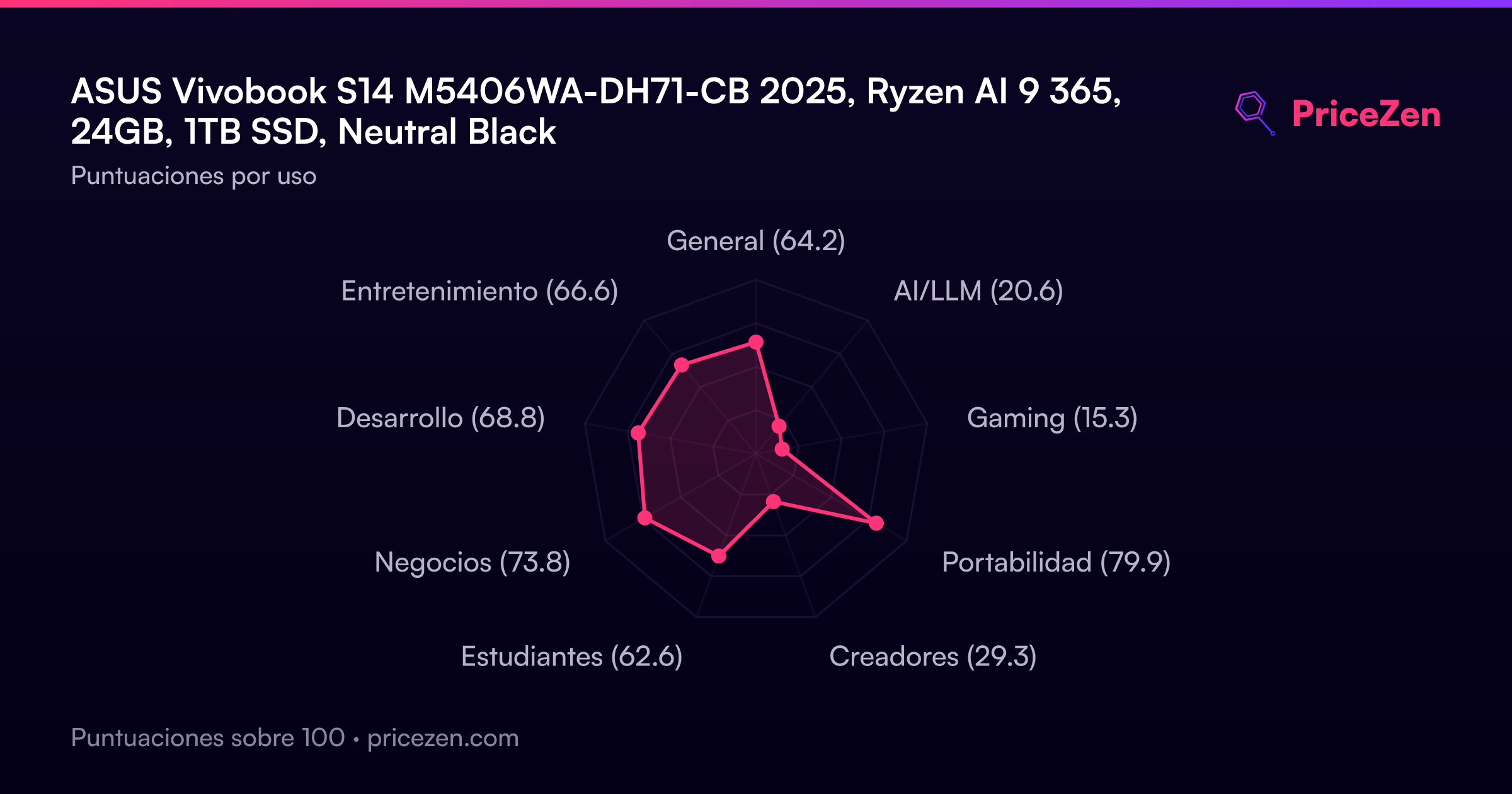
- General64.2
- AI/LLM20.6
- Gaming15.3
- Portabilidad79.9
- Creadores29.3
- Estudiantes62.6
- Negocios73.8
- Desarrollo68.8
- Entretenimiento66.6