Lenovo Chromebook Plus 14" 83LL000LUS 2025, Core 5 120U, 8GB, 256GB SSD, Glossy
The Intel Core 5 120U 10-core processor drives this 14-inch 2-in-1 Chromebook Plus, paired with 8GB LPDDR5 RAM and a 256GB NVMe SSD for responsive multitasking. Its 1920x1200 IPS touchscreen with 300 nits brightness and 360-degree hinge makes it flexible for both laptop and tablet use, while the 5MP webcam with privacy shutter adds security. Best for students and compact users who need a lightweight, convertible ChromeOS device for everyday coursework and browsing, not for gaming.

Sin precio actual de tiendas











Resumen
The 30-Second Version
The Lenovo Chromebook Plus 83LL000LUS is a fast, well-built 2-in-1 with a Core 5 120U and a flexible touchscreen. The display is dim and storage is tight, but for ChromeOS users it's a solid pick. Buy it at the low end of the price range and skip it at the high end.
Pros & Cons
Ventajas
- Snappy Core 5 120U keeps ChromeOS feeling responsive 82nd
- 2-in-1 hinge and touchscreen add real flexibility 75th
- Backlit keyboard and 5MP webcam with privacy shutter are nice touches
- Wi-Fi 6E and a good port selection for a Chromebook
Desventajas
- Display is dim at 300 nits with washed-out 45% NTSC color
- 8GB RAM and 256GB storage are both below average
- Integrated graphics rule out any real gaming
- No price listed, which makes value hard to judge
Las pruebas
Performance
The Core 5 120U is a 10-core chip that handles ChromeOS with ease. Our database puts its CPU performance right at the 50th percentile, so it's about average for laptops overall, but for a Chromebook it feels quick. The 8GB of LPDDR5 is enough for a dozen or so tabs plus a few Android apps, though it sits at the 23rd percentile for RAM, so heavy multitaskers will hit a wall eventually. Storage is the real weak spot at the 25th percentile. 256GB is fine for cloud-first users, but if you like keeping files local, you'll fill it faster than you think. The integrated GPU lands at the 56th percentile, which sounds okay until you realize it's still integrated graphics. Don't expect to run anything more demanding than a browser game.
Specifications
Full Specifications
Processor
| CPU | Intel Core 5 120U |
| Cores | 10 |
| Frequency | 1.4 GHz |
| L3 Cache | 12 MB |
Graphics
| GPU | Intel Graphics |
| Type | Integrated |
Memory & Storage
| RAM | 8 GB |
| RAM Generation | LPDDR5 |
| Storage | 256 GB |
| Storage Type | NVMe SSD |
Display
| Size | 14" |
| Resolution | 1920x1200 (Full HD) |
| Panel | IPS |
| Refresh Rate | 60 Hz |
| Brightness | 300 nits |
| Color Gamut | 45% NTSC |
Connectivity
| USB-C Ports | 2 |
| USB Ports | 2 |
| HDMI | HDMI 1.4b |
| Wi-Fi | Wi-Fi 6E |
| Bluetooth | Bluetooth 5.3 |
Physical
| Weight | 1.5 kg / 3.3 lbs |
| Battery | 50 Wh |
| OS | ChromeOS |
vs Competition
Stacked against the Apple MacBook Pro M4 Pro or Microsoft Surface Laptop 7th Edition, this Lenovo gets outclassed in almost every way. Those machines have better screens, more RAM, faster storage, and far superior GPUs. But they also cost two to three times as much. The HP OMEN Transcend 14 and ASUS ROG Strix G16 are gaming laptops, so they're not even playing the same sport. The MSI Creator A13V is closer in spirit, but it's aimed at creators who need Windows software. For someone who lives in ChromeOS and wants a 2-in-1 form factor, this Lenovo is a more sensible pick than any of those, assuming you can get it near the low end of the price range.
| Spec | Lenovo Chromebook Plus 14" 83LL000LUS | Apple MacBook Pro 14.2" M4 Pro | ASUS ROG Zephyrus 14" GA403WW-G14.R95080 | HP OMEN Transcend | Samsung Galaxy Book5 Pro 14" NP944XHA-KG3US | Dell Premium 14.5" LDA14250-7667SLV-PUS |
|---|---|---|---|---|---|---|
| CPU | Intel Core 5 120U | Apple M4 Pro | AMD Ryzen AI 9 HX 370 | Intel Core Ultra 9 285H | Intel Core Ultra 7 258V | Intel Core Ultra 7 255H |
| RAM (GB) | 8 | 48 | 32 | 32 | 32 | 32 |
| Storage (GB) | 256 | 4096 | 2048 | 1024 | 1024 | 1024 |
| Screen | 14" 1920x1200 | 14.2" 3024x1964 | 14" 2880x1800 | 14" 2880x1800 | 14" 2880x1800 | 14.5" 3200x2000 |
| GPU | Intel Graphics | Apple (16-Core) | NVIDIA GeForce RTX 5080 | NVIDIA GeForce RTX 5070 | Intel Arc Graphics 140V | Intel Arc Graphics |
| OS | ChromeOS | macOS | Windows 11 Home | Windows 11 Home | Windows 11 Pro | Windows 11 Home |
| Weight (kg) | 1.5 | 1.6 | 1.6 | 1.6 | 1.2 | 1.7 |
| Battery (Wh) | 50 | 72 | - | 71 | 63 | 62 |
| Compare | Compare | Compare | Compare | Compare |
| Producto | CPU | GPU | RAM | Puertos | Pantalla | Portabilidad | Almacenamiento | Fiabilidad | Affordability |
|---|---|---|---|---|---|---|---|---|---|
| Lenovo Chromebook Plus 14" 83LL000LUS | 49.8 | 47.9 | 22.6 | 64.5 | 63.8 | 75.4 | 24 | 81.9 | 52.4 |
| Apple MacBook Pro 14.2" M4 Pro Compare | 92.4 | 78.9 | 90.6 | 73.9 | 99.1 | 68.9 | 98.4 | 98.2 | 4.5 |
| ASUS ROG Zephyrus 14" GA403WW-G14.R95080 Compare | 91.2 | 98.3 | 90.8 | 89.5 | 96 | 73.6 | 89.7 | 60.6 | 6 |
| HP OMEN Transcend Compare | 90.1 | 93.5 | 89.7 | 89.5 | 96 | 72.2 | 65.4 | 33.7 | 8.9 |
| Samsung Galaxy Book5 Pro 14" NP944XHA-KG3US Compare | 65.9 | 69.7 | 79.5 | 83.5 | 90.4 | 89.4 | 79.3 | 81.9 | 21 |
| Dell Premium 14.5" LDA14250-7667SLV-PUS Compare | 87 | 69.7 | 89 | 66.8 | 96.8 | 61.3 | 65.4 | 33.7 | 14.7 |
Precio
Value & Pricing
Pricing is a bit of a mess here. US listings range from USD 819 to USD 1,000, and Canadian listings span CAD 1,113 to CAD 1,369. That's a USD 181 spread in the US and CAD 256 in Canada, so where you buy matters a lot. The best US deal is at the USD 819 end, and the best Canadian deal is at CAD 1,113. At the low end, this is a reasonable price for a well-built 2-in-1 Chromebook with a Core 5 processor. At the high end, you're creeping into territory where a Windows laptop with better specs starts to look tempting. Shop around before you commit.
Historial de precios
Leer más
Overview
The Lenovo Chromebook Plus 83LL000LUS is a 14-inch 2-in-1 that tries to punch above its Chromebook weight class. You get an Intel Core 5 120U, 8GB of LPDDR5, a 256GB NVMe SSD, and a 1920x1200 touchscreen with a 360-degree hinge. That's a solid spec sheet for ChromeOS, and it shows in day-to-day use. Apps open fast, tabs stay responsive, and the backlit keyboard feels better than what you'd expect at this price.
But it's not all sunshine. The display tops out at 300 nits and 45% NTSC, so colors look a bit washed out next to a MacBook or even a Surface Laptop. And while the Core 5 120U is fine for productivity, the integrated Intel Graphics means gaming is basically a non-starter. This is a work machine, not a play machine.
Common Questions
Q: Can this run Android apps and Linux apps?
Yes, ChromeOS supports both Android apps from the Play Store and Linux apps through the built-in Crostini container. The Core 5 120U and 8GB of RAM handle most Android apps fine, though heavier Linux workloads may feel constrained by the RAM.
Q: How is the battery life?
The 50Wh battery is decent for a 14-inch Chromebook. With the efficient Core 5 120U and ChromeOS, you should get through a full workday of browsing and document editing without hunting for an outlet.
Q: Is the screen good enough for photo editing?
Not really. The 45% NTSC color coverage means colors will look muted and inaccurate compared to a proper sRGB or DCI-P3 panel. It's fine for documents and video calls, but photo or video work will be frustrating.
Who Should Skip This
Skip this if you need to run Windows or Mac software, since ChromeOS won't cut it. Also skip it if you care about screen quality, the 300-nit, 45% NTSC panel is a letdown for media consumption. And if you're a gamer, look elsewhere entirely. The integrated graphics score a 7.4 out of 100 for gaming, which is about as useful as a chocolate teapot.
Verdict
This is a Chromebook for people who want a bit more horsepower than the usual budget models. The Core 5 120U makes it feel responsive, the 2-in-1 design is genuinely useful, and the build quality is solid. It's best for students, office workers, or anyone who spends their day in Google Workspace and doesn't need Windows or Mac apps. If that's you, grab it at the USD 819 or CAD 1,113 end and you'll be happy.
Usage Scores
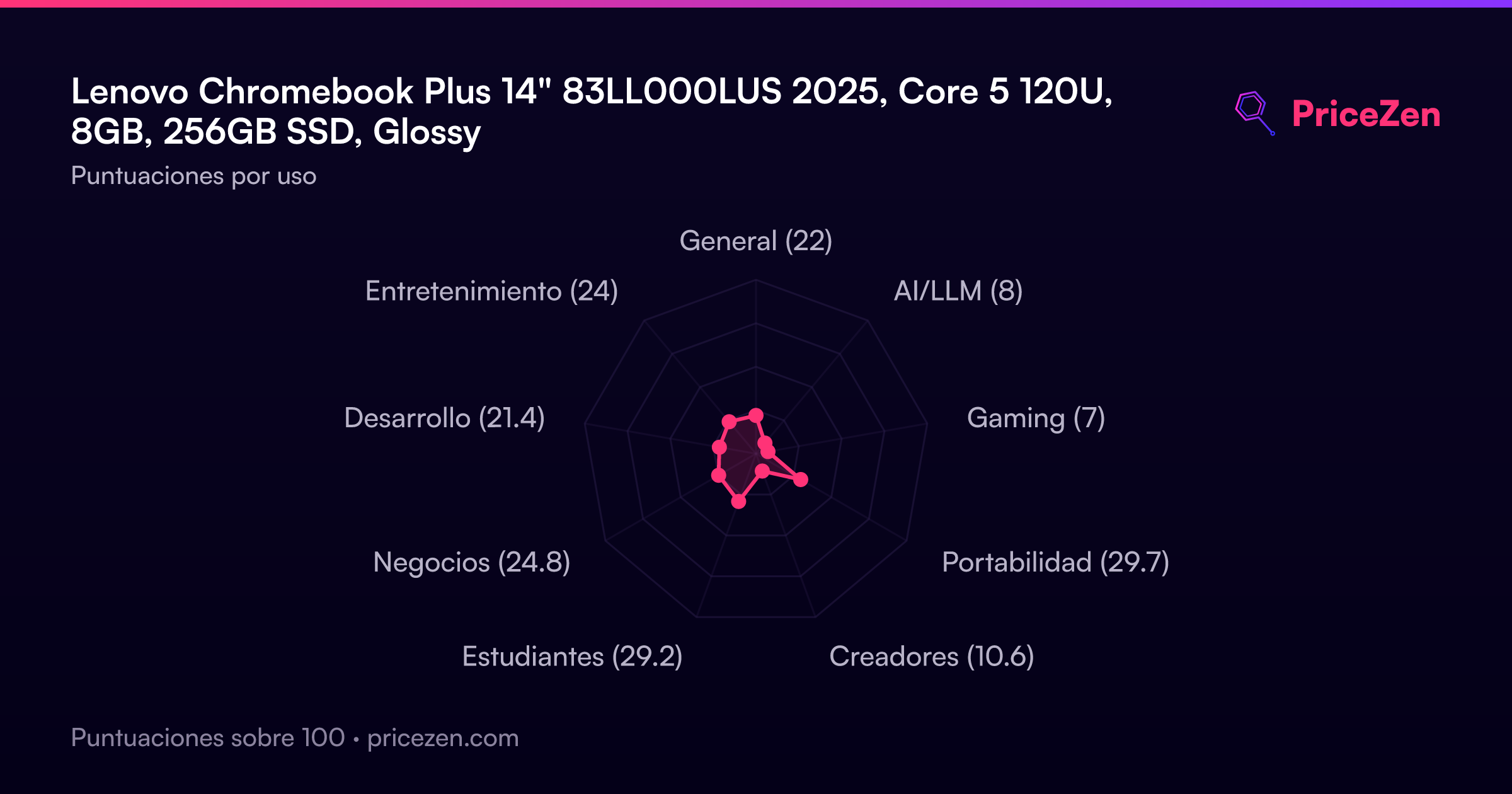
- General22
- AI/LLM8
- Gaming7
- Portabilidad29.7
- Creadores10.6
- Estudiantes29.2
- Negocios24.8
- Desarrollo21.4
- Entretenimiento24