Lenovo Yoga 14" 83JQ00FLCF, Core Ultra 5 226V, 16GB, 512GB SSD, Luna Grey
The Intel Core Ultra 5 226V processor and 16GB of LPDDR5X RAM deliver smooth multitasking for everyday productivity. The 14-inch OLED touchscreen with pen support offers vivid colors and creative flexibility in a 2-in-1 form factor. This laptop is best for business users and students who need a portable device for note-taking, document work, and light creative tasks.

Sin precio actual de tiendas
Resumen
The 30-Second Version
The Lenovo Yoga 7i is a solid 2-in-1 with a gorgeous 14-inch OLED touchscreen and reliable everyday performance from the Intel Core Ultra 5. It's great for students and office work, especially with pen support included. Just don't expect to game on it, and be ready to live with limited ports and 512GB of storage. At around CAD 1,100 to 1,700, it's a good value if you prioritize screen quality and flexibility over raw power.
Pros & Cons
Ventajas
- 14-inch OLED touchscreen with vivid colors and deep blacks 83rd
- Reliability score in the 81st percentile, a strong sign for long-term durability 82nd
- 2-in-1 hinge with included pen support for note-taking and sketching 76th
- 16GB RAM handles multitasking without breaking a sweat 72nd
- Solid social proof with a 4.1 out of 5 rating from 23 reviews
Desventajas
- Gaming performance is nearly nonexistent at 12.1 out of 100
- Port selection is terrible, sitting at the 4th percentile
- 512GB storage is tight for a modern laptop
- Hinge requires a lot of force to open, according to multiple owners
- GPU performance lands in the bottom 14th percentile
Opinión de los propietarios
The Word on the Street
Cómo cambió la opinión de los propietarios con el tiempo
ExclusivaSegún cuándo escribieron realmente sus opiniones los clientes, para ver si los elogios iniciales se mantuvieron.
4 opiniones escritas, jul 2026: 4 satisfechos
En las 23 valoraciones de tiendas: 4,1★. La mayoría de los propietarios valora sin escribir una opinión. El gráfico cuenta las 4 opiniones escritas.
Cada punto es una opinión escrita, en el mes en que se escribió. Satisfechos = 4-5★, neutrales = 3★, insatisfechos = 1-2★.
Las pruebas
Performance
The Intel Core Ultra 5 226V is an 8-core chip running at 2.1GHz, and it lands right at the 60th percentile for CPUs in our database. That's solid middle-of-the-pack performance. For everyday tasks like web browsing, document editing, video calls, and juggling a dozen Chrome tabs, it's more than enough. The 16GB of LPDDR5X RAM helps keep things smooth, though that RAM score sits at the 51st percentile, so it's about average for this class. You won't feel constrained unless you're doing heavy creative work or running virtual machines.
The Intel Arc Graphics are where things get interesting, and not in a great way. The GPU score is at the 14th percentile, which puts it near the bottom of our charts. This is integrated graphics, so it's fine for streaming video, light photo editing, and maybe some older or less demanding games at low settings. But don't expect to run anything modern at playable frame rates. The 512GB SSD is also on the smaller side, landing at the 37th percentile. It's enough for documents and a reasonable media library, but you'll probably want an external drive or cloud storage if you keep a lot of files locally.
Specifications
Full Specifications
Processor
| CPU | Intel Core Ultra 5 226V |
| Cores | 8 |
| Frequency | 2.1 GHz |
| L3 Cache | 8 MB |
Graphics
| GPU | Intel Arc Graphics |
| Type | Integrated |
| VRAM Type | Shared |
Memory & Storage
| RAM | 16 GB |
| RAM Generation | LPDDR5X |
| Storage | 512 GB |
| Storage Type | SSD |
Display
| Size | 14" |
| Resolution | 1920x1200 (Full HD) |
| Panel | OLED |
| Refresh Rate | 60 Hz |
Connectivity
| USB-C Ports | 2 |
| USB Ports | 1 |
| Thunderbolt | Thunderbolt 4 x 2 |
| HDMI | HDMI 1.4b |
| Wi-Fi | Wi-Fi 7 |
| Bluetooth | 5.4 |
Physical
| Weight | 1.4 kg / 3.0 lbs |
| Battery | 65 Wh |
| OS | Windows 11 Home |
vs Competition
The most obvious competitor here is the Samsung Galaxy Book5 Pro NP940XHA-KG3US. Both have gorgeous OLED screens and target the same productivity-focused buyer. The Samsung tends to have better port selection and a slightly more premium build, but you'll usually pay more for it. The Yoga's 2-in-1 hinge and pen support give it an edge for students and note-takers who want that flexibility.
If you're even thinking about gaming, the ASUS ROG Zephyrus G14 GA403WW-G14.R95080 and HP OMEN Transcend 14-fb1023dx are in a completely different league. Both have dedicated GPUs that will run circles around the Yoga's integrated Arc Graphics. The trade-off is weight, battery life, and price. The MSI Prestige PRE13EVOA2088 is another productivity option worth a look, often with better port selection and similar performance. And then there's the Apple MacBook Pro M4 Max, which is overkill for most people shopping in this price range, but it's the benchmark for performance and battery life if you have the budget.
| Spec | Lenovo Yoga 14" 83JQ00FLCF | Apple MacBook Pro 14.2" M4 Max | ASUS ROG Zephyrus 14" GA403WW-G14.R95080 | HP OMEN Transcend | Samsung Galaxy Book5 Pro 14" NP944XHA-KG3US | Dell Premium 14.5" LDA14250-7667SLV-PUS |
|---|---|---|---|---|---|---|
| CPU | Intel Core Ultra 5 226V | Apple M4 Max | AMD Ryzen AI 9 HX 370 | Intel Core Ultra 9 285H | Intel Core Ultra 7 258V | Intel Core Ultra 7 255H |
| RAM (GB) | 16 | 64 | 32 | 32 | 32 | 32 |
| Storage (GB) | 512 | 4096 | 2048 | 1024 | 1024 | 1024 |
| Screen | 14" 1920x1200 | 14.2" 3024x1964 | 14" 2880x1800 | 14" 2880x1800 | 14" 2880x1800 | 14.5" 3200x2000 |
| GPU | Intel Arc Graphics | Apple (40-Core) | NVIDIA GeForce RTX 5080 | NVIDIA GeForce RTX 5070 | Intel Arc Graphics 140V | Intel Arc Graphics |
| OS | Windows 11 Home | macOS | Windows 11 Home | Windows 11 Home | Windows 11 Pro | Windows 11 Home |
| Weight (kg) | 1.4 | 1.6 | 1.6 | 1.6 | 1.2 | 1.7 |
| Battery (Wh) | 65 | 72 | - | 71 | 63 | 62 |
| Compare | Compare | Compare | Compare | Compare |
| Producto | CPU | GPU | RAM | Puertos | Pantalla | Portabilidad | Almacenamiento | Fiabilidad | Valoración social | Affordability |
|---|---|---|---|---|---|---|---|---|---|---|
| Lenovo Yoga 14" 83JQ00FLCF | 62.8 | 69.7 | 66.7 | 71.7 | 75.6 | 82.6 | 35.8 | 82 | 39.6 | 45.4 |
| Apple MacBook Pro 14.2" M4 Max Compare | 93.7 | 91.5 | 95.6 | 73.9 | 99.1 | 68.9 | 98.4 | 98.2 | 72.6 | 1.8 |
| ASUS ROG Zephyrus 14" GA403WW-G14.R95080 Compare | 91.2 | 98.3 | 90.8 | 89.5 | 96 | 73.6 | 89.7 | 60.6 | 95.6 | 6 |
| HP OMEN Transcend Compare | 90.1 | 93.5 | 89.7 | 89.5 | 96 | 72.2 | 65.4 | 33.7 | 93.1 | 8.9 |
| Samsung Galaxy Book5 Pro 14" NP944XHA-KG3US Compare | 65.9 | 69.7 | 79.5 | 83.5 | 90.4 | 89.4 | 79.3 | 82 | 95.6 | 21 |
| Dell Premium 14.5" LDA14250-7667SLV-PUS Compare | 87 | 69.7 | 89 | 66.8 | 96.8 | 61.3 | 65.4 | 33.7 | 95.6 | 14.6 |
Precio
Value & Pricing
Pricing on this one is a bit of a moving target. We're seeing it listed at CAD 1,700 in Canada, but one reviewer mentioned grabbing it for CAD 1,099.99 in store, which is a pretty significant gap. At the lower end of that range, this is a genuinely good deal for an OLED 2-in-1 with a modern Intel chip. At the higher end, you're starting to brush up against some serious competition.
The value proposition really depends on what you prioritize. If you want a premium screen and a flexible form factor for productivity, this delivers. But if you need more storage, better graphics, or more ports, you'll be spending extra on dongles and external drives, which eats into the savings. Compared to something like the Samsung Galaxy Book5 Pro, which also has an OLED panel, the Yoga is often cheaper but gives up some port selection and overall polish.
Leer más
Overview
The Lenovo Yoga 7i 83JQ00FLCF is one of those laptops that tries to do a bit of everything, and honestly, it mostly pulls it off. You're getting a 14-inch OLED touchscreen, a 2-in-1 hinge, pen support, and Intel's new Core Ultra 5 226V chip. It's aimed squarely at students, office workers, and anyone who wants a flexible machine for productivity and media without lugging around a gaming brick. The OLED panel is the headline feature here, and it's a good one at this price.
Our database puts this thing at 62.7 out of 100 for business use, 58.4 for compact carry, and 57.2 for students. Those aren't chart-topping numbers, but they're respectable for a mid-range convertible. The reliability score sits at the 81st percentile, which is genuinely reassuring for a laptop you'll probably toss in a bag daily. Social proof is also solid at the 74th percentile, meaning real buyers are mostly happy with what they got.
What makes this interesting is the balance. You're not paying MacBook Pro money, but you're getting an OLED screen and a modern Intel chip with decent integrated graphics. The trade-off is that this is not a gaming machine, not even close. Our gaming score of 12.1 out of 100 should tell you everything you need to know about that. But if your idea of fun is spreadsheets, Netflix, and maybe some light photo editing, this Yoga has your back.
Common Questions
Q: Can this laptop handle gaming?
No, not really. The Intel Arc Graphics are integrated and score in the bottom 14th percentile of our database. You can play older or less demanding titles at low settings, but anything modern will struggle. If gaming matters to you, look at something with a dedicated GPU like the ASUS ROG Zephyrus G14 or HP OMEN Transcend 14.
Q: Is the OLED screen worth it?
For most people, yes. OLED gives you perfect blacks, vibrant colors, and excellent contrast, which makes a huge difference for watching movies, editing photos, or just staring at spreadsheets all day. The screen score sits at the 72nd percentile, so it's well above average for this class of laptop.
Q: How is the battery life?
We don't have specific battery benchmarks for this model, but the Intel Core Ultra 5 226V is designed with efficiency in mind. For typical productivity use like web browsing and document editing, you should expect a full workday on a charge. Heavy video streaming or gaming will drain it faster.
Q: Does the 512GB SSD fill up quickly?
It can, especially if you store a lot of photos, videos, or games. The storage score is at the 37th percentile, which is below average for modern laptops. If you're worried about space, plan to use cloud storage or pick up an external SSD. There's no easy way to upgrade the internal drive on most Yoga models.
Who Should Skip This
If you're a gamer, just move along. The 12.1 out of 100 gaming score is not a typo. This machine will frustrate you the moment you try to run anything more demanding than Minesweeper. Look at the ASUS ROG Zephyrus G14 or HP OMEN Transcend 14 instead, both of which have dedicated GPUs and are still reasonably portable.
Also skip this if you rely on a lot of wired peripherals. The port selection is at the 4th percentile, which is genuinely bad. You'll be living that dongle life, and if you need to connect an external monitor, a mouse, and a USB drive at the same time, you'll need a hub. Creative professionals who need serious GPU power for video editing or 3D rendering should also look elsewhere, something like the MacBook Pro M4 Max or a workstation-class laptop would serve you much better.
Verdict
For students and office workers who want a flexible 2-in-1 with a beautiful OLED screen, the Yoga 7i is an easy recommendation, especially if you can find it on sale. The pen support is genuinely useful for note-taking, and the reliability numbers suggest this thing will survive a few years of daily abuse. Just make sure you're okay with the limited storage and the fact that you'll need a dongle for anything beyond basic USB devices.
If you're a creative professional who needs more GPU power for video editing or 3D work, or if you want to game even casually, look elsewhere. The integrated graphics simply can't keep up. And if you're someone who travels with a lot of peripherals, the port situation will drive you nuts. But for the right buyer, this is a well-rounded machine that nails the basics and throws in a killer screen as a bonus.
Usage Scores
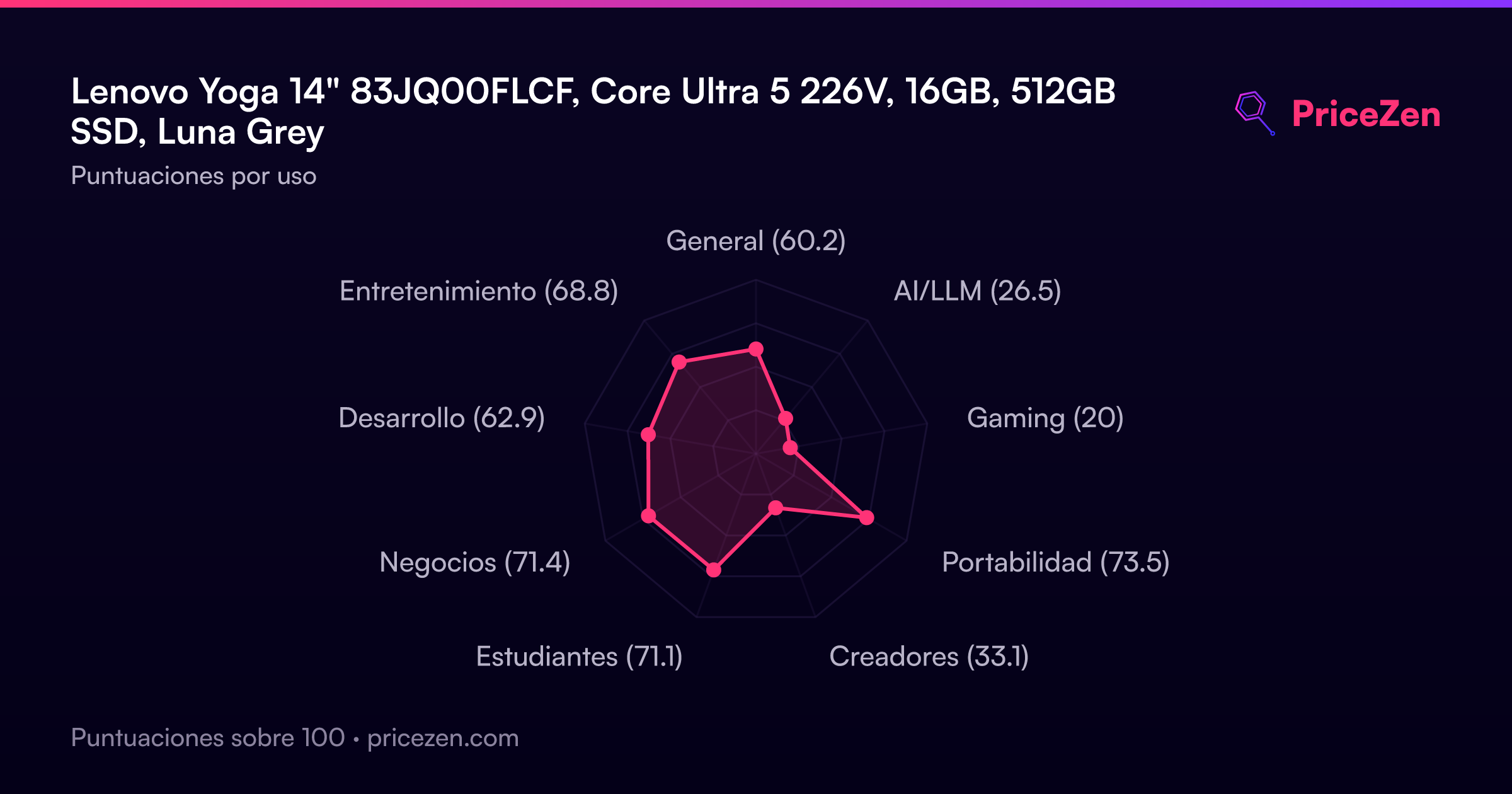
- General60.2
- AI/LLM26.5
- Gaming20
- Portabilidad73.5
- Creadores33.1
- Estudiantes71.1
- Negocios71.4
- Desarrollo62.9
- Entretenimiento68.8