HP 14 inch Laptop PC 2025, Intel N200, 4GB, 128GB SSD, Silver
The Intel N200 processor and 4GB RAM handle basic tasks, while the 14-inch 250-nit IPS display with anti-glare and flicker-free tech eases eye strain during long sessions. Windows 11 Home in S Mode and a dedicated Copilot key offer a secure, AI-assisted experience, plus Wi-Fi 6 and USB-C for fast connectivity. Best for budget-conscious students needing a lightweight, secure laptop for web browsing, document editing, and video calls, not for demanding workloads.

Sin precio actual de tiendas
Dónde lo vimos antes. Consulta el precio de hoy en la tienda.











Resumen
The 30-Second Version
Cheap, light, and barely functional. It's a USD 253 laptop pretending to be a USD 490 one.
Pros & Cons
Ventajas
- Light at 1.40kg, easy to toss in a bag 94th
- Wi-Fi 6 keeps connections snappy 81st
- Anti-glare screen helps in bright rooms
- USB-C port included, rare at this price
Desventajas
- 4GB RAM is barely enough for Windows 11
- 1366x768 screen is a blurry mess
- 128GB storage fills up fast
- S Mode locks you into Microsoft Store apps
Opinión de los propietarios
Cómo cambió la opinión de los propietarios con el tiempo
ExclusivaSegún cuándo escribieron realmente sus opiniones los clientes, para ver si los elogios iniciales se mantuvieron.
1 opinión escrita, oct 2025: 1 insatisfecho
En las 1 valoraciones de tiendas: 1,0★. El gráfico cuenta 1 opinión escrita.
Cada punto es una opinión escrita, en el mes en que se escribió. Satisfechos = 4-5★, neutrales = 3★, insatisfechos = 1-2★.
Las pruebas
Performance
The N200 is a 4-core chip that sits in the 4th percentile for CPUs, which means it's slower than 96% of laptops we've tested. 4GB of RAM is the real killer though, Windows 11 will eat most of that before you even open a browser tab. The 128GB SSD is also tiny, you'll fill it with Windows updates and a few apps before you know it. The one bright spot is Wi-Fi 6, so at least your slow laptop will have fast internet.
Specifications
Full Specifications
Processor
| CPU | Intel N-Series N200 |
| Cores | 4 |
| Frequency | 1.0 GHz |
| L3 Cache | 6 MB |
Graphics
| GPU | Intel UHD Graphics |
| Type | Integrated |
| VRAM Type | Shared |
Memory & Storage
| RAM | 4 GB |
| RAM Generation | DDR4 |
| Storage | 128 GB |
| Storage Type | SSD |
Display
| Size | 14" |
| Resolution | 1366x768 |
| Panel | IPS |
| Brightness | 250 nits |
| Color Gamut | 45 percent NTSC |
Connectivity
| USB-C Ports | 1 |
| USB Ports | 2 |
| HDMI | HDMI 1.4 |
| Wi-Fi | Wi-Fi 6 |
| Bluetooth | Bluetooth 5.4 |
Physical
| Weight | 1.4 kg / 3.1 lbs |
| OS | Windows 11 Home in S Mode |
vs Competition
Against something like the Lenovo ThinkPad X1 Carbon or Apple MacBook Pro, this HP isn't even in the same conversation, those are premium machines with real performance. The ASUS Vivobook and Microsoft Surface Laptop also run circles around it. But those all cost several times more. The honest comparison is against other budget laptops, and even there, 4GB of RAM and a 768p screen in 2024 is rough. You'd be better off finding a used ThinkPad or a Chromebook at this price.
| Spec | HP 14 inch Laptop PC | Apple MacBook Pro 14.2" M4 Pro | ASUS ROG Zephyrus 14" GA403WW-G14.R95080 | Lenovo Legion Pro 7i Gen 10 16" | MSI Vector VECTOR16HXA2400 | Microsoft Surface Laptop 15" Ultra |
|---|---|---|---|---|---|---|
| CPU | Intel N-Series N200 | Apple M4 Pro | AMD Ryzen AI 9 HX 370 | Intel Core Ultra 9 275HX | Intel Core Ultra 9 275HX | NVIDIA RTX Spark N1X |
| RAM (GB) | 4 | 48 | 32 | 32 | 16 | 32 |
| Storage (GB) | 128 | 4096 | 2048 | 1024 | 1024 | 1024 |
| Screen | 14" 1366x768 | 14.2" 3024x1964 | 14" 2880x1800 | 16" 2560x1600 | 16" 2560x1600 | 15" 3270x2180 |
| GPU | Intel UHD Graphics | Apple (16-Core) | NVIDIA GeForce RTX 5080 | NVIDIA GeForce RTX 5070 Ti | NVIDIA GeForce RTX 5080 | NVIDIA Blackwell RTX |
| OS | Windows 11 Home in S Mode | macOS | Windows 11 Home | Windows 11 Home | Windows 11 Home | Windows 11 Pro |
| Weight (kg) | 1.4 | 1.6 | 1.6 | 2.7 | 2.7 | 2 |
| Battery (Wh) | - | 72 | - | 99 | - | 140 |
| Compare | Compare | Compare | Compare | Compare |
| Producto | CPU | GPU | RAM | Puertos | Pantalla | Portabilidad | Almacenamiento | Fiabilidad | Valoración social | Affordability |
|---|---|---|---|---|---|---|---|---|---|---|
| HP 14 inch Laptop PC | 15.4 | 28.3 | 2.4 | 37.1 | 8.5 | 80.8 | 7.5 | 33.7 | 1.1 | 93.7 |
| Apple MacBook Pro 14.2" M4 Pro Compare | 92.4 | 78.9 | 90.6 | 73.9 | 99.1 | 68.9 | 98.4 | 98.2 | 99.7 | 4.7 |
| ASUS ROG Zephyrus 14" GA403WW-G14.R95080 Compare | 91.2 | 98.3 | 90.8 | 89.5 | 96 | 73.6 | 89.7 | 60.6 | 95.6 | 6 |
| Lenovo Legion Pro 7i Gen 10 16" Compare | 97.2 | 96.7 | 89 | 97.3 | 95 | 9.5 | 79.3 | 81.9 | 99.7 | 5.9 |
| MSI Vector VECTOR16HXA2400 Compare | 97.2 | 98.3 | 59.9 | 89.5 | 88.4 | 9.9 | 65.4 | 60.6 | 74.1 | 9.6 |
| Microsoft Surface Laptop 15" Ultra Compare | 91 | 99.9 | 79.5 | 64.5 | 99.3 | 57.8 | 65.4 | 81.9 | 32.3 | 5.9 |
Precio
Value & Pricing
Pricing is all over the place, from USD 253 to USD 490 across two US listings. At USD 253, it's a borderline impulse buy for a kid's first laptop or a backup machine. At USD 490, you're getting robbed. If you're shopping, find the cheapest listing and don't pay a cent more.
Seguimos los precios de este producto desde el 30 oct 2026. El gráfico aparecerá cuando tengamos más datos.
Leer más
Overview
This HP 14 is the laptop you buy because it's cheap, not because it's good. The Intel N200 and 4GB of RAM put it near the bottom of our entire database for performance, and that 1366x768 screen is one of the worst we've seen. But it's light, it's compact, and if you just need something for email and web browsing, it technically works.
Common Questions
Q: Can I upgrade the RAM or storage?
The RAM is soldered on this model, so no. The 128GB SSD might be replaceable, but with only 4GB of RAM, upgrading storage won't fix the real bottleneck.
Q: Can I switch out of Windows 11 S Mode?
Yes, you can switch to full Windows 11 Home for free through the Microsoft Store. But with 4GB of RAM, running regular desktop apps will be painful. S Mode is actually doing you a favor by limiting what you can install.
Q: Is this good for school or college?
Only if your schoolwork is limited to Google Docs and email. The screen is too low-res for comfortable reading, and 4GB of RAM will choke on multiple tabs. A Chromebook or used ThinkPad would serve you better.
Who Should Skip This
If you need to run anything beyond a web browser, skip this. No photo editing, no coding, no gaming, no heavy multitasking. Go find a used ThinkPad or a Chromebook with 8GB of RAM instead. Your patience will thank you.
Verdict
Don't buy this unless you find it under USD 300 and your needs are extremely basic. It'll handle email, light web browsing, and not much else. The 4GB of RAM and S Mode restrictions will frustrate you within a week. Save up a little more and get something with 8GB of RAM and a 1080p screen.
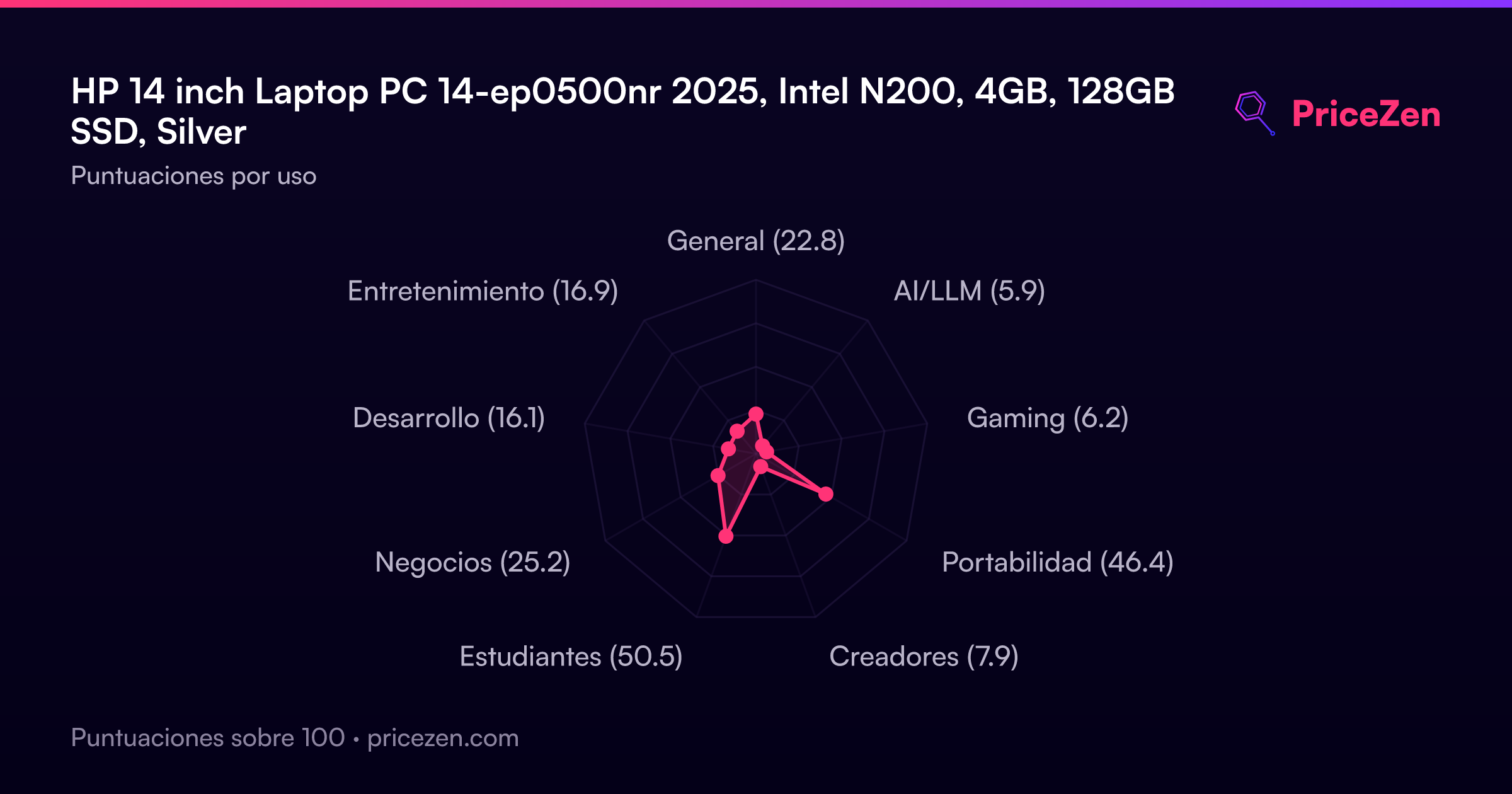
Usage Scores
- General22.8
- AI/LLM5.9
- Gaming6.2
- Portabilidad46.4
- Creadores7.9
- Estudiantes50.5
- Negocios25.2
- Desarrollo16.1
- Entretenimiento16.9