HP Envy x360 2-in-1 Convertible 15.6" 2023, Core i7-1255U, 32GB, 1TB SSD
The 12th Gen Intel Core i7-1255U and 32GB of DDR4 RAM handle heavy multitasking and development workloads without slowdowns. The 15.6-inch FHD IPS touchscreen with 178-degree viewing angles and a 360-degree hinge make it a flexible tool for presentations and note-taking. Best for developers and business users who need a convertible with strong processing power and ample memory for coding, virtual machines, and productivity tasks.

Sin precio actual de tiendas
Resumen
The 30-Second Version
The HP Envy x360 is a 2-in-1 with a standout 32GB of RAM and a 1TB SSD, but the CPU and GPU are below average for the category. At $2,069 USD, it's overpriced for what you get, especially with weak integrated graphics and a mediocre screen. It's best for developers or business users who need the convertible form factor and lots of memory, but most people should look elsewhere.
Pros & Cons
Ventajas
- 32GB of DDR4 RAM is a standout at the 73rd percentile, great for heavy multitasking 72nd
- 1TB SSD gives you plenty of fast storage at the 67th percentile 72nd
- Port selection is strong with 2x Thunderbolt 4, 2x USB-A, and HDMI 65th
- 360-degree hinge and touchscreen add real flexibility for note-taking and presentations
- Windows 11 Pro includes enterprise-grade security features for business users
Desventajas
- CPU is below average at the 38th percentile, limiting heavy workloads
- Intel Iris Xe graphics are weak at the 14th percentile, bad for gaming or GPU tasks
- Screen is mediocre at the 41st percentile, not the premium display the marketing suggests
- Reliability score is low at the 33rd percentile, a concern for long-term use
- Price is high at $2,069 USD for what you're actually getting
Las pruebas
Performance
Let's talk about that Core i7-1255U. It's a 10-core chip with a 1.7GHz base clock, and it's designed for efficiency, not raw speed. In our rankings, it lands at the 38th percentile for CPUs in this category. That means it's below average compared to other 2-in-1 laptops we've tested. For everyday tasks like web browsing, email, and Office apps, you won't notice a problem. But if you're compiling code, editing video, or running anything that actually pushes the processor, you'll feel the ceiling. The 32GB of RAM helps with multitasking, and it's the standout spec here at the 73rd percentile. You can keep a ton of browser tabs and apps open without slowdowns, but the CPU will still be the bottleneck for heavy workloads.
The Intel Iris Xe graphics are, frankly, a weak spot. At the 14th percentile, this is one of the lower-ranked GPUs in our database for this category. You can play older or less demanding games at low settings, but anything modern will struggle. Don't expect to run Cyberpunk or even Fortnite at a smooth frame rate. The 1TB SSD is solid, landing at the 67th percentile, and you'll appreciate the fast boot times and quick file transfers. The port selection is also above average at the 72nd percentile, with two Thunderbolt 4 ports, two USB-A ports, and HDMI. That's genuinely useful for a business laptop. But the overall performance story is one of balance. You get great RAM and storage, but the CPU and GPU hold the whole package back.
Specifications
Full Specifications
Processor
| CPU | Intel Core i7 1255U |
| Cores | 10 |
| Frequency | 1.7 GHz |
| L3 Cache | 12 MB |
Graphics
| GPU | Intel Iris Xe Graphics |
Memory & Storage
| RAM | 32 GB |
| RAM Generation | DDR4 |
| Storage | 1 TB |
| Storage Type | SSD |
Display
| Size | 15.6" |
| Resolution | 1920x1080 (Full HD) |
| Panel | IPS |
Connectivity
| USB-C Ports | 2 |
| USB Ports | 2 |
| Thunderbolt | Thunderbolt 4 |
| HDMI | ✓ |
| Wi-Fi | Wi-Fi 6E |
| Bluetooth | Bluetooth combo |
Physical
| OS | Windows 11 Pro |
vs Competition
When you stack this against the competition, the trade-offs become obvious. The Apple MacBook Pro M4 Max is in a completely different league for performance, with a chip that crushes the i7-1255U in both CPU and GPU tasks. But it's also a lot more expensive and doesn't offer the 2-in-1 form factor. If you need raw power for video editing or development, the MacBook is the clear choice. The ASUS ROG Zephyrus G14 is another strong alternative, especially if you want gaming capability. It has a dedicated GPU that makes the Iris Xe look like a toy, and it's built for performance. But again, no 360-degree hinge.
The Microsoft Surface Laptop 7th Edition is probably the closest competitor in spirit. It's a premium Windows laptop with a focus on design and portability, and it generally has better build quality and screen quality than this HP. The Lenovo Legion Pro 7i and MSI Raider are gaming machines, so they're aimed at a different audience entirely. If you want a convertible specifically, the HP Envy x360 is a decent option, but you're sacrificing performance and reliability for that hinge. The real question is whether the 2-in-1 flexibility is worth the compromises, and for most people at this price, it probably isn't.
| Spec | HP Envy x360 2-in-1 Convertible 15.6" | Apple MacBook Pro 14.2" M4 Max | ASUS ROG Zephyrus 14" GA403WW-G14.R95080 | Lenovo Legion Pro 7i Gen 10 16" | Samsung Galaxy Book5 Pro 14" NP944XHA-KG3US | Dell Premium 14.5" LDA14250-7667SLV-PUS |
|---|---|---|---|---|---|---|
| CPU | Intel Core i7 1255U | Apple M4 Max | AMD Ryzen AI 9 HX 370 | Intel Core Ultra 9 275HX | Intel Core Ultra 7 258V | Intel Core Ultra 7 255H |
| RAM (GB) | 32 | 64 | 32 | 32 | 32 | 32 |
| Storage (GB) | 1024 | 4096 | 2048 | 1024 | 1024 | 1024 |
| Screen | 15.6" 1920x1080 | 14.2" 3024x1964 | 14" 2880x1800 | 16" 2560x1600 | 14" 2880x1800 | 14.5" 3200x2000 |
| GPU | Intel Iris Xe Graphics | Apple (40-Core) | NVIDIA GeForce RTX 5080 | NVIDIA GeForce RTX 5070 Ti | Intel Arc Graphics 140V | Intel Arc Graphics |
| OS | Windows 11 Pro | macOS | Windows 11 Home | Windows 11 Home | Windows 11 Pro | Windows 11 Home |
| Weight (kg) | - | 1.6 | 1.6 | 2.7 | 1.2 | 1.7 |
| Battery (Wh) | - | 72 | - | 99 | 63 | 62 |
| Compare | Compare | Compare | Compare | Compare |
| Producto | CPU | GPU | RAM | Puertos | Pantalla | Portabilidad | Almacenamiento | Fiabilidad | Affordability |
|---|---|---|---|---|---|---|---|---|---|
| HP Envy x360 2-in-1 Convertible 15.6" | 41 | 47.7 | 72 | 71.6 | 37.5 | 38.6 | 65.2 | 33.7 | 15.2 |
| Apple MacBook Pro 14.2" M4 Max Compare | 93.7 | 91.5 | 95.6 | 73.8 | 99.1 | 68.9 | 98.4 | 98.3 | 1.7 |
| ASUS ROG Zephyrus 14" GA403WW-G14.R95080 Compare | 91.2 | 98.3 | 90.8 | 89.4 | 96 | 73.7 | 89.7 | 60.7 | 5.9 |
| Lenovo Legion Pro 7i Gen 10 16" Compare | 97.2 | 96.7 | 89 | 97.3 | 94.9 | 9.5 | 79.2 | 82.1 | 5.7 |
| Samsung Galaxy Book5 Pro 14" NP944XHA-KG3US Compare | 65.7 | 69.6 | 79.4 | 83.4 | 90.3 | 89.5 | 79.2 | 82.1 | 21 |
| Dell Premium 14.5" LDA14250-7667SLV-PUS Compare | 87 | 69.6 | 89 | 66.6 | 96.8 | 61.2 | 65.2 | 33.7 | 14.4 |
Precio
Value & Pricing
Here's where things get uncomfortable. This HP Envy x360 is listed at $2,069 USD. For that money, you're getting a mid-range CPU, weak integrated graphics, and a screen that's below average for the category. The 32GB of RAM and 1TB SSD are nice, but they don't justify the price when the core components are so underwhelming. You can find laptops with better CPUs and dedicated GPUs in this price range, or you can spend less and get similar performance from a cheaper ultrabook.
The value proposition gets worse when you look at the reliability score, which sits at the 33rd percentile. That's below average for this type of laptop, and it means you're paying a premium for a machine that might not hold up as well as competitors. The social proof is also weak at the 21st percentile, with only 4 reviews and a 4.1 rating. That's not a lot of data to go on, and it doesn't inspire confidence when you're dropping over two grand. If you're set on a convertible with 32GB of RAM, this might be one of your few options, but you're paying a steep premium for that memory.
Leer más
Overview
The HP Envy x360 is one of those laptops that looks great on a spec sheet but tells a different story once you dig into the numbers. You get a 12th Gen Intel Core i7-1255U, a generous 32GB of DDR4 RAM, a 1TB SSD, and a 15.6-inch FHD touchscreen with a 360-degree hinge. On paper, that's a solid productivity machine for someone who wants a convertible without paying MacBook Pro money. But our database paints a more complicated picture, and the price tag here, around $2,069 USD, makes things even trickier.
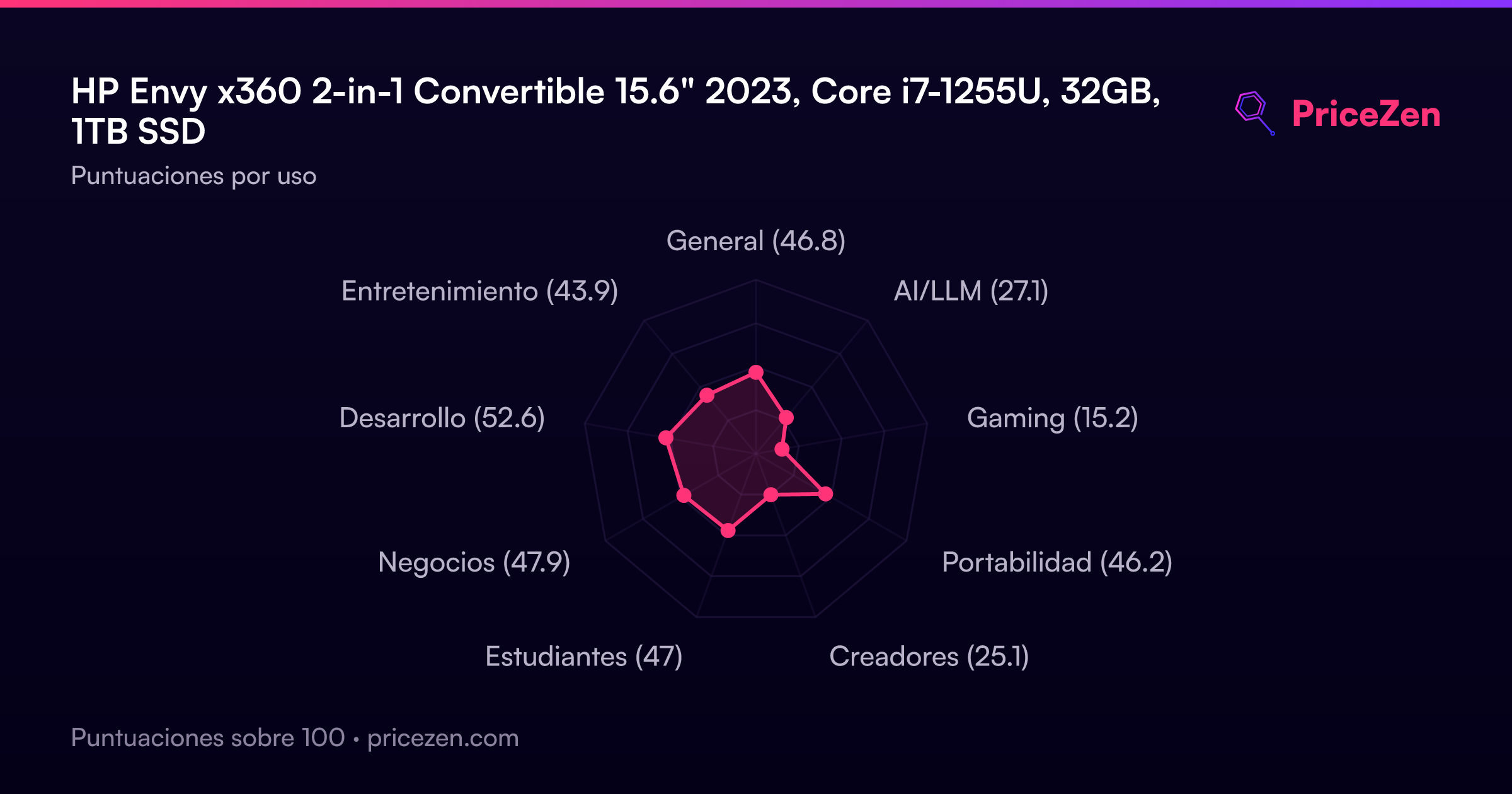
Who is this actually for? Based on our scoring, it's best suited for developers, with a 48/100 fit score. Business users come in at 43.2, and students at 41.8. Gaming is a lost cause at 11.2, which won't surprise anyone who's heard of Intel Iris Xe graphics. The real draw is the form factor. You can flip this thing into a tent, a tablet, or a standard laptop, and the touchscreen makes it handy for note-taking or quick sketches. But the internals are more 'efficient ultrabook' than 'powerhouse convertible'.
The interesting part is the mismatch between the marketing and the reality. HP talks up 'premium design' and 'stunning visuals,' but the screen lands at the 41st percentile for this category. That's not terrible, but it's not the edge-to-edge wow factor the listing implies. And while 32GB of RAM is genuinely useful for multitasking, the CPU sits at the 38th percentile. You're getting a lot of memory paired with a processor that's fine, not fast. It's a machine that wants to be a premium convertible but ends up feeling like a mid-range laptop with a few high-end accessories bolted on.
Common Questions
Q: Can this laptop handle gaming?
No, not really. The Intel Iris Xe graphics sit at the 14th percentile for this category, which is one of the weakest GPU scores in our database. You can play older or less demanding games at low settings, but anything modern will struggle. If gaming matters to you, look for a laptop with a dedicated GPU like the ASUS ROG Zephyrus G14 instead.
Q: Is the screen good for creative work?
It's okay, but not great. The 15.6-inch FHD IPS touchscreen lands at the 41st percentile, which is below average for 2-in-1 laptops. You get 1920x1080 resolution and 178-degree viewing angles, but the color accuracy and brightness won't impress anyone doing serious photo or video editing. For everyday use and note-taking, it's fine, but creative professionals should look for a higher-quality display.
Q: How does the battery life hold up?
We don't have specific battery benchmarks for this model, so we can't give you a concrete number. HP markets it as having 'long battery life,' but without data, that's just marketing. The efficient Core i7-1255U should help with power consumption, but the 15.6-inch screen will draw more power than a smaller display. Expect typical ultrabook battery life, but don't count on all-day use under heavy load.
Q: Is this a good choice for programming or development work?
It's decent, which is why it scores highest for developers at 48/100. The 32GB of RAM is the big advantage here, letting you run multiple containers, virtual machines, or heavy IDEs without running out of memory. But the CPU is below average at the 38th percentile, so compile times and CPU-intensive tasks will be slower than on a machine with a stronger processor. If your work is mostly RAM-bound, this is a solid pick. If you need CPU power, look elsewhere.
Who Should Skip This
If you're a gamer, skip this without a second thought. The Intel Iris Xe graphics are one of the weakest we've seen in this category, and you'll be frustrated trying to run anything beyond basic titles. Look at the ASUS ROG Zephyrus G14 or Lenovo Legion Pro 7i instead, both of which offer dedicated GPUs that will actually handle modern games. You'll get far more performance for a similar or lower price.
Creative professionals should also look elsewhere. The screen is below average for the category, and the CPU won't keep up with demanding video editing or 3D rendering workloads. If you need a machine for creative work, the Apple MacBook Pro M4 Max is a much better choice, though it costs more. And if you're just looking for a general-purpose laptop and don't need the 2-in-1 hinge, you can find better performance and reliability for less money. This HP is a niche product, and unless you specifically need a convertible with 32GB of RAM, you're probably better off with something else.
Verdict
If you're a developer or business user who absolutely needs a 2-in-1 with 32GB of RAM and a 1TB SSD, this HP Envy x360 will get the job done. The port selection is genuinely good, and the touchscreen plus 360-degree hinge is handy for presentations, note-taking, or casual use in tablet mode. The RAM is the real selling point here, and it's the one spec that stands out as genuinely above average. For multitasking-heavy workflows that don't require much GPU power, this machine will handle your daily grind without complaint.
But for everyone else, there are better ways to spend $2,069 USD. The CPU is below average, the graphics are weak, and the screen is nothing special. The reliability concerns and lack of social proof make it hard to recommend as a long-term investment. If you don't need the convertible form factor, you can get a much more powerful laptop for the same money. And if you do need a 2-in-1, you might be better off looking at a cheaper model with similar specs or waiting for a sale. This is a laptop that makes sense for a narrow slice of buyers and leaves everyone else wondering what they paid for.
Usage Scores
- General46.8
- AI/LLM27.1
- Gaming15.2
- Portabilidad46.2
- Creadores25.1
- Estudiantes47
- Negocios47.9
- Desarrollo52.6
- Entretenimiento43.9