Lenovo Yoga Pro 15.3" 83SN0003US 2026, Core Ultra 9 386H, 32GB, 1TB SSD, RTX 5060, Luna Grey
Impulsada por un procesador Intel Core Ultra 9 y una GPU GeForce RTX 5060 de 8GB, ofrece renderizado y multitarea acelerados por IA junto a una pantalla Tandem OLED de 15.3 pulgadas con 1100 nits de brillo máximo y 165Hz. Su panel PureSight Pro garantiza colores precisos y los 32GB de RAM LPDDR5X manejan sin pausas proyectos pesados. Es la opción adecuada para editores de video que trabajan con material en 4K y valoran un chasis de 1.75kg, aunque la batería de 20Wh limitará las sesiones lejos del enchufe.

Sin precio actual de tiendas
Resumen
The 30-Second Version
The Lenovo Yoga Pro 7i Aura Edition pairs a stunning 3K OLED display with solid RTX 5060 performance, making it a strong pick for creators who also game. The 1100-nit screen is one of the best we've seen, and 32GB of RAM gives you plenty of headroom. Prices swing wildly from USD 2,018 to USD 2,900, so shop carefully. Skip it if AI workloads are your thing, that's its weakest area.
Pros & Cons
Ventajas
- That 3K OLED display is stunning, 1100 nits peak brightness and 165Hz at the 97th percentile 97th
- 32GB of LPDDR5X RAM means multitasking headroom for days 92nd
- RTX 5060 handles gaming and creative workloads well above average 92nd
- Wi-Fi 7 and Thunderbolt support keep connectivity future-proof 88th
- 1.75kg weight is reasonable for a 15.3-inch laptop with this much power
Desventajas
- 8GB of VRAM on the RTX 5060 could become a bottleneck in a few years
- 1TB storage is only middle of the pack at the 61st percentile
- AI and LLM workloads score just 55.2/100, a real weak spot
- No price listed directly, and the USD 2,018 to USD 2,900 spread is massive
- Compactness sits at the 55th percentile, so it's not the most portable option
Opinión de los propietarios
Cómo cambió la opinión de los propietarios con el tiempo
ExclusivaSegún cuándo escribieron realmente sus opiniones los clientes, para ver si los elogios iniciales se mantuvieron.
5 opiniones escritas, oct 2026: 4 satisfechos, 1 neutral
En las 25 valoraciones de tiendas: 4,3★. La mayoría de los propietarios valora sin escribir una opinión. El gráfico cuenta las 5 opiniones escritas.
Cada punto es una opinión escrita, en el mes en que se escribió. Satisfechos = 4-5★, neutrales = 3★, insatisfechos = 1-2★.
Las pruebas
Performance
The Core Ultra 9 386H is a 16-core chip running at 2.1GHz base, and it lands in the 89th percentile for CPU performance across our database. That's a standout, no question. For real-world work, this means timeline scrubbing in Premiere feels responsive, compiling code doesn't make you go grab a coffee, and having 40 browser tabs open while rendering a video won't bring the system to its knees. The 32GB of LPDDR5X RAM helps a lot here too, sitting at the 93rd percentile. You're not going to run out of memory unless you're doing something genuinely unhinged.
The RTX 5060 with 8GB of VRAM is the other half of the story. It's at the 89th percentile for GPU performance, which puts it well above average but not at the absolute top of the charts. For gaming, that means you'll handle most modern titles at 1440p with DLSS 4 doing some heavy lifting. The 8GB of VRAM is the limiting factor here. It's fine for today's games at high settings, but if you're planning to keep this laptop for 4-5 years, that VRAM ceiling might start to feel tight as games get hungrier. For creative work, the NVIDIA Studio drivers give you solid acceleration in Blender, DaVinci Resolve, and the Adobe suite. Just don't expect it to match a desktop RTX 5080 in raw render times.
Specifications
Full Specifications
Processor
| CPU | Intel Core Ultra 9 386H |
| Cores | 16 |
| Frequency | 2.1 GHz |
| L3 Cache | 18 MB |
Graphics
| GPU | NVIDIA GeForce RTX 5060 |
| Type | Discrete |
| VRAM | 8 GB |
| VRAM Type | GDDR7 |
Memory & Storage
| RAM | 32 GB |
| RAM Generation | LPDDR5X |
| Storage | 1 TB |
| Storage Type | SSD |
Display
| Size | 15.3" |
| Resolution | 2560x1600 (QHD) |
| Panel | OLED |
| Refresh Rate | 165 Hz |
| Brightness | 1100 nits |
Connectivity
| USB-C Ports | 2 |
| USB Ports | 2 |
| Thunderbolt | Thunderbolt 4 x 2 |
| HDMI | HDMI 2.1 |
| Wi-Fi | Wi-Fi 7 |
| Bluetooth | ✓ |
Physical
| Weight | 1.7 kg / 3.8 lbs |
| Battery | 20 Wh |
| OS | Windows 11 Home |
vs Competition
The Apple MacBook Pro M4 Max is the elephant in the room. Apple's silicon absolutely crushes AI and LLM workloads, which is exactly where the Yoga Pro struggles with its 55.2/100 score. If you're doing machine learning work or heavy AI-assisted creative tasks, the MacBook is the better tool, no contest. But the Yoga Pro fights back with that 165Hz OLED display and a touchscreen, neither of which Apple offers. Plus, Windows gives you more flexibility for gaming.
The ASUS ROG Zephyrus G14 is probably the closest direct competitor. It's more compact, has a strong gaming pedigree, and typically undercuts the Yoga Pro on price. The trade-off is the display. The G14's screen is good, but it's not a 3K Tandem OLED pushing 1100 nits. The MSI Raider is a different beast entirely, bigger and heavier with more raw gaming power, but it sacrifices portability and that creator-focused display. The Microsoft Surface Laptop 7th Edition is the opposite end of the spectrum, thinner and lighter with better battery life, but it can't touch the Yoga Pro's GPU performance.
| Spec | Lenovo Yoga Pro 15.3" 83SN0003US | Apple MacBook Pro 14.2" M4 Max | ASUS ROG Zephyrus 14" GA403WW-G14.R95080 | HP OMEN Transcend | Samsung Galaxy Book5 Pro 14" NP944XHA-KG3US | MSI Raider 16" RAIDERGE6814247 |
|---|---|---|---|---|---|---|
| CPU | Intel Core Ultra 9 386H | Apple M4 Max | AMD Ryzen AI 9 HX 370 | Intel Core Ultra 9 285H | Intel Core Ultra 7 258V | Intel Core i9 14900HX |
| RAM (GB) | 32 | 64 | 32 | 32 | 32 | 32 |
| Storage (GB) | 1024 | 4096 | 2048 | 1024 | 1024 | 2048 |
| Screen | 15.3" 2560x1600 | 14.2" 3024x1964 | 14" 2880x1800 | 14" 2880x1800 | 14" 2880x1800 | 16" 3840x2160 |
| GPU | NVIDIA GeForce RTX 5060 | Apple (40-Core) | NVIDIA GeForce RTX 5080 | NVIDIA GeForce RTX 5070 | Intel Arc Graphics 140V | NVIDIA GeForce RTX 4070 |
| OS | Windows 11 Home | macOS | Windows 11 Home | Windows 11 Home | Windows 11 Pro | Windows 11 Home |
| Weight (kg) | 1.7 | 1.6 | 1.6 | 1.6 | 1.2 | 2.7 |
| Battery (Wh) | 20 | 72 | - | 71 | 63 | 100 |
| Compare | Compare | Compare | Compare | Compare |
| Producto | CPU | GPU | RAM | Puertos | Pantalla | Portabilidad | Almacenamiento | Fiabilidad | Valoración social | Affordability |
|---|---|---|---|---|---|---|---|---|---|---|
| Lenovo Yoga Pro 15.3" 83SN0003US | 92 | 88.4 | 92.2 | 77.2 | 97.1 | 56.4 | 65.3 | 81.8 | 82.2 | 6.8 |
| Apple MacBook Pro 14.2" M4 Max Compare | 93.7 | 91.7 | 95.7 | 73.3 | 99.3 | 68.9 | 98.5 | 98.1 | 87.7 | 1.7 |
| ASUS ROG Zephyrus 14" GA403WW-G14.R95080 Compare | 91.3 | 98.4 | 90.9 | 89.3 | 96.5 | 73.6 | 89.8 | 60.4 | 98.4 | 5.6 |
| HP OMEN Transcend Compare | 90.2 | 93.6 | 89.8 | 89.3 | 96.5 | 72.3 | 65.3 | 33.5 | 97.3 | 8.3 |
| Samsung Galaxy Book5 Pro 14" NP944XHA-KG3US Compare | 65.9 | 69.8 | 79.6 | 83.2 | 91.6 | 89.4 | 79.4 | 81.8 | 98.4 | 20.1 |
| MSI Raider 16" RAIDERGE6814247 Compare | 93.2 | 95.5 | 86.4 | 98.6 | 98 | 9.3 | 94 | 60.4 | 50.2 | 10.2 |
Precio
Value & Pricing
Here's where things get tricky. The Yoga Pro 7i Aura Edition doesn't have a single listed price, and the spread across US retailers is wild. We're seeing anywhere from USD 2,018 to USD 2,900 for the same configuration. That's a USD 882 gap, which is frankly absurd. If you're shopping for this, you absolutely need to compare listings. The lowest price we're tracking comes in at USD 2,018, and at that number, this laptop makes a lot of sense. At USD 2,900, you're paying a premium that's hard to justify.
For context, the MacBook Pro M4 Max sits in a similar performance tier for creative work but typically costs more. The ASUS ROG Zephyrus G14 offers comparable gaming performance in a smaller package, often at a lower price. The value here really depends on how much you care about that OLED display. If the screen is your priority, the Yoga Pro justifies its price. If you're more focused on raw GPU performance per dollar, there are cheaper ways to get an RTX 5060.
Leer más
Overview
The Lenovo Yoga Pro 7i Aura Edition is one of those laptops that makes you do a double take when you see the spec sheet. A 15.3-inch 3K OLED display pushing 1100 nits of peak brightness, a Core Ultra 9 386H with 16 cores, and an RTX 5060 with 8GB of VRAM. That's a serious amount of hardware packed into a 1.75kg chassis. Lenovo is clearly aiming this at creators who want desktop-class performance without being chained to a desk.
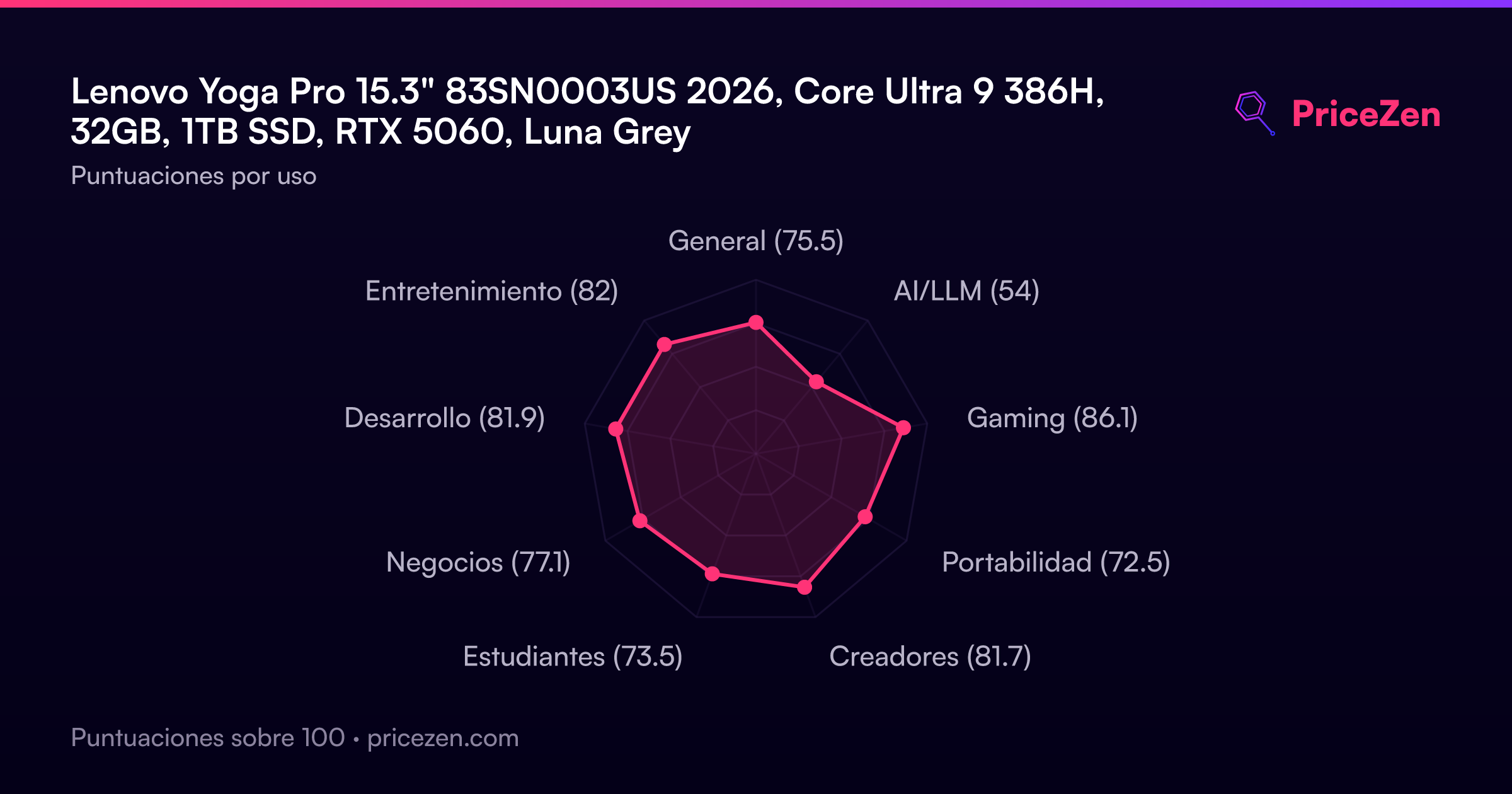
Who's this for? Honestly, it's for the person who edits 4K video, dabbles in 3D rendering, and still wants to fire up a game at the end of the day. The 88/100 gaming score and 84.2/100 creator score tell you exactly where this thing shines. It's not a dedicated gaming laptop with aggressive RGB and a 17-inch screen, but it's not a thin-and-light ultrabook that chokes on anything heavier than a spreadsheet either. It sits in that sweet middle ground.
What makes it interesting is the combination of that Tandem OLED panel and the RTX 5060. Most laptops in this class either give you a gorgeous screen or a capable GPU, but rarely both without pushing the price into MacBook Pro territory. Lenovo's PureSight Pro display tech is the real headline here, and the fact that it's paired with a 165Hz refresh rate means you're not sacrificing smoothness for color accuracy.
Common Questions
Q: Is the RTX 5060 with 8GB of VRAM enough for 4K video editing?
For most 4K editing workflows, yes. The RTX 5060 sits at the 89th percentile for GPU performance, and with NVIDIA Studio drivers, you'll get hardware acceleration in Premiere Pro and DaVinci Resolve. The 8GB of VRAM is adequate for 4K timelines with effects, though heavy 8K work or complex 3D scenes might push against that limit. The 32GB of system RAM helps compensate by keeping more data in main memory.
Q: How does the battery life hold up with that bright OLED display?
The 70Wh battery is decent but not class-leading. The Tandem OLED panel is actually more energy-efficient than traditional OLED, which helps offset the brightness. However, if you're running at full 1100 nits brightness with the RTX 5060 active, expect to reach for the charger sooner. For everyday productivity at moderate brightness, you should get through a full workday, but heavy creative workloads will drain it faster.
Q: Can this laptop handle AI and machine learning tasks?
This is the Yoga Pro's weakest area. The AI and LLM score of 55.2/100 puts it at the bottom of its feature set. The RTX 5060 has 8GB of VRAM, which is limiting for larger models, and the Intel Core Ultra 9 386H doesn't have the same AI acceleration chops as Apple's M4 Max. If AI work is a priority, you'd be better served by a MacBook Pro M4 Max or a laptop with a higher-VRAM GPU.
Q: Is the touchscreen actually useful on a creator laptop?
It depends on your workflow. For photo editing, pinch-to-zoom and direct manipulation can feel natural. For video editing, most people stick with keyboard and mouse. The touchscreen adds a bit of weight and cost, but it's nice to have for presentations or casual use. The 165Hz refresh rate also makes touch interactions feel more responsive than typical 60Hz panels.
Who Should Skip This
If your work revolves around AI, machine learning, or running local LLMs, look elsewhere. The 55.2/100 AI score is a genuine weak spot, and the 8GB of VRAM on the RTX 5060 will frustrate you when you're trying to load larger models. A MacBook Pro M4 Max handles these workloads far better, though you'll pay more for the privilege.
Also skip this if portability is your top priority. At 1.75kg and with a 15.3-inch footprint, it's not exactly a featherweight. The compactness score sits at the 55th percentile, which is about average for this class but not great if you're commuting daily. The Microsoft Surface Laptop 7th Edition or a 14-inch ultrabook would serve you better if you're constantly on the move and don't need the discrete GPU.
Verdict
If you're a creator who values display quality above all else, this is one of the best screens you can get on a Windows laptop right now. The 97th percentile display score isn't marketing fluff. It's genuinely one of the best panels we've seen. Pair that with solid CPU and GPU performance, and you've got a machine that handles photo editing, video work, and gaming without breaking a sweat. Just make sure you're paying closer to USD 2,018 than USD 2,900.
For gamers, the recommendation is a bit more nuanced. The RTX 5060 is capable, and the 165Hz refresh rate means you'll actually see the benefit in fast-paced titles. But if gaming is your primary use case, the ASUS ROG Zephyrus G14 or MSI Raider might serve you better with more VRAM headroom or better thermals. The Yoga Pro is a creator laptop that happens to game well, not the other way around.
Usage Scores
- General75.5
- AI/LLM54
- Gaming86.1
- Portabilidad72.5
- Creadores81.7
- Estudiantes73.5
- Negocios77.1
- Desarrollo81.9
- Entretenimiento82