NVIDIA Tesla P100 16GB HBM2 datacenter Black
Equipped with 16GB of HBM2 memory on a 4096-bit bus and 3584 CUDA cores, this Pascal-based accelerator delivers high double-precision throughput for HPC workloads. Its passive 250W design and PCIe Gen3 interface allow dense server integration, effectively replacing half a rack of CPU nodes in a single system. This refurbished card is best for research institutions running legacy CUDA simulations who need affordable, high-memory-bandwidth compute without scaling to newer architectures.

Sin precio actual de tiendas


Resumen
The 30-Second Version
A $117 ticket to 16GB of HBM2, if you don't mind bolting a fan to a server relic.
Pros & Cons
Ventajas
- 16GB HBM2 on a 4096-bit bus, well above average for VRAM 82nd
- $117 USD makes it one of the cheapest paths to 16GB of CUDA-accessible memory 78th
- ECC support for error-sensitive workloads
- Affordability is one of the best across all GPUs we track
Desventajas
- Passive cooling demands server-grade airflow, not a desktop case
- Gaming and raster performance are near dead last
- 250W TDP with efficiency near the bottom, it's a power hog for what it delivers
- No display outputs whatsoever, this is compute-only
Opinión de los propietarios
The Word on the Street
Las pruebas
Performance
What surprised us most is how lopsided this thing is. The memory subsystem is genuinely strong, 16GB of HBM2 on a 4096-bit interface ranks among the best, but raw compute sits at just the 14th percentile with 3584 CUDA cores on Pascal architecture. That means it's memory-rich and compute-poor, which is actually fine for loading larger models but painful for training speed. Efficiency is also near the bottom, so that 250W TDP buys you less work per watt than almost anything else we track. And the connectivity score is the worst we've seen, PCIe Gen3 x16 with zero display outputs means this card literally cannot drive a monitor.
Specifications
Full Specifications
Chipset
| GPU Chipset | Tesla P100 |
| Brand | NVIDIA |
| Architecture | Pascal |
| Class | datacenter |
Memory
| VRAM | 16 GB |
| Memory Type | HBM2 |
| Memory Bus | 4096 |
| ECC | Yes |
Compute
| CUDA Cores | 3584 |
Power & Cooling
| TDP | 250 |
| Cooler | Passive |
| Fans | 0 |
Connectivity
| Interface | PCI Express 3.0 x16 |
| DisplayPort | 4 |
| Max Displays | 4 |
| Max Resolution | 5120 x 2880 |
Physical
| Length | 267 |
| Slot Width | 2 |
| Form Factor | Full Height |
Features
| Ray Tracing | No |
| Upscaling | None |
| AV1 Encode | No |
| VR Ready | No |
| DirectX | 12 |
| RGB | No |
vs Competition
Cross-shop this against the MSI GeForce RTX 5060 SHADOW, PNY GeForce RTX 5060 Dual Fan OC, or Gigabyte GeForce RTX 5060 WINDFORCE OC if you want something that actually works in a normal PC with display outputs and modern efficiency. The XFX Radeon RX 7600 XT Speedster is another option if you're open to AMD. The P100 only wins if your single priority is maximum VRAM per dollar and you can handle the cooling situation yourself.
| Spec | NVIDIA Tesla P100 | ASUS GeForce RTX 5090 TUF Gaming | Gigabyte GeForce RTX 5070 Ti Eagle Ice | MSI GeForce RTX 5070 Ti Ventus 3X OC | ZOTAC GeForce RTX 5080 APOCALYPSE | Sapphire Radeon RX 7900 XTX NITRO+ |
|---|---|---|---|---|---|---|
| Chipset | Tesla P100 | GeForce RTX 5090 | GeForce RTX 5070 Ti | GeForce RTX 5070 Ti | GeForce RTX 5080 | Radeon RX 7900 XTX |
| Vram | 16GB HBM2 | 32GB GDDR7 | 16GB GDDR7 | 16GB GDDR7 | 16GB GDDR7 | 24GB GDDR6 |
| Boost Clock Mhz | - | 2407 | 2542 | 2482 | 2730 | 2680 |
| Tdp W | 250 | 575 | 300 | 300 | 360 | 339 |
| Memory Bus Bits | 4096 | 512 | 256 | 256 | 256 | 384 |
| Ray Tracing | false | true | true | true | true | true |
| GPU Class | datacenter | consumer | consumer | consumer | consumer | consumer |
| Compare | Compare | Compare | Compare | Compare |
| Producto | AI | Rt | Vram | Raster | Compute | Feature | Thermal | Efficiency | Connectivity | Affordability |
|---|---|---|---|---|---|---|---|---|---|---|
| NVIDIA Tesla P100 | 64.9 | 16.1 | 81.8 | 15.7 | 14.1 | 40.2 | 13.5 | 11.9 | 48.1 | 77.8 |
| ASUS GeForce RTX 5090 TUF Gaming Compare | 97.1 | 90.6 | 97.8 | 98.8 | 97.7 | 95.9 | 72.3 | 23.9 | 99.3 | 2.3 |
| Gigabyte GeForce RTX 5070 Ti Eagle Ice Compare | 79.5 | 88.7 | 86.1 | 89 | 88.1 | 95.9 | 91.7 | 72 | 94.1 | 26.6 |
| MSI GeForce RTX 5070 Ti Ventus 3X OC Compare | 79.5 | 92.5 | 86.1 | 89 | 88.1 | 95.9 | 91.7 | 72 | 94.1 | 23.2 |
| ZOTAC GeForce RTX 5080 APOCALYPSE Compare | 85.6 | 97.6 | 89.1 | 94.5 | 93.4 | 95.9 | 91.7 | 56.9 | 94.1 | 20.3 |
| Sapphire Radeon RX 7900 XTX NITRO+ Compare | 95.1 | 96.3 | 92 | 83.5 | 95.6 | 95.9 | 91.7 | 51.9 | 98.8 | 18.7 |
Precio
Value & Pricing
At $117 USD, this is worth it if you specifically need cheap VRAM for inference experiments and you already have a way to cool a passive 250W card. For anyone else, the CAD 849 listing in Canada is a hard pass when modern alternatives exist at lower prices in that market.
Leer más
Overview
The Tesla P100 is a 16GB HBM2 compute card you can grab for $117, and that's the whole pitch. It's not a graphics card in any practical sense: no display outputs, passive cooling built for server airflow, and a gaming score of 9.1/100 that puts it near the bottom of our rankings. But if you want cheap VRAM for CUDA experiments, this Pascal-era datacenter part still has a job to do.
Our scoring model gives it 50.6/100 for AI and LLM work, which is middling but respectable for something this old. The 4096-bit HBM2 bus feeding 16GB is the standout spec here, sitting well above average for VRAM capacity in our data. Just know what you're signing up for: a 250W passive card that needs a server chassis or a janky fan mod to not cook itself.
Common Questions
Q: Can I use this as a regular graphics card?
No. It has zero display outputs. This is a compute accelerator only, you'll need a separate GPU or integrated graphics for your monitor.
Q: Will it fit in a normal desktop case?
Physically yes at 267mm and 2 slots, but it's passively cooled. Without forced airflow from a server chassis or a DIY fan mount, it will thermal throttle or shut down under load.
Q: Is 16GB enough for running local LLMs?
For inference on quantized models up to around 13B parameters, yes. The HBM2 bandwidth helps with token generation speed, but don't expect fast training, the compute cores are dated.
Who Should Skip This
If you want a GPU that just works in your desktop for gaming, creative apps, or even hassle-free AI tinkering, this isn't it. Go grab the MSI GeForce RTX 5060 SHADOW or the Gigabyte GeForce RTX 5060 WINDFORCE OC instead. You'll get display outputs, active cooling, and modern efficiency without playing thermal engineer.
Verdict
Buy the Tesla P100 if you're a tinkerer who wants 16GB of HBM2 for under $120 and you've got a plan for cooling a passive server card. Skip it if you want plug-and-play anything. Our ranking puts it solidly mid-pack for AI work but near the bottom for everything else, and that's exactly what it is: a niche tool, not a general-purpose GPU.
Usage Scores
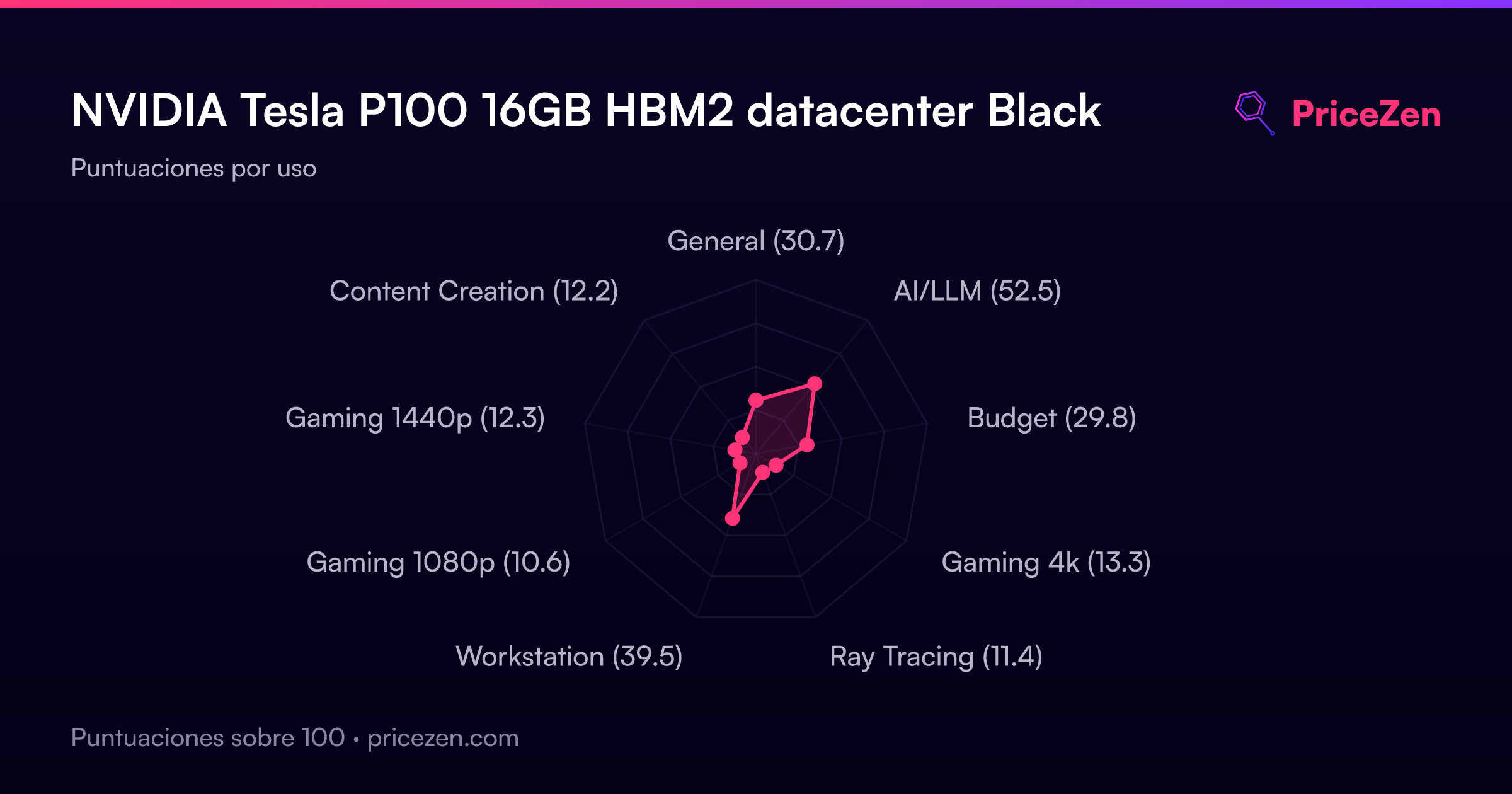
- General30.7
- AI/LLM52.5
- Budget29.8
- Gaming 4k13.3
- Ray Tracing11.4
- Workstation39.5
- Gaming 1080p10.6
- Gaming 1440p12.3
- Content Creation12.2