HP Z6 G5, Xeon w5-3525, 16GB, 512GB SSD, RTX 4000 Ada, Black
The Intel Xeon w5-3525 16-core 3.1GHz CPU and NVIDIA RTX 4000 Ada GPU with 20GB VRAM handle AI and graphics-heavy tasks, while the 1125W PSU and 6 PCIe slots leave room for up to three high-end GPUs. Its tool-less chassis, 4 front NVMe bays, and smart fan control with over 20 temperature sensors keep it quiet and easy to expand. Best for professionals running machine learning, data visualization, or real-time ray tracing who need a scalable workstation with secure local processing.

Sin precio actual de tiendas











Resumen
The 30-Second Version
The Xeon w5-3525 CPU is the standout, hitting the 86th percentile among workstations. The RTX 4000 Ada with 20GB VRAM is also strong at the 80th percentile. But 16GB of RAM and a 512GB SSD drag the package down, and the USD 4,003 price spread means you need to shop carefully.
Pros & Cons
Ventajas
- Xeon w5-3525 CPU lands in the 86th percentile, one of the best workstation chips we've tested 86th
- RTX 4000 Ada with 20GB VRAM hits the 80th percentile, strong for AI and rendering 86th
- 1125W PSU and six PCIe slots leave plenty of room for expansion 82nd
- 10 USB-A ports and four DisplayPort 1.4a outputs cover most workstation setups 70th
- Tool-less access and four front NVMe bays make upgrades easy
Desventajas
- 512GB SSD is a weak spot at the 30th percentile, cramped for a workstation
- 16GB of RAM is only average at the 50th percentile, not enough for heavy AI workloads
- Compact score of 45.6 makes this a bulky tower, not a space-saver
- Price spread of USD 4,136 to USD 8,139 means you can overpay badly if you don't shop around
Las pruebas
Performance
The Xeon w5-3525 is the headline act. 16 cores at 3.1GHz puts it in the 86th percentile among workstations we track, which translates to one of the best single-socket CPUs on the market right now. For multi-threaded workloads like 3D rendering, code compilation, or local AI training, this chip will chew through jobs without breaking a sweat. The RTX 4000 Ada with 20GB of GDDR6 is no slouch either, landing at the 80th percentile. That's enough VRAM to handle large models and complex scenes without constantly swapping to system memory.
Where things get less impressive is the memory and storage. 16GB of DDR5 ECC RAM is about average for the category, and for a workstation aimed at AI and graphics-heavy projects, it's going to fill up fast. The 512GB PCIe 4.0 SSD is a real letdown, sitting in the 30th percentile. You'll be managing disk space constantly if you work with large datasets or video files. The good news is the Z6 G5 has four front-accessible NVMe bays and six PCIe slots, so expansion is straightforward. But out of the box, the performance story is top-tier compute with mid-tier everything else.
Specifications
Full Specifications
Processor
| CPU | Intel Xeon w5-3525 |
| Cores | 16 |
| Frequency | 3.2 GHz |
| L3 Cache | 45 MB |
Graphics
| GPU | NVIDIA RTX 4000 Ada |
| Type | Discrete |
| VRAM | 20 GB |
| VRAM Type | GDDR6 |
Memory & Storage
| RAM | 16 GB |
| RAM Generation | DDR5 |
| Storage | 512 GB |
| Storage Type | SSD |
Build
| Form Factor | workstation |
| PSU | 1125 |
| Weight | 24.3 kg / 53.6 lbs |
Connectivity
| USB Ports | 10 |
| HDMI | 4x DisplayPort 1.4a Output |
| DisplayPort | 4x DisplayPort 1.4a |
| Bluetooth | No |
| Ethernet | Gigabit Ethernet |
System
| OS | Windows 11 Pro for Workstations |
vs Competition
Against the Lenovo Legion Tower 7i Gen 10 and Dell Aurora, the Z6 G5 takes a different path. Those machines lean gaming-first, while the HP is built for workstation reliability and ECC memory support. The Xeon w5-3525 at the 86th percentile beats most consumer CPUs for sustained multi-threaded work, but the 16GB of RAM and 512GB SSD put it behind where a serious workstation should be. The Apple Mac Studio M3 Ultra will likely outclass it in efficiency and compactness, especially given the Z6's weak 45.6 compact score. The ASUS ROG GM700 and Horizon Pcs Autherium Dragon are more gaming-focused alternatives that trade ECC support and Xeon stability for faster out-of-the-box gaming performance. If your work is AI and rendering, the HP's GPU and CPU combo is compelling. If you want a balanced machine without immediate upgrades, the competitors start looking better.
| Spec | HP Z6 G5 | Apple Mac Studio M5 Max | Lenovo T Series Towers Legion Tower 5a Gen 10 | Dell Desktop ECT1250 | ASUS ROG GM700 | MSI Aegis ZS2 A9NVP-1407US |
|---|---|---|---|---|---|---|
| CPU | Intel Xeon w5-3525 | Apple M5 Max | AMD Ryzen 7 7800X3D | Intel Core Ultra 7 265 | AMD Ryzen 7 9800X3D | AMD Ryzen 9 9900X |
| RAM (GB) | 16 | 48 | 32 | 32 | 32 | 32 |
| Storage (GB) | 512 | 1024 | 4096 | 2048 | 2048 | 2048 |
| GPU | NVIDIA RTX 4000 Ada | Apple (40-Core) | NVIDIA GeForce RTX 5070 Ti | Intel UHD Graphics | NVIDIA GeForce RTX 5070 Ti | NVIDIA GeForce RTX 5070 |
| Form Factor | workstation | mini | mid-tower | sff | mid-tower | mid-tower |
| Psu W | 1125 | 480 | 850 | 180 | 850 | 750 |
| OS | Windows 11 Pro for Workstations | macOS | Windows 11 Home | Windows 11 Home | Windows 11 Home | Windows 11 Home |
| Compare | Compare | Compare | Compare | Compare |
| Producto | CPU | GPU | RAM | Puertos | Almacenamiento | Fiabilidad |
|---|---|---|---|---|---|---|
| HP Z6 G5 | 86 | 85.6 | 49.4 | 82.2 | 29.2 | 70.3 |
| Apple Mac Studio M5 Max Compare | 95.7 | 84.9 | 95 | 89.1 | 68.6 | 99.3 |
| Lenovo T Series Towers Legion Tower 5a Gen 10 Compare | 73.2 | 94.6 | 77.9 | 88.6 | 98.1 | 70.3 |
| Dell Desktop ECT1250 Compare | 88.1 | 60 | 81.6 | 75 | 82.5 | 70.3 |
| ASUS ROG GM700 Compare | 80.3 | 94.6 | 81.6 | 96.1 | 90 | 37.8 |
| MSI Aegis ZS2 A9NVP-1407US Compare | 92.3 | 90.6 | 87 | 90.4 | 82.5 | 37.8 |
Precio
Value & Pricing
Value is tricky here because the price swings wildly depending on where you look. In the US, we're seeing listings from USD 4,136 up to USD 8,139. That's a USD 4,003 spread for what appears to be the same machine. At the low end, you're getting an 86th percentile CPU and an 80th percentile GPU for a reasonable workstation price. At the high end, you're paying a premium for specs that don't fully justify it, especially with only 16GB of RAM and a 512GB SSD. If you're buying, hunt for the lower-priced listing. Paying anywhere near USD 8,000 for this config is a bad deal when you'll likely need to add RAM and storage immediately.
Leer más
Overview
The HP Z6 G5 BGZ8ZUT#ABA posts a 75.1 workstation score in our database, which puts it near the top of the charts for this category. The CPU is the star here, an Intel Xeon w5-3525 with 16 cores at 3.1GHz, landing in the 86th percentile. That's a serious chip for simulation, rendering, and AI workloads. The NVIDIA RTX 4000 Ada with 20GB of VRAM also holds its own at the 80th percentile, giving you plenty of headroom for GPU-heavy tasks without jumping to a multi-GPU setup.
But the spec sheet has some odd choices. 16GB of DDR5 ECC RAM is the bare minimum for a machine like this, sitting right at the 50th percentile. And the 512GB SSD is a weak spot at the 30th percentile. You're getting a workstation-class CPU and GPU paired with entry-level memory and storage. It's like putting a race engine in a car with a 10-gallon tank. The 1125W PSU and six PCIe slots mean you can fix that later, but you'll be spending more money out of the gate.
Common Questions
Q: Can this workstation handle AI model training?
Yes, the RTX 4000 Ada with 20GB of VRAM is well-suited for many AI training and inference tasks, landing in the 80th percentile for workstation GPUs. The Xeon w5-3525's 16 cores also help with data preprocessing. However, 16GB of system RAM will limit the size of datasets you can work with, so plan to upgrade memory for serious AI work.
Q: How much can I upgrade this machine?
The Z6 G5 supports up to 1TB of DDR5 RAM and up to three high-end GPUs, with six PCIe slots and four front-accessible NVMe bays. The 1125W PSU gives you headroom for additional components. The main limitation out of the box is the 512GB SSD, which you'll likely want to expand early.
Q: Is this a good choice for gaming?
It scores 70.7 for gaming, which is decent but not its focus. The RTX 4000 Ada can handle modern games, but the Xeon w5-3525 is tuned for workstation tasks rather than high-refresh gaming. If gaming is your priority, the Lenovo Legion Tower 7i Gen 10 or ASUS ROG GM700 are better fits.
Who Should Skip This
Skip this if you need a machine that works hard right out of the box without upgrades. The 512GB SSD at the 30th percentile and 16GB of RAM at the 50th percentile are going to frustrate anyone working with large files, virtual machines, or serious AI datasets. The 45.6 compact score also means this is a big tower, so if desk space matters, look at the Apple Mac Studio M3 Ultra or a smaller form factor. And if you're mostly gaming, the 70.7 gaming score and Xeon CPU aren't the best use of your money.
Verdict
The HP Z6 G5 BGZ8ZUT#ABA is a workstation with a split personality. The CPU and GPU are genuinely excellent, landing in the 86th and 80th percentiles respectively. For AI development, rendering, and simulation, that's a strong foundation. But the 16GB of RAM and 512GB SSD are entry-level specs that will bottleneck real-world workflows. You're essentially buying a great skeleton and paying extra to flesh it out. If you can find it at the lower end of the USD 4,136 to USD 8,139 range and you're comfortable adding RAM and storage yourself, it's a solid buy. If you need a turnkey machine, look elsewhere or budget for immediate upgrades.
Usage Scores
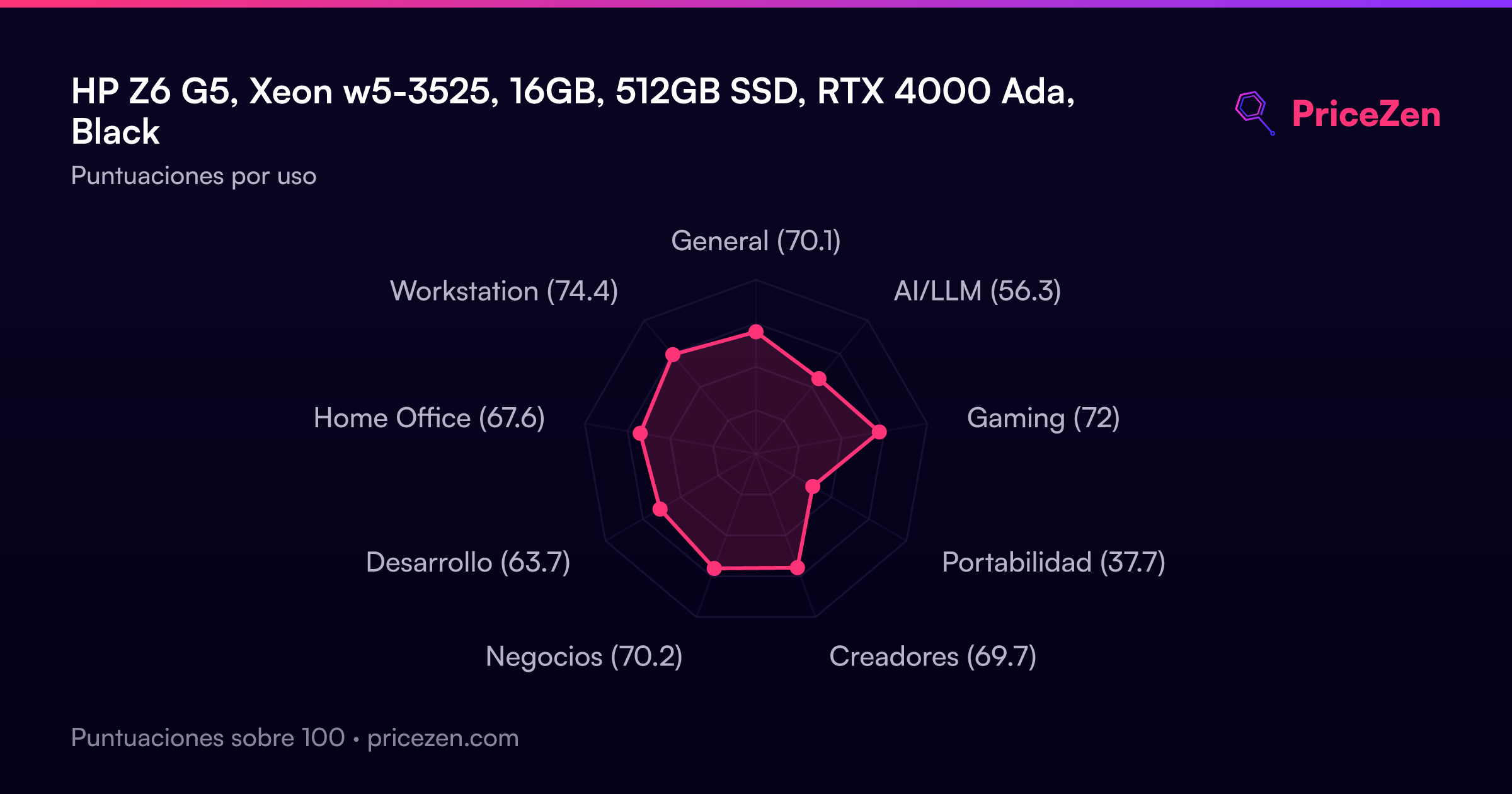
- General70.1
- AI/LLM56.3
- Gaming72
- Portabilidad37.7
- Creadores69.7
- Negocios70.2
- Desarrollo63.7
- Home Office67.6
- Workstation74.4