HP Z8 G5 Tower Z8 G5, Xeon Silver 4514Y, 64GB, 512GB SSD, Black

Fuente de 1125 W con margen para ampliar verificado el 29 nov
51/100 puntuación global
- CPU
- Intel Xeon Silver 4514Y
- RAM
- 64 GB
- Storage
- 512 GB
- GPU
- Intel No Graphics Controller Installed
- Form factor
- workstation
- Psu
- 1125 W
- OS
- Windows 11 Pro for Workstations











Resumen
The 30-Second Version
The HP Z8 G5 Tower is a dual socket Xeon workstation with 32 cores, 64 threads, and 64GB of ECC DDR5 RAM. It's built for CPU-heavy multi-threaded work, not gaming or GPU rendering, since there's no discrete graphics card installed. Pricing ranges from USD 6,570 to USD 11,452, so shop carefully. If your software can use all those cores, this is a solid foundation with room to grow.
Pros & Cons
Ventajas
- 32 cores and 64 threads across two Xeon Silver 4514Y CPUs 95th
- 64GB of DDR5 ECC registered RAM in the 95th percentile for capacity 70th
- Upgradeable to 1TB of RAM for extreme workloads 65th
- 1125W power supply leaves room for a beefy discrete GPU later
- Dual Gigabit Ethernet ports for fast network transfers and redundancy
Desventajas
- No discrete graphics card installed, limiting GPU-accelerated work out of the box
- 512GB SSD is small for a workstation at this price point
- 2.0 GHz base clock means sluggish single-threaded performance
- Only 4x USB-A ports listed, which is thin for a workstation
- 24.4 kg weight makes this a desk anchor, not a portable machine
Las pruebas
Performance
The dual Xeon Silver 4514Y setup is the star here. With 32 cores and 64 threads across two sockets, this machine lands in the 66th percentile for CPU performance among workstations in our database. That's solid, but not top of the charts. The 2.0 GHz base clock is on the lower side, which means single-threaded tasks won't feel snappy compared to a modern desktop CPU running at 4+ GHz. But when you throw a heavily multi-threaded workload at it, like 3D rendering or scientific computing, those 64 threads start to earn their keep.
The 64GB of DDR5 ECC RAM is a genuine highlight, sitting in the 95th percentile for memory capacity. That's enough headroom for large datasets, multiple virtual machines, or complex assemblies in CAD software. And since it's ECC registered memory, you get that extra layer of data integrity that consumer RAM simply doesn't offer. The 512GB SSD is the weak spot in the performance story, landing in the 41st percentile for storage. It's PCIe 4.0, so it's fast, but 512GB fills up quickly when you're working with 4K video, large simulation outputs, or multiple project files.
Specifications
Full Specifications
Processor
| CPU | Intel Xeon Silver 4514Y |
| Cores | 16 |
| Frequency | 2.0 GHz |
| L3 Cache | 39 MB |
Graphics
| GPU | No Graphics Controller Installed |
| Type | Integrated |
Memory & Storage
| RAM | 64 GB |
| RAM Generation | DDR5 |
| Storage | 512 GB |
| Storage Type | NVMe SSD |
Build
| Form Factor | workstation |
| PSU | 1125 |
| Weight | 24.4 kg / 53.8 lbs |
Connectivity
| USB Ports | 4 |
| Bluetooth | No |
| Ethernet | Gigabit Ethernet |
System
| OS | Windows 11 Pro for Workstations |
vs Competition
The Apple Mac Studio M5 Max is the most interesting alternative if you're not locked into Windows or x86 software. Apple's M5 Max delivers exceptional single-threaded performance and has a much stronger integrated GPU than what's in this HP. But the Mac Studio tops out at 128GB of unified memory, while the Z8 G5 can go to 1TB of ECC RAM. For memory-hungry workloads, the HP wins on expandability.
The Lenovo Legion Tower 5a Gen 10 and Dell Aurora ACT1250 are gaming-oriented desktops that will absolutely crush the Z8 G5 in gaming and single-threaded tasks, but they lack ECC memory support and dual socket scalability. The CLX SET and MSI Aegis ZS2 are similar stories, consumer machines with strong GPUs but no workstation-class reliability features. If you need a machine that runs 24/7 without flinching, the HP's server-grade DNA matters. If you want to play games or do GPU rendering, any of those competitors with a discrete GPU will be a better fit out of the box.
| Spec | HP Z8 G5 Tower | Apple Mac Studio M5 Max | Lenovo T Series Towers Legion Tower 5a Gen 10 | Dell Desktop ECT1250 | ASUS ROG GM700 | CLX SET TGMSETRTU5204BM |
|---|---|---|---|---|---|---|
| CPU | Intel Xeon Silver 4514Y | Apple M5 Max | AMD Ryzen 7 7800X3D | Intel Core Ultra 7 265 | AMD Ryzen 7 9800X3D | Intel Core i9 14900KF |
| RAM (GB) | 64 | 48 | 32 | 32 | 32 | 64 |
| Storage (GB) | 512 | 1024 | 4096 | 2048 | 2048 | 8192 |
| GPU | Intel No Graphics Controller Installed | Apple (40-Core) | NVIDIA GeForce RTX 5070 Ti | Intel UHD Graphics | NVIDIA GeForce RTX 5070 Ti | NVIDIA GeForce RTX 5070 |
| Form Factor | workstation | mini | mid-tower | sff | mid-tower | mid-tower |
| Psu W | 1125 | 480 | 850 | 180 | 850 | 850 |
| OS | Windows 11 Pro for Workstations | macOS | Windows 11 Home | Windows 11 Home | Windows 11 Home | Windows 11 Home |
| Compare | Compare | Compare | Compare | Compare |
| Producto | CPU | GPU | RAM | Puertos | Almacenamiento | Fiabilidad |
|---|---|---|---|---|---|---|
| HP Z8 G5 Tower | 65.1 | 8.1 | 95.3 | 27.1 | 40.5 | 70.2 |
| Apple Mac Studio M5 Max Compare | 95.7 | 85 | 95 | 89.1 | 68.6 | 99.3 |
| Lenovo T Series Towers Legion Tower 5a Gen 10 Compare | 73.2 | 94.6 | 78 | 88.6 | 98.1 | 70.2 |
| Dell Desktop ECT1250 Compare | 88 | 60.1 | 81.6 | 75.1 | 82.5 | 70.2 |
| ASUS ROG GM700 Compare | 80.3 | 94.6 | 81.6 | 96.1 | 90 | 37.7 |
| CLX SET TGMSETRTU5204BM Compare | 94.8 | 90.7 | 96.5 | 84.5 | 99.2 | 11.7 |
Precio
Value & Pricing
Pricing on the Z8 G5 is all over the place right now. We're seeing USD 6,570 to USD 11,452 across two US listings, which is a spread of nearly USD 4,900 for what appears to be the same configuration. That's a huge range, and it means you absolutely need to shop around before pulling the trigger. The lower end of that range is reasonable for a dual socket Xeon workstation with 64GB of ECC DDR5. The upper end is harder to justify unless you're getting some kind of extended warranty or service contract bundled in.
For context, a single socket workstation with a high-end consumer CPU like a Ryzen 9 or Core i9 will often beat this machine in single-threaded tasks and cost less. But you're paying for the dual socket platform, ECC memory support, and the ability to scale up to 1TB of RAM. If your software licenses are per-core or per-socket, that's another cost factor to consider. The value proposition here depends entirely on whether your workloads can actually use 32 cores and 64 threads efficiently.
Leer más
Overview
The HP Z8 G5 Tower is not a gaming PC, and it's not trying to be. This is a dual socket workstation built for people who need serious CPU muscle for rendering, simulation, data crunching, and other multi-threaded workloads. Two Intel Xeon Silver 4514Y processors sit at the heart of this thing, each with 16 cores running at 2.0 GHz base and boosting up to 3.4 GHz. That's 32 cores and 64 threads total, which is a lot of parallel processing power for software that can actually use it.
HP pairs those CPUs with 64GB of DDR5 ECC registered RAM running at 4800 MHz. ECC memory matters here because it catches and corrects single-bit errors, which is a big deal when you're running a simulation for three days straight and can't afford a silent data corruption. The 512GB NVMe SSD is fine for an OS drive and a few active projects, but you'll probably want to add more storage if you're working with large datasets or video files.
What's interesting about this specific config is what's missing: there's no discrete graphics card installed. The listing mentions a 'No Graphics Controller Installed' with 24GB VRAM, which is a bit confusing. In practice, this means you're getting integrated or basic display output only. For a machine aimed at CPU-heavy workflows, that's a deliberate choice, but it also means anyone doing GPU-accelerated rendering or AI model training will need to budget for a separate GPU right away.
Common Questions
Q: Can I add a discrete GPU to this workstation later?
Yes. The 1125W power supply gives you plenty of headroom for a high-end GPU like an RTX 4080 or RTX 4090. The chassis is large enough to accommodate full-length cards, and HP's workstation boards typically have multiple PCIe x16 slots. Just make sure you check the physical clearance and power connector requirements before buying a card.
Q: Is 512GB of storage enough for a workstation?
For an OS drive and a few active projects, it's workable. But 512GB fills up fast if you're working with large video files, simulation outputs, or multiple software installations. The good news is that the Z8 G5 has room for additional drives, and the Intel C741 chipset supports RAID 0, 1, 5, and 10, so you can add storage and configure it for speed or redundancy.
Q: How does the dual Xeon Silver 4514Y compare to a single high-end consumer CPU?
In heavily multi-threaded workloads, the dual Xeon setup with 32 cores and 64 threads will generally outperform a single consumer CPU with 16 or 24 cores. But in single-threaded tasks, the 2.0 GHz base clock is a real limitation. A modern consumer CPU running at 4.5 to 5.5 GHz will feel noticeably snappier for everyday tasks and lightly threaded applications. The Xeon's advantage is core count and ECC memory support, not raw clock speed.
Q: What kind of RAM upgrades does this system support?
The Z8 G5 comes with 64GB in a 4 x 16GB configuration and can be upgraded to 1TB total. That's a massive amount of memory, which is useful for large in-memory databases, complex simulations, or running many virtual machines at once. The RAM is DDR5 ECC registered, so you'll need to buy compatible ECC RDIMM modules if you want to upgrade.
Who Should Skip This
If you're a gamer, skip this entirely. The gaming score of 22.2 out of 100 tells you everything you need to know. No discrete GPU, low clock speeds, and a chassis that weighs as much as a small refrigerator. You'd be far better off with a Lenovo Legion Tower or Dell Aurora for a fraction of the price.
Also skip this if your work is primarily single-threaded. CAD modelers, photo editors, and anyone who spends most of their day in lightly threaded applications will feel the 2.0 GHz base clock every single day. A high-clock-speed consumer CPU in a cheaper system will feel dramatically faster. And if you need GPU acceleration for rendering or AI work, you'll need to factor in the cost of a discrete GPU on top of the already significant price tag.
Verdict
For CPU-bound workstation tasks like software rendering, scientific simulation, or running multiple virtual machines, the Z8 G5 makes a strong case. The dual Xeon setup with 64GB of ECC DDR5 is a serious foundation, and the upgrade path to 1TB of RAM means this machine can grow with your workload. Just know that you'll need to add a discrete GPU if your software uses CUDA, OptiX, or any other GPU acceleration.
If your work is more single-threaded, like CAD modeling or photo editing, you might be better served by a high-clock-speed consumer CPU in a cheaper chassis. The 2.0 GHz base clock will feel sluggish in those scenarios. But for the right multi-threaded workload, this is a dependable, expandable workhorse that should run for years without drama.
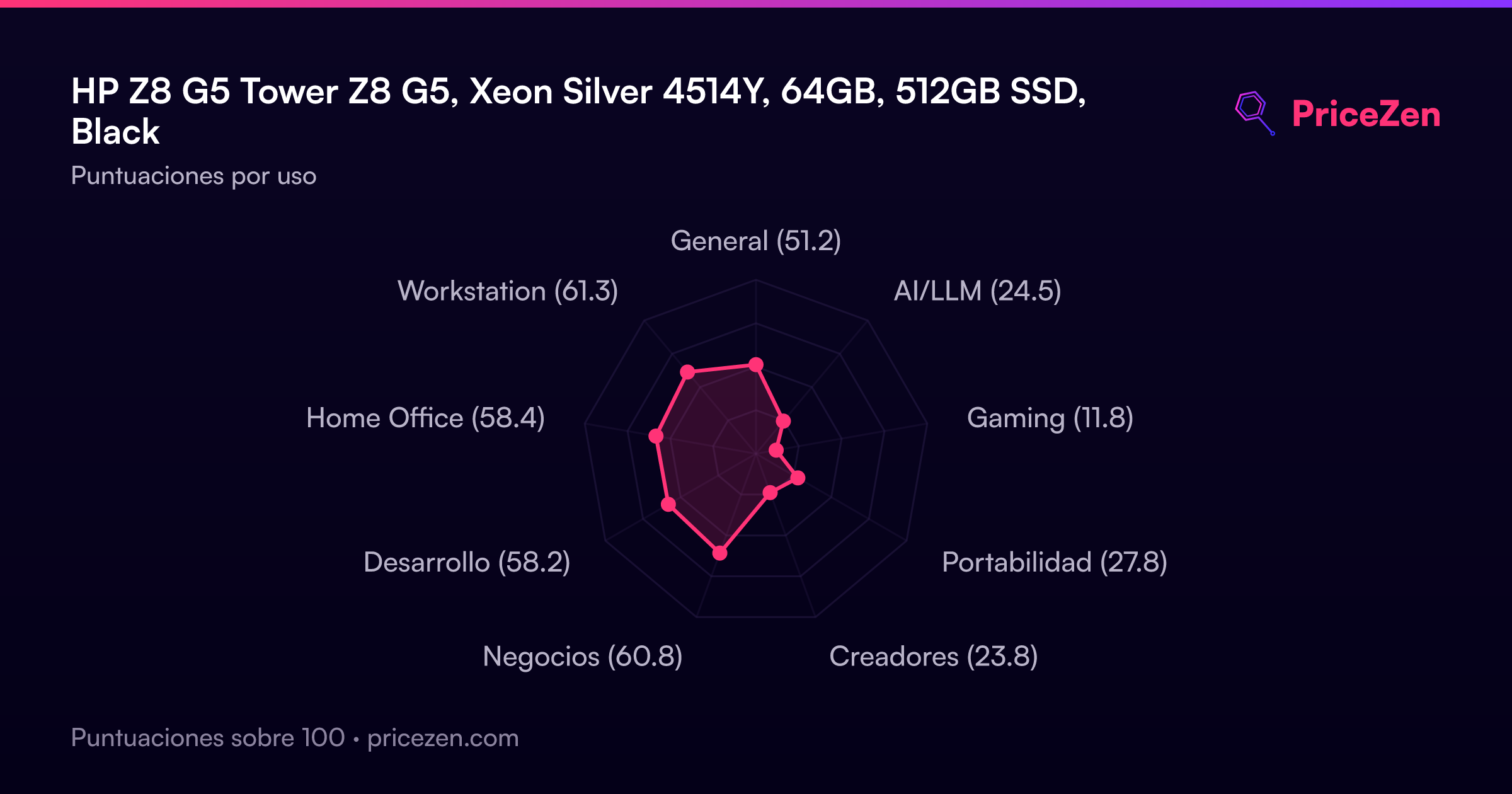
Usage Scores
- General51.2
- AI/LLM24.5
- Gaming11.8
- Portabilidad27.8
- Creadores23.8
- Negocios60.8
- Desarrollo58.2
- Home Office58.4
- Workstation61.3