Lenovo ThinkCentre Neo 50a 12SC00BJUX-Upgraded 2025, Core i5-13420H, 32GB, 1TB SSD, Eclipse Black

Un cable, una pantalla y el PC integrado verificado el 29 nov
62/100 puntuación global
- CPU
- Intel Core i5 13420H
- RAM
- 32 GB
- Storage
- 1 TB
- GPU
- Intel UHD Graphics
- Form factor
- aio
- Psu
- 90 W
- OS
- Windows 11 Pro
Resumen
The 30-Second Version
The Lenovo ThinkCentre Neo 50a is a 24-inch all-in-one desktop built for office work, not gaming. It comes with a generous 32GB of RAM and a 1TB SSD, but the integrated graphics and mid-range CPU hold it back. It's a decent buy at the low end of its USD 1,050 to USD 1,600 price range, but look elsewhere if you need real performance.
Pros & Cons
Ventajas
- 32GB of DDR5 RAM is generous for office multitasking 72nd
- 1TB NVMe SSD gives you plenty of fast storage 70th
- 100Hz Full HD display is smooth for everyday use 69th
- Windows 11 Pro included, which businesses will appreciate
- Compact all-in-one design saves desk space
Desventajas
- Integrated graphics can't handle gaming or heavy creative work
- Port selection is limited, especially USB-A
- CPU performance is below average for this category
- Price varies widely, from USD 1,050 to USD 1,600
- No customer reviews yet, so long-term reliability is unproven
Las pruebas
Performance
The Core i5-13420H is a laptop-class chip with 8 cores and a 2.1GHz base clock. In our database, it lands around the 38th percentile for CPUs in this category, which means it's fine for everyday office work but nothing to write home about. The 32GB of DDR5 RAM is the real standout here, sitting at the 74th percentile and giving you plenty of headroom for multitasking. The 1TB NVMe SSD is similarly solid at the 73rd percentile, so boot times and app launches will feel snappy.
Where this machine falls flat is graphics. The integrated Intel UHD Graphics scores in the 38th percentile, and our gaming score for this system is a rough 11.6 out of 100. That's not a typo. You can play Solitaire and maybe some light browser games, but anything 3D will chug. The 100Hz display is smooth for scrolling and video, but it's wasted on gaming.
Specifications
Full Specifications
Processor
| CPU | Intel Core i5 13420H |
| Cores | 8 |
| Frequency | 2.1 GHz |
| L3 Cache | 12 MB |
Graphics
| GPU | Intel UHD Graphics |
| Type | Integrated |
| VRAM Type | Not provided |
Memory & Storage
| RAM | 32 GB |
| RAM Generation | DDR5 |
| Storage | 1 TB |
| Storage Type | NVMe SSD |
Build
| Form Factor | aio |
| PSU | 90 |
| Weight | 5.8 kg / 12.8 lbs |
Connectivity
| USB-C Ports | 1 |
| USB Ports | 1 |
| HDMI | 2x HDMI |
| Wi-Fi | Wi-Fi 6 |
| Bluetooth | Bluetooth 5.4 |
| Ethernet | RJ-45 |
System
| OS | Windows 11 Pro |
vs Competition
Compared to the HP OMEN GT16-0364 or the ASUS ROG GM700, the ThinkCentre Neo 50a is in a completely different league, and not in a good way. Those are gaming desktops with dedicated GPUs, and they'll run circles around this machine in any graphics-heavy task. But they're also bigger, louder, and not all-in-ones, so it's not a fair fight if you just want a clean office setup.
The Dell Tower Plus EBT2250 is a closer competitor in spirit, though it's a traditional tower rather than an all-in-one. You'll likely get better CPU performance and more ports for similar money, but you'll need to buy a monitor separately. The MSI Aegis ZS2 is another tower that offers far more raw power, but again, it's a different form factor. If desk space and simplicity matter more than performance, the ThinkCentre holds its own. If you want the most bang for your buck, a tower with a dedicated GPU is the smarter play.
| Spec | Lenovo ThinkCentre Neo 50a 12SC00BJUX-Upgraded | Apple Mac Studio M5 Max | HP OMEN GT16-0364 | Dell Desktop ECT1250 | ASUS ROG GM700 | CLX SET TGMSETRTU5204BM |
|---|---|---|---|---|---|---|
| CPU | Intel Core i5 13420H | Apple M5 Max | AMD Ryzen 7 8700F | Intel Core Ultra 7 265 | AMD Ryzen 7 9800X3D | Intel Core i9 14900KF |
| RAM (GB) | 32 | 48 | 32 | 32 | 32 | 64 |
| Storage (GB) | 1024 | 1024 | 1024 | 2048 | 2048 | 8192 |
| GPU | Intel UHD Graphics | Apple (40-Core) | NVIDIA GeForce RTX 5070 | Intel UHD Graphics | NVIDIA GeForce RTX 5070 Ti | NVIDIA GeForce RTX 5070 |
| Form Factor | aio | mini | mid-tower | sff | mid-tower | mid-tower |
| Psu W | 90 | 480 | 850 | 180 | 850 | 850 |
| OS | Windows 11 Pro | macOS | Windows 11 Home | Windows 11 Home | Windows 11 Home | Windows 11 Home |
| Compare | Compare | Compare | Compare | Compare |
| Producto | CPU | GPU | RAM | Puertos | Almacenamiento | Fiabilidad |
|---|---|---|---|---|---|---|
| Lenovo ThinkCentre Neo 50a 12SC00BJUX-Upgraded | 45.7 | 49.9 | 72.2 | 29.1 | 68.6 | 70.2 |
| Apple Mac Studio M5 Max Compare | 95.7 | 85 | 95 | 89.1 | 68.6 | 99.3 |
| HP OMEN GT16-0364 Compare | 69.3 | 90.7 | 87 | 97.9 | 53.3 | 70.2 |
| Dell Desktop ECT1250 Compare | 88 | 60.1 | 81.6 | 75.1 | 82.5 | 70.2 |
| ASUS ROG GM700 Compare | 80.3 | 94.6 | 81.6 | 96.1 | 90 | 37.7 |
| CLX SET TGMSETRTU5204BM Compare | 94.8 | 90.7 | 96.5 | 84.5 | 99.2 | 11.7 |
Precio
Value & Pricing
Pricing on this thing is all over the place. Best Buy lists it anywhere from USD 1,050 to USD 1,600 depending on the configuration, which is a huge spread for what is essentially the same machine with different storage or RAM amounts. At the low end, you're getting a decent office all-in-one with a lot of RAM and storage. At the high end, you're paying a premium for upgrades that don't fix the weak CPU and GPU. If you can find the 32GB/1TB config near USD 1,050, it's a reasonable deal. If you're staring at USD 1,600, you should probably look elsewhere.
Leer más
Overview
The Lenovo ThinkCentre Neo 50a is a 24-inch all-in-one desktop aimed squarely at offices and home workspaces. This particular unit has been professionally upgraded by Velztorm, bumping the RAM to 32GB of DDR5 and the storage to a 1TB NVMe SSD. It runs Windows 11 Pro on an Intel Core i5-13420H, and Best Buy lists it between USD 1,050 and USD 1,600 depending on the configuration you grab.
If you're searching for a clean, space-saving business desktop that handles spreadsheets, video calls, and a dozen browser tabs without breaking a sweat, this fits the bill. The 100Hz Full HD display is a nice touch for an office machine, and the integrated Intel UHD graphics keep things simple and quiet. Just don't expect it to moonlight as a gaming rig.
Port selection is a bit of a mixed bag. You get one USB-C, one USB-A, two HDMI, Ethernet, and Wi-Fi 6, which covers the basics. But for a desktop in this price range, we'd like to see more USB ports on the front. The 90W power supply also tells you this is built for efficiency, not raw horsepower.
Common Questions
Q: Is the Lenovo ThinkCentre Neo 50a good for gaming?
No, the integrated Intel UHD Graphics can't handle modern games. Our gaming score for this system is 11.6 out of 100, so it's really only suited for casual browser games.
Q: Can I upgrade the RAM or storage on the ThinkCentre Neo 50a?
This unit has already been professionally upgraded to 32GB of DDR5 RAM and a 1TB NVMe SSD. All-in-ones are generally harder to upgrade than towers, so check with the seller before buying if you think you'll need more later.
Q: Does the ThinkCentre Neo 50a come with a keyboard and mouse?
Yes, this configuration includes a USB keyboard and USB mouse, along with a webcam and Windows 11 Pro preinstalled.
Q: How does the ThinkCentre Neo 50a compare to a traditional desktop tower?
It saves desk space and includes a built-in 24-inch 100Hz display, but towers in the same price range typically offer better CPU performance, dedicated graphics options, and more ports.
Who Should Skip This
Skip this if you're a gamer, video editor, or anyone who needs a dedicated GPU. The integrated graphics are a non-starter for those tasks. Also skip it if you need lots of USB ports or plan to connect multiple peripherals, the port selection is thin. If you're shopping at the USD 1,600 end of the range, you can get a much more capable tower like the Dell Tower Plus EBT2250 or MSI Aegis ZS2 and a decent monitor for the same money.
Verdict
Should you buy the Lenovo ThinkCentre Neo 50a? If you need a tidy all-in-one for office work, email, video calls, and light multitasking, and you can find it near the USD 1,050 mark, it's a solid choice. The 32GB of RAM and 1TB SSD are genuinely useful upgrades that will keep this machine feeling responsive for years.
But if you have any interest in gaming, video editing, or 3D work, this is not the machine for you. The integrated graphics are a hard stop, and the CPU is merely adequate. At the higher end of its price range, you're better off with a tower and a separate monitor.
Usage Scores
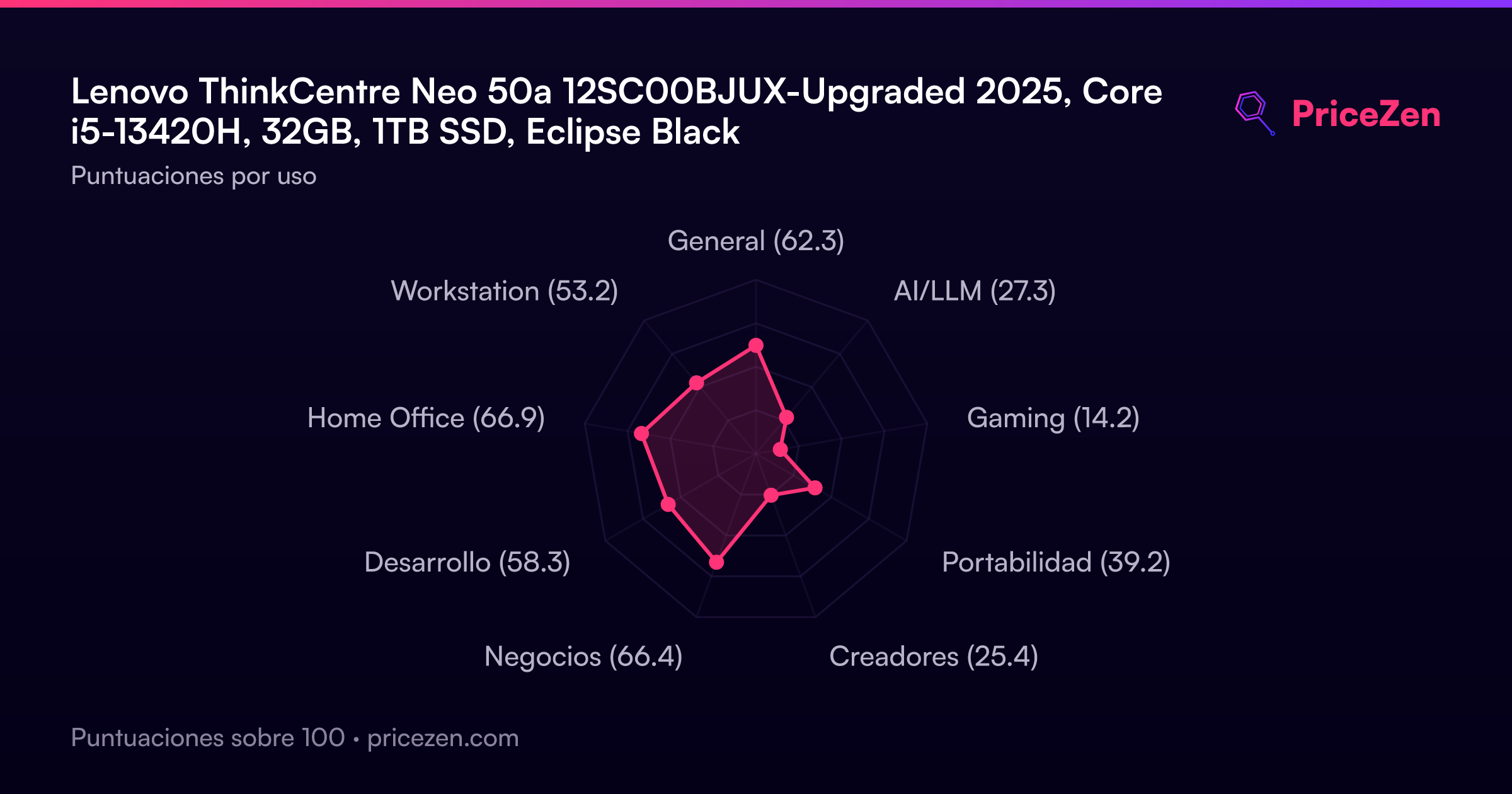
- General62.3
- AI/LLM27.3
- Gaming14.2
- Portabilidad39.2
- Creadores25.4
- Negocios66.4
- Desarrollo58.3
- Home Office66.9
- Workstation53.2